1. Introducció
The OWC Atlas Pro CFexpress 4.0 Type A Memory Card is a high-performance, professional-grade storage solution designed for demanding content creation workflows. It offers exceptional speed and reliability for capturing high-resolution photos, fast burst RAW image sequences, and high-bitrate video recording up to 8K. This manual provides essential information for the proper use and care of your memory card.
2. Característiques clau
- Alt rendiment: Engineered for professional filmmakers, photographers, and videographers, ensuring optimal performance with compatible cameras.
- Velocitat excepcional: Achieves read speeds of up to 1850MB/s and write speeds of up to 1700MB/s, with a dependable minimum sustained write speed of 400MB/s.
- Compatibilitat robusta: Designed for seamless integration with Sony Alpha and FX cameras, including models like a1, a7SIII, a7IV, a7rV, a9III, FX3, FX6, FR7, and FX30. Also compatible with CFexpress Type A memory card readers and devices.
- VPG200 Certified: Ensures reliable performance across all Sony camera modes and supports the highest allowable settings in Sony Alpha, FX, and FR7 cameras.
- Disseny durador: Fully compliant with CFexpress Type A 4.0 specifications and built to be impact, bend, shock, ESD, UV ray, and X-ray resistant.
- Innergize Software: Includes the Innergize health, performance, and field upgrade management tool for OWC Atlas Memory Cards.
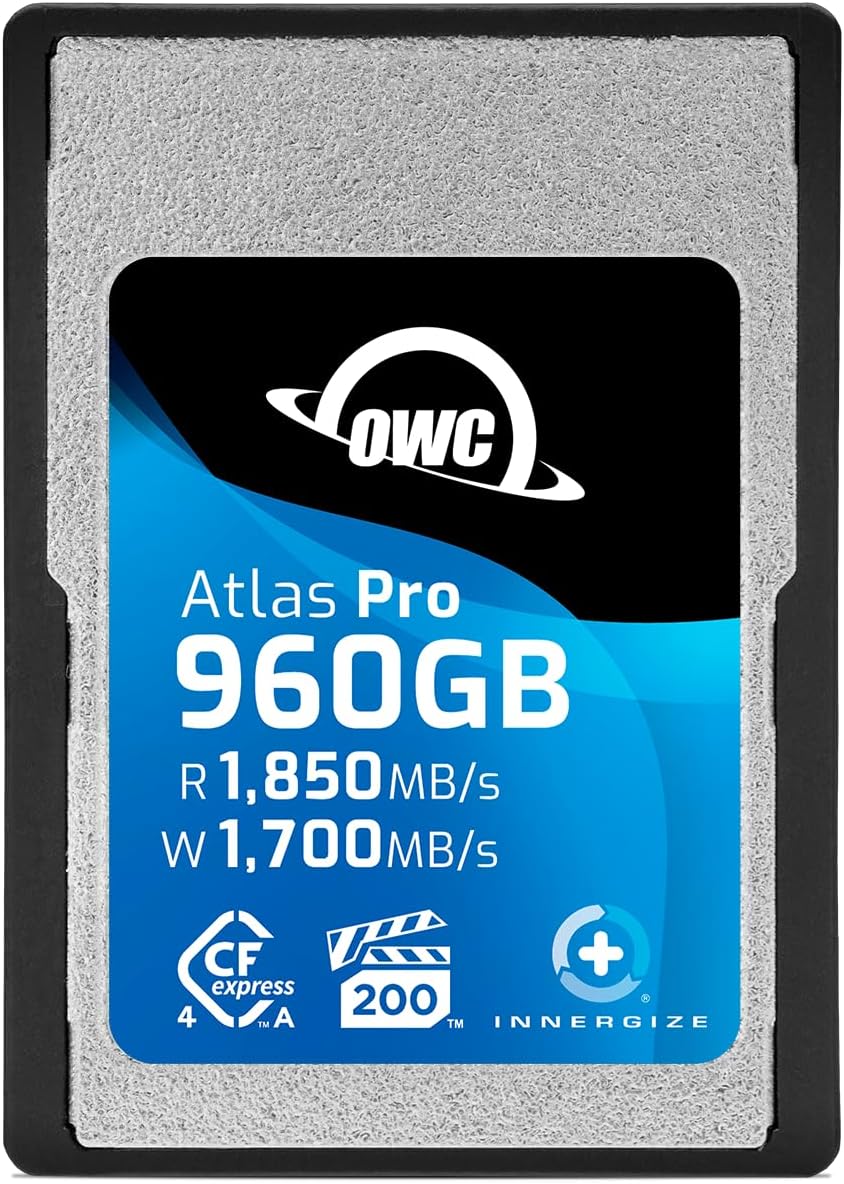
Figura 2.1: Frontal view of the OWC 960GB Atlas Pro CFexpress 4.0 Type A Memory Card.

Figure 2.2: OWC Atlas Pro memory cards highlighting their rugged and tough construction.
3. Configuració
- Comprovar la compatibilitat: Ensure your camera or device supports CFexpress Type A memory cards. Refer to your device's manual for specific compatibility requirements.
- Insereix la targeta: Locate the CFexpress Type A card slot on your camera or card reader. Gently insert the OWC Atlas Pro memory card into the slot with the gold contacts facing the correct direction, as indicated by the slot's design. Do not force the card.
- Format de la targeta: For optimal performance and to ensure proper file system compatibility, it is highly recommended to format the memory card using your camera's or device's internal formatting function before initial use. This will erase all data on the card.
- Verificar el reconeixement: After insertion and formatting, confirm that your device recognizes the memory card and displays its correct capacity.

Figure 3.1: OWC Atlas Pro memory cards demonstrating compatibility with Sony Alpha cameras.
4. Instruccions de funcionament
Once the OWC Atlas Pro CFexpress 4.0 Type A Memory Card is properly set up and formatted, it is ready for use in your compatible device.
- Captura de fotos: For high-speed continuous shooting of RAW images or large JPEG files, ensure your camera settings are configured to utilize the card's maximum write speed. The VPG200 certification guarantees sustained performance for demanding photo sequences.
- Gravació de vídeo: The card supports high-bitrate video recording up to 8K resolution. Select the appropriate video recording settings in your camera to match the card's capabilities. Monitor your camera's buffer status during recording to ensure smooth operation.
- Transferència de dades: To achieve the advertised read speeds of up to 1850MB/s, use a compatible CFexpress Type A card reader that supports USB 3.2 Gen 2x2 or Thunderbolt 3/4 for optimal offload performance.

Figure 4.1: OWC Atlas Pro memory cards enabling improved ingest speeds for efficient workflow.
5. Manteniment i cura
Proper maintenance ensures the longevity and reliable performance of your OWC Atlas Pro CFexpress 4.0 Type A Memory Card.
- Manejar amb cura: Avoid dropping the card or subjecting it to excessive force. While designed to be robust, extreme physical shock can still cause damage.
- Mantenir els contactes nets: Avoid touching the gold contacts directly. If necessary, gently clean them with a soft, lint-free cloth.
- Emmagatzematge: Store the memory card in its protective case or a dedicated card wallet when not in use to prevent dust, scratches, and static discharge.
- Temperatura: Avoid exposing the card to extreme temperatures or direct sunlight for prolonged periods.
- Eject Safely: Always safely eject the memory card from your computer or device before removing it to prevent data corruption.
- Actualitzacions de firmware: Utilize the included Innergize software to check for and apply any available firmware updates for your OWC Atlas memory card. This can improve performance and compatibility.
6. Solució De Problemes
If you encounter issues with your OWC Atlas Pro CFexpress 4.0 Type A Memory Card, consider the following troubleshooting steps:
- Targeta no reconeguda:
- Assegureu-vos que la targeta estigui completament i correctament inserida a la ranura.
- Try inserting the card into a different compatible slot or card reader.
- Reinicieu la càmera o l'ordinador.
- Check if the card is locked (write-protected) if your device has such a mechanism.
- Slow Performance/Buffering Issues:
- Verify that your camera or card reader supports CFexpress 4.0 speeds. Older devices or readers may limit performance.
- Assegureu-vos que el firmware de la càmera estigui actualitzat.
- Format the card in your camera. (Note: This will erase all data.)
- Check the card's health and performance using the OWC Innergize software.
- Corrupció/errors de dades:
- Expulseu sempre la targeta de manera segura abans de treure-la.
- Eviteu treure la targeta durant les operacions de lectura/escriptura.
- If data is corrupted, data recovery services may be an option, but prevention is key.
7. Especificacions
| Atribut | Detall |
|---|---|
| Marca | OWC |
| Nom del model | Atlas Pro Cfexpress 4.0 Type A Memory Card |
| Número de model | OWCCFXA4P00960 |
| Tipus de memòria flash | CFexpress |
| Capacitat d'emmagatzematge de memòria | 960 GB |
| Velocitat màxima de lectura | 1850 MB/s |
| Velocitat màxima d'escriptura | 1700 MB/s |
| Minimum Sustained Write Speed | 400 MB/s (VPG200 Certified) |
| Interfície del maquinari | CompactFlash (CFexpress Type A) |
| Característiques especials | Drop Proof, X-Ray Proof, Impact, Bend, Shock, ESD, UV Ray Resistant |
| Dimensions del producte | 4.8 x 4 x 0.62 polzades |
| Pes de l'article | 22.68 g (0.8 unces) |
| UPC | 810149209208 |
8. Garantia i Suport
The OWC 960GB Atlas Pro CFexpress 4.0 Type A Memory Card is backed by a Garantia limitada OWC de 3 anys. For warranty claims, technical support, or additional product information, please visit the official OWC weblloc web o poseu-vos en contacte amb el servei d'atenció al client. Conserveu el comprovant de compra per validar la garantia.
OWC also provides the Innergize health, performance, and field upgrade management tool for OWC Atlas Memory Cards, which can be downloaded from their official support page.


