1. Introducció
The Ferguson Regent i351S is a versatile internet radio designed to provide a rich audio experience with multiple connectivity options. This manual offers detailed instructions for setting up, operating, and maintaining your device, ensuring you can fully utilize its features including Wi-Fi, DAB+, FM radio, Bluetooth, Spotify Connect, and dual alarms. Please read this manual thoroughly before first use and keep it for future reference.
2. Informació de seguretat
Per garantir un funcionament segur i evitar danys, observeu les següents precaucions de seguretat:
- No exposeu el dispositiu a la pluja, la humitat ni a temperatures extremes.
- Avoid placing the unit near heat sources such as radiators, stoves, or other heat-producing appliances.
- No bloquegeu cap obertura de ventilació. Assegureu-vos que hi hagi prou espai al voltant de la unitat per a un flux d'aire adequat.
- Utilitzeu només accessoris/accessoris especificats pel fabricant.
- Desconnecteu el dispositiu durant les tempestes amb llamps o quan no l'utilitzeu durant llargs períodes.
- No obriu la c.asing. Demaneu totes les tasques de manteniment a personal de servei qualificat.
- Mantingueu el dispositiu allunyat de camps magnètics forts.
3. Contingut del paquet
Si us plau, comproveu el contingut del paquet en desembalar-lo. Si falta algun article o hi ha algun malmès, poseu-vos en contacte amb el vostre distribuïdor.
- Ferguson Regent i351S Internet Radio
- Adaptador d'alimentació
- Control remot
- Guia d'inici ràpid
4. Producte acabatview
Familiarize yourself with the main components and controls of your Ferguson Regent i351S.
4.1 Panell frontal i pantalla
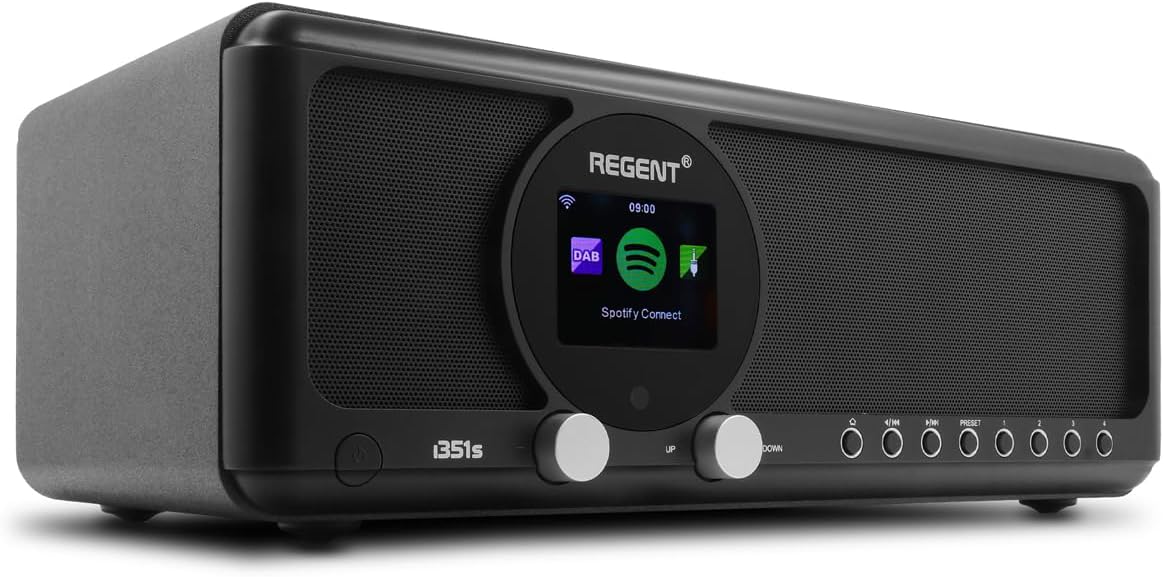
Imatge: Frontal view of the Ferguson Regent i351S Internet Radio, showcasing the central color display, dual speakers, and control knobs/buttons.
The front panel features a prominent 2.4-inch TFT color display, two main control knobs (Up/Down), and several function buttons for navigation and mode selection. The stereo speakers are located on either side of the central display.
4.2 Panell posterior i connexions

Imatge: Part posterior view of the Ferguson Regent i351S Internet Radio, showing the telescopic antenna, USB port, power input, and bass reflex port.
The rear panel includes the telescopic antenna for DAB+/FM reception, a USB port for media playback, an AUX-in port for external audio sources, a 3.5mm headphone output, and the power adapter input.
4.3 Control remot

Image: The remote control unit for the Ferguson Regent i351S Internet Radio, featuring various buttons for power, volume, navigation, mode selection, and presets.
The included remote control allows convenient operation of all radio functions from a distance.
4.4 Dimensions del producte

Image: Diagram showing the dimensions of the Ferguson Regent i351S Internet Radio: 33 cm (length), 17.30 cm (depth), and 11.50 cm (height).
The radio measures approximately 41 cm (length) x 17 cm (width) x 22 cm (height).
5. Guia de configuració
Follow these steps for initial setup of your internet radio.
- Connexió d'alimentació: Connect the supplied power adapter to the DC IN port on the rear of the radio and then plug it into a wall outlet.
- Encesa inicial: Press the Power button on the front panel or remote control to turn on the radio.
- Selecció d'idioma: The display will prompt you to select your preferred language. Use the navigation knobs or remote to select and confirm.
- Network Setup (Wi-Fi):
- La ràdio buscarà les xarxes Wi-Fi disponibles. Seleccioneu la vostra xarxa de la llista.
- Enter your Wi-Fi password using the on-screen keyboard and navigation controls.
- Alternatively, if your router supports WPS, you can select the WPS option on the radio and activate WPS on your router for a quick connection.
- Un cop connectat, la icona del Wi-Fi apareixerà a la pantalla.
- Hora i data: The radio will automatically synchronize the time and date via the internet connection.
6. Instruccions de funcionament
Learn how to use the various audio modes and features of your Ferguson Regent i351S.
6.1 Ràdio per Internet
Access a vast selection of online radio stations from around the world.
- Al menú principal, seleccioneu "Ràdio per Internet".
- Podeu navegar per les emissores per ubicació, gènere o cercar emissores específiques.
- Seleccioneu una emissora per iniciar la reproducció.
- To save a station as a preset, press and hold the "Preset" button until the save menu appears.
Ràdio DAB+ 6.2
Enjoy high-quality digital audio broadcasting.
- Esteneu completament l'antena telescòpica.
- Select "DAB+" from the main menu. The radio will automatically scan for available DAB+ stations.
- Use the navigation controls to select a station from the list.
6.3 Ràdio FM
Tune into traditional FM radio broadcasts with RDS information.
- Esteneu completament l'antena telescòpica.
- Seleccioneu "FM" al menú principal.
- Use the tuning controls to manually scan or auto-scan for stations.
- RDS (Radio Data System) information, such as station name, will be displayed if available.
6.4 Bluetooth Connectivity (Two-Way BT Transmitter)
The Regent i351S features unique two-way Bluetooth 5.0 capabilities, allowing both transmission and reception of high-quality audio.
- Receiving Audio (Bluetooth Speaker Mode):
- Select "Bluetooth" from the main menu. The radio will enter pairing mode.
- On your smartphone or other Bluetooth device, search for "Regent i351S" and pair.
- Once connected, you can stream audio from your device to the radio.
- Transmitting Audio (Bluetooth Transmitter Mode):
- This mode allows the radio to send its audio output to Bluetooth headphones or speakers.
- Navigate to the Bluetooth settings on the radio and select "BT Transmitter" mode.
- Poseu els auriculars/altaveu Bluetooth en mode d'emparellament.
- The radio will search for and connect to your Bluetooth audio device.
6.5 Spotify Connect
Stream your Spotify playlists directly through the Regent i351S without needing Bluetooth pairing.

Image: Close-up of the Ferguson Regent i351S display, showing the Spotify Connect logo and interface.
- Ensure your radio is connected to the same Wi-Fi network as your smartphone or tablet running the Spotify app.
- Obriu l'aplicació Spotify al vostre dispositiu.
- Reprodueix una cançó i toca la icona "Dispositius disponibles" (normalment una icona d'altaveu o d'ordinador).
- Select "Regent i351S" from the list of available devices.
- The radio will begin streaming directly from Spotify.
6.6 USB/AUX Input
Connect external audio sources or play media from a USB drive.
- Reproducció USB: Insert a USB drive into the USB port on the rear panel. Select "USB" mode from the menu to browse and play audio files.
- Entrada AUX: Connect an external audio device (e.g., MP3 player) to the AUX IN port using a 3.5mm audio cable. Select "AUX In" mode to listen to audio from the connected device.
6.7 Dual Alarms
Set up two independent alarms with customizable sources and times.
- Access the "Alarm" settings from the main menu.
- Select Alarm 1 or Alarm 2 to configure.
- Set the alarm time, source (e.g., buzzer, FM, DAB+, Internet Radio), volume, and recurrence (daily, weekdays, weekends, once).
- Confirma la configuració per activar l'alarma.
6.8 Aplicació de control remot
Control your radio using a dedicated mobile application for smartphones.
- Download the official Ferguson remote control app from your device's app store (e.g., Google Play Store for Android).
- Ensure your smartphone and the radio are connected to the same Wi-Fi network.
- Open the app and follow the on-screen instructions to connect to your Regent i351S.
- The app provides full control over radio functions, including mode selection, station browsing, volume, and presets.
7. Manteniment
Proper care will ensure the longevity of your Ferguson Regent i351S.
- Neteja: Feu servir un drap suau i sec per netejar l'exterior de la ràdio. No utilitzeu productes de neteja abrasius, ceres ni dissolvents.
- Antena: Handle the telescopic antenna carefully to avoid bending or breaking.
- Emmagatzematge: If storing the radio for an extended period, unplug it from the power outlet and store it in a cool, dry place.
8. Solució De Problemes
Consulteu aquesta secció per obtenir solucions a problemes comuns que podeu trobar.
| Problema | Causa possible | Solució |
|---|---|---|
| Sense poder | Adaptador de corrent no connectat; presa de corrent defectuosa. | Ensure the power adapter is securely connected. Try a different power outlet. |
| Sense so | Volum massa baix; Silenciament activat; Font d'àudio incorrecta seleccionada. | Increase volume. Check if mute is active. Select the correct audio source (e.g., Internet Radio, DAB+). |
| Wi-Fi connection unstable or lost | Weak Wi-Fi signal; Incorrect password; Router issues. | Move the radio closer to the Wi-Fi router. Re-enter Wi-Fi password. Restart your Wi-Fi router. Ensure no interference from other devices. |
| Cannot find DAB+/FM stations | Antenna not extended; Poor signal area. | Fully extend the telescopic antenna. Try repositioning the radio for better reception. Perform a full scan for stations. |
| L'aparellament de Bluetooth falla | Device not in pairing mode; Radio not in correct Bluetooth mode. | Ensure both the radio and your external device are in Bluetooth pairing mode. Check if the radio is set to BT Receiver or BT Transmitter mode as needed. |
| El comandament a distància no funciona | Dead batteries; Obstruction between remote and radio. | Replace batteries in the remote control. Ensure a clear line of sight to the radio's IR receiver. |
9. Especificacions
| Marca | Ferguson |
| Número de model | i351s |
| Color | Negre |
| Tecnologia de connectivitat | Auxiliary, Bluetooth, USB, Wi-Fi |
| Característiques especials | Mobile app control, Built-In Clock, Weather alarm, Spotify Connect, DAB, DAB+ and FM tuner with RDS, Wi-Fi, Unique Two-Way Bluetooth IN/OUT Transmitter |
| Dispositius compatibles | Speaker, Smartphone, Earphone |
| Dimensions del producte (L x A x A) | 41 cm x 17 cm x 22 cm |
| Tecnologia d'afinació | Spotify Connect, Internet Radio, DAB, DAB+ and FM tuner with RDS |
| Font d'alimentació | AC adapter powered |
| Bandes de ràdio compatibles | 2 bandes |
| Components inclosos | Guia d'inici ràpid |
10. Informació de la garantia
The Ferguson Regent i351S comes with a manufacturer's warranty. Please refer to the warranty card included in your package for specific terms and conditions.
- Disponibilitat de peces de recanvi: 2 Anys
- Actualitzacions de programari garantides fins a: Informació no disponible
Conserva el comprovant de compra per a qualsevol reclamació de garantia.
11. Suport
For further assistance, technical support, or service inquiries, please contact Ferguson customer support through their official weblloc web o la informació de contacte proporcionada amb la documentació del producte.
També podeu visitar el pàgina del producte a Amazon per a recursos addicionals i preguntes freqüents.


