1. Introducció
This manual provides essential information for the proper use and maintenance of your Realme 12 Plus 5G RMX3867 smartphone. Please read this guide thoroughly before operating your device to ensure optimal performance and longevity. Keep this manual for future reference.
2. Llista d'embalatge
Upon opening the package, verify that all items listed below are present and in good condition. If any items are missing or damaged, please contact your retailer.

Image: Contents of the Realme 12 Plus 5G RMX3867 retail box. Includes the phone, phone case, quick guide, detachable camera decoration replacement guide, safety guide, screwdriver, two screws, USB cable, and SIM card ejector.
- Realme 12 Plus 5G RMX3867 Smartphone
- Funda de telèfon
- Guia ràpida
- Detachable Camera Decoration Replacement Guide
- Guia de seguretat
- Tornavís
- Cargols (x2)
- Cable USB
- Expulsor de targetes SIM
Note: Some accessories, such as the detachable camera decoration, may come in a separate package or require assembly. Refer to the specific guides provided.

Image: Contents of the Detachable Camera Decoration Protective Cover Set. Includes a packaging box, detachable deco case (x1), two screws, and a phone case (x1).
3. Configuració
3.1. Instal·lació de la targeta SIM
- Localitza la safata de la targeta SIM al lateral del dispositiu.
- Insert the provided SIM card ejector tool into the small hole next to the tray.
- Empenyeu suaument fins que la safata surti.
- Place your Nano-SIM card(s) into the tray with the gold contacts facing down. Ensure the card is correctly oriented according to the tray's diagram.
- Torneu a inserir la safata amb cura al telèfon fins que encaixi al seu lloc.

Imatge: Part inferior view of the Realme 12 Plus 5G RMX3867, showing the USB-C port, speaker grille, microphone, and SIM card tray slot.
3.2. Encès / apagat
- Per encendre: Press and hold the Power button (located on the right side of the device) until the realme logo appears.
- Per apagar: Mantingueu premut el botó d'engegada fins que aparegui el menú d'opcions d'engegada. Toqueu "Apagar" i confirmeu.
- Per reiniciar: Press and hold the Power button until the power options menu appears. Tap "Restart" and confirm.

Imatge: Lateral view of the Realme 12 Plus 5G RMX3867, highlighting the power button and volume rocker on the right edge of the device.
3.3. Configuració inicial
The first time you power on your device, you will be guided through the initial setup process. This includes:
- Selecció del vostre idioma.
- Connexió a una xarxa Wi-Fi.
- Configuració del vostre compte de Google.
- Configuring screen lock (PIN, pattern, password, fingerprint, face unlock).
- Transferència de dades des d'un dispositiu antic (opcional).
4. Funcionament del vostre dispositiu
4.1. Navegació bàsica
- Gestos tàctils: Your device supports various touch gestures for navigation, including tap, swipe, pinch-to-zoom, and long press.
- Pantalla d'inici: El centre neuràlgic de les teves aplicacions i widgets. Fes lliscar el dit cap a l'esquerra o la dreta per accedir a pantalles addicionals.
- Panell de notificacions: Llisca cap avall des de la part superior de la pantalla per accedir a les notificacions i a la configuració ràpida.
- Calaix d'aplicacions: Feu lliscar cap amunt des de la part inferior de la pantalla fins a view totes les aplicacions instal·lades.

Imatge: Frontal view of the Realme 12 Plus 5G RMX3867, displaying its large screen with a punch-hole camera cutout at the top center.
4.2. Funcions de la càmera
The Realme 12 Plus 5G RMX3867 features a powerful 200MP main camera. To access the camera, tap the Camera icon on your home screen or app drawer.
- Modes de foto: Switch between various modes like Photo, Portrait, Night, Pro, and more.
- Gravació de vídeo: Record high-quality videos. Adjust resolution and frame rate in settings.
- Configuració: Access camera settings to customize features such as HDR, AI enhancements, and grid lines.
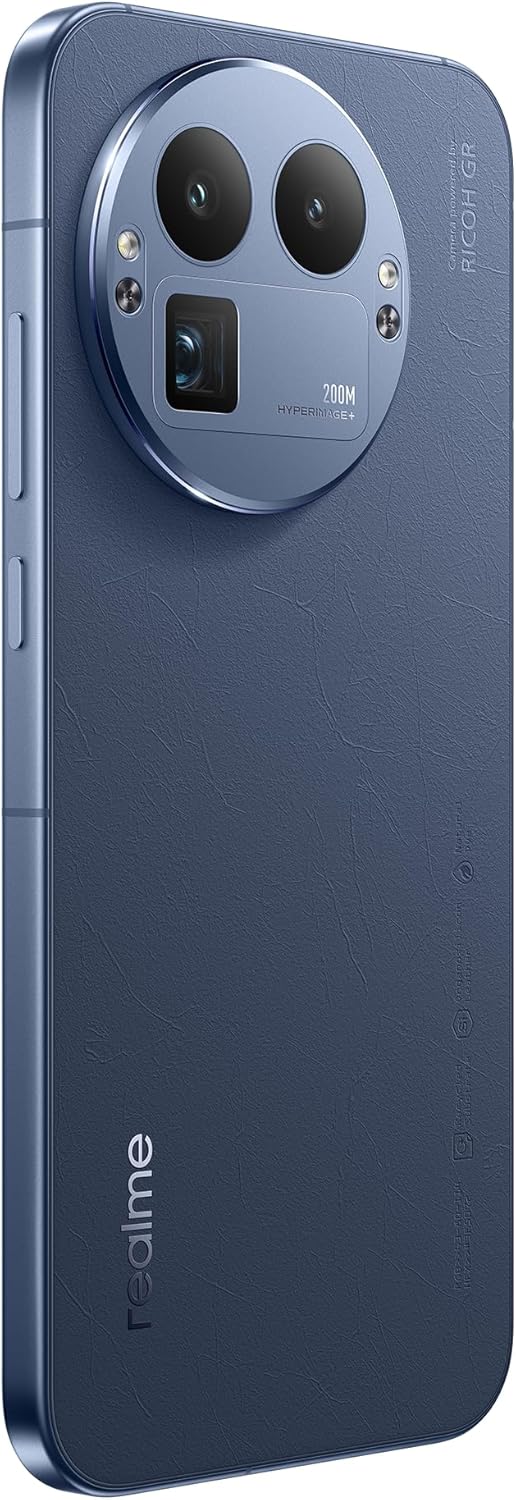
Imatge: Part posterior view of the Realme 12 Plus 5G RMX3867, showcasing the prominent circular camera module with multiple lenses and a "200M HYPERIMAGE+" label.
4.3. Connectivitat
- Xarxa 5G: Your device supports 5G connectivity for faster mobile data speeds. Ensure your SIM card and plan support 5G.
- Wi-Fi: Connecteu-vos a xarxes sense fil per accedir a Internet. Aneu a Configuració > Wi-Fi per gestionar les connexions.
- Bluetooth: Pair with Bluetooth devices like headphones, speakers, or car systems. Go to Settings > Bluetooth.
- USB-C: Feu servir el port USB-C per carregar i transferir dades.
4.4. Característiques de seguretat
- Sensor d’empremta digital: Unlock your device quickly and securely using the in-display fingerprint sensor. Register your fingerprints in Settings > Security & Privacy > Fingerprint.
- Desbloqueig facial: Use facial recognition to unlock your phone. Set up Face Unlock in Settings > Security & Privacy > Face.
- Bloqueig de pantalla: Choose from PIN, pattern, or password for basic screen security.
5. Manteniment
5.1. Neteja del dispositiu
- Feu servir un drap suau i sense borrissol per netejar la pantalla i la carcassa del telèfon.
- Eviteu l'ús de productes químics agressius, materials abrasius o aerosols.
- Per a taques persistents, lleugerament dampNetegeu el drap amb aigua o un netejador de pantalles dissenyat específicament per a electrònica.
5.2. Actualitzacions de programari
Comproveu i instal·leu regularment si hi ha actualitzacions de programari per assegurar-vos que el dispositiu tingui les funcions, els pegats de seguretat i les millores de rendiment més recents. Aneu a Configuració > Quant al dispositiu > Actualitzat per comprovar si hi ha actualitzacions.
5.3. Cura de la bateria
- Eviteu les temperatures extremes, ja que poden reduir la durada de la bateria.
- Use only the original charger and cable or certified compatible accessories.
- Do not let the battery drain completely frequently. It is generally recommended to keep the battery level between 20% and 80%.
6. Solució De Problemes
6.1. Problemes comuns i solucions
| Problema | Solució |
|---|---|
| El dispositiu no s'encén | Assegureu-vos que la bateria estigui carregada. Premeu i manteniu premut el botó d'engegada durant almenys 10-15 segons. |
| Les aplicacions es bloquegen o es bloquegen | Close the app and reopen it. Clear the app's cache (Settings > Apps > [App Name] > Storage > Clear cache). Restart the device. |
| Poca durada de la bateria | Check background app usage. Reduce screen brightness. Disable unnecessary features like GPS or Bluetooth when not in use. |
| No es pot connectar a la Wi-Fi | Reinicieu el router i el telèfon. Oblideu-vos de la xarxa i torneu a connectar-vos. Assegureu-vos que el Wi-Fi estigui activat al dispositiu. |
6.2. Restabliment de fàbrica
Si teniu problemes persistents, un restabliment de fàbrica els pot resoldre. Avís: Un restabliment de fàbrica esborrarà totes les dades del telèfon. Fes una còpia de seguretat de les dades importants abans de continuar.
- Aneu a Configuració > Sistema > Opcions de restabliment.
- Toca "Esborra totes les dades (restabliment de fàbrica)".
- Confirmeu la vostra decisió i introduïu el vostre PIN/contrasenya si se us demana.
- El dispositiu es reiniciarà i començarà el procés de restabliment.
7. Especificacions
Below are the key technical specifications for the Realme 12 Plus 5G RMX3867:
| Característica | Detall |
|---|---|
| Marca | realme |
| Nom del model | Realme 12 Plus 5G (RMX3867) |
| Sistema operatiu | Android |
| Capacitat d'emmagatzematge de memòria | 256 GB |
| Mida instal·lada de la memòria RAM | 12 GB |
| Model de CPU | Snapdragon |
| Velocitat de la CPU | 1200 MHz |
| Mida de la pantalla | 6.4 polzades |
| Tipus de visualització | AMOLED |
| Resolució | 1440 x 2560 |
| Resolució de vídeo efectiva | 200 MP |
| Tecnologia cel·lular | 5G |
| Capacitat de la bateria | 7000 milionsamp Hores |
| Durada mitjana de la bateria | 21 hores |
| Entrada de la interfície humana | Pantalla tàctil |
| Número de model de l'article | GT 8 Pro (Note: Product title is Realme 12 Plus 5G RMX3867) |
Note: Some specifications may vary slightly based on region or specific product variant. The model number in the product title is RMX3867, while some specifications list 'GT 8 Pro'. Please refer to your device's packaging for the most accurate model information.
8. Garantia i Suport
Your Realme 12 Plus 5G RMX3867 device comes with a limited warranty. Please refer to the warranty card included in your product packaging for detailed terms and conditions, including warranty period and coverage.
Per a assistència tècnica, servei o més consultes, visiteu el lloc web oficial d'assistència de Realme. website or contact their customer service. Contact information can typically be found on the realme official website or in the "Safety Guide" included with your device.
Conserveu el vostre comprovant de compra per a reclamacions de garantia.


