Introducció
Gràcies per la compraasing the Soundmaster MCD5600 Stereo System. This comprehensive audio system combines classic and modern playback options, including a turntable, double cassette deck, CD player, USB port, and Bluetooth connectivity. It also features a DAB+ and FM radio tuner and the ability to digitize your audio recordings to a USB stick. Please read this manual carefully before operating the unit to ensure proper use and to maximize your listening experience.
Instruccions importants de seguretat
- Llegeix aquestes instruccions.
- Conserveu aquestes instruccions.
- Compte amb totes les advertències.
- Seguiu totes les instruccions.
- No utilitzeu aquest aparell prop de l'aigua.
- Netegeu només amb un drap sec.
- No bloquegeu cap obertura de ventilació. Instal·leu-ho d'acord amb les instruccions del fabricant.
- No instal·leu a prop de cap font de calor com ara radiadors, registres de calor, estufes o altres aparells (inclosos amplificadors) que produeixen calor.
- Eviteu que el cable d'alimentació sigui trepitjat o pessigat, especialment als endolls, els endolls i el punt on surten de l'aparell.
- Utilitzeu només accessoris/accessoris especificats pel fabricant.
- Desendolleu aquest aparell durant les tempestes amb llamps o quan no l'utilitzeu durant llargs períodes de temps.
- Demaneu tot el servei a personal de servei qualificat. El manteniment és necessari quan l'aparell s'ha fet malbé d'alguna manera, com ara el cable d'alimentació o l'endoll està danyat, s'ha vessat líquid o han caigut objectes a l'aparell, l'aparell ha estat exposat a la pluja o la humitat, no funciona amb normalitat. , o s'ha deixat caure.
Contingut del paquet
Si us plau, comproveu que tots els elements que s'enumeren a continuació estiguin inclosos al vostre paquet:
- Soundmaster MCD5600 Main Unit
- Two Stereo Speakers
- Control remot
- Cable d'alimentació
- Manual d'instruccions (aquest document)
- FM/DAB+ Antenna
Producte acabatview
Familiarize yourself with the components and controls of your Soundmaster MCD5600 system.
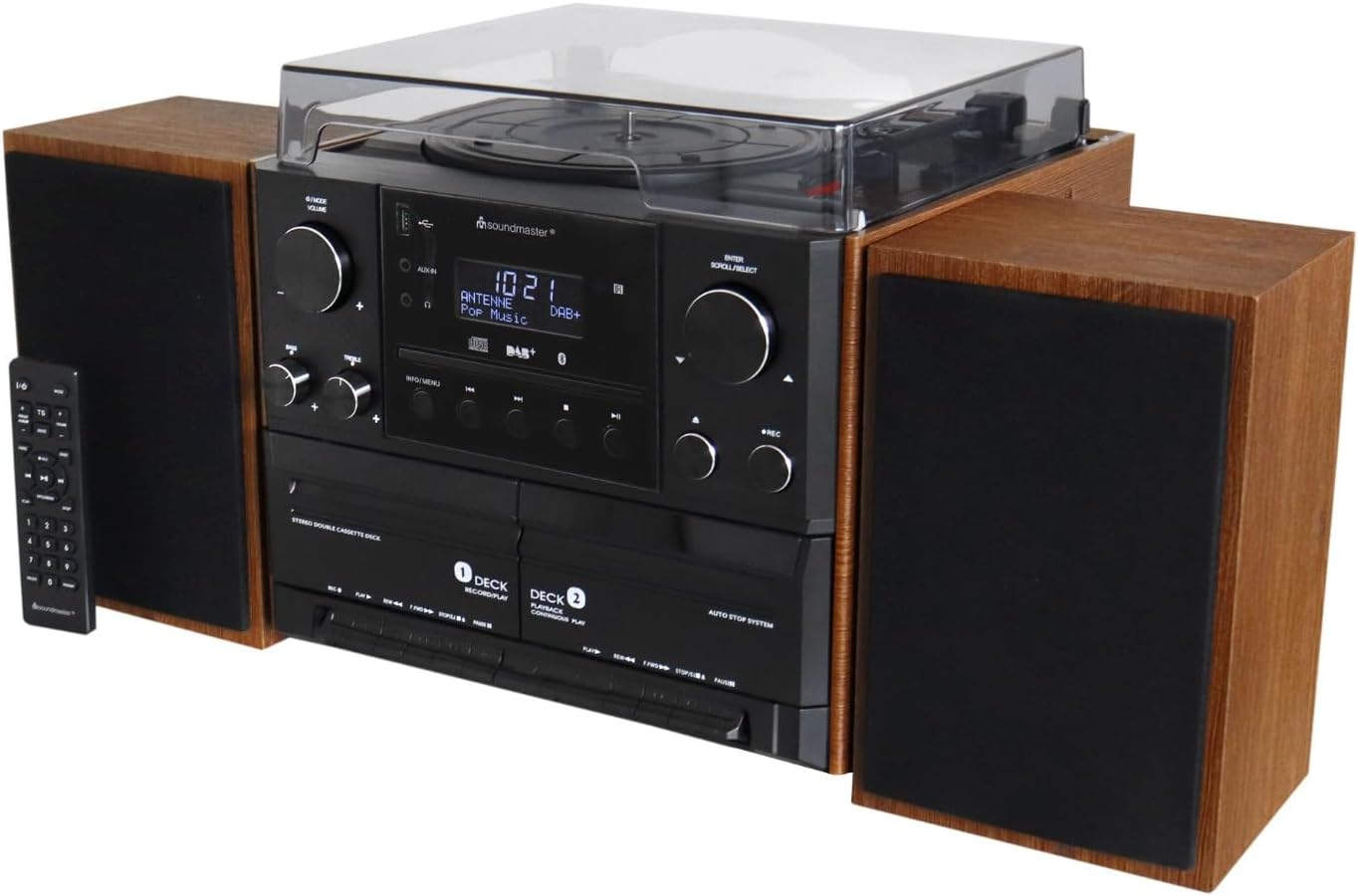
Figura 1: Frontal view of the Soundmaster MCD5600 Stereo System, including the main unit, two external speakers, and the remote control. The turntable is visible on top, and the CD tray and cassette decks are on the front panel.

Figura 2: Primer pla frontal view of the Soundmaster MCD5600 Stereo System, showing the central control panel with display, volume and tuning knobs, and various function buttons for CD, USB, Bluetooth, and radio.
Main Unit Controls:
- Botó d'encesa: Encén o apaga la unitat.
- Selector de funcions: Switches between Turntable, CD, Cassette, USB, Bluetooth, DAB+, and FM modes.
- Pom de volum: Ajusta el nivell de volum principal.
- Tuning/Scroll Knob: Used for radio tuning, menu navigation, and track selection.
- Pantalla de visualització: Mostra el mode actual, la informació de la pista, la freqüència de ràdio, etc.
- Safata de CD: Per inserir CD d'àudio.
- Platines de casset (plataforma 1 i platina 2): Per reproduir i gravar cintes de casset.
- Port USB: For USB playback and recording.
- Auriculars Jack: Per a una escolta privada.
- Entrada auxiliar: Per connectar dispositius d'àudio externs.
Connexions del panell posterior:
- Terminals d'altaveus: Connect the included stereo speakers.
- FM/DAB+ Antenna Input: Connect the supplied antenna for radio reception.
- Entrada d'alimentació de CA: Connecteu el cable d'alimentació.
Configuració
1. Desembalatge i col·locació:
- Traieu amb cura tots els components de l'embalatge.
- Place the main unit on a stable, flat surface. Ensure adequate ventilation around the unit.
- Position the speakers on either side of the main unit, ensuring they are on a stable surface.
2. Connexió dels altaveus:
- Connect the speaker wires from the left speaker to the "L" speaker terminals on the rear of the main unit. Ensure correct polarity (+ to + and - to -).
- Connect the speaker wires from the right speaker to the "R" speaker terminals on the rear of the main unit, observing polarity.
3. Connecting the Antenna:
- Connect the supplied FM/DAB+ antenna to the 75 Ohm antenna input on the rear of the unit.
- Esteneu l'antena completament i col·loqueu-la per a una recepció òptima.
4. Connexió d'alimentació:
- Ensure the unit is switched off before connecting the power cord.
- Insert the power cord into the AC power input on the rear of the unit.
- Connecteu l'altre extrem del cable d'alimentació a una presa de corrent estàndard.
Instruccions de funcionament
Funcionament general:
- Encès/apagat: Press the Power button on the front panel or remote control.
- Ajust de volum: Rotate the Volume knob or use the VOL+/- buttons on the remote.
- Selecció de la funció: Press the Function button repeatedly on the unit or use the dedicated function buttons on the remote (e.g., CD, PHONO, TAPE, USB, BT, DAB/FM).
Funcionament de la placa giratòria:
- Select "PHONO" mode.
- Aixequeu la coberta antipols.
- Posa un disc al plat.
- Seleccioneu la velocitat adequada (33, 45 o 78 RPM) amb el selector de velocitat.
- Move the tone arm to the desired position on the record and gently lower it.
- At the end of the record, manually return the tone arm to its rest.
Funcionament del reproductor de CD:
- Select "CD" mode.
- Press the Eject button to open the CD tray.
- Place a CD (CD/CD-MP3/CD-R/CD-RW/MP3/WMA compatible) with the label side facing up.
- Press the Eject button again to close the tray. Playback will start automatically or after pressing Play.
- Use the Skip/Search buttons to navigate tracks.
Cassette Deck Operation:
- Select "TAPE" mode.
- Open the cassette deck door (Deck 1 for playback/recording, Deck 2 for playback only).
- Inseriu una cinta de casset.
- Press Play to begin playback. Use Fast Forward/Rewind buttons as needed.
- To record, ensure you are in the desired source mode (e.g., PHONO, CD, RADIO) and then press the Record button on Deck 1.
Radio Operation (DAB+/FM):
- Select "DAB" or "FM" mode.
- For DAB+: The system will automatically scan for available stations on first use. Use the Tuning/Scroll knob to navigate through stations.
- For FM: Use the Tuning/Scroll knob to manually tune to a station or press the Scan button for automatic scanning.
- Press the Preset button to save or recall favorite stations.
Reproducció USB:
- Inseriu una unitat flaix USB al port USB.
- Select "USB" mode.
- El sistema detectarà i reproduirà automàticament àudio compatible files (MP3/WMA).
- Use the Play/Pause, Skip, and Folder navigation buttons to control playback.
Connectivitat Bluetooth:
- Select "BT" (Bluetooth) mode. The display will show "Pairing" or "Waiting for connection".
- On your Bluetooth-enabled device (smartphone, tablet, etc.), search for "MCD5600" in the Bluetooth settings.
- Select "MCD5600" to pair. Once connected, you can stream audio from your device to the stereo system.
Encoding (Digitization to USB):
- Inseriu una unitat flaix USB al port USB.
- Select the desired source for recording (e.g., PHONO, CD, TAPE, DAB/FM).
- Start playback of the source material (e.g., start playing a record, CD, or cassette).
- Press the "RECORD" button on the main unit or remote control. The recording indicator will light up.
- Press "RECORD" again to stop recording. The recorded audio will be saved as an MP3 file a la unitat USB.
Manteniment
Neteja de la unitat:
- Desconnecteu sempre la unitat de la presa de corrent abans de netejar-la.
- Feu servir un drap suau i sec per netejar les superfícies exteriors.
- No utilitzeu netejadors abrasius, ceres o dissolvents, ja que poden danyar l'acabat.
Cura del tocadiscs:
- Mantingueu la tapa antipols tancada quan no la feu servir per evitar l'acumulació de pols.
- Clean the stylus regularly with a soft brush designed for turntable styli.
- Handle records by their edges to avoid fingerprints and dirt.
CD and Cassette Care:
- Wipe CDs from the center outwards with a soft, lint-free cloth.
- Store cassettes in their cases to protect them from dust and magnetic fields.
- Periodically clean the cassette deck's heads and pinch rollers with a specialized cleaning cassette.
Resolució de problemes
| Problema | Causa possible | Solució |
|---|---|---|
| Sense poder | Cable d'alimentació no connectat; Presa de corrent no activa. | Assegureu-vos que el cable d'alimentació estigui ben connectat; proveu una altra presa de corrent. |
| Sense so | Volume too low; Speakers not connected; Incorrect function selected. | Augmenta el volum; Comprova les connexions dels altaveus; Selecciona la font d'entrada correcta. |
| La plataforma giratòria no gira | Speed selector incorrect; Belt dislodged (rare). | Check speed setting; Contact service if belt issue is suspected. |
| El CD no es reprodueix | CD inserted incorrectly; CD is scratched/dirty; Disc format not supported. | Reinsert CD correctly; Clean CD; Ensure CD is compatible (CD/MP3/WMA). |
| Mala recepció de ràdio | Antena no connectada o mal posicionada. | Connect and adjust antenna position; Try auto-scan for DAB+. |
| S'ha produït un error en l'aparellament de Bluetooth | Device too far; Bluetooth not enabled on device; Incorrect mode. | Ensure device is within range; Enable Bluetooth on device; Select "BT" mode on system. |
| La gravació per USB no funciona | USB drive full or incompatible format; Source not playing. | Check USB drive capacity and format (FAT32 recommended); Ensure source is playing before pressing record. |
Especificacions
| Característica | Detall |
|---|---|
| Model | MCD5600 |
| Marca | Mestre de so |
| Dimensions del producte (L x A x A) | 40 x 50 x 39 mil·límetres |
| Pes | 7.7 kg |
| Tecnologia de connectivitat | Bluetooth, Auxiliar, USB |
| Tipus d'altaveu | estèreo |
| Velocitats de la placa giratòria | 33/45/78 rpm |
| Compatibilitat amb CD | CD/CD-MP3/CD-R/CD-RW/MP3/WMA |
| Platines de casset | Doble platina de casset |
| Sintonitzador de ràdio | DAB+, FM |
| Encoding Function | Recording from Disk, CD, Cassette to USB (MP3 format) |
Garantia i Suport
Soundmaster products are designed and manufactured to the highest quality standards. In the unlikely event that you experience any issues with your MCD5600 Stereo System, please refer to the troubleshooting section first.
For warranty information and technical support, please refer to the warranty card included in your package or visit the official Soundmaster weblloc web. Conserveu el comprovant de compra per a reclamacions de garantia.
Note: Specifications and design are subject to change without notice for product improvement.


