Producte acabatview
The Elektron Digitakt II is a powerful 16-track drum computer and sampler designed for music production and live performance. It offers extensive sound manipulation capabilities, a robust sequencer, and a compact, durable design, making it suitable for both studio and on-the-go creative work.

Figura 1: Frontal view of the Elektron Digitakt II, showing the display, knobs, and performance pads.
Contingut del paquet
Assegureu-vos que tots els elements siguin presents a la caixa:
- Elektron Digitakt II Unit
- Adaptador d'alimentació
- Cable USB
Configuració inicial
Follow these steps to set up your Digitakt II for the first time:
- Connectar l'alimentació: Plug the included power adapter into the 12V DC IN port on the rear of the unit and then into a wall outlet.
- Connecta l'àudio: Connect your audio output cables from the L/R OUT ports to your mixer, audio interface, or headphones. If using external audio sources, connect them to the L/R IN ports.
- Connecteu l'USB (opcional): For computer integration and use with Elektron's Overbridge software, connect a USB cable from the Digitakt II's USB port to your computer.
- Encès: Press the Power button on the rear of the unit to turn on the Digitakt II.
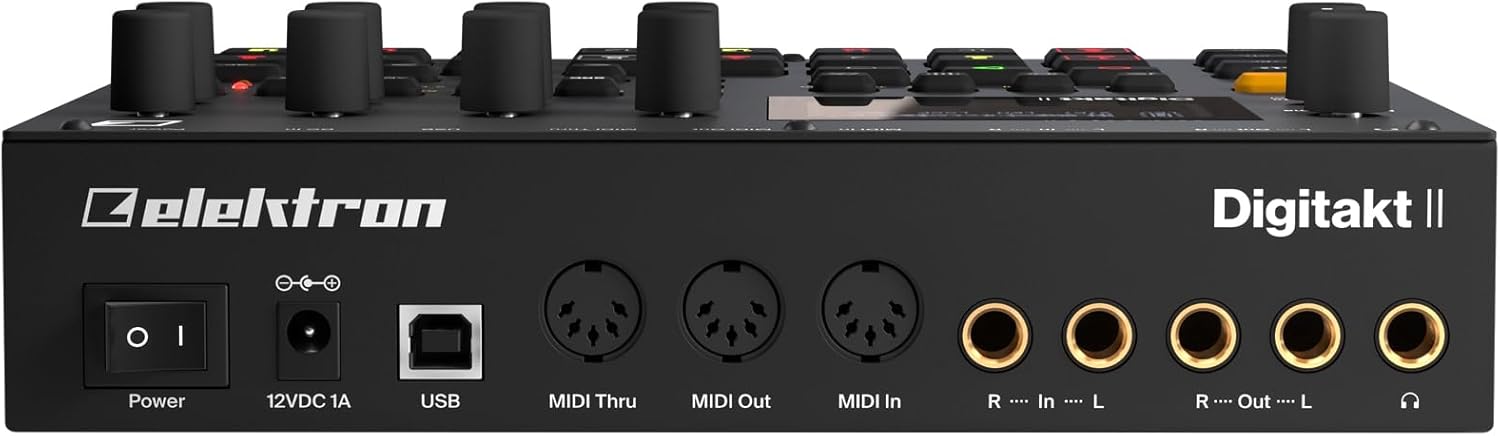
Figura 2: posterior view of the Elektron Digitakt II, showing power, USB, MIDI, and audio connections.
Operating Your Digitakt II
The Digitakt II features an intuitive interface with dedicated buttons and encoders for efficient workflow. Familiarize yourself with the main display and control layout.
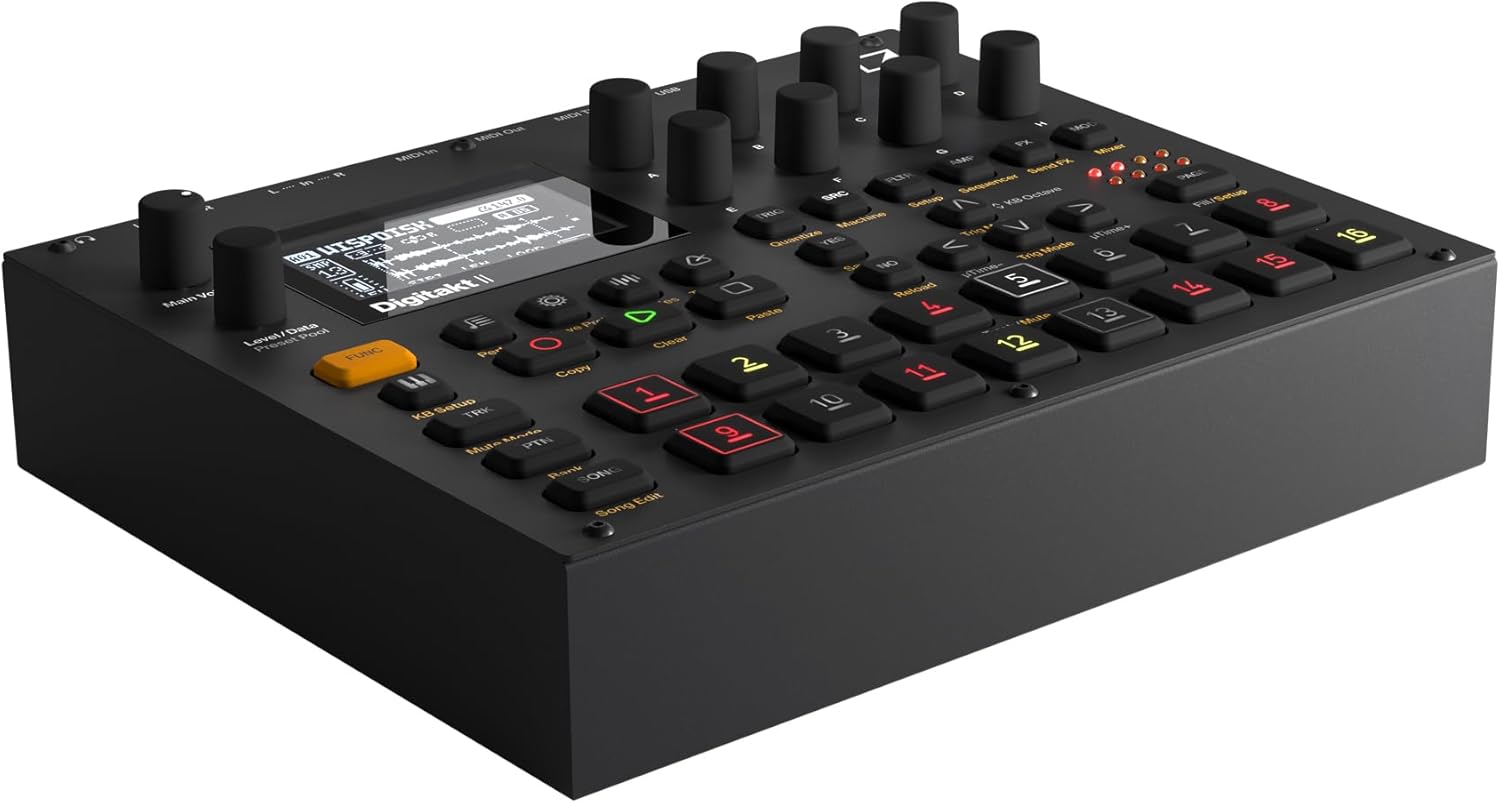
Figura 3: Angle view of the Elektron Digitakt II, highlighting the control surface and display.
Característiques clau
- 16 Audio Tracks: Each track supports stereo or mono samples, or MIDI data.
- 128-Step Elektron Sequencer: Program intricate patterns with precise control.
- 3 Assignable LFOs per Track: Modulate various parameters for dynamic sound design.
- Per-Track Effects: Apply Delay, Reverb, Chorus, Bit Reduction, Sample Reduction, and Overdrive to individual tracks.
- Euclidean Sequence Generator: Explore complex rhythmic possibilities.
- Swappable Filters: Utilize a Base-width filter and choose from Multi-mode, Low Pass 4, Comb, EQ, or Legacy LP/HP filters.
- 4 Trig Modes: Enhance sequencing with various trigger behaviors.
- Mode de cançó: Create, edit, and play full compositions with ease.
Funcionament bàsic
Carregant Samples: Use the 'Samples' button and the data encoders to browse and load samples into your project. Samples can be imported via USB using Elektron's software.
Seqüenciació: Select a track using the numbered pads. Enter notes and parameter locks by holding a trig button and adjusting parameters. The 128-step sequencer allows for detailed pattern creation.
Efectes: Access the FX section to apply and adjust the built-in effects for each track. Experiment with different effect types and parameters to shape your sound.
Desar projectes: Regularly save your work by pressing the 'Save Proj' button to prevent data loss.
Cura i Manteniment
To ensure the longevity and optimal performance of your Digitakt II, follow these guidelines:
- Neteja: Feu servir un drap suau i sec per netejar la unitat. Eviteu productes de neteja o dissolvents abrasius.
- Emmagatzematge: Guardeu la unitat en un lloc fresc i sec, allunyat de la llum solar directa i de temperatures extremes.
- Manipulació: Avoid dropping the unit or exposing it to excessive force.
- Ventilació: Assegureu-vos una ventilació adequada al voltant de la unitat per evitar el sobreescalfament.
Resolució de problemes
If you encounter issues with your Digitakt II, refer to the table below for common problems and solutions:
| Problema | Causa possible | Solució |
|---|---|---|
| Sense sortida de so | Incorrect audio connections, volume too low, muted tracks. | Check audio cables, increase Main Volume, ensure tracks are not muted in Mute Mode. |
| La unitat no s'encén | Power adapter not connected or faulty, power outlet issue. | Verify power adapter connection, try a different power outlet, ensure power button is pressed. |
| Problemes de connectivitat USB | Incorrect USB cable, driver not installed, Overbridge not running. | Use the provided USB cable, install the latest Elektron drivers and Overbridge software from the official weblloc. |
| Pads unresponsive | Unit frozen, calibration issue. | Restart the unit. If the problem persists, consult the full manual for calibration procedures. |
Especificacions tècniques
| Característica | Detall |
|---|---|
| Nom del model | Digitakt II |
| Pes de l'article | 3.3 lliures (1.5 kg) |
| Dimensions del producte (L x A x A) | 8.4 x 6.9 x 2.5 polzades (21.3 x 17.5 x 6.4 cm) |
| Material del cos | Alumini fos |
| Color | Negre |
| Tipus de connector | USB, Proprietary Power, MIDI In/Out/Thru, Audio In L/R, Audio Out L/R, Headphones |
| Components inclosos | Adaptador d'alimentació |
Garantia i Suport
Elektron products are manufactured to high standards and come with a limited warranty. For detailed warranty information, product registration, and technical support, please visit the official Elektron weblloc web o poseu-vos en contacte amb el servei d'atenció al client. Conserveu el comprovant de compra per a reclamacions de garantia.
Recursos en línia: For the most up-to-date information, firmware updates, and additional resources, please refer to the official Elektron support page.


