1. Producte acabatview
This ZTUZAUTO Wireless CarPlay Android Auto Retrofit Kit is designed to integrate modern smartphone connectivity into your BMW Mini vehicle equipped with the CIC system. It enables wireless Apple CarPlay, Android Auto, and Mirror Link functionalities, enhancing your driving experience with navigation, music, and communication features.
1.1 Contingut del paquet
El paquet normalment inclou els components següents:
- CarPlay Module
- Cable d'alimentació
- Antena WiFi
- Idrive 10 Pin Cable
- Idrive 4 Pin Cable
- Cable LVDS
- Micròfon

Imatge: Més deview of the CarPlay module and included accessories. The module dimensions are approximately 14.2cm x 8.5cm x 2.4cm.
1.2 Models compatibles
This retrofit kit is compatible with BMW Mini vehicles featuring the CIC system, specifically for models manufactured between 2009 and 2014, with a 6.5-inch screen.

Image: A visual representation of the compatible model list, confirming compatibility with MINI CIC systems from 2009-2014 with a 6.5-inch screen.
2. Informació i precaucions de seguretat
Please read and understand the following safety information before installation and use:
- Garantia: This product comes with a 12-month quality warranty. For any issues during this period, please contact customer support.
- Instal·lació: Do not cut or damage original car wires. This product is designed not to affect your factory car warranty. If you are not confident in performing the installation, it is highly recommended to seek assistance from a qualified specialist.
- Prova: Before restoring any vehicle panels, thoroughly test all functions of the module to ensure proper operation. This prevents the inconvenience of re-disassembly.
- Suport: For any installation or operational issues, please contact our support team. We can provide more specialized assistance than a general auto repair shop.
3. Guia d'instal·lació
The ZTUZAUTO Retrofit Kit is designed for a "Plug and Play" installation, meaning no wire cutting or breaking is required. It integrates with your existing vehicle systems.
3.1 Comprovacions prèvies a la instal·lació
- Verify your car's model and year are compatible with this kit.
- Refer to the provided manual (if separate wiring diagram is included) to locate the wiring diagram and dial code specific to your car's model.
3.2 Passos d'instal·lació (General)view)
The installation involves connecting the module to your car's existing wiring harness and display unit. The process typically includes:
- Carefully remove the necessary dashboard panels to access the vehicle's head unit.
- Disconnect the original cables from the head unit.
- Connect the provided LVDS cable, power cable, and other interface cables from the retrofit module to the corresponding ports on the head unit and vehicle harness.
- Assegureu-vos que totes les connexions siguin segures.
- Mount the WiFi antenna in a suitable location for optimal signal reception.
- Connect the external microphone for voice commands.
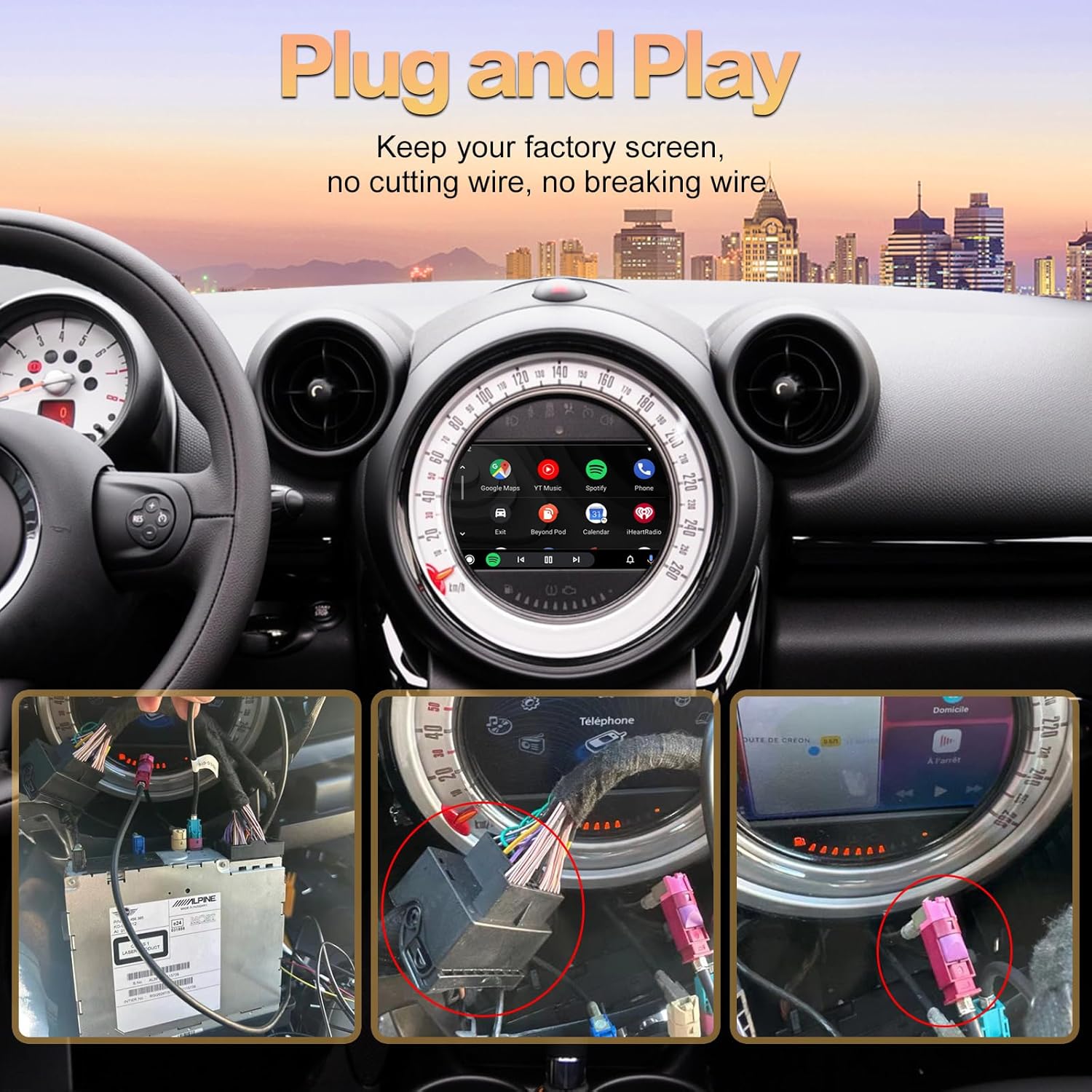
Image: Illustrates the "Plug and Play" installation concept, showing connections to the car's head unit without cutting wires.
3.3 Post-Installation Verification
After connecting the module but before reassembling the dashboard, power on your vehicle and test all functions of the CarPlay/Android Auto system to confirm correct operation.
4. Instruccions de funcionament
4.1 Switching Between Original System and CarPlay/Android Auto
To switch from your original car system to the CarPlay/Android Auto interface, press and hold the MENU button (or equivalent) on your i-Drive controller for approximately 2 seconds.
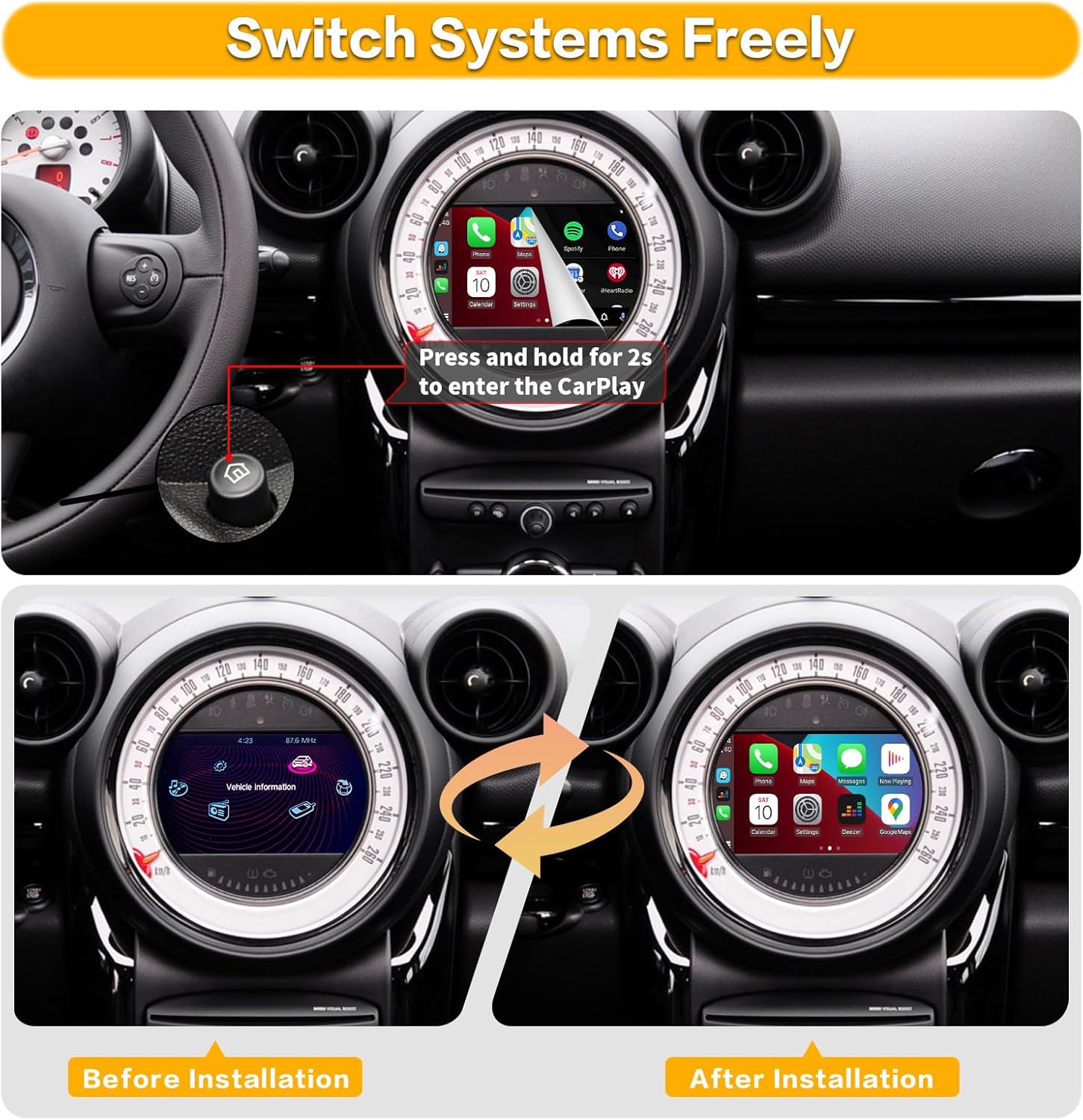
Image: Demonstrates the transition from the original vehicle information display to the CarPlay interface by pressing and holding a button.
4.2 Wireless CarPlay Connection Steps
To connect your iPhone wirelessly to CarPlay:
- Al vostre iPhone, aneu a Configuració > Bluetooth.
- On the car screen, navigate to the Bluetooth settings of the CarPlay module.
- Pair your iPhone with the device named "ZTUZAUTO Box_FXX" (or similar) displayed on the car screen. Confirm the pairing code if prompted.
- Once Bluetooth is connected, the system will automatically prompt you to enable CarPlay.
- Ensure your iPhone's Wi-Fi is also enabled, as CarPlay uses Wi-Fi for data transfer after the initial Bluetooth handshake.
Video: Demonstrates the steps for connecting an iPhone to the ZTUZAUTO CarPlay module wirelessly via Bluetooth and Wi-Fi.
4.3 Wireless Android Auto Connection Steps
Per connectar el telèfon Android sense fil a Android Auto:
- Al teu telèfon Android, vés a Configuració > Bluetooth.
- On the car screen, navigate to the Bluetooth settings of the Android Auto module.
- Pair your Android phone with the device named "ZTUZAUTO Box_FXX" (or similar) displayed on the car screen. Confirm the pairing code if prompted.
- Once Bluetooth is connected, the system will automatically prompt you to enable Android Auto.
- Ensure your Android phone's Wi-Fi is also enabled, as Android Auto uses Wi-Fi for data transfer after the initial Bluetooth handshake.
Video: The same video above also illustrates the connection process for Android Auto, showing the pairing of an Android device with the module.
4.4 Audio Output Settings
To ensure audio functions correctly:
- If using AUX: You need to set "AUX front" in your original car's multimedia interface. Access the Settings interface > Factory Mode > Phone Link setting > Turn off the "Disable phone link audio" option > Reboot. Then, enter the Multimedia interface, click "External devices", and select "AUX front".
- If using Bluetooth for sound: Access the Settings interface > Factory Mode > Phone Link setting > Open the option "Disable phone link audio" > Reboot. Then, pair your smartphone with the original vehicle's Bluetooth and select the original car Bluetooth for both phone and music sound sources in the original car media settings.

Image: Detailed steps for configuring audio output via AUX and Bluetooth within the car's settings.
4.5 Característiques i funcionalitats principals
Once connected, the retrofit kit provides access to various smartphone features directly on your car's display:
- Navegació: Use your preferred navigation apps like Apple Maps, Google Maps, or Waze for real-time directions.
- Música i àudio: Stream music, podcasts, and audiobooks from apps like Spotify, Apple Music, Pandora, and more.
- Comunicació: Make and receive calls, send and read messages (via voice commands or on-screen display), and access your phone's contacts.
- Control de veu: Utilize Siri or Google Assistant for hands-free control of various functions.
- Enllaç mirall: Duplica la pantalla del telèfon directament a la pantalla del cotxe.
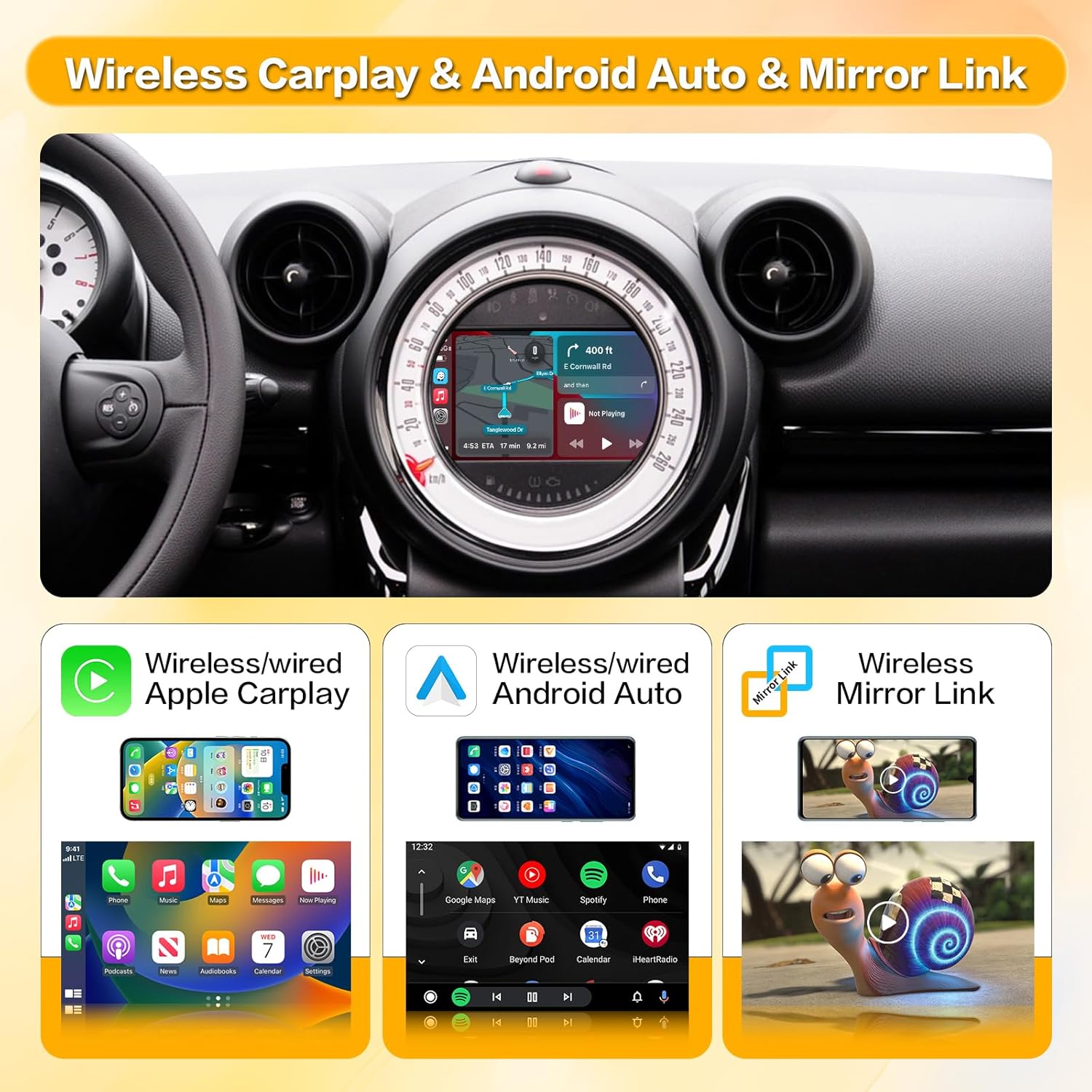
Image: Illustrates the main features: Wireless Apple CarPlay, Wireless Android Auto, and Wireless Mirror Link.

Image: Shows a variety of supported applications for navigation, music, and communication within the CarPlay/Android Auto interface.

Image: Provides close-up views of music playback, message display, map navigation, and phone call interfaces.

Image: Highlights the integration of intelligent voice systems like Siri and Google Assistant for hands-free operation.
4.6 Conservació de les funcions originals del cotxe
The retrofit kit is designed to retain the functionality of your original car controls, including:
- Botons del volant: Volume control (+/-), voice awakening, and other media controls remain functional.
- i-Drive Controller: The i-Drive knob can be used to navigate the CarPlay/Android Auto interface, press to enter APP functions, and use arrow keys for cursor movement.

Image: Illustrates how original steering wheel buttons and the i-Drive controller are used to interact with the new system.
5. Manteniment
The ZTUZAUTO Wireless CarPlay Android Auto Retrofit Kit requires minimal maintenance. Keep the unit free from dust and moisture. Ensure all cable connections remain secure. Software updates, if available, will be provided by the manufacturer and should be installed according to their instructions.
6. Solució De Problemes
If you encounter issues with your ZTUZAUTO Retrofit Kit, consider the following troubleshooting steps:
- Sense pantalla/Pantalla negra:
- Ensure all power and LVDS cables are securely connected.
- Verify the car's ignition is on.
- Try switching between the original system and the CarPlay interface using the i-Drive button.
- Sense so:
- Check your audio output settings as described in Section 4.4.
- Ensure your phone's volume is up and not muted.
- Verify the car's audio source is correctly selected (e.g., AUX).
- Wireless Connection Issues (CarPlay/Android Auto):
- Assegureu-vos que el Bluetooth i la Wi-Fi estiguin activats al vostre telèfon intel·ligent.
- Oblida't del dispositiu des de la configuració de Bluetooth del telèfon i torna a emparellar-lo.
- Restart your smartphone and the car's infotainment system.
- Ensure the WiFi antenna is properly connected to the module.
- Els controls no responen:
- Check the i-Drive and steering wheel button connections.
- Reinicieu el sistema.
If these steps do not resolve the issue, please contact ZTUZAUTO customer support for further assistance.
7. Especificacions
| Característica | Especificació |
|---|---|
| Dimensions del producte | 3.34 x 0.94 x 5.59 polzades |
| Pes de l'article | 2.55 lliures |
| Tecnologia de connectivitat | Bluetooth, USB, Wi-Fi |
| Font d'alimentació | 12-volt DC Power |
| Material | Metall |
| Característica especial | Bluetooth |
8. Garantia i Suport
ZTUZAUTO provides a Garantia de qualitat de 12 mesos for this product. If you encounter any problems during this period, please do not hesitate to contact us. Our support team is available to assist you with installation, operation, and troubleshooting.
Informació de contacte: Please refer to your purchase documentation or the ZTUZAUTO official weblloc web per obtenir les dades de contacte d'atenció al client més actualitzades.


