1. Introducció
This manual provides essential information for the installation, operation, and maintenance of your NZXT C1200 Gold ATX 3.1 Power Supply. Please read this manual thoroughly before installation and retain it for future reference. The NZXT C1200 Gold ATX 3.1 is a fully modular, low-noise power supply designed for high-performance PC gaming systems, offering 1200 Watts of power with 80 PLUS Gold efficiency and a 12V-2x6 connector.

Figure 1: NZXT C1200 Gold ATX 3.1 Power Supply (White)
2. Informació de seguretat
ADVERTIMENT: Failure to follow these safety instructions may result in electric shock, fire, or damage to the product and connected components.
- Desconnecteu sempre l'alimentació de la presa de corrent altern abans de la instal·lació o el manteniment.
- No obriu la font d'alimentació. Alt voltatgetagHi ha peces a l'interior i no hi ha peces que l'usuari pugui reparar. L'obertura de la unitat anul·larà la garantia.
- Ensure the power supply is installed in a well-ventilated area, away from heat sources, direct sunlight, and moisture.
- Use only the modular cables provided with this NZXT C1200 Gold ATX 3.1 power supply. Using cables from other power supplies may cause damage.
- Assegureu-vos que tots els connectors estiguin ben col·locats abans d'encendre el sistema.
- This product is designed for use in desktop personal computers only. Do not use it for any other purpose.
- Mantenir fora de l'abast dels nens.
3. Contingut del paquet
Verifiqueu que tots els elements siguin presents al paquet:
- NZXT C1200 Gold ATX 3.1 Power Supply Unit
- Modular Cable Set (see Figure 2 for details)
- Cable d'alimentació CA
- Cargols de muntatge
- Manual d'usuari (aquest document)

Figure 2: Included Modular Cable Set
4. Característiques del producte
The NZXT C1200 Gold ATX 3.1 Power Supply incorporates several key features for optimal performance and reliability:
- Conformitat amb ATX 3.1: Designed to meet the ATX 3.1 standard, ensuring stable and efficient power delivery for modern high-performance PC components, with enhanced resistance to power spikes.
- 40 Series Ready: Features a durable, heat-resistant 12V-2x6 connector capable of supplying up to 600 watts to NVIDIA GeForce RTX 40 Series graphics cards.
- High Efficiency, Low Noise: Certified with 80 PLUS Gold Efficiency, Cybenetics Gold Efficiency, and Cybenetics A- Noise Level ratings, indicating high energy efficiency and quiet operation.
- Ultra-Low Noise Fan: Equipped with a 135mm fluid dynamic bearing fan that includes a Zero Fan Mode, allowing for completely silent operation when the power supply is under 50% load.
- Construcció d'alta qualitat: Utilizes 100% premium Japanese capacitors, which contribute to improved hold-up time and minimal ripple noise, ensuring reliable and stable power delivery.

Figure 3: Key Features and Certifications
5. Configuració i instal·lació
5.1 Llista de comprovació prèvia a la instal·lació
- Ensure your computer case supports ATX power supplies and has adequate space for the unit (dimensions: 6.3 x 5.91 x 3.39 inches).
- Reuneix les eines necessàries: tornavís Phillips.
- Unpack the power supply and all modular cables.
5.2 Instal·lació física
- Turn off your computer and disconnect the AC power cord from the wall outlet.
- Obriu la caixa de l'ordinador.
- If replacing an existing power supply, disconnect all cables from the old PSU and remove it from the case.
- Carefully slide the NZXT C1200 Gold ATX 3.1 power supply into the designated PSU bay in your computer case.
- Fixeu la font d'alimentació a la carcassa amb els cargols de muntatge proporcionats.

Figure 4: Power Supply Installed in PC Case
5.3 Connexions de cable
Connect only the necessary modular cables to the power supply and your components. This helps improve airflow and cable management.
- Cable de placa base ATX de 24 pins: Connecteu el cable gran de 24 pins al port corresponent de la placa base.
- 8-pin (4+4) CPU Power Cable: Connect the CPU power cable(s) to the CPU power connector(s) on your motherboard. High-end motherboards may require two 8-pin CPU cables.
- PCIe Power Cables (6+2 pin and 12V-2x6):
- For graphics cards requiring 6-pin or 8-pin PCIe connectors, use the provided 8-pin (6+2) PCIe cables.
- For NVIDIA GeForce RTX 40 Series graphics cards, use the dedicated 16-pin (12V-2x6) PCIe cable. Ensure it is fully seated into both the power supply and the graphics card.
- Cables d'alimentació SATA: Connecteu els cables d'alimentació SATA a les unitats d'emmagatzematge (SSD, HDD) i altres dispositius alimentats per SATA.
- Peripheral Power Cables: Connect peripheral cables for devices such as case fans, fan controllers, or older components requiring Molex connectors.

Figure 5: Modular Cable Connections, including 12V-2x6

Figure 6: 12V-2x6 Cable Connected
After all cables are connected, ensure they are routed neatly to avoid obstructing airflow. Close your computer case.
6. Instruccions de funcionament
6.1 Powering On Your System
- Connect the AC power cord to the power supply's AC inlet and then to a wall outlet.
- Flip the power switch on the back of the power supply to the "ON" (I) position.
- Premeu el botó d'engegada de la caixa de l'ordinador per iniciar el sistema.
6.2 Zero Fan Mode
The NZXT C1200 Gold ATX 3.1 features a Zero Fan Mode. When the power supply load is below 50%, the fan will remain off for silent operation. As the load increases above 50%, the fan will automatically activate to maintain optimal temperatures.
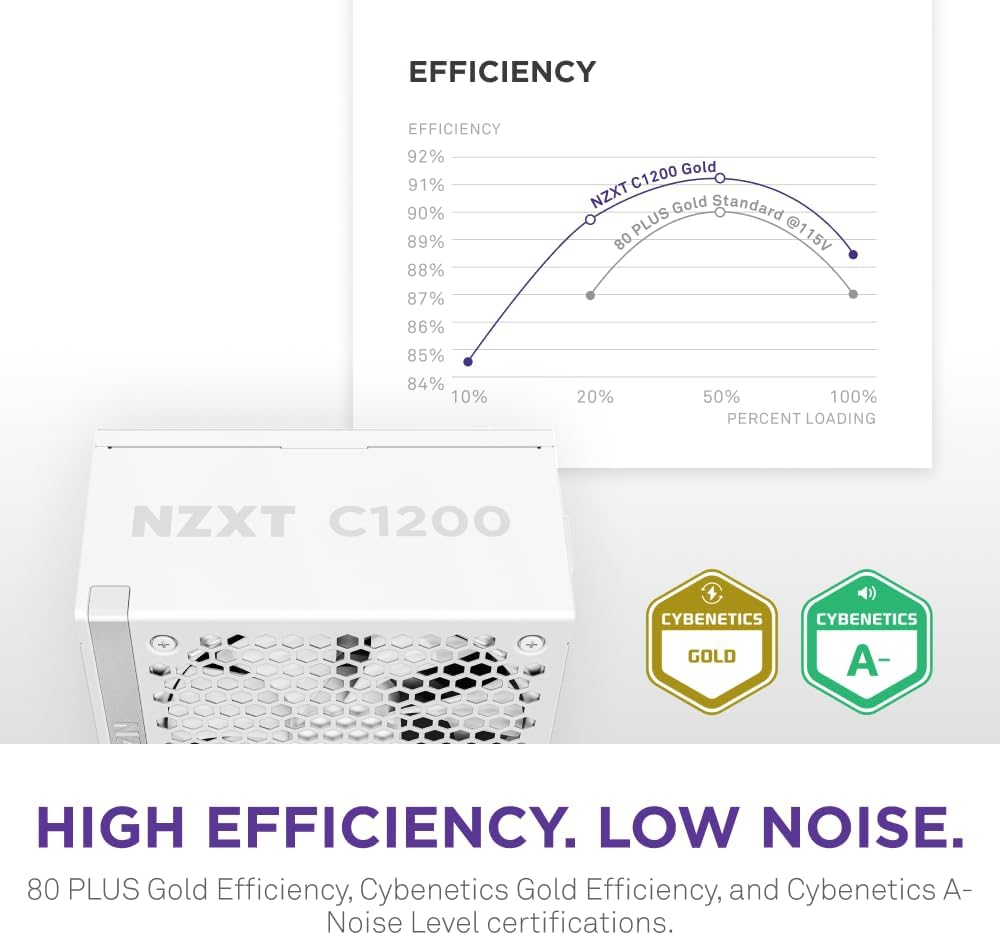
Figure 7: Efficiency and Noise Level Certifications
7. Manteniment
Un manteniment adequat garanteix la longevitat i el rendiment òptim de la vostra font d'alimentació.
- Neteja de pols: Periodically clean the exterior of the power supply and its fan grille using compressed air to remove dust buildup. Ensure the system is powered off and unplugged before cleaning. Do not spray liquids directly onto the unit.
- Condicions ambientals: Operate the power supply within its specified temperature and humidity ranges. Avoid extreme temperatures and high humidity environments.
- Gestió de cables: Ensure cables are not obstructing airflow within the PC case.
8. Solució De Problemes
If you encounter issues with your power supply, refer to the following troubleshooting steps:
8.1 No Power to System
- Check AC Power: Ensure the AC power cord is securely connected to both the power supply and the wall outlet. Verify the wall outlet is functional.
- PSU Switch: Confirm the power switch on the back of the power supply is in the "ON" (I) position.
- Connexions internes: Double-check that all modular cables (24-pin ATX, CPU, PCIe) are firmly connected to both the power supply and the respective components.
- Curtcircuit: Disconnect all components except the motherboard, CPU, and one stick of RAM. If the system powers on, reconnect components one by one to identify the faulty component.
8.2 System Instability or Random Shutdowns
- Sobrecàrrega: Ensure your system's total power consumption does not exceed the power supply's 1200W capacity. Use a power calculator if unsure.
- Integritat del cable: Verify all power cables are correctly and securely connected. Loose connections can cause instability.
- Ventilació: Ensure adequate airflow within your PC case and that the power supply fan is not obstructed. Overheating can lead to shutdowns.
- Comprovació de components: Test other components (RAM, GPU) if possible, as they can also cause instability.
8.3 Fan Not Spinning
- Mode de ventilador zero: The fan may not spin if the power supply load is below 50% (Zero Fan Mode). This is normal operation.
- Acumulació de pols: Check for dust accumulation on the fan blades or grille that might impede movement. Clean if necessary (with power off and unplugged).
If issues persist after following these steps, please contact NZXT customer support.
9. Especificacions
| Característica | Detall |
|---|---|
| Marca | NZXT |
| Nom del model | NZXT C1200 Gold ATX 3.1 |
| Número de model de l'article | PA-2G2BW-US |
| Potència de sortidatage | 1200 watts |
| Classificació d'eficiència | 80 PLUS Gold, Cybenetics Gold |
| Estàndard ATX | ATX 3.1 |
| Factor de forma | ATX |
| Mètode de refrigeració | Air (135mm Fluid Dynamic Bearing Fan with Zero Fan Mode) |
| Nivell de soroll | Cybenetics A- |
| Condensadors | Condensadors 100% japonesos |
| Modular | Totalment Modular |
| Dimensions (LxWxH) | 6.3 x 5.91 x 3.39 polzades (160 x 150 x 86 mm) |
| Pes de l'article | 8.34 lliures (3.79 quilograms) |
| Color | Blanc |
| Tipus de connector | ATX, 12V-2x6 |

Figure 8: Internal Components with Japanese Capacitors
10. Garantia i Suport
10.1 Informació de la garantia
The NZXT C1200 Gold ATX 3.1 Power Supply comes with a 10 any de garantia from the date of purchase. This warranty covers defects in materials and workmanship under normal use. Please retain your proof of purchase for warranty claims. The warranty does not cover damage caused by improper installation, accidents, abuse, misuse, natural disasters, or unauthorized modifications.
10.2 Atenció al client
For technical assistance, troubleshooting, or warranty inquiries, please visit the official NZXT support weblloc o poseu-vos en contacte amb el seu departament d'atenció al client.
- Suport de NZXT Weblloc: www.nzxt.com/support
- Refer to the NZXT weblloc web per obtenir la informació de contacte i els recursos d'assistència més actualitzats.


