1. Informació important de seguretat
Before using your new Samsung Smart TV, please read all safety instructions carefully to prevent electric shock, fire, or injury. Keep this manual for future reference.
- No exposeu el televisor a la pluja o la humitat.
- Assegureu-vos que la ventilació sigui adequada; no obstruïu les obertures de ventilació.
- Use only the power cord supplied by the manufacturer.
- No sobrecarregueu els endolls de paret ni els cables d'extensió.
- Demaneu tot el servei a personal de servei qualificat.
2. Producte acabatview
The Samsung DU8000 Crystal UHD LED 4K Smart TV offers a stunning visual experience with its 4K resolution and advanced picture technologies. Its sleek design integrates seamlessly into any living space.

Imatge: Davant view of the Samsung DU8000 Crystal UHD LED 4K Smart TV, showcasing its vibrant display with an underwater scene.
Característiques principals:
- Crystal UHD 4K Processor: Enhances content to 4K resolution.
- Color del cristall dinàmic: Delivers a wide spectrum of colors for a lifelike picture.
- Motion Xcelerator: Provides smooth motion for clear details in fast-paced scenes.
- Disseny AirSlim: Pro ultra primfile for seamless wall mounting.
- Televisor intel·ligent amb tecnologia Tizen: Access to a vast array of streaming apps and services.
3. Configuració
3.1 Desembalatge i inspecció inicial
Carefully remove the TV from its packaging. Inspect for any damage. Ensure all components listed in the packing list are present.
3.2 Instal·lació de l'estand
If using the included stand, attach the stand feet to the bottom of the TV using the provided screws. Ensure they are securely fastened.
3.3 Muntatge a la paret (opcional)
For wall mounting, a compatible VESA wall mount (sold separately) is required. Follow the instructions provided with your wall mount. The TV's AirSlim design allows for a flush fit against the wall.
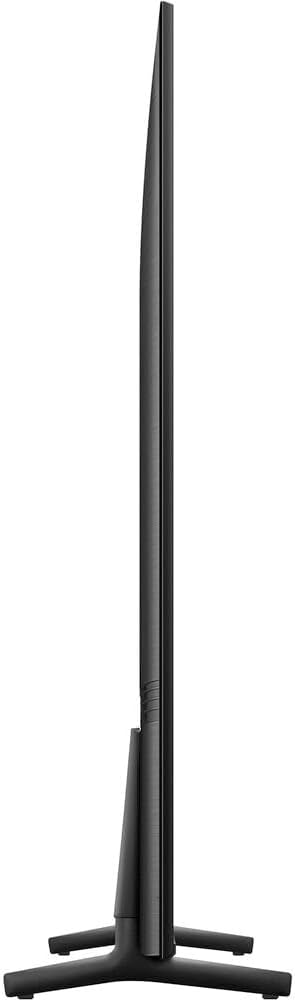
Imatge: El lateral prim professionalfile of the Samsung DU8000 TV, demonstrating its AirSlim design for a sleek appearance.
3.4 Connexió de perifèrics
Connect your devices (e.g., cable box, gaming console, Blu-ray player) to the HDMI ports. Use the USB ports for external storage or accessories. Connect the power cable to the TV and then to a wall outlet.

Imatge: The back panel of the Samsung DU8000 TV, illustrating the available connectivity ports for external devices.
3.5 Engegada inicial i connexió de xarxa
Press the power button on the remote. Follow the on-screen instructions to select your language, country, and connect to your Wi-Fi network. This step is crucial for accessing Smart TV features.
4. Instruccions de funcionament
4.1 Funcions de control remot
The included remote control allows for easy navigation. Use the directional pad to move through menus, the 'Home' button to access the Smart Hub, and dedicated buttons for popular streaming services.
4.2 Smart Hub Navigation and App Management
The Smart Hub is your gateway to all applications, live TV, and connected devices. You can customize your app layout, add new apps from the app store, or remove unused ones.
Vídeo: This video demonstrates how to move and remove applications on your Samsung Smart TV, allowing for personalized organization of your home screen.
Vídeo: This video illustrates the various viewing options available on the Samsung Smart TV, including access to different streaming services and live TV channels.
4.3 Configuració d'imatge i so
Access the settings menu to adjust picture modes (e.g., Standard, Dynamic, Movie), brightness, contrast, and color temperature. For audio, select sound modes or adjust equalizer settings for optimal listening.
- Color del cristall dinàmic: Provides a wide range of colors for a vibrant picture.
- Ampliació d'escala de 4K: Millora automàticament el contingut de baixa resolució a una qualitat propera a 4K.
- Motion Xcelerator: Reduces motion blur in fast-moving scenes.
- Potenciador de contrast: Ajusta dinàmicament el contrast per millorar la profunditat i el color.
- Mode cineasta: Preserves the director's original vision for movies.

Imatge: The Dynamic Crystal Color feature of the Samsung DU8000 TV, showing how it produces rich and detailed colors.

Imatge: A motocross scene on the Samsung DU8000 TV, demonstrating the Motion Xcelerator feature for clear and fluid action.
Vídeo: Un acabatview of the Samsung DU8000 Crystal UHD LED 4K Smart TV, highlighting its key features and sleek design.
Vídeo: This video showcases the ultra-slim design and stunning motion clarity of the Samsung 4K Smart TV, emphasizing its visual performance.
5. Manteniment
5.1 Neteja del televisor
Per netejar la pantalla, netegeu suaument amb un drap de microfibra suau i sec. Per a marques difícils, netegeu suaument.ampen the cloth with water or a screen-specific cleaning solution. Avoid harsh chemicals or abrasive materials. Clean the TV frame and stand with a soft, dry cloth.
5.2 Actualitzacions de programari
Ensure your TV's software is up-to-date for optimal performance and security. Navigate to Configuració > Suport > Actualització de programari to check for and install available updates. Automatic updates can also be enabled.
5.3 Gestió de l'energia
For energy efficiency, utilize the TV's power-saving modes. Unplug the TV from the power outlet during lightning storms or when it will be left unattended for long periods.
6. Solució De Problemes
Si teniu problemes amb el televisor, consulteu les solucions habituals següents abans de contactar amb el servei d'assistència.
- Sense energia: Comproveu si el cable d'alimentació està connectat correctament tant al televisor com a la presa de corrent. Proveu la presa de corrent amb un altre dispositiu.
- Sense imatge/so: Verify the correct input source is selected. Check all cable connections (HDMI, audio). Restart connected devices.
- El comandament a distància no funciona: Canvieu les piles. Assegureu-vos que no hi hagi cap obstacle entre el comandament a distància i el televisor.
- Problemes de connexió de xarxa: Restart your Wi-Fi router. Reconnect the TV to the Wi-Fi network via Configuració > General > Xarxa > Obre la configuració de xarxa.
- Problemes de qualitat d'imatge: Ajusta la configuració de la imatge (brillantor, contrast, nitidesa, color). Assegura't que la font del contingut sigui d'alta qualitat.
- Restabliment de fàbrica: As a last resort, a factory reset can resolve many software-related issues. Go to Configuració > General > Restablir. Note that this will erase all personalized settings and installed apps.
7. Especificacions
| Característica | Detall |
|---|---|
| Marca | Samsung |
| Número de model | E99SAMUN50DU8000 |
| Mida de la pantalla | 50 polzades |
| Tecnologia de visualització | LED |
| Resolució | 4K (3840 x 2160) |
| Freqüència d'actualització | 60 Hz |
| Característiques especials | AirSlim Design, 4K Upscaling, Motion Xcelerator, Dynamic Crystal Color, HDR10+, Contrast Enhancer, Filmmaker Mode |
| Tecnologia de connectivitat | Bluetooth, WiFi |
| Dimensions del producte (P x A x A) | 9 x 48.5 x 29.4 polzades |
| Pes de l'article | 26 lliures |
| Tipus d'altaveu | 2 canals |
8. Garantia i Suport
8.1 Garantia del producte
Your Samsung TV comes with a standard manufacturer's warranty. Please refer to the warranty card included with your product for specific terms, conditions, and duration. Additional protection plans may have been purchased separately.
8.2 Atenció al client
For technical assistance, troubleshooting, or service requests, please visit the official Samsung support website or contact their customer service hotline. Have your TV's model number (DU8000) and serial number ready when contacting support.
Podeu trobar més informació i recursos de suport a Botiga Samsung.


