1. Introducció
Thank you for choosing the Yesido SF14 Handheld Gimbal Stabilizer Selfie Stick. This device is designed to enhance your mobile photography and videography experience by providing stable, shake-free footage and versatile shooting options. It features a 360-degree rotating gimbal, a detachable Bluetooth remote control, and an integrated invisible tripod. Please read this manual carefully to ensure proper use and optimal performance.
2. Contingut del paquet
Verifiqueu que tots els elements siguin presents al vostre paquet:
- Yesido SF14 Handheld Gimbal Stabilizer Selfie Stick
- Control remot Bluetooth desmuntable
- Cable de càrrega USB
- Manual d'usuari (aquest document)

Image: The Yesido SF14 Gimbal Stabilizer and its packaging box, showing the product and its features.
3. Producte acabatview
Familiarize yourself with the main components of your Yesido SF14 device:
- Telèfon Clamp: Subjecta el teu telèfon intel·ligent de manera segura.
- Gimbal Head: Provides 360-degree rotation and stabilization.
- Barra d'extensió: Telescopic rod for selfie stick functionality.
- Handle/Tripod Base: Ergonomic handle that unfolds into a stable tripod.
- Comandament a distància Bluetooth: Detachable remote for wireless photo/video capture.
- Port de càrrega: Micro USB port for charging the device.
- Botó d'engegada/indicador lluminós: For turning the device on/off and checking status.

Imatge: Una imatge detallada view of the Yesido SF14 Gimbal Stabilizer with a smartphone mounted, showcasing el seu disseny.
4. Configuració
4.1. Càrrega del dispositiu
Before first use, fully charge the gimbal stabilizer.
- Connect the provided USB charging cable to the charging port on the gimbal.
- Connecteu l'altre extrem del cable a un adaptador de corrent USB (no inclòs) o al port USB d'un ordinador.
- The indicator light will show red during charging and turn green when fully charged. A built-in 450mAh battery provides approximately 10 hours of standby time and 2 hours of continuous anti-shake shooting.
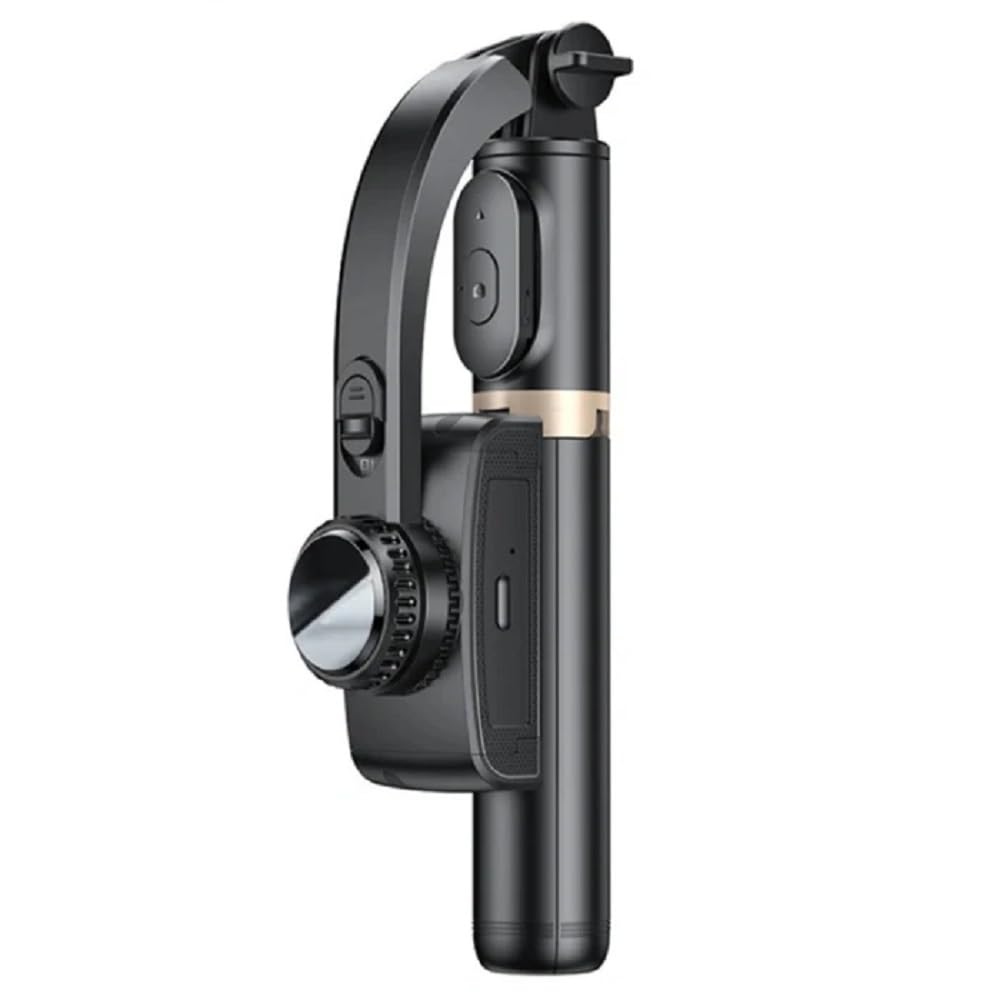
Image: Close-up of the Yesido SF14 showing the charging port and indicator light, illustrating charging (red light) and in-use (green light) states.
4.2. Muntatge del telèfon intel·ligent
- Gently pull open the phone clamp.
- Introduïu el vostre telèfon intel·ligent al clamp, ensuring it is centered and securely held.
- Ensure the phone's buttons are not obstructed by the clamp.
4.3. Encès / apagat
- Per encendre: Press and hold the power button on the gimbal for 3 seconds until the indicator light flashes.
- Per apagar: Manteniu premut el botó d'engegada durant 3 segons fins que s'apagui el llum indicador.
5. Instruccions de funcionament
5.1. Emparellament del comandament a distància Bluetooth
The detachable Bluetooth remote control allows for convenient wireless operation.
- Remove the remote control from its slot on the gimbal handle.
- Engegueu el comandament a distància (normalment prement i mantenint premut un botó fins que un indicador lluminós parpellegi).
- Al teu telèfon intel·ligent, vés a la configuració de Bluetooth i busca els dispositius disponibles.
- Select "SF14" or a similar name from the list to pair. The remote's indicator light will stop flashing once paired.

Image: A close-up of the Yesido SF14 handle showing the detachable Bluetooth remote control and its slot, highlighting its anti-lost design.
5.2. Using Gimbal Stabilization
The SF14 features an anti-shake sensor and high-density motor for smooth footage.
- Once the gimbal is powered on and your phone is mounted, the stabilization function will activate automatically.
- Hold the gimbal firmly. The device will counteract minor shakes and movements to keep your phone level and your video smooth.
- The gimbal head can rotate 360 degrees, allowing for dynamic shots.

Image: A user holding the Yesido SF14, demonstrating its motion stabilization feature with a clear and smooth image on the phone screen.
5.3. Selfie Stick Function
Extend the rod for wider angles and group shots.
- Hold the handle and gently pull the extension rod upwards to extend it to your desired length.
- Use the Bluetooth remote control to capture photos or start/stop video recording.

Image: A person using the Yesido SF14 extended as a selfie stick, capturing a stable shot with their phone.
5.4. Invisible Tripod Function
For stable, hands-free shooting, deploy the integrated tripod.
- While holding the handle, gently push the bottom part outwards to unfold the tripod legs.
- Col·loqueu el trípode sobre una superfície plana i estable.
- Adjust the extension rod and gimbal head to achieve the desired height and angle.
- Use the Bluetooth remote control to take photos or record videos remotely. This is ideal for live broadcasting, group photos, or time-lapse videos.

Image: The Yesido SF14 Gimbal Stabilizer with its integrated tripod legs extended, standing on a surface, ready for hands-free shooting.
6. Manteniment
- Neteja: Netegeu el dispositiu amb un drap suau i sec. No utilitzeu productes químics agressius ni materials abrasius.
- Emmagatzematge: Store the gimbal in a cool, dry place away from direct sunlight and extreme temperatures. Ensure it is fully folded to prevent damage.
- Cura de la bateria: For optimal battery life, charge the device regularly, even if not in use for extended periods. Avoid fully discharging the battery frequently.
- Eviteu l'aigua: This device is not waterproof. Do not expose it to water or moisture.
7. Solució De Problemes
| Problema | Causa possible | Solució |
|---|---|---|
| Gimbal does not power on. | Bateria baixa. | Carregueu el dispositiu completament. |
| Bluetooth remote does not pair. | Remote not in pairing mode; phone Bluetooth off; interference. | Ensure remote is on and in pairing mode. Turn phone Bluetooth off and on. Move away from other Bluetooth devices. |
| Gimbal is not stable or vibrates. | Phone not properly mounted; device not calibrated; excessive movement. | Ensure phone is centered and secure. Power cycle the gimbal. Avoid sudden, jerky movements. |
| Remote control buttons do not work. | Not paired; low remote battery; app compatibility. | Re-pair the remote. Check remote battery (if replaceable). Ensure your camera app supports Bluetooth shutter controls. |
8. Especificacions
- Model: SF14
- Fabricant: Yesido
- Dispositius compatibles: Telèfons intel·ligents
- Color: Negre
- Pes de l'article: 480 grams
- Dimensions del paquet: 25 x 8 x 5 cm
- Capacitat de la bateria: 450mAh (approx. 10h standby, 2h continuous anti-shake)
- Connectivitat: Bluetooth
- Característiques: 360-degree rotation, anti-shake sensor, foldable design, detachable remote, invisible tripod.
9. Garantia i Suport
Per obtenir informació sobre la garantia i assistència al client, consulteu la documentació proporcionada en el moment de la compra o poseu-vos en contacte amb el vostre distribuïdor. Conserveu el comprovant de compra per a qualsevol reclamació de garantia.


