LQWELL® Remote Control User Manual
Model: HY300 HY320
Introducció
This manual provides comprehensive instructions for the LQWELL® Remote Control, specifically designed for the HY-300 and HY320 Mirror Projectors (Non-Android OS versions). This remote serves as a direct replacement or spare for the original remote control supplied with your projector, ensuring seamless compatibility and functionality.
Contingut del paquet
- 1x LQWELL® HY-300 HY320 Mirror Version Universal Remote Control
- (Les bateries no estan incloses)
Producte acabatview
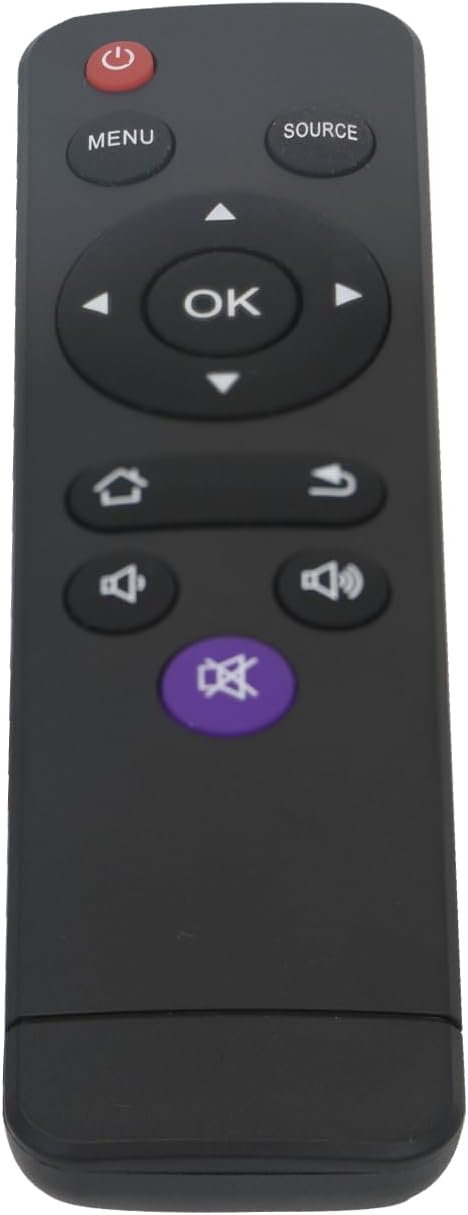
Imatge: Frontal view of the LQWELL HY-300 HY320 remote control, showcasing its ergonomic design and all functional buttons including Power, Menu, Source, Navigation (Up, Down, Left, Right, OK), Home, Return, Volume Up, Volume Down, and Mute.
Funcions del botó
| Botó | Funció |
|---|---|
| Poder | Encén o apaga el projector. |
| Menú | Accesses the projector's main menu for settings and adjustments. |
| Font | Selects the input source (e.g., HDMI, USB, AV). |
| Navegació (amunt/avall/esquerra/dreta) | Navigates through menu options and content. |
| OK | Confirms selection or enters a sub-menu. |
| Casa | Returns to the main home screen or dashboard of the projector. |
| Tornar | Goes back to the previous screen or menu level. |
| Puja el volum | Increases the audio volume output from the projector. |
| Baixa el volum | Decreases the audio volume output from the projector. |
| Silenciar | Silencia o activa la sortida d'àudio. |
Configuració
Instal·lació de bateries
- Localitzeu el compartiment de la bateria a la part posterior del comandament a distància.
- Slide open the battery cover in the direction indicated by the arrow.
- Insert two AAA batteries (not included), ensuring correct polarity (+ and -) as marked inside the compartment.
- Tanqueu la tapa de la bateria de manera segura fins que encaixi al seu lloc.
Precaució: Ensure batteries are inserted correctly. Incorrect polarity can damage the remote control or cause battery leakage. Do not mix old and new batteries, or different types of batteries.
Instruccions de funcionament
This remote control is specifically designed and pre-programmed for the LQWELL HY-300 and HY320 Mirror Projectors (Non-Android OS). No additional setup, pairing, or programming is required for its basic functions.
Funcionament bàsic
- Encès/apagat: Premeu el botó Poder button to turn your projector on or off.
- Navegació: Utilitza el Up, Avall, Esquerra, i D'acord arrow buttons to move through menus, options, and content displayed on your projector screen.
- Selecció: Premeu el botó OK button to confirm a selection, open an item, or enter a sub-menu.
- Font d'entrada: Premeu el botó Font button to cycle through available input sources connected to your projector (e.g., HDMI 1, HDMI 2, USB).
- Control de volum: Utilitza el Puja el volum i Baixa el volum buttons to adjust the audio level. Press the Silenciar button to silence the audio temporarily or restore it.
- Accés al menú: Premeu el botó Menú button to open the projector's main settings menu.
- Tornada: Premeu el botó Tornar button to go back to the previous screen or exit a menu without saving changes.
- Inici: Premeu el botó Casa button to return directly to the projector's main interface or home screen.
Manteniment
- Neteja: To clean the remote control, gently wipe it with a soft, dry cloth. Do not use liquid cleaners, aerosols, or abrasive materials, as these can damage the surface or internal components.
- Substitució de la bateria: Replace batteries when the remote's response becomes sluggish, the range decreases, or it stops working entirely. Always replace both batteries at the same time with new ones of the same type.
- Emmagatzematge: If the remote control will not be used for an extended period (e.g., several weeks or months), remove the batteries to prevent potential leakage and corrosion. Store the remote in a cool, dry place away from direct sunlight.
Resolució de problemes
| Problema | Solució |
|---|---|
| El comandament a distància no respon. | Check battery polarity. Replace batteries with new ones. Ensure there are no obstructions between the remote control and the projector's infrared (IR) receiver. Point the remote directly at the projector. |
| Buttons are unresponsive or work incorrectly (e.g., volume up lowers volume). | This remote is specifically for the LQWELL HY-300/HY320 Mirror Projector (Non-Android OS). Verify that your projector model matches this specification. If the issue persists, it may indicate a faulty remote or projector IR receiver. |
| Curt abast operatiu. | Replace batteries with fresh ones. Ensure the remote is pointed directly at the projector's IR receiver and that there are no strong light sources (like direct sunlight) interfering with the signal. |
Especificacions
- Nom del model: HY300 HY320
- Tecnologia de connectivitat: Infrarojos (IR)
- Nombre de botons: 15
- Tipus de controlador: Control de botons
- Interval màxim: Fins a 10 metres (33 peus)
- Dispositius compatibles: LQWELL HY-300 / HY320 Mirror Projector (Non-Android OS)
- Tipus de bateria: 2 x AAA (Alkaline batteries recommended for optimal performance)
- Dimensions (L x A x A): Aproximadament 13.8 x 3.7 x 2.3 cm (5.43 x 1.46 x 0.91 polzades)
- Pes: Approximately 30 Grams (1.06 ounces, without batteries)
Garantia i Suport
For any issues, technical assistance, or support inquiries regarding your LQWELL® remote control, please contact LQWELL customer service. Refer to your product packaging or the official LQWELL website for the most current contact details and warranty information.
This product is manufactured to be identical in function and form to the original remote control provided with your LQWELL HY-300 or HY320 Mirror Projector.


