Introducció
This manual provides detailed instructions for the setup, operation, and maintenance of your TNICER R3 Motorcycle Helmet Camera. The R3 camera is designed to capture high-resolution video during motorcycle rides, cycling, and other outdoor sports. It features 1080P video recording, a 120° wide-angle lens, IP67 waterproofing, and Wi-Fi connectivity for smartphone control. Please read this manual thoroughly before using the device to ensure proper functionality and longevity.
Contingut del paquet
Verifiqueu que tots els elements que s'enumeren a continuació s'inclouen al vostre paquet. Si falta algun element o hi ha algun malmès, poseu-vos en contacte amb l'atenció al client.
- Camera Body (R3)
- 3 Mounting Accessory Kits (Fixed base, Helmet bracket kit, Handlebar mounting bracket)
- Waterproof Charging Cable
- Cable de dades
- Manual d'usuari (Aquest document)
- 32GB TF Card (Micro SD)
- Adhesiu de fixació 3M
- Velcro

Image: The TNICER R3 camera body, various mounting accessories, cables, 32GB TF card, 3M adhesive, and Velcro, illustrating the complete package contents.
Producte acabatview
The TNICER R3 camera is a compact and robust device designed for capturing dynamic footage. Key features include a 1080P lens system, Wi-Fi module, and a durable, waterproof casing.

Image: The TNICER R3 camera, shown with a handlebar mounting bracket and a 32GB Micro SD card, highlighting its compact design.
Sistema d’objectius
The camera features a 6-layer glass lens with an F1.8 caliber and a 120° wide-angle view, ensuring clear 1080P video capture at 30 frames per second. It incorporates a SONY CMOS sensor for enhanced image quality.

Imatge: Una explosió view diagram illustrating the multi-layer lens structure and internal components of the TNICER R3 camera, emphasizing its optical design.
Connectivitat i controls
The R3 camera connects to your smartphone via 2.4GHz Wi-Fi for real-time preview, video playback, and download through a dedicated application. It does not support Bluetooth connectivity.
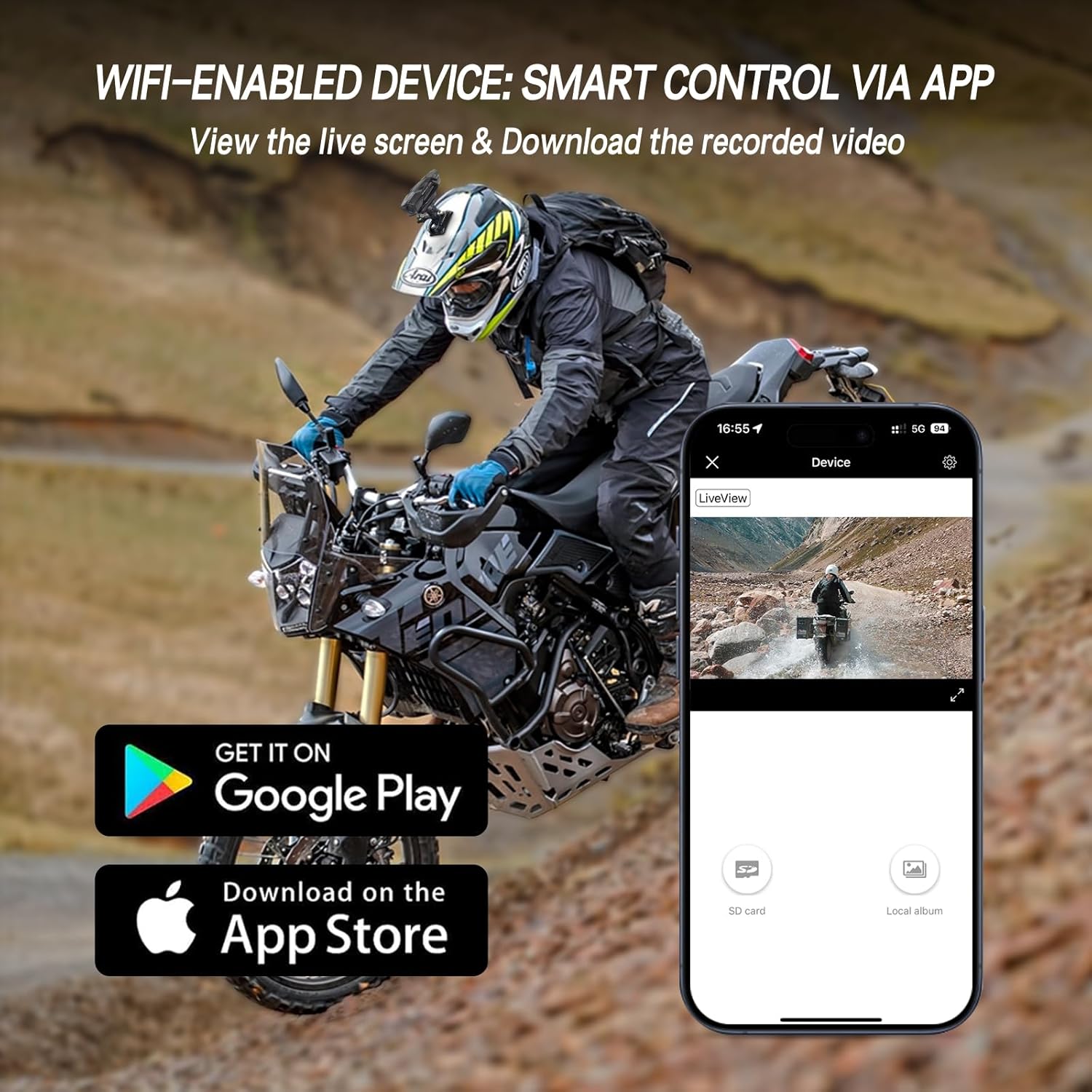
Image: A smartphone displaying the TNICER R3 camera's companion application, showing live view and options for accessing recorded videos, with app store download icons.
Durability and Power
The camera is IP67 rated, making it waterproof and dustproof for reliable performance in various weather conditions. It includes a 720mAh battery, providing over 2 hours of 1080P recording, and supports continuous recording with the waterproof charging cable.

Image: The TNICER R3 camera mounted on a bicycle handlebar, with water droplets visible on its surface, demonstrating its IP67 waterproof rating.

Imatge: Una imatge interna view of the TNICER R3 camera highlighting its 720mAh battery and the connection point for the waterproof charging cable, indicating power capabilities.
Configuració
1. Instal·lació de la targeta de memòria
- Locate the Micro SD card slot on the camera body.
- Insert the included 32GB Micro SD card into the slot until it clicks into place. Ensure the card is inserted correctly to avoid damage.
- The camera supports loop recording, which will automatically overwrite the oldest files quan la targeta està plena.

Imatge: Una imatge detallada view of the TNICER R3 camera's Micro SD card slot, showing a card being inserted, illustrating the memory card installation process.
2. Càrrega de la càmera
- Connect the provided Data Cable or Waterproof Charging Cable to the camera's charging port.
- Connect the other end of the cable to a USB power source (e.g., computer, USB wall adapter).
- The charging indicator light will illuminate. Once fully charged, the light will change or turn off (refer to specific indicator behavior in the operating section).
- For continuous recording during rides, use the Waterproof Charging Cable connected to a suitable power source on your vehicle.
3. Muntatge de la càmera
The R3 camera offers multiple installation options to suit your needs.
- Muntatge del manillar: Use the handlebar mounting bracket to secure the camera to your motorcycle or bicycle handlebars.
- Helmet Mount (Top): Attach the fixed base and helmet bracket kit to the top of your helmet using the 3M fixing adhesive. Ensure the surface is clean and dry before application.
- Helmet Mount (Side): Use the appropriate bracket and adhesive to mount the camera to the side of your helmet.
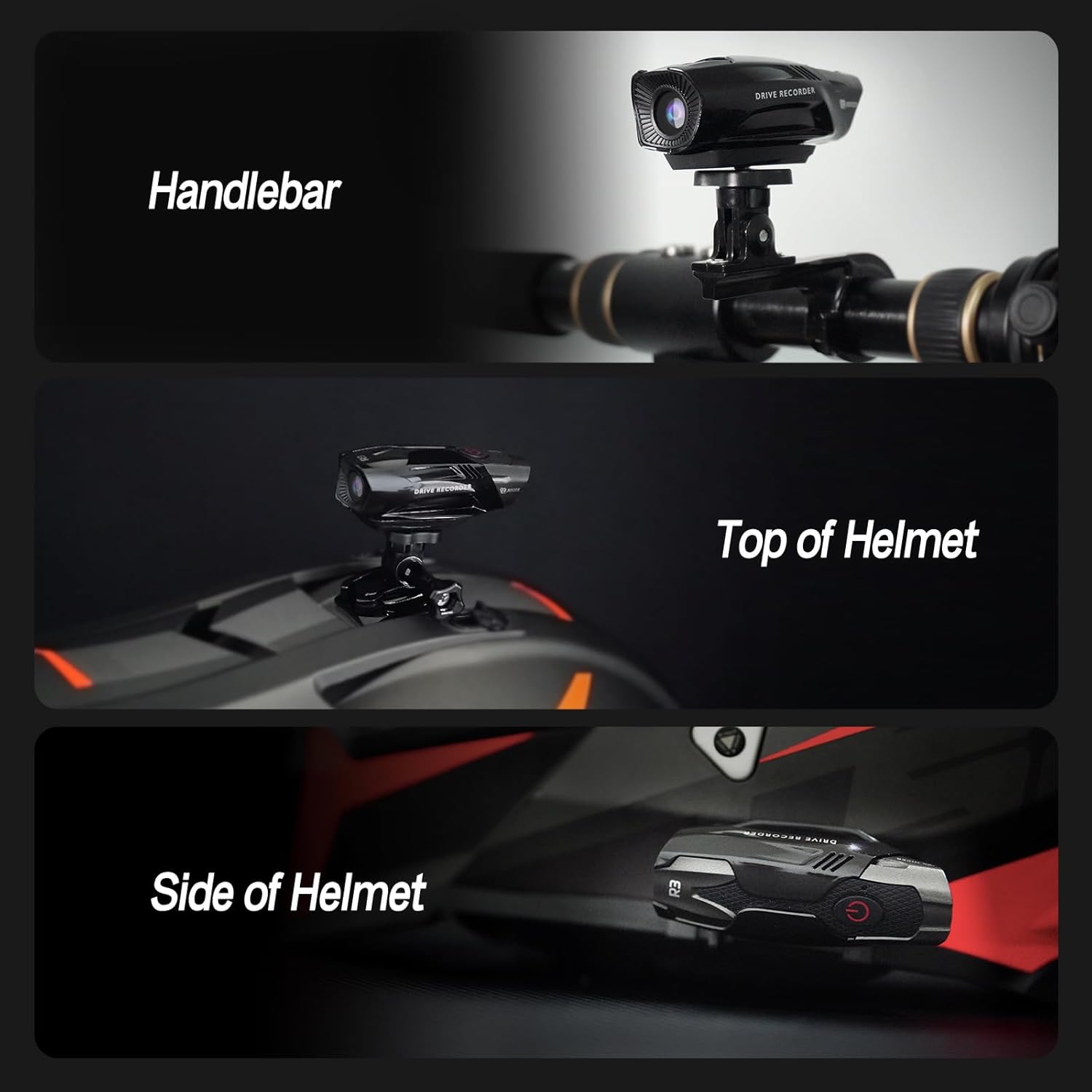
Image: A composite image demonstrating three different mounting positions for the TNICER R3 camera: on a handlebar, on the top of a helmet, and on the side of a helmet.
4. Instal·lació i connexió de l'aplicació
- Download the dedicated TNICER R3 application from the Google Play Store (for Android) or Apple App Store (for iOS).
- Enceneu la càmera.
- On your smartphone, go to Wi-Fi settings and connect to the camera's Wi-Fi network (SSID and password typically found on the camera or in a quick start guide).
- Open the TNICER R3 app. You should now be able to see a live preview and access camera functions.
Instruccions de funcionament
Encès/Apagat
- Per encendre: Press and hold the power button (usually marked with a power symbol) for a few seconds until the indicator light illuminates.
- Per apagar: Premeu i manteniu premut el botó d'engegada de nou fins que l'indicador lluminós s'apagui.
Gravació de vídeo
- Once powered on, the camera typically begins recording automatically. Refer to the indicator light for recording status (e.g., flashing light).
- The camera records in 1080P resolution at 30 frames per second.
- Enregistrament en bucle: La càmera admet l'enregistrament en bucle, és a dir, enregistrarà i sobreescriurà contínuament els elements més antics files when the memory card is full. This ensures uninterrupted recording.
- Sensor G: The integrated G-sensor detects sudden impacts or collisions. In such events, the camera will automatically lock the current video file, evitant que es sobreescrigui amb l'enregistrament en bucle.

Image: The TNICER R3 camera displayed alongside icons representing its ultra-light design, loop recording capability, and G-sensor function, with a motorcycle accident scene in the background to illustrate G-sensor activation.
Ús de l'aplicació per a telèfon intel·ligent
After connecting your smartphone to the camera's Wi-Fi:
- Pre Liveview: View a real-time feed from the camera on your smartphone screen.
- Reproducció de vídeo: Access and play back recorded videos directly from the camera's memory card.
- Download Videos: Transfer recorded video files from the camera to your smartphone for editing or sharing.
- Configuració: Adjust camera settings such as video resolution, loop recording duration, and G-sensor sensitivity (if available in the app).
Manteniment
- Neteja: Wipe the camera body and lens with a soft, damp cloth. Avoid using harsh chemicals or abrasive materials that could scratch the lens or casing.
- Exposició a l'aigua: While the camera is IP67 waterproof, ensure all ports are securely closed before exposing it to water. After exposure to saltwater, rinse with fresh water and dry thoroughly.
- Emmagatzematge: Guardeu la càmera en un lloc fresc i sec, allunyat de la llum solar directa quan no la feu servir.
- Targeta de memòria: Periodically format the Micro SD card using the camera's app or a computer to maintain optimal performance and prevent data corruption. Back up important files abans de formatar.
- Cura de la bateria: Per a l'emmagatzematge a llarg termini, carregueu la bateria aproximadament al 50% per allargar-ne la vida útil. Eviteu descarregar completament la bateria durant períodes prolongats.
Resolució de problemes
| Problema | Causa possible | Solució |
|---|---|---|
| La càmera no s'encén. | Bateria baixa; botó d'engegada defectuós. | Charge the camera for at least 2 hours. If the issue persists, contact support. |
| No es pot connectar a la Wi-Fi. | Incorrect Wi-Fi password; camera Wi-Fi not active; app issue. | Ensure camera Wi-Fi is enabled. Verify password. Restart camera and phone. Reinstall app if necessary. Note: R3 does not have Bluetooth. |
| Vídeo footage is blurry or distorted at high speeds. | Vibrations from motorcycle; unstable mounting. | Ensure the camera is securely mounted and vibrations are minimized. Consider alternative mounting positions. |
| Error de la targeta de memòria. | Card not inserted correctly; card corrupted; incompatible card. | Reinsert the card. Format the card via the app or computer. Try a different compatible Micro SD card. |
| Càmera casing appears fragile or separates easily. | Physical impact; manufacturing defect. | Handle with care. If damage occurs under normal use within warranty, contact customer support. |
Especificacions
| Característica | Detall |
|---|---|
| Marca | TNICER |
| Model | R3 |
| Resolució de captura de vídeo | 1080p at 30FPS |
| Angle de la lent | Gran angular de 120° |
| Tecnologia del sensor fotogràfic | CMOS (SONY CMOS Sensor) |
| Classificació impermeable | IP67 |
| Capacitat de la bateria | Polímer de liti de 720 mAh |
| Temps de gravació | Over 2 hours (1080P video) |
| Connectivitat | Wi-Fi (2.4 GHz) |
| Tipus de targeta de memòria | Micro SD (32GB included) |
| Característiques especials | Loop Recording, G-Sensor, Lightweight |
| Pes de l'article | Aproximadament 13.7 unces |
| Dimensions del paquet | 6.1 x 3.66 x 3.19 polzades |
Garantia i Suport
Informació de la garantia
The TNICER R3 Motorcycle Helmet Camera comes with a one-year warranty from the date of purchase. This warranty covers manufacturing defects and malfunctions under normal use. It does not cover damage caused by misuse, accidents, unauthorized modifications, or natural disasters. Please retain your proof of purchase for warranty claims.
Atenció al client
For technical assistance, warranty claims, or any questions regarding your TNICER R3 camera, please refer to the official TNICER weblloc web o la informació de contacte que s'inclou amb l'embalatge del producte.