1. Introducció
Thank you for choosing the ASD Security Flood Light Camera Outdoor. This smart floodlight camera is designed to provide enhanced security and illumination for your outdoor spaces. Featuring a 180° motion sensor, adjustable light heads, and smart app control, it integrates seamlessly with your smart home ecosystem, including Alexa and Google Assistant. This manual provides essential information for safe installation, operation, and maintenance of your device.
2. Informació important de seguretat
Si us plau, llegiu atentament totes les instruccions abans de la instal·lació i l'ús. Conserveu aquest manual per a futures consultes.
- Seguretat elèctrica: Installation must be performed by a qualified electrician or a person with electrical knowledge. Ensure power is turned off at the circuit breaker before installation or servicing.
- Voltage: This product is designed to operate on 120V circuits.
- Muntatge: Mount the fixture securely to a junction box. Ensure the mounting surface can support the weight of the fixture.
- Ubicacions humides: This product is Wet Locations rated (IP54), suitable for outdoor use. However, avoid submerging the unit in water.
- Calor: Do not operate the fixture near flammable materials. Allow the fixture to cool before handling.
- Lent de la càmera: Avoid touching the camera lens directly to prevent smudges or damage.
3. Contingut del paquet
Verifiqueu que tots els components siguin presents abans de començar la instal·lació:
- ASD Security Flood Light Camera Outdoor (1 unit)
- Mounting Crossbar
- Cargols de muntatge
- Filferro
- Coixinet EVA
- Manual d'usuari (aquest document)
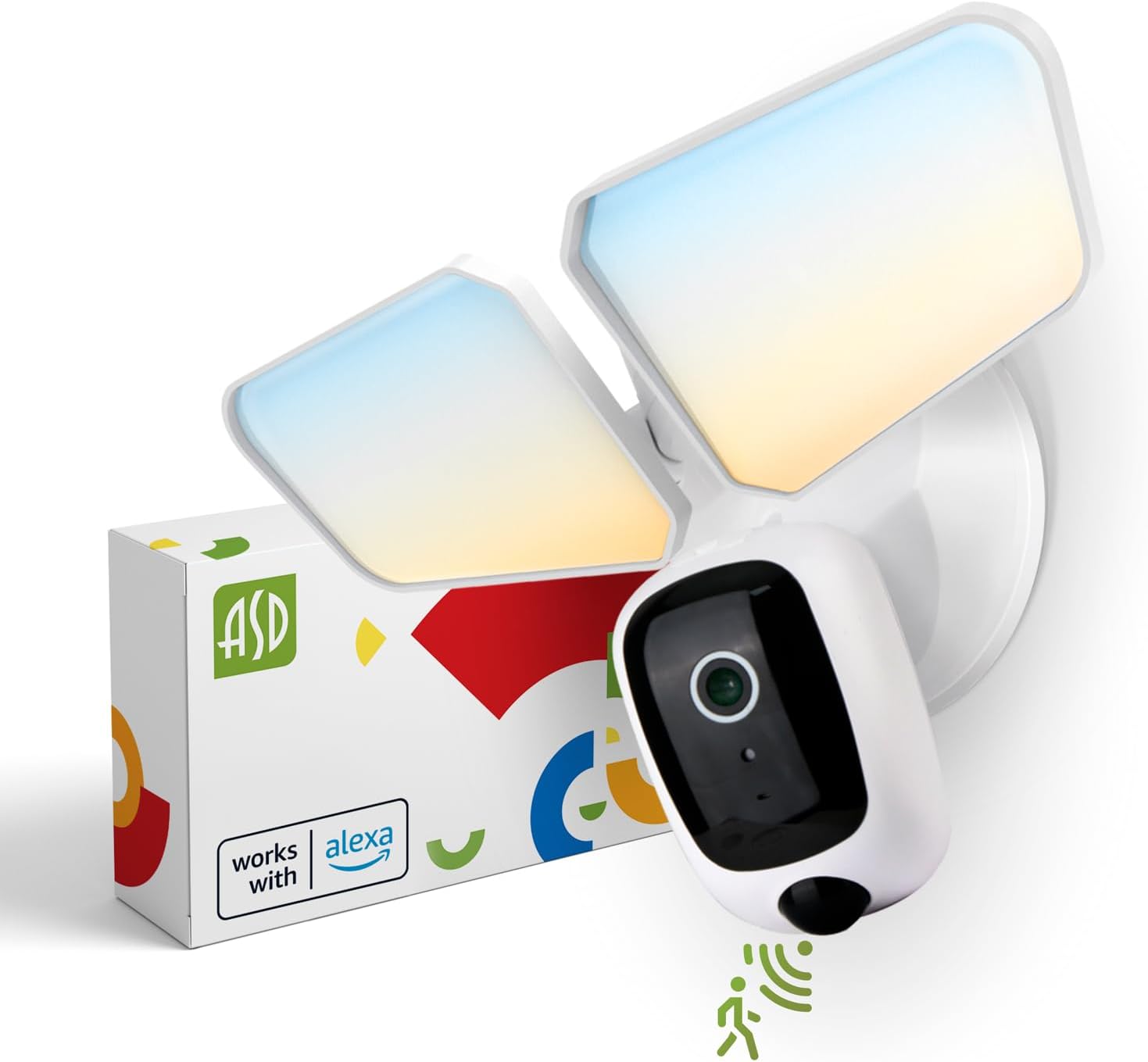
Image 1: ASD Security Flood Light Camera Outdoor and its packaging.
4. Característiques del producte
- Capçals de llum ajustables: Side-to-side (150°) and up-and-down (180°) rotatable light heads for directional illumination.
- Integrated Smart Camera: Monitor, record, and engage in two-way audio communication.
- 180° Motion Sensor: Automatically activates light and camera recording upon motion detection.
- Fotocèl·lula del capvespre a l'alba: Automatically turns the light on at dusk and off at dawn.
- Color seleccionable: Choose from 5 color temperatures: 2700K (Soft White), 3000K (Warm White), 3500K (Neutral White), 4000K (Cool White), or 5000K (Daylight).
- Integració de la llar intel·ligent: Compatible with Amazon Alexa and Google Assistant for voice control.
- Control de l'aplicació: Gestiona la configuració, view live feed, and receive motion-activated push notifications via the dedicated app.
- Opcions d'emmagatzematge: Records can be stored on a Micro SD card (not included) or in a Cloud service (subscription may be required).
- Construcció duradora: Made from Aluminum and Polycarbonate.
- Certificacions: UL and DLC Premium certified, ensuring quality and safety.

Image 2: Key features of the ASD Security Flood Light Camera.
5. Especificacions tècniques
| Especificació | Detall |
|---|---|
| Número de model | A-SFL-20WH-SC |
| Font d'alimentació | Cablejat |
| Voltage | 120 Volts |
| Wattage | 20 watts |
| Tipus de font de llum | LED |
| Temperatura de color (CCT) | 2700K, 3000K, 3500K, 4000K, 5000K (seleccionable) |
| Angle de detecció del sensor de moviment | 180° |
| Distància de detecció del sensor de moviment | 16.4-32.9 m (5-10 peus) |
| Angle del feix | 100° |
| Material | Alumini, Policarbonat |
| Dimensions del producte | 10.24 cm de llargada x 4.45 cm d'amplada x 7.68 cm d'alçada |
| Pes de l'article | 1.2 lliures |
| Ús interior/exterior | A l'aire lliure |
| Classificació de la il·luminació de la zona | IP54 (Wet Locations Rated) |
| Protocol de connectivitat | Wi-Fi |
| Tipus de controlador | Amazon Alexa, Google Assistant, aplicació |
| Vida útil | 145,000 hores |

Imatge 3: Especificacions i dimensions detallades del producte.
6. Passos d'instal·lació
Abans de començar: Turn off power at the circuit breaker. Ensure you have the necessary tools (screwdriver, wire strippers, etc.).
- Prepareu el dispositiu:
Attach the crossbar to the outlet box using two mounting screws. Remove the cover on the top of the camera. Insert a Micro SD card (sold separately) into the slot until it clicks. Place the cover back on. Change the position of the CCT switch on the housing to the desired color temperature (2700K, 3000K, 3500K, 4000K, or 5000K). - Mount and Wire:
Tear off the EVA pad adhesive and stick it on the rear cover (pay attention to the direction of the gap). Thread the fixture wire through the gasket. Connect the wires: Black to Black, White to White, and Green to Green (ground). Secure the connection with wire nuts. - Assegureu el dispositiu:
Drive the bracket screw through the center hole of the fixture base to the crossbar and secure it by tightening.

Image 4: Visual guide for the installation process.
7. Instruccions de funcionament
7.1 Funcionament del sensor de moviment
The built-in 180° motion sensor detects movement within its range (16.4-32.9 ft or 5-10 m). When motion is detected, the floodlight will illuminate, and the camera will begin recording. You can adjust the sensitivity and duration settings via the ASD SMART app.

Image 5: The built-in motion sensor detects movement.
7.2 Dusk-to-Dawn Photocell
The integrated photocell automatically senses ambient light levels. It will turn the floodlight on when it gets dark and turn it off when daylight returns, ensuring efficient operation without manual intervention.

Image 6: Built-in dusk-to-dawn photocell for automatic operation.
7.3 Color Temperature Selection (CCT)
Before final installation, you can select your preferred color temperature using the switch located on the fixture's housing. Choose from 2700K (Soft White), 3000K (Warm White), 3500K (Neutral White), 4000K (Cool White), or 5000K (Daylight) to match your aesthetic and lighting needs.

Image 7: Selectable color temperature options.
8. App Control and Smart Integration
8.1 ASD SMART App Setup
To unlock the full potential of your floodlight camera, download and set up the ASD SMART app:
- Descarrega't el ASD SMART app des de l'App Store (iOS) o Google Play Store (Android).
- Registreu-vos o inicieu sessió al vostre compte.
- Select "Add a device" and choose "Camera and lock".
- Follow the on-screen instructions to connect your device to your Wi-Fi network.
- Scan the QR code on your camera when prompted.
For a detailed guide, please refer to the full manual PDF: ASD Security Flood Light Camera Manual PDF
Descarrega l'aplicació:
- iOS App Store: ASD SMART on App Store
- Android Google Play: ASD SMART on Google Play

Image 8: App control interface and smart assistant compatibility.
8.2 Remote Monitoring and Two-Way Audio
Through the ASD SMART app, you can:
- View live video feed from your camera anytime, anywhere.
- Engage in two-way audio communication with visitors or deter intruders.
- Receive instant motion-activated push notifications on your smartphone.
8.3 Recording Storage
Els enregistraments de vídeo es poden emmagatzemar de dues maneres:
- Targeta micro SD: Insert a Micro SD card (up to 128GB, not included) into the designated slot on the camera for local storage.
- Servei al núvol: Opt for a cloud storage subscription (available through the app) for secure, remote access to your recordings.

Image 9: Remote monitoring and recording storage options.
8.4 Integració de l'assistent intel·ligent
Connect your ASD Security Flood Light Camera to Amazon Alexa or Google Assistant for convenient voice control. Follow the instructions within the ASD SMART app to link your accounts and enable features like turning the light on/off or viewing the camera feed on compatible smart displays.
9. Manteniment
- Neteja: Assegureu-vos que l'alimentació estigui apagada abans de netejar-la. Netegeu l'aparell amb un drap suau i sec.amp tela. No utilitzeu netejadors abrasius ni dissolvents.
- Cura de les lents: Gently clean the camera lens with a microfiber cloth to maintain clear image quality.
- Comprovacions periòdiques: Periodically check for any loose connections or damage to the wiring and housing.
10. Solució De Problemes
| Problema | Causa possible | Solució |
|---|---|---|
| La llum no s’encén. | No power, faulty wiring, photocell issue, CCT switch not set. | Check circuit breaker. Verify wiring connections. Ensure photocell is not obstructed. Confirm CCT switch is set. |
| El sensor de moviment no detecta. | Incorrect sensitivity settings, obstruction, improper installation height. | Adjust motion sensor sensitivity in the app. Clear any obstructions. Ensure installation height is appropriate (approx. 9.8 ft / 3 m). |
| La càmera no es connecta a la Wi-Fi. | Incorrect Wi-Fi password, weak signal, router issues. | Double-check Wi-Fi password. Move router closer or use a Wi-Fi extender. Restart router. Ensure 2.4GHz Wi-Fi network is used. |
| Poca qualitat de vídeo. | Dirty lens, poor Wi-Fi signal, low light conditions. | Clean camera lens. Improve Wi-Fi signal strength. Ensure adequate lighting. |
| L'àudio bidireccional no funciona. | Microphone/speaker issues, app permissions. | Check app permissions for microphone. Ensure volume is up on your device. |
11. Informació de la garantia
ASD provides a Garantia limitada d'5 any for this Security Flood Light Camera. This warranty covers defects in materials and workmanship under normal use. Please retain your proof of purchase for warranty claims. For full warranty terms and conditions, please refer to the official ASD weblloc o contacteu amb el servei d'atenció al client.
12. Atenció al client
For additional assistance, technical support, or warranty inquiries, please visit the ASD Lighting Corporation website or refer to the comprehensive manual available online.
- ASD Lighting Corporation Store: Visit ASD Store on Amazon
- Full Product Manual (PDF): Descarrega el manual en PDF


