Introducció
Welcome to the user manual for your Tibuta Smartpad A40 tablet. This guide provides essential information on setting up, operating, maintaining, and troubleshooting your device. The Smartpad A40 is designed for versatile use, featuring a large 10.1-inch display, a powerful quad-core processor, and the Android 14 operating system.

Image: The Tibuta Smartpad A40 tablet, shown with its protective case, highlighting its Android 14 operating system and 6GB RAM + 64GB ROM configuration.
Guia de configuració
1. Unboxing i Inspecció Inicial
Carefully remove all components from the packaging. Ensure the tablet, protective case, charging cable, and power adapter are present. Inspect the tablet for any physical damage.

Image: The Tibuta Smartpad A40 tablet with its included case and headphones, illustrating its core features such as Android 14, IPS display, memory, battery capacity, and camera specifications.
2. Càrrega de la tauleta
Before first use, fully charge the tablet. Connect the Type-C charging cable to the tablet's charging port and the other end to the power adapter. Plug the adapter into a wall outlet. The charging indicator will show the charging status.

Image: The Tibuta Smartpad A40 tablet connected to a Type-C charger, emphasizing its 5000mAh battery capacity and estimated usage times for video playback and overall endurance.
3. Encès / apagat
- Per encendre: Press and hold the Power button located on the side of the tablet until the Tibuta logo appears.
- Per apagar: Premeu i manteniu premut el botó d'engegada fins que aparegui el menú d'opcions d'engegada. Seleccioneu "Apagar" i confirmeu.
- Per reiniciar: From the power options menu, select "Restart" and confirm.
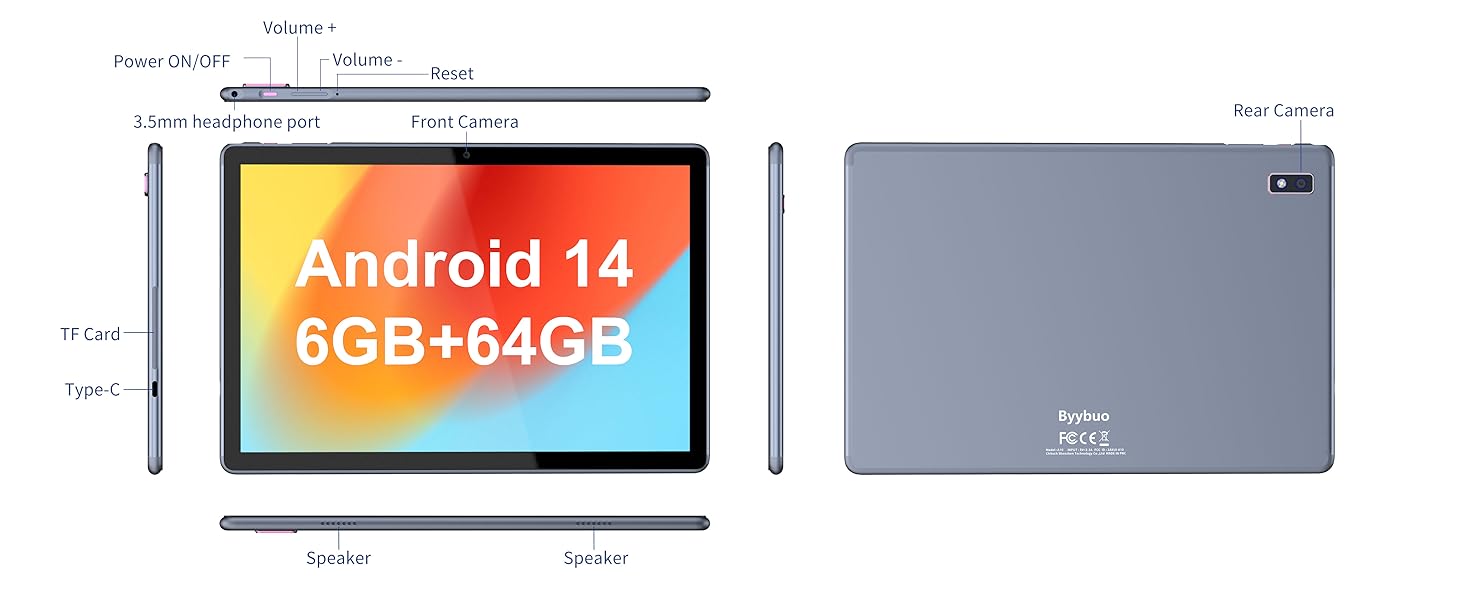
Image: A detailed diagram illustrating the physical layout of the Tibuta Smartpad A40, including the positions of its buttons, ports, and cameras for easy identification.
4. Assistent de configuració inicial
Upon first power-on, the tablet will guide you through the initial setup process. Follow the on-screen prompts to:
- Seleccioneu el vostre idioma.
- Connecteu-vos a una xarxa Wi-Fi.
- Inicia la sessió amb el teu compte de Google o crea'n un de nou.
- Configura el bloqueig de pantalla (PIN, patró, contrasenya).
- Review i acceptar els termes i condicions.
Operating Your Tibuta Smartpad A40
1. Navigation and Touchscreen Gestures
The Smartpad A40 features a responsive multi-touch display. Common gestures include:
- Toca: Per seleccionar un element o obrir una aplicació.
- Toca i mantén premut: Per accedir a menús contextuals o moure icones.
- Llisca: To scroll through pages or navigate between screens.
- Pessiga per fer zoom: Per ampliar o reduir les imatges i web pàgines.
2. Pantalla i àudio
Experience vibrant visuals on the 10.1-inch IPS HD display with a resolution of 1280 x 800 pixels. The tablet also features an eye protection mode to reduce strain during prolonged use. Enjoy clear audio through the integrated dual high-fidelity speakers.

Image: The Tibuta Smartpad A40 tablet showcasing its IPS Full HD display and dual speakers, emphasizing its 10.1-inch screen size, 1280x800 IPS resolution, eye protection mode, and high-fidelity audio output.
3. Performance and Operating System
Powered by a robust Quad-Core processor and running on Android 14, the Smartpad A40 delivers smooth performance for multitasking, gaming, and streaming. The Android 14 system ensures access to the latest features and security updates.

Image: The Tibuta Smartpad A40 tablet showcasing its Android 14 operating system and GMS certification, with various application icons visible on the screen.
4. Emmagatzematge i memòria
The tablet comes with 6GB of RAM (2GB + 4GB virtual) and 64GB of internal storage, providing ample space for your applications, photos, videos, and documents. Storage can be expanded up to 128GB using a microSD card (not included).

Image: The Tibuta Smartpad A40 tablet highlighting its 6GB RAM and 64GB internal storage, along with the option to expand storage up to 128GB via a microSD card.
5. Càmeres
Capture moments with the tablet's dual cameras: a 5 MP front camera for video calls and selfies, and an 8 MP rear camera for photos and videos.

Image: Demonstrates the Tibuta Smartpad A40's camera capabilities, featuring a 5.0 MP front camera for HD video and an 8.0 MP rear camera with autofocus for capturing photos.
6. Connectivitat
The Smartpad A40 supports Wi-Fi (802.11ac) for fast internet access and Bluetooth for connecting to wireless peripherals like headphones and speakers.
7. Versatile Use Cases
The Tibuta Smartpad A40 is designed for a wide range of activities, from entertainment to productivity. Its portability makes it ideal for on-the-go use, while its features support various daily needs.

Image: Illustrates the diverse applications of the Tibuta Smartpad A40, including watching videos, assisting with daily tasks, and serving as a tablet for both children and seniors.
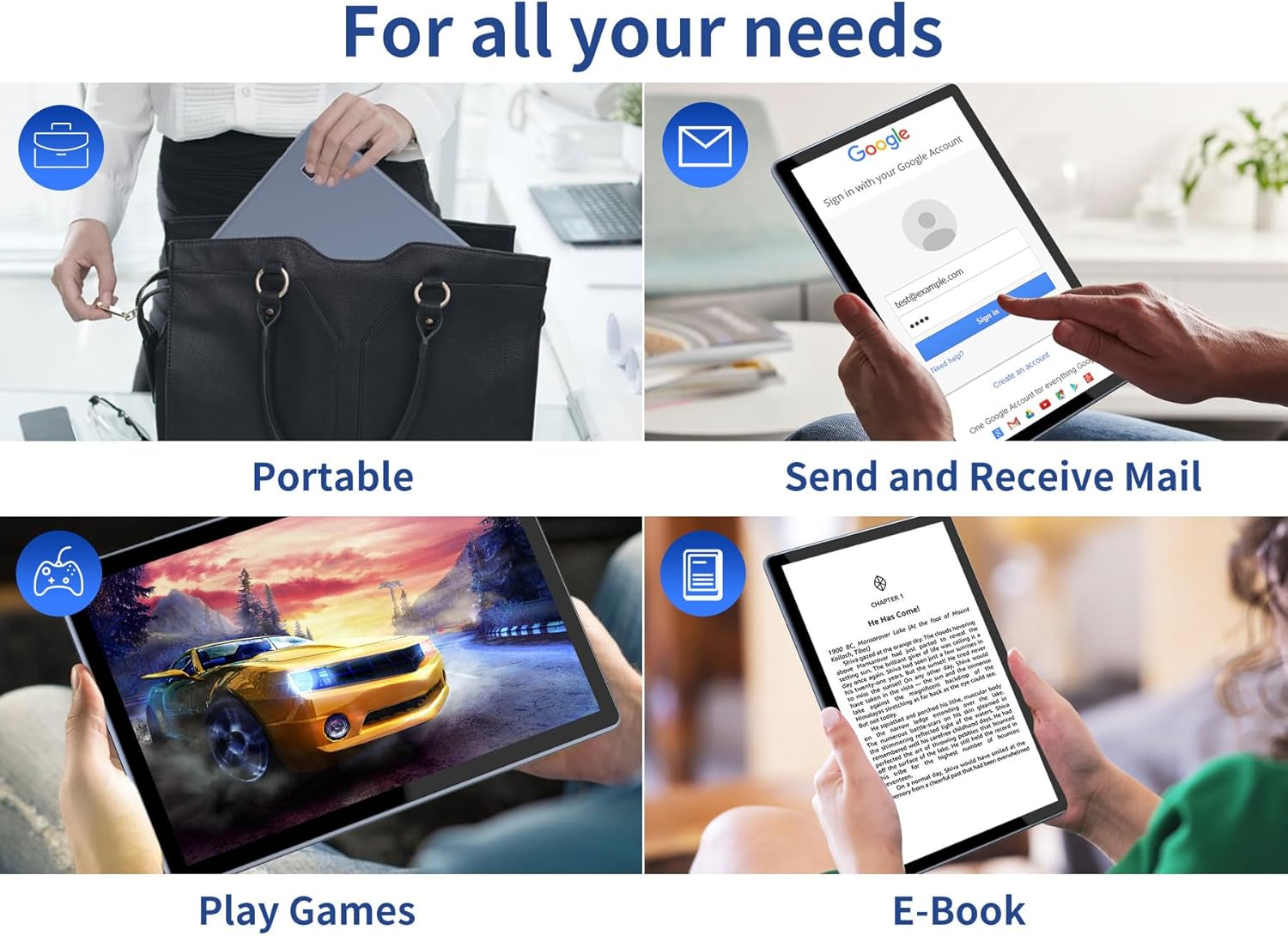
Image: Depicts the versatility of the Tibuta Smartpad A40 for various user needs, including portability, email communication, gaming, and e-book reading.
Manteniment
1. Neteja de la tauleta
Feu servir un drap suau i sense borrissol per netejar la pantalla i el cos de la tauleta. Per a taques difícils, fregueu lleugerament.ampNetegeu el drap amb aigua o un netejador de pantalles. Eviteu utilitzar productes químics agressius o materials abrasius.
2. Actualitzacions de programari
Regularly check for and install system updates to ensure your tablet has the latest features, security patches, and performance improvements. Go to Configuració > Sistema > Actualització del sistema per comprovar si hi ha actualitzacions.
3. Cura de la bateria
Per allargar la durada de la bateria:
- Eviteu temperatures extremes.
- No deixeu que la bateria s'esgoti completament abans de tornar-la a carregar sovint.
- Desendolleu el carregador un cop la bateria estigui plena.
4. Gestió de l'emmagatzematge
Periòdicament review your installed applications and files. Desinstal·leu les aplicacions que no feu servir i suprimiu les innecessàries files to free up storage space and maintain optimal performance. Utilize the microSD card slot for additional storage if needed.
Resolució de problemes
| Problema | Causa possible | Solució |
|---|---|---|
| La tauleta no s'encén. | Bateria baixa; bloqueig del sistema. | Charge the tablet for at least 30 minutes. Press and hold the Power button for 10-15 seconds to force restart. If unresponsive, locate the small reset pinhole (refer to diagram in Setup Guide) and gently press it with a paperclip. |
| Problemes de connexió Wi-Fi. | Contrasenya incorrecta; problema amb el router; Wi-Fi de la tauleta desactivat. | Ensure Wi-Fi is enabled in Settings. Re-enter Wi-Fi password. Restart your Wi-Fi router. Forget the network and reconnect. |
| Rendiment lent. | Massa aplicacions en execució; poc espai d'emmagatzematge; programari obsolet. | Close background apps. Clear cache. Uninstall unused apps. Check for system updates. Restart the tablet. |
| Les aplicacions es bloquegen o es bloquegen. | App bug; insufficient resources. | Force close the app (Settings > Apps > [App Name] > Force Stop). Clear app cache/data. Reinstall the app. Ensure system is updated. |
Especificacions
| Característica | Detall |
|---|---|
| Marca | Tibuta |
| Número de model | A40 |
| Sistema operatiu | Android 14 (Android 13 listed in some specs, but product title indicates 14) |
| Mida de la pantalla | 10.1 polzades |
| Resolució de pantalla | 1280 x 800 píxels (IPS HD) |
| Marca del processador | Allwinner (Quad-Core) |
| Mida de la RAM instal·lada | 6 GB (2+4GB) |
| Capacitat d'emmagatzematge de memòria | 64 GB |
| Emmagatzematge ampliable | Micro SD (fins a 128 GB) |
| Càmera frontal | 5 MP |
| Càmera posterior | 8 MP |
| Capacitat de la bateria | 5000 mAh |
| Connectivitat | Wi-Fi (802.11ac), Bluetooth |
| Port de càrrega | Tipus-C |
| Dimensions de l'article (L x A x A) | 25.8 x 15.8 x 2 cm |
| Pes de l'article | 1.16 quilograms |
Garantia i suport
Informació de la garantia
Specific warranty details for the Tibuta Smartpad A40 are typically provided with your purchase documentation or on the product packaging. Please refer to these resources for information regarding warranty period, coverage, and terms. In general, manufacturer warranties cover defects in materials and workmanship under normal use.
Atenció al client
For technical assistance, troubleshooting beyond this manual, or warranty claims, please contact Tibuta customer support through the following channels:
- Consulteu la informació de contacte que trobareu a l'embalatge del producte.
- Visit the official Tibuta weblloc web amb recursos de suport, preguntes freqüents i formularis de contacte.
- If purchased through an online retailer, their customer service portal may also offer support or direct you to the manufacturer.


