1. Introducció
The ARCTIC M2 Pro is a passive heatsink cooler designed for M.2 2280 SSDs. It enhances SSD performance and longevity by efficiently dissipating heat, preventing thermal throttling during intensive operations. This manual provides instructions for installation, operation, and maintenance of your ARCTIC M2 Pro.

Image 1.1: The ARCTIC M2 Pro heatsink cooler, black variant, shown with a blue thermal pad visible on one end.
2. Què hi ha a la caixa
Verifiqueu que tots els components siguin presents abans de continuar amb la instal·lació.
- ARCTIC M2 Pro Heatsink (Black)
- ARCTIC TP-3 Thermal Pads (pre-applied or included separately)
3. Configuració i instal·lació
The ARCTIC M2 Pro is designed for easy installation on M.2 2280 SSDs, compatible with both single-sided and double-sided SSDs, as well as gaming consoles like the PlayStation 5.
3.1 Components anteriorsview

Imatge 3.1: Desplegada view showing the ARCTIC M2 Pro heatsink, an M.2 SSD, and two thermal pads, illustrating the assembly order.
The heatsink consists of two main parts that sandwich the M.2 SSD. Two precisely cut ARCTIC TP-3 thermal pads are included to ensure optimal contact and heat transfer from the SSD components (controller, RAM, NAND) to the heatsink.
3.2 Passos d'instal·lació
- Prepare your M.2 SSD: Ensure your M.2 2280 SSD is clean and free of any dust or debris. If your SSD has a pre-installed label or thin sticker, it is generally recommended to remove it for better thermal contact, though some thin labels may be left if they do not interfere with thermal pad contact.
- Aplicar coixinets tèrmics: Carefully peel off the protective films from both sides of the ARCTIC TP-3 thermal pads. Place one thermal pad onto the bottom heatsink piece. Place the M.2 SSD onto this thermal pad. Place the second thermal pad on top of the M.2 SSD, ensuring it covers the main components.
- Assemble the Heatsink: Align the top heatsink piece over the M.2 SSD and the thermal pads. Gently press the top and bottom pieces together until they click into place. The design utilizes a click mechanism, eliminating the need for screws or rubber bands for assembly.
- Install into System: Insert the assembled M.2 SSD with the ARCTIC M2 Pro heatsink into the M.2 slot on your motherboard or gaming console (e.g., PlayStation 5). Secure it with the standard M.2 screw provided by your system.

Image 3.2: Cross-section diagram illustrating the precise fit of ARCTIC TP-3 thermal pads between the heatsink and the M.2 SSD components.
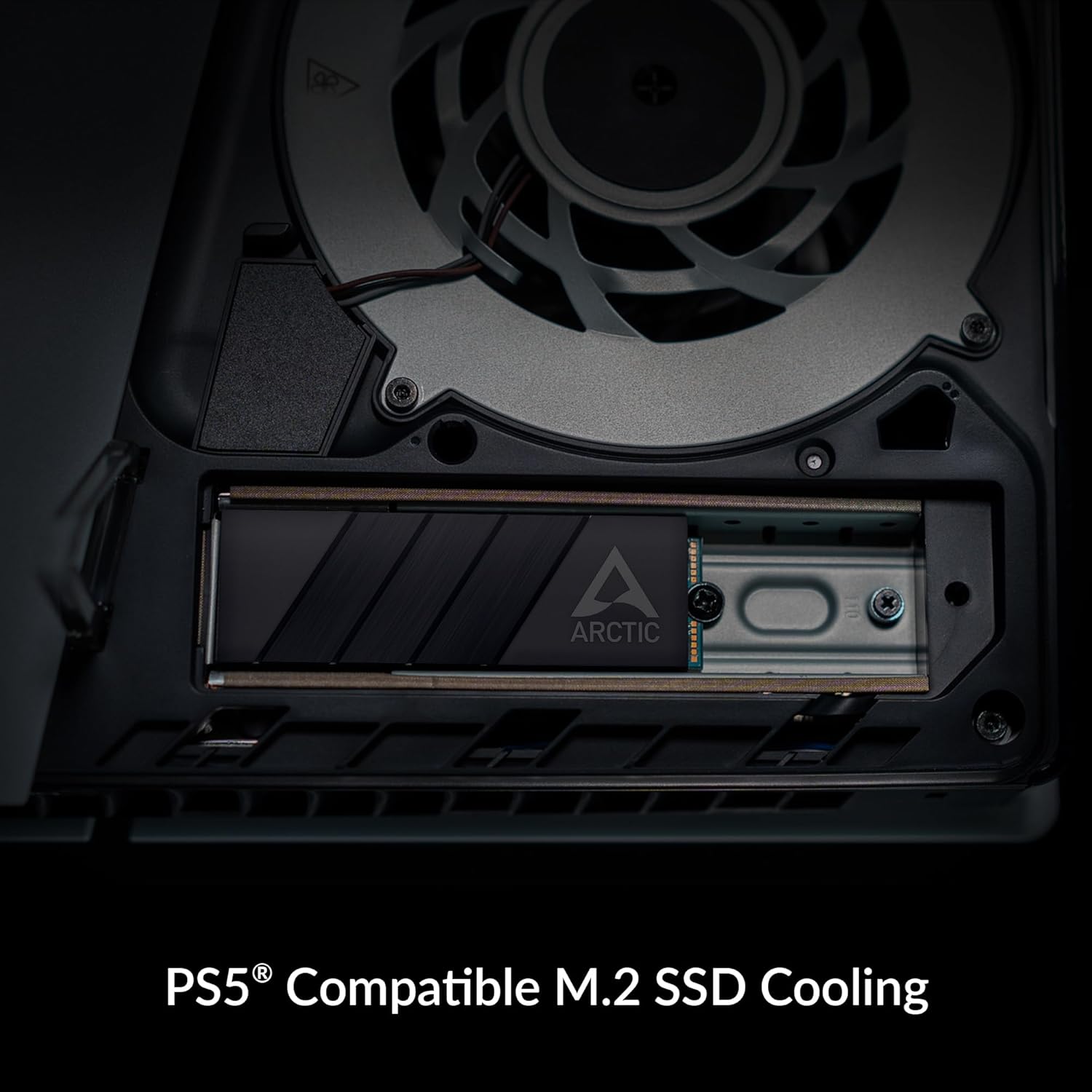
Image 3.3: The ARCTIC M2 Pro heatsink cooler installed on an M.2 SSD within a PlayStation 5 console's expansion slot.
Nota: Ensure proper alignment during the click-on installation to avoid damaging the SSD or heatsink. The thermal pads are designed to conform to component height differences, providing optimal contact.
4. Funcionament
The ARCTIC M2 Pro operates as a passive cooling solution. Once installed, it continuously dissipates heat generated by your M.2 SSD to the surrounding environment. This process helps maintain lower operating temperatures, which is crucial for sustained performance and the longevity of your SSD.
4.1 Performance Benefits
- Reduced Thermal Throttling: High temperatures can cause SSDs to reduce their performance (thermal throttling) to prevent damage. The M2 Pro helps mitigate this, allowing your SSD to operate at its peak performance for longer durations.
- Improved Data Transfer Speeds: By keeping the SSD cooler, the M2 Pro ensures consistent high-speed data read and write operations, especially during demanding tasks like large file transfers or gaming.
- Extended SSD Lifespan: Operating at lower temperatures can contribute to a longer overall lifespan for your M.2 SSD.

Image 4.1: A line graph comparing SSD controller temperature over time during sequential write operations, showing significantly lower temperatures with the ARCTIC M2 Pro heatsink compared to without a heatsink.

Image 4.2: A bar chart illustrating the reduced write duration for a 200 GB file when using an SSD with the ARCTIC M2 Pro heatsink, indicating improved performance.
5. Manteniment
The ARCTIC M2 Pro heatsink requires minimal maintenance due to its passive design.
- Eliminació de pols: Periodically inspect the heatsink for dust accumulation. Use compressed air or a soft brush to gently remove any dust from the fins to ensure optimal airflow and heat dissipation.
- Thermal Pad Integrity: The included ARCTIC TP-3 thermal pads are designed for long-term use. If the heatsink is removed and reinstalled, inspect the thermal pads for any damage or degradation. If necessary, replace them with new ARCTIC TP-3 thermal pads to maintain effective heat transfer.
6. Solució De Problemes
This section addresses common issues you might encounter with the ARCTIC M2 Pro heatsink.
- Heatsink does not close properly:
- Ensure the M.2 SSD is correctly seated between the thermal pads and within the bottom heatsink piece.
- Verify that the thermal pads are correctly positioned and not overlapping.
- For double-sided SSDs, ensure the thermal pads are thin enough to allow the heatsink to close without excessive force. The ARCTIC TP-3 pads are designed for this purpose. If using third-party pads, ensure their thickness is appropriate.
- Check for any obstructions in the M.2 slot or around the SSD.
- SSD temperatures are not improving significantly:
- Confirm that the thermal pads are making full and even contact with both the SSD components and the heatsink. Re-open and re-seat if necessary.
- Ensure the protective films were removed from both sides of the thermal pads.
- Check the overall airflow within your PC case or console. Poor case airflow can limit the effectiveness of any passive heatsink.
- Verify that the M.2 SSD is properly installed and recognized by your system.
- Heatsink interferes with other components:
- The ARCTIC M2 Pro has a low-profile design. However, in some compact systems or motherboards with crowded M.2 slots, minor clearance issues might occur. Check your motherboard or console's manual for M.2 slot clearance specifications.
7. Especificacions
| Característica | Detall |
|---|---|
| Número de model | ACOTH00001A |
| Marca | ÀRTIC |
| Compatibilitat | M.2 2280 SSDs (Single- and Double-Sided), PlayStation 5 |
| Material del dissipador de calor | Alumini |
| Material d'interfície tèrmica | ARCTIC TP-3 Thermal Pads |
| Dimensions del producte (L x A x A) | 2.9" x 0.9" x 0.4" (73.66 mm x 22.86 mm x 10.41 mm) |
| Pes de l'article | 40.5 grams (1.43 unces) |
8. Garantia i assistència
For warranty information and technical support, please refer to the official ARCTIC website or contact ARCTIC customer service directly. Details regarding warranty periods and support procedures can typically be found on the product support page for the ARCTIC M2 Pro.
ARCTIC Official Weblloc: www.arctic.ac


