1. Introducció
Thank you for choosing the i-aplus LED Nightstand. This nightstand is designed to provide functional storage and ambient lighting for your bedroom or living space. Featuring two spacious drawers, a convenient charging station, and customizable LED lighting, this unit combines modern design with practical utility. Please read this manual thoroughly before assembly and use to ensure proper installation and safe operation.
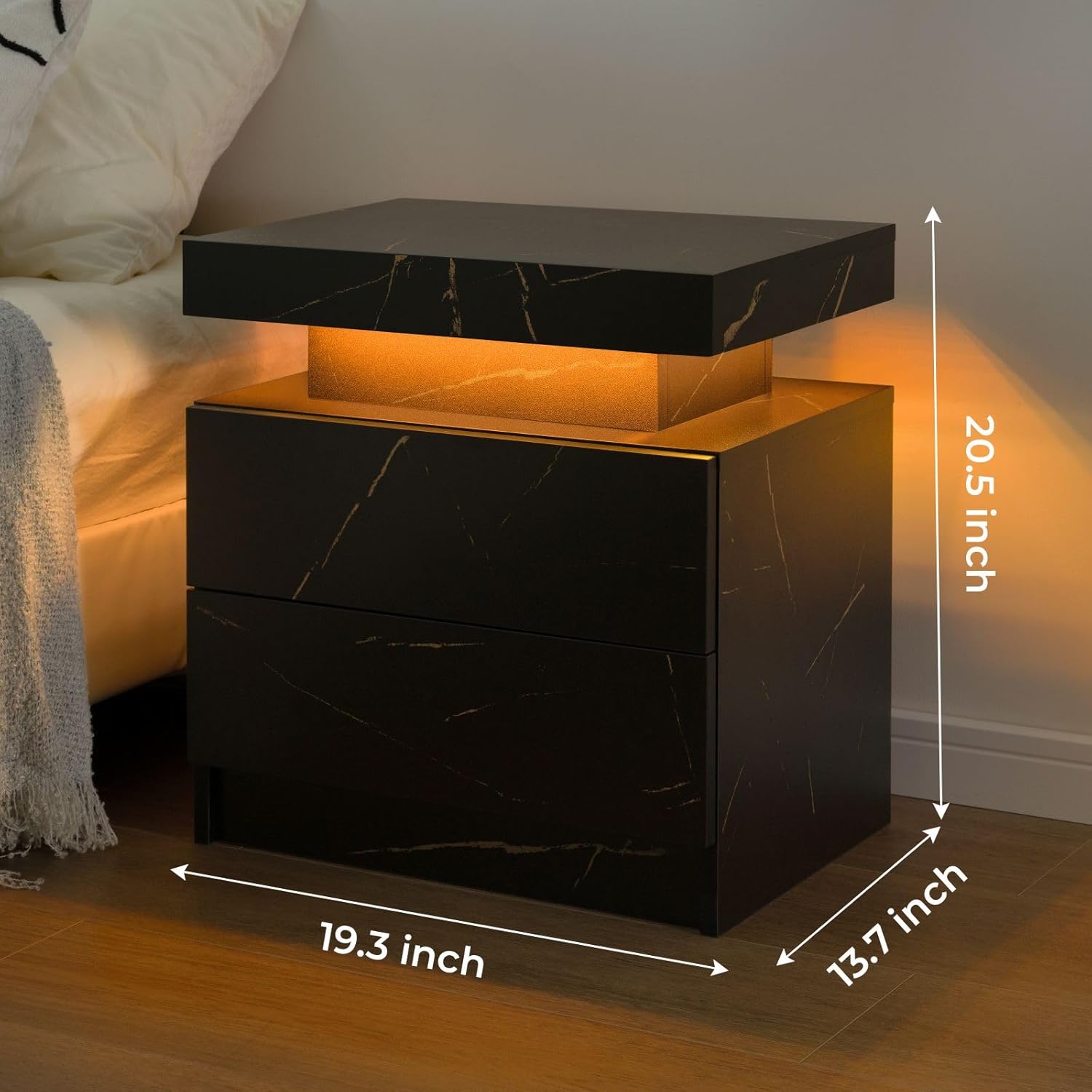
The i-aplus LED Nightstand provides both functional storage and ambient lighting.
2. Informació de seguretat
- Capacitat de pes: Do not exceed the maximum weight recommendation of 50 pounds on the top surface.
- Estabilitat: Ensure all fasteners are securely tightened during assembly to prevent wobbling or instability.
- Ancoratge: For added safety, especially in homes with children or pets, consider anchoring the nightstand to the wall using appropriate hardware (not included).
- Seguretat elèctrica: Only use the integrated charging station with compatible devices. Do not overload the power sockets. Keep liquids away from electrical components.
- Muntatge: Follow all assembly instructions carefully. It is recommended that two people assemble this unit.
3. Contingut del paquet
Before beginning assembly, verify that all parts and hardware listed below are present and undamaged. If any parts are missing or damaged, please contact customer support.
Panells de fusta
- A (Top Panel)
- A2 (Bottom Panel)
- B (Side Panel)
- C (Side Panel)
- D (Back Panel)
- E (Drawer Side)
- F (Drawer Side)
- G (Drawer Front)
- H (Drawer Back)
- I (Drawer Bottom)
- J (Drawer Front)
- K (Drawer Back)
- L (Drawer Bottom)
- L2 (Drawer Side)
- M (Drawer Side)
- N (Drawer Bottom)
Maquinari i accessoris
- Guide Rails (x4)
- Cam Bolts (x64)
- Cam Locks (x64)
- Tacs de fusta (x18)
- Cargols (x20)
- Nanses (x2)
- Plastic Caps (x4)
- Guia de muntatge
- Installation Tool (Screwdriver)
4. Muntatge i muntatge
Follow these step-by-step instructions for assembling your i-aplus LED Nightstand. It is recommended to have a second person assist with assembly.
Guia de vídeo de muntatge
Official HNEBC Nightstand Installation Video (Duration: 10:13)
Instruccions pas a pas
- Preparació dels panells: Carefully remove the protective film from all panels before installation to avoid difficult removal later.
- Fixeu els cargols de lleva: Screw cam bolts (1) into panels A and A2 as indicated in the diagram.
- Instal·leu els rails de guia: Pull out the guide rail sections and screw them onto panels A and A2 using screws (4).
- Muntar panells laterals: Attach side panels B and C to panel A using cam locks (2) and wooden dowels (3).
- Fixeu els panells posteriors: Secure back panels D to the assembled structure using cam locks (2).
- Complete Main Frame: Attach panel A2 to the structure, securing it with cam locks (2) and cam bolts (1).
- Muntar calaixos: For each drawer, attach the side panels (L, L2, M, N) to the front (G) and back (H) panels using cam bolts (1) and cam locks (2). Slide the drawer bottom (I) into the grooves.
- Fixeu els tiradors dels calaixos: Secure the handles (5) to the front of each drawer using the provided screws.
- Instal·lar calaixos: Carefully align the drawer rails with the guide rails on the nightstand frame and slide the drawers into place until they click securely.
- Tocs finals: Insert plastic caps (6) into any visible screw holes for a clean finish.
5. Instruccions de funcionament
5.1. Il·luminació LED
The i-aplus LED Nightstand features integrated LED lighting with 16 RGB colors to enhance your room's ambiance.

The LED lighting offers multiple colors and control options.
- Control: Use the included remote control or a compatible mobile application to manage the LED lights.
- Selecció de color: Choose from 16 different RGB colors to match your mood or decor.
- Ajust de brillantor: Adjust the brightness level of the lights to your preference.
- Modes: Explore various lighting modes, including static colors, dynamic changes, and music rhythm mode (if supported by the app).
- Temporitzador: Utilize the timer switch feature to set specific operating times for the lights.
5.2. Estació de càrrega
The nightstand includes a built-in charging station located within the top sliding compartment for convenient access to power.
- Accés: Gently slide the top panel of the nightstand to reveal the charging station.
- Ports: The charging station is equipped with 2 USB ports and 2 standard power sockets.
- Ús: Plug in your electronic devices such as phones, tablets, or laptops for charging.
- Interruptor d'alimentació: Use the integrated power switch to turn the charging station on or off as needed.
6. Manteniment
- Neteja: To clean the nightstand, wipe surfaces with a soft, damp cloth. Avoid using harsh chemicals or abrasive cleaners that may damage the finish.
- Vessaments: Promptly wipe up any spills to prevent staining, as the material is not stain-resistant.
- Cura del calaix: Comproveu periòdicament que les guies del calaix funcionin correctament. Si cal, netegeu la pols o les restes de les guies.

Neteja les superfícies amb l’anunciamp drap per netejar.
7. Solució De Problemes
- Els llums LED no funcionen:
- Check if the power cable for the LED lights is securely plugged into a working outlet.
- Assegureu-vos que la pila del comandament a distància funcioni.
- If using a mobile app, verify Bluetooth connection and app settings.
- Els calaixos no llisquen suaument:
- Inspect the drawer slides for any obstructions or debris.
- Ensure all screws attaching the slides to the drawer and frame are tight.
- Verify that the drawers are correctly aligned on their tracks.
- Nightstand is Wobbly:
- Check and tighten all cam bolts and screws throughout the entire assembly.
- Ensure the nightstand is placed on a flat, even surface.
8. Especificacions
| Característica | Detall |
|---|---|
| Marca | i-aplus |
| Nom del model | A02 |
| Dimensions del producte (P x A x A) | 16 "P x 19" W x 24" H |
| Pes de l'article | 34 lliures |
| Recomanació de pes màxim | 50 lliures |
| Material del marc | Fusta |
| Tipus de material superior | Fusta d'enginyeria |
| Nombre de calaixos | 2 |
| Nombre de prestatgeries | 1 |
| Color | Or Negre |
| Material del mànec | Metal or Alloy Steel |
| Muntatge requerit | Sí |
| Nombre recomanat de persones per a l'assemblea | 2 |
| Instruccions de cura del producte | Netegeu amb Damp Tela |
9. Garantia i Suport
For warranty information or customer support, please refer to the documentation included with your purchase or contact the retailer directly. Keep your proof of purchase for any warranty claims.


