1. Introducció
This manual provides detailed instructions for the setup, operation, and maintenance of your Vixic P-T M950 Label Maker Machine. Please read this manual thoroughly before using the device to ensure proper functionality and longevity.
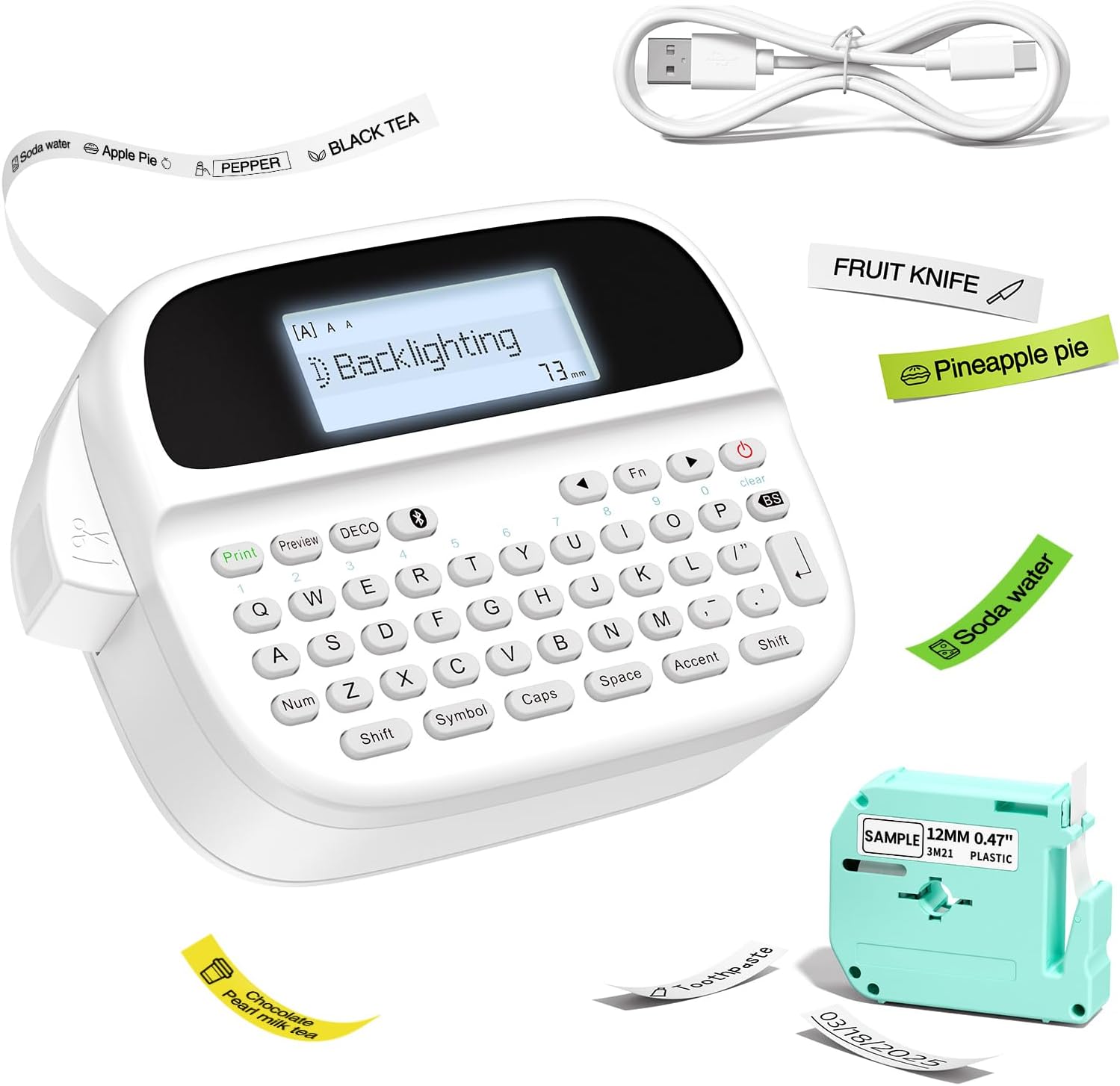
Figure 1: Vixic P-T M950 Label Maker Machine and accessories.
2. Contingut del paquet
Verifiqueu que tots els elements siguin presents al paquet:
- 1 x Vixic M950 Label Maker Machine
- 1 x MZ Label Tape (Black on White, 12mm*4m)
- 1 x cable de càrrega tipus C
- 1 x Manual d'usuari
3. Configuració
3.1 Càrrega del dispositiu
The label maker is equipped with a built-in 1200mAh lithium battery. Before first use, fully charge the device.
- Connecteu el cable de càrrega tipus C proporcionat al port de càrrega del dispositiu.
- Connecteu l'altre extrem del cable a un adaptador de corrent USB compatible (no inclòs).
- The device takes approximately 2.5 hours to fully charge. The charging indicator will show the charging status.

Figure 2: Charging the Vixic M950 Label Maker. A full charge allows for approximately 1.6 hours of continuous printing.
3.2 Càrrega de la cinta d'etiquetes
To load or replace the label tape:
- Locate the tape compartment on the back of the label maker.
- Open the integrated back cover.
- Insert the label tape cassette into the compartment, ensuring it clicks into place. The tape end should extend slightly from the printer's output slot.
- Tanqueu la coberta posterior de manera segura.

Figure 3: Loading the label tape cassette into the Vixic M950 Label Maker.
4. Instruccions de funcionament
4.1 Engegada/apagada
Press the power button to turn the device on or off. The backlit LCD display will illuminate upon powering on.
4.2 Creating Labels
The Vixic M950 offers two modes for label creation:
4.2.1 Keyboard Input Mode
- Enceneu el dispositiu.
- Use the QWERTY keyboard to type your desired text. The 14-character backlit LCD display allows for easy preview.
- Press the 'Print' button to print the label.
4.2.2 Bluetooth App Mode
For advanced customization, connect to the "Print Master" app via Bluetooth.
- Download the "Print Master" app from your device's app store.
- Assegureu-vos que el Bluetooth estigui habilitat al vostre telèfon intel·ligent.
- Open the "Print Master" app and connect to your Vixic M950 device.
- Use the app to design your label with various fonts, borders, symbols, and clip art.
- Send the design to the label maker for printing.

Figure 4: Label creation using both the integrated keyboard and the Bluetooth app.
4.3 Opcions de personalització
The Vixic M950 offers extensive customization:
- Tipus de lletra: Choose from 8 artistic fonts.
- Fronteres: Select from 103 borders/underscores.
- Symbols & Clip Art: Access 791 symbols and clip art options.
- Emmagatzematge d'etiquetes: Store up to 9 labels for future printing, each supporting up to 89 characters.

Figure 5: Customization options available for label design.
4.4 Cutting Labels
The device features a built-in cutter for clean label separation. After printing, press the cutter button to trim the label.
5. Manteniment
5.1 Cura de la bateria
Per allargar la durada de la bateria:
- Carregueu completament el dispositiu abans del primer ús.
- The device automatically shuts down after 5 minutes of inactivity to conserve power.
- Eviteu exposar el dispositiu a temperatures extremes.
5.2 Neteja
Gently wipe the exterior of the label maker with a soft, dry cloth. Do not use liquid cleaners or abrasive materials.
6. Solució De Problemes
If you encounter issues with your Vixic M950, please refer to the following common solutions:
- El dispositiu no s'encén: Ensure the battery is charged. Connect the device to the Type-C cable and a power source.
- No print or faint print: Check if the label tape is correctly installed and not empty. Ensure the tape is properly aligned in the output slot.
- Problemes de connexió Bluetooth: Make sure Bluetooth is enabled on your smartphone and the "Print Master" app is updated. Restart both the label maker and your smartphone.
- Labels not cutting cleanly: Ensure the tape is fully extended before cutting. The built-in cutter should be free of debris.
For further assistance, please contact Vixic customer support.
7. Especificacions
| Característica | Especificació |
|---|---|
| Model | M950 |
| Marca | Vixic |
| Connectivitat | Bluetooth, QWERTY Keyboard |
| Tecnologia d'impressió | Tèrmic / Transferència tèrmica |
| Resolució màxima d'impressió | 203 DPI |
| Velocitat màxima d'impressió (monocrom) | 10 mm/s |
| Compatible Label Widths | 9 mm, 12 mm |
| Tipus de visualització | LCD retroil·luminat |
| Bateria | Ió de liti de 1200 mAh (recarregable) |
| Interfície de càrrega | USB tipus C |
| Dimensions | 16.8P x 7.2A x 11.8H centímetres |
| Pes de l'article | 489 grams |
| Característiques especials | Built-in Cutter, Backlit LCD screen, QWERTY Keyboard, Portable, Rechargeable |
8. Garantia i Suport
Vixic provides professional customer service and technical support for its products. For any inquiries, technical assistance, or warranty claims, please contact our support team through the following channels:
- Correu electrònic: Refer to your product packaging or the official Vixic weblloc web per obtenir l'adreça de correu electrònic més actual.
- Xat en directe: Available on the official Vixic weblloc durant l'horari comercial.

Figure 6: Vixic Customer Service and Technical Support.


