1. Introducció
The Mastech MS8250D is a high-performance digital multimeter designed for accurate measurement of AC/DC voltage, AC/DC current, resistance, capacitance, frequency, and temperature. It features a 6600-count display, auto/manual ranging, True RMS, Non-Contact Voltage (NCV) detection, diode and continuity testing, and a USB interface for PC connectivity. This manual provides detailed instructions for safe and effective use of the device.
Característiques principals:
- 6600-count digital display
- Automatic and Manual Ranging
- Mesuració RMS veritable
- Vol. Sense contactetage (NCV) detecció
- Diode and Continuity Tester (buzzer < 50Ω)
- MAX/MIN value recording
- Funció de retenció de dades
- Retroil·luminació de la pantalla
- Apagat automàtic
- Mode de mesura relativa
- Indicació de bateria baixa
- USB Interface for Windows OS
2. Informació de seguretat
ADVERTIMENT: To avoid electric shock or personal injury, and to avoid damage to the meter or to the equipment under test, read all safety information carefully before using the meter. This device complies with CE, RoHS, and UL safety standards.
- Assegureu-vos sempre que els cables de prova estiguin en bon estat i connectats correctament.
- No apliqueu més del volum nominaltage, tal com està marcat al comptador, entre els terminals o entre qualsevol terminal i terra.
- Tingueu precaució quan treballeu amb voltagper sobre de 30 V CA RMS, 42 V pic o 60 V CC. Aquests voltagsuposen un risc de xoc.
- Before measuring current, ensure the circuit is de-energized and the meter is connected in series.
- Desconnecteu sempre els cables de prova del circuit abans de canviar les funcions o els rangs.
- No utilitzeu el mesurador si sembla danyat o si la carcassa està oberta.
- Substituïu la bateria tan bon punt aparegui l'indicador de bateria baixa per garantir lectures precises.
- Adhere to the specified measurement categories (CAT III 1000V / CAT IV 600V) for safe operation.
3. Producte acabatview
Familiarize yourself with the components of your Mastech MS8250D Digital Multimeter.

Imatge 3.1: Davant view of the Mastech MS8250D Digital Multimeter, showing the display, function dial, and input jacks. The display shows "1.987 V", indicating a voltage measurement. The function dial is set to T-RMS. Input jacks are labeled for µA mA, A, VΩHz%, and COM.
Components principals:
- Pantalla LCD: Mostra lectures de mesura, unitats i indicadors de funció.
- Marcador de funció: Used to select the desired measurement function (e.g., Voltage, Current, Resistance, Diode, Continuity, Temperature).
- Botons de funció:
- MANTENIR: Congela la lectura actual de la pantalla.
- GAMMA: Switches between auto and manual ranging.
- REL: Activates relative measurement mode.
- MÀXIM / MÍN: Registra els valors màxims i mínims.
- FUNCIÓ: Selects sub-functions within a dial position (e.g., AC/DC, Diode/Continuity).
- T-RMS: (Indicated on dial) True RMS measurement.
- NCV: Vol. Sense contactetage detecció.
- Botó de retroil·luminació: Activates display backlight.
- Preses d'entrada:
- COM: Common terminal for all measurements (negative lead).
- VΩHz%: Entrada per al voltage, resistance, frequency, capacitance, and diode/continuity measurements (positive lead).
- µA mA: Input for microampere and milliampere current measurements (positive lead). Fused for protection.
- A: Entrada per ampere current measurements (positive lead). Fused for protection.
Components inclosos:
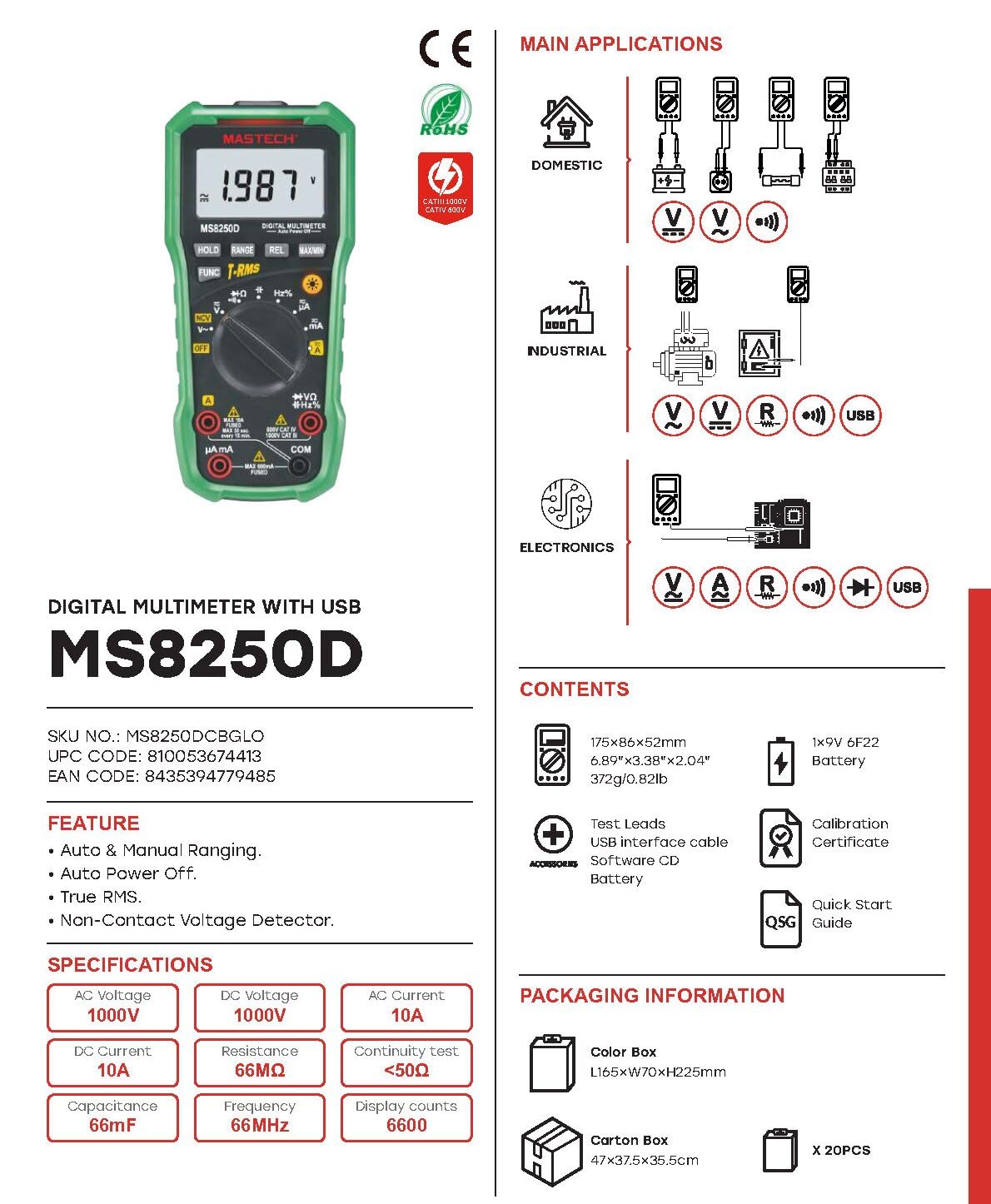
Imatge 3.2: Diagram showing the Mastech MS8250D Multimeter and its included accessories. The image also illustrates typical applications in domestic, industrial, and electronics settings.
- Mastech MS8250D Digital Multimeter
- Cables de prova (vermell i negre)
- 1 pila de 9V 6F22 (preinstal·lada o inclosa per separat)
- Cable d'interfície USB
- Software CD (for Windows OS)
- Certificat de calibratge
- Guia d'inici ràpid
4. Configuració
4.1 Instal·lació de la bateria
The MS8250D requires one 9V 6F22 battery for operation. Two LR44 batteries are also mentioned in specifications, likely for a different internal component or an error in data. For the main power, use the 9V battery.
- Assegureu-vos que el multímetre estigui APAGAT.
- Localitzeu la tapa del compartiment de la bateria a la part posterior del mesurador.
- Feu servir un tornavís per afluixar el(s) cargol(s) que fixen la coberta.
- Traieu la coberta.
- Connect the 9V battery to the battery clips, observing correct polarity (+ and -).
- Col·loqueu la bateria al compartiment.
- Torneu a col·locar la tapa del compartiment de la bateria i fixeu-la amb el(s) cargol(s).
Nota: The meter also uses 2 LR44 batteries, which are typically included and pre-installed for specific functions like the backlight or non-contact voltage detection. Refer to the quick-start guide for specific details on these smaller batteries if replacement is needed.
4.2 Connexió dels cables de prova
Always connect the black test lead to the COM jack. Connect the red test lead to the appropriate input jack based on the measurement type:
- Per al voltage, Resistance, Capacitance, Frequency, Diode, and Continuity measurements: Connect the red lead to the VΩHz% jack.
- For Current measurements (µA or mA): Connect the red lead to the µA mA jack.
- For High Current measurements (A): Connect the red lead to the A jack.
Ensure the test leads are fully inserted into the jacks.
5. Instruccions de funcionament
5.1 Encès/Apagat
To turn the meter ON, rotate the function dial from the "OFF" position to any desired measurement function. To turn the meter OFF, rotate the function dial back to the "OFF" position.
The meter features an Apagat automàtic function to conserve battery life. It will automatically power off after a period of inactivity. To disable or re-enable this feature, refer to the quick-start guide or the full user manual provided on the software CD.
5.2 Auto Ranging and Manual Ranging
The MS8250D defaults to Rang automàtic, which automatically selects the best measurement range. Press the GAMMA botó per canviar a Distància manual. In manual ranging, each press of the GAMMA button cycles through available ranges. To return to auto ranging, press and hold the GAMMA botó.
5.3 Mesurar AC/DC Voltage (V)
- Posa el dial de funció a V~ (Volum AC)tage) o V- (DC Voltage) posició.
- Connecteu el cable de prova negre al COM jack i el cable de prova vermell al VΩHz% jack.
- Connecteu les sondes de prova al circuit o component que s'ha de mesurar.
- Llegeix el voltage value on the display. The meter will automatically detect AC or DC if the dial is set to the combined V position, or you can use the EMPLEAT button to toggle between AC and DC if available on your model.
5.4 Measuring AC/DC Current (A, mA, µA)
ADVERTIMENT: Never connect the meter in parallel to a voltage source when measuring current. This can blow the fuse or damage the meter.
- Apagueu l'alimentació del circuit.
- Posa el dial de funció a A~ (AC Current), A- (DC Current), mA~, mA-, µA~, o µA- posició.
- Connecteu el cable de prova negre al COM jack.
- Connecteu el cable de prova vermell al A jack for high current, or µA mA jack for low current.
- Open the circuit where the current is to be measured and connect the meter in series with the load.
- Aplica energia al circuit.
- Read the current value on the display. Use the EMPLEAT button to toggle between AC and DC if needed.
5.5 Mesura de la resistència (Ω)
- Posa el dial de funció a Ω posició.
- Connecteu el cable de prova negre al COM jack i el cable de prova vermell al VΩHz% jack.
- Assegureu-vos que el circuit o component que s'està provant estigui desenergitzat.
- Connecteu les sondes de prova a través del component.
- Llegiu el valor de resistència a la pantalla.
5.6 Diode Test and Continuity Test
- Posa el dial de funció a Díode/Continuitat position (often shared with resistance or capacitance).
- Connecteu el cable de prova negre al COM jack i el cable de prova vermell al VΩHz% jack.
- Utilitza el EMPLEAT button to select between Diode Test and Continuity Test.
- For Diode Test: Connecteu la sonda vermella a l'ànode i la sonda negra al càtode del díode. La pantalla mostrarà el volum directe.tage drop (typically 0.5V to 0.8V for silicon diodes). Reversing the probes should show "OL" (Open Loop).
- Per a la prova de continuïtat: Connect the probes across the circuit or component. If resistance is less than approximately 50Ω, the buzzer will sound, indicating continuity.
5.7 Measuring Capacitance (F)
- Posa el dial de funció a Capacitat position (often shared with resistance or diode).
- Connecteu el cable de prova negre al COM jack i el cable de prova vermell al VΩHz% jack.
- Ensure the capacitor is fully discharged before testing to avoid damage to the meter.
- Connecteu les sondes de prova als terminals del condensador.
- Llegiu el valor de la capacitat a la pantalla.
5.8 Measuring Frequency (Hz) and Duty Cycle (%)
- Posa el dial de funció a % Hz position (often shared with voltagi).
- Connecteu el cable de prova negre al COM jack i el cable de prova vermell al VΩHz% jack.
- Connecteu les sondes de prova a la font de senyal.
- The display will show the frequency. Press the EMPLEAT button to toggle to Duty Cycle measurement if available.
5.9 Vol. sense contactetage (NCV) Detecció
- Posa el dial de funció a NCV posició.
- Hold the meter with the NCV sensor (usually at the top of the meter) near a live AC voltage font.
- El mesurador indicarà la presència de voltatge de CAtage through an audible beep and/or visual indicator (e.g., LED).
5.10 USB Interface (Windows OS)
The MS8250D includes a USB interface for connecting to a computer running Windows OS. This allows for data logging and real-time monitoring of measurements. Install the provided software from the CD and follow the on-screen instructions for driver installation and software usage.
6. Manteniment
6.1 Neteja
Netegeu la carcassa del comptador amb anuncisamp drap i un detergent suau. No utilitzeu abrasius ni dissolvents. Assegureu-vos que el mesurador estigui completament sec abans d'utilitzar-lo.
6.2 Substitució de la bateria
When the low battery indicator appears on the display, replace the 9V battery immediately to ensure accurate readings. Follow the steps in Section 4.1 Battery Installation.
6.3 Canvi de fusibles
If the meter fails to measure current, the fuse may be blown. Fuses are located inside the meter. To replace a fuse:
- Assegureu-vos que el mesurador estigui apagat i que tots els cables de prova estiguin desconnectats.
- Open the battery compartment cover (and potentially the main case, depending on design).
- Traieu amb cura el fusible vell.
- Replace with a fuse of the exact same type and rating (e.g., F600mA/250V for mA/µA range, F10A/250V for A range). Refer to the meter's internal markings or the full manual for specific fuse ratings.
- Reassemble the meter, ensuring all screws are tightened.
ADVERTIMENT: Never use a fuse with a different rating or bypass the fuse. This can damage the meter and pose a serious safety hazard.
7. Solució De Problemes
| Problema | Causa possible | Solució |
|---|---|---|
| El mesurador no s'encén. | Bateria esgotada. | Substituïu la bateria de 9V. |
| Es mostra "OL" (sobrecàrrega). | La mesura supera el rang seleccionat o la capacitat màxima del mesurador. | Switch to a higher range (if in manual ranging) or ensure the measurement is within the meter's limits. |
| No current reading. | Blown fuse; incorrect lead connection; open circuit. | Check and replace fuse if necessary. Ensure leads are connected correctly (in series). Verify circuit continuity. |
| Lectures inexactes. | Low battery; poor lead contact; external interference. | Replace battery. Ensure leads are firmly connected. Move away from strong electromagnetic fields. |
| Display shows "USB" but no PC connection. | Drivers not installed; incorrect software settings. | Install drivers from the provided CD. Refer to software manual for connection instructions. |
8. Especificacions
The following table details the technical specifications of the Mastech MS8250D Digital Multimeter.

Imatge 8.1: Detailed specifications table for the Mastech MS8250D, outlining ranges, resolutions, and accuracies for various measurement functions.
| Funció | Interval | Resolució | Precisió |
|---|---|---|---|
| DC Voltage | |||
| 660mV | 0.1mV | ±(0.8%+3) | |
| 6.6V/66V/660V/1000V | 1mV/10mV/0.1V/1V | ±(0.5%+5) | |
| Vol. ACtage (RMS veritable) | |||
| 660mV | 0.1mV | ±(1.5%+5) | |
| 6.6V/66V | 1 mV/10 mV | ±(1.2%+5) | |
| 660V/1000V | 0.1V/1V | ±(1.0%+3) | |
| Corrent DC | |||
| 660µA/6600µA/66mA/660mA | 0.1 µA/1 µA/10 µA/0.1 mA | ±(1.0%+5) | |
| 10A | 10 mA | ±(2.0%+5) | |
| Corrent alternatiu (RMS veritable) | |||
| 660µA/6600µA/66mA/660mA | 0.1µA/1µA/0.01mA/0.1mA | ±(1.5%+5) | |
| 10A | 10 mA | ±(3.0%+5) | |
| Resistència | |||
| 660Ω / 6.6kΩ / 66kΩ / 660kΩ / 6.6MΩ | 0.1Ω / 1Ω / 10Ω / 100Ω / 1kΩ | ±(0.8%+5) | |
| 66 MΩ | 10kΩ | ±(1.5%+5) | |
| Capacitat | |||
| 6.6nF/66nF/660nF/6.6µF/66µF | 1pF/10pF/0.1nF/1nF/10nF | ±(4.0%+5) | |
| 600μF | 1μF | ±(3.0%+5) | |
| 6.6 mF/66 mF | 1µF/10µF | ±(4.0%+5) | |
| Freqüència | |||
| 66Hz/660Hz/6.6kHz/66kHz | 0.01Hz/0.1Hz/1Hz/10Hz | ±(1.5%+5) | |
| 660kHz/6.6MHz/66MHz | 0.1 kHz/1 kHz/10 kHz | ±(1.5%+5) | |
| Cicle de treball | |||
| 0.1% ~ 99.9% | 0.1% | ±(2.0%+5) | |
Especificacions generals:
- Visualització: 6600 recomptes
- Font d'alimentació: 1x 9V 6F22 Battery (main power), 2x LR44 batteries (auxiliary, e.g., backlight)
- Apagat automàtic: Sí
- RMS veritable: Sí
- Vol. Sense contactetage (NCV) Detector: Sí
- Volum obert de díodestage: 3.2 V
- Brunzidor de continuïtat: < 50Ω
- MÀXIM / MÍN: Sí
- Conservació de dades: Sí
- Indicació de bateria baixa: Sí
- Il·luminació de fons de pantalla: Sí
- Interfície USB: Yes (Windows OS)
- Classificació de seguretat: CAT III 1000V / CAT IV 600V
- Precisió de mesura: 0.4% (general, specific accuracies per function in table)
- Vol. Operatiutage (mínim): 3.2 Volts
- Valoració de temperatura superior: 50 graus centígrads
- Dimensions (L x A x A): 20 x 15 x 25 cm
- Pes de l'article: 1 kg
- Material: Acrilonitril butadiè estirè (ABS)
- Color: Blau
- Fabricant: MASTECH
- País d'origen: Taiwan
- Certificacions: CE, RoHS, UL
9. Garantia i Suport
Mastech products are designed for reliability and durability. For specific warranty information, please refer to the warranty card included with your product or contact Mastech customer support directly. Typically, Mastech offers a limited warranty against defects in materials and workmanship.
For technical support, troubleshooting assistance, or warranty claims, please contact your authorized Mastech dealer or visit the official Mastech weblloc per obtenir informació de contacte.
Durada de la disponibilitat de recanvis a la UE: 1 any


