1. Introducció
This manual provides essential information for the safe and effective operation of your Mastech MS8301A Digital Multimeter. Please read this manual thoroughly before using the device to ensure proper functionality and to prevent potential hazards. Keep this manual for future reference.
2. Informació de seguretat
Always adhere to the following safety precautions to avoid electric shock or personal injury, and to prevent damage to the multimeter or the equipment under test.
- Llegeix les instruccions: Understand all instructions and safety information before use.
- Voltage: No apliqueu més del volum nominaltage, as marked on the multimeter, between the terminals or between any terminal and ground.
- Cables de prova: Inspeccioneu els cables de prova per detectar si hi ha aïllament danyat o metall exposat. Substituïu-los si estan danyats.
- Circuit Disconnection: Disconnect the circuit power and discharge all high-voltage condensadors abans de provar la resistència, la continuïtat, els díodes o la capacitat.
- Selecció de la funció: Assegureu-vos que l'interruptor de funció estigui en la posició correcta per a la mesura que s'està realitzant.
- Circuits en directe: Do not measure current on a live circuit with the test leads connected in parallel.
- Entorn de funcionament: Do not operate the multimeter in explosive gas, vapor, or damp ambients.
- Equips de protecció individual: Always wear appropriate personal protective equipment, such as safety glasses, when working with electrical circuits.
- Classificació de seguretat: This device is rated for CAT III 600V. Do not exceed this rating.
3. Producte acabatview
3.1 Característiques
The Mastech MS8301A Digital Multimeter offers a range of features for various electrical measurements:
- Visualització: 2000 recomptes
- Conservació de dades: Congela la lectura mostrada per a un registre còmode.
- Battery Tester: For 1.5V and 9V batteries.
- Disseny compacte: Product Size: 150mm x 74mm x 48mm (5.9" x 2.9" x 1.7")
- Pes lleuger: Product Weight: 220g (0.48lb)

Image: Detailed features and specifications of the Mastech MS8301A multimeter, including display count, data hold, battery test function, and physical dimensions.
3.2 Components
The Mastech MS8301A package typically includes the following components:
- Mastech MS8301A Digital Multimeter Unit
- Cables de prova (vermell i negre)
- AAA Batteries (2x1.5V)
- Calibration Certificate (if applicable)
- Guia d'inici ràpid
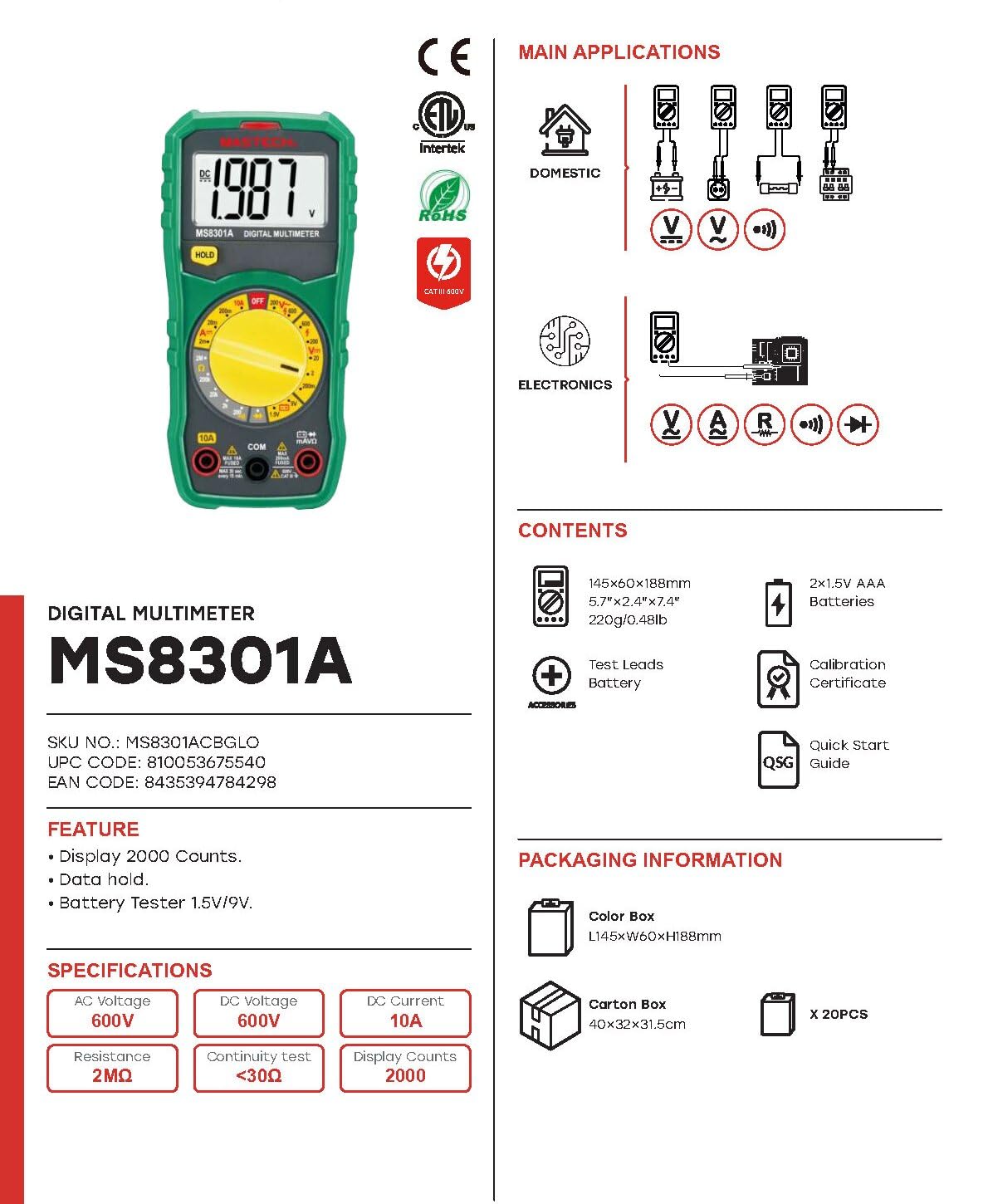
Image: The Mastech MS8301A Digital Multimeter showing its front panel, rotary switch, display, input jacks, and a list of included accessories such as test leads and batteries.
4. Configuració
4.1 Instal·lació de la bateria
- Assegureu-vos que el multímetre estigui apagat i desconnecteu tots els cables de prova.
- Localitzeu la tapa del compartiment de la bateria a la part posterior del multímetre.
- Descargoleu el(s) cargol(s) de subjecció i traieu la coberta.
- Introduïu dues piles AAA d'1.5 V, observant la polaritat correcta (+ i -) tal com s'indica a l'interior del compartiment.
- Torneu a col·locar la tapa del compartiment de la bateria i fixeu-la amb el(s) cargol(s).
4.2 Connexió dels cables de prova
Connect the test leads to the appropriate input jacks on the multimeter:
- Inseriu el negre cable de prova a la COM (common) jack.
- Per a la majoria de mesures (Voltage, Resistance, Diode, Continuity, Temperature, Battery Test), insert the vermell cable de prova a la VΩmA jack.
- Per a mesures de corrent elevat (fins a 10 A), inseriu el vermell cable de prova a la 10A jack.
5. Instruccions de funcionament
Before taking any measurement, ensure the test leads are correctly connected and the rotary switch is set to the desired function.
5.1 Mesurar DC Voltage (V=)
- Set the rotary switch to the desired V= range (e.g., 20V for measuring up to 20V DC).
- Connecteu el cable de prova vermell al costat positiu (+) del circuit i el cable de prova negre al costat negatiu (-).
- Llegeix el voltage valor a la pantalla.
5.2 Mesurar AC Voltage (V~)
- Set the rotary switch to the desired V~ range (e.g., 200V for measuring up to 200V AC).
- Connecteu els cables de prova a través del voltatge de CAtage font.
- Llegeix el voltage valor a la pantalla.
5.3 Measuring DC Current (A=)
- Important: Desconnecteu l'alimentació del circuit abans de connectar el multímetre en sèrie.
- Set the rotary switch to the desired A= range (e.g., 200mA or 10A). Remember to move the red lead to the 10A jack for high current.
- Open the circuit where current is to be measured.
- Connect the multimeter in series with the circuit, ensuring the current flows through the multimeter.
- Connecteu el circuit a l'alimentació i llegiu el valor del corrent a la pantalla.
5.4 Mesura de la resistència (Ω)
- Important: Assegureu-vos que el circuit estigui desenergitzat i que tots els condensadors estiguin descarregats abans de mesurar la resistència.
- Set the rotary switch to the desired Ω rang.
- Connecteu els cables de prova al component que s'ha de mesurar.
- Llegiu el valor de resistència a la pantalla.
5.5 Prova de díodes (→|)
- Important: Assegureu-vos que el díode estigui desconnectat del circuit.
- Poseu el commutador rotatiu a la Prova de díode posició.
- Connecteu el cable de prova vermell a l'ànode i el cable de prova negre al càtode del díode. La pantalla mostrarà el volum directe.tage gota.
- Inverteix els cables. La pantalla hauria de mostrar "OL" (bucle obert) per a un díode en bon estat.
5.6 Prova de continuïtat ())))
- Important: Assegureu-vos que el circuit estigui desenergitzat.
- Poseu el commutador rotatiu a la Prova de continuïtat posició.
- Connect the test leads across the component or wire to be tested.
- If the resistance is below approximately 30Ω, the buzzer will sound, indicating continuity. The display will also show the resistance value.
5.7 Prova de bateria (1.5 V/9 V)
- Poseu el commutador rotatiu a la 1.5 V or 9V battery test position, corresponding to the battery type.
- Connect the red test lead to the positive (+) terminal of the battery and the black test lead to the negative (-) terminal.
- Llegeix el vol de la bateriatage a la pantalla.
5.8 Retenció de dades
Press the "HOLD" button to freeze the current reading on the display. Press it again to release the hold function and resume live readings.
6. Especificacions
| Mesurament | Interval | Resolució |
|---|---|---|
| DC Voltage | 200mV / 2V / 20V / 200V / 600V | 100µV / 1mV / 10mV / 100mV / 1V |
| Vol. ACtage | 200V / 600V | 100 mV / 1 V |
| Corrent DC | 2mA / 20mA / 200mA / 10A | 1µA / 10µA / 100µA / 10mA |
| Resistència | 200Ω / 2kΩ / 20kΩ / 200kΩ / 2MΩ | 0.1Ω / 1Ω / 10Ω / 100Ω / 1kΩ |
| Prova de continuïtat | Buzzer sounds at <30Ω | — |
| Prova de díode | Endavant voltage gota | — |
| Prova de bateria | 1.5V / 9V | — |
Especificacions generals
- Visualització: 2000 recomptes
- Font d'alimentació: 2 piles AAA de 1.5 V
- Dimensions: 150 mm x 74 mm x 48 mm (5.9 "x 2.9" x 1.7")
- Pes: 220 g (0.48 lliures)
- Classificació de seguretat: CAT III 600V
- Material: Acrilonitril butadiè estirè (ABS)
- Color: Blau

Image: A table detailing manual ranging specifications for various Mastech digital multimeters, including the MS8301A, showing display counts, safety ratings, and measurement capabilities.
7. Manteniment
7.1 Substitució de la bateria
When the battery low indicator appears on the display, replace the batteries immediately to ensure accurate readings. Follow the steps outlined in Section 4.1 for battery installation.
7.2 Neteja
Netegeu el cas amb l'anunciamp drap i detergent suau. No utilitzeu abrasius ni dissolvents. Assegureu-vos que el multímetre estigui completament sec abans d'utilitzar-lo.
7.3 Emmagatzematge
If the multimeter is not used for an extended period, remove the batteries to prevent leakage and damage to the device. Store in a cool, dry place away from direct sunlight.
8. Solució De Problemes
| Problema | Causa possible | Solució |
|---|---|---|
| Sense pantalla o pantalla tènue | Dead or low batteries; incorrect battery polarity. | Replace batteries; check battery orientation. |
| Es mostra "OL" (sobrecàrrega) | Measurement exceeds selected range; open circuit. | Select a higher range; check for open circuit in the component or leads. |
| Lectures incorrectes | Incorrect function selected; poor test lead connection; damaged test leads. | Verify function switch position; ensure secure lead connection; inspect and replace damaged leads. |
| No hi ha bip de continuïtat | Open circuit; resistance too high. | Check for breaks in the circuit; ensure resistance is below 30Ω. |
9. Garantia i Suport
Mastech products are designed for reliability and performance. For specific warranty information, please refer to the warranty card included with your product or contact Mastech customer support. Keep your purchase receipt as proof of purchase.
For technical support or service inquiries, please visit the official Mastech weblloc web o poseu-vos en contacte amb els seus centres de servei autoritzats.


