Introducció
Gràcies per la compraasing the YESIDO YSW14 Portable Wireless Bluetooth Speaker. This speaker combines high-quality audio with vibrant RGB lighting and versatile playback options, including Bluetooth, TF card, and USB disk support. Please read this manual carefully to ensure proper use and to maximize your listening experience.
Producte acabatview
Característiques clau
- Disseny portàtil: Compact and easy to carry for music on the go.
- Wireless Bluetooth 5.0: Stable and rapid signal transmission for seamless connectivity.
- Llums RGB dinàmiques: Adds visual ambiance with various lighting effects.
- Subwoofer potent: Delivers rich bass and immersive sound quality.
- Multi-Playback Modes: Supports Bluetooth, TF card, and USB disk (U disk) playback.
- Bateria de llarga durada: Integrated 1200mAh lithium battery for extended use.
Components dels altaveus
Familiarize yourself with the main components of your YESIDO YSW14 speaker:
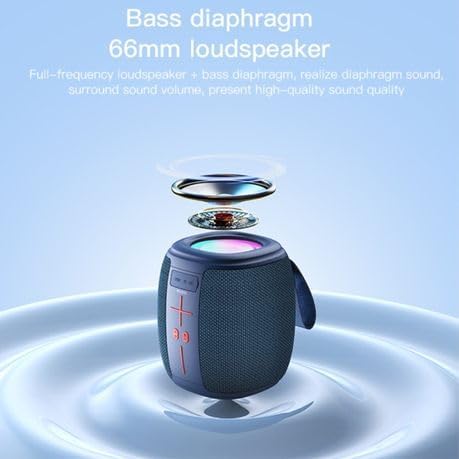
Imatge: Davant view of the YESIDO YSW14 speaker, highlighting the control panel with volume buttons, play/pause, and mode selection, along with the integrated carrying handle.
- Tauler de control: Includes power, volume, play/pause, and mode buttons.
- Tira de llum RGB: Located around the top of the speaker, providing dynamic lighting effects.
- Charging Port (DC5V): Per connectar el cable de càrrega.
- Ranura per a targetes TF: For inserting a MicroSD (TF) card.
- Port USB: For connecting a USB disk (U disk).
- Bass Diaphragm/Loudspeaker: Located at the top, responsible for sound output.
Configuració
1. Carregant l’altaveu
Before first use, fully charge the speaker. A full charge takes approximately 4 hours.
- Connect the provided charging cable to the DC5V charging port on the speaker.
- Connecteu l'altre extrem del cable a un adaptador de corrent USB (no inclòs) o al port USB d'un ordinador.
- El llum indicador de càrrega s'il·luminarà. S'apagarà o canviarà de color un cop finalitzada la càrrega.
The speaker can be used while charging. A fully charged battery provides approximately 2-5 hours of music playback, depending on volume and RGB light usage.
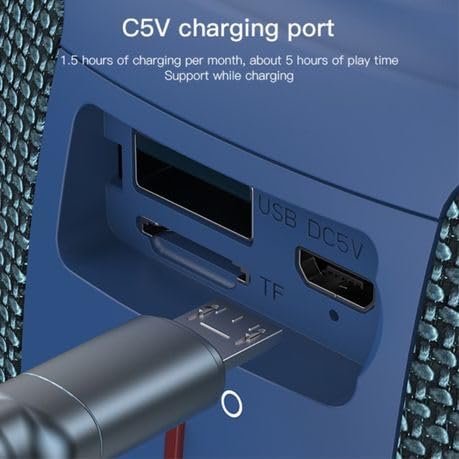
Imatge: Detallada view of the USB DC5V charging port, TF card slot, and USB port on the side of the speaker, with a charging cable inserted into the DC5V port.
2. Encès / apagat
- Per encendre: Press and hold the Power button (usually marked with a power symbol) for a few seconds until you hear an audible prompt or see the indicator light illuminate.
- Per apagar: Premeu i manteniu premut el botó d'engegada de nou durant uns segons fins que sentiu un missatge audible o l'indicador lluminós s'apagui.
Instruccions de funcionament
1. Emparellament Bluetooth
The YESIDO YSW14 uses Bluetooth 5.0 for a stable wireless connection up to 10 meters.
- Ensure the speaker is powered on and in Bluetooth mode. If not, press the Mode button (if available) to switch to Bluetooth mode. The speaker will typically announce "Bluetooth mode" or have a blinking blue indicator light.
- Al dispositiu (telèfon intel·ligent, tauleta, ordinador), activeu el Bluetooth i cerqueu els dispositius disponibles.
- Select "YSW14" or a similar name from the list of devices.
- Once paired, the speaker will indicate a successful connection (e.g., "Connected" voice prompt, solid blue indicator light).
- Ara pots reproduir àudio des del teu dispositiu a través de l'altaveu.
Nota: L'altaveu intentarà tornar a connectar-se automàticament amb l'últim dispositiu emparellat quan s'encengui.
2. TF Card / USB Disk Playback
The speaker supports direct playback from TF (MicroSD) cards and USB disks (U disk) with MP3, WAV, WMA, FLAC, and APE music formats.

Imatge: Detallada view of the speaker's side panel showing the USB port with a USB drive inserted and the TF card slot, indicating multiple playback options.
- Inseriu una targeta TF a la ranura per a targetes TF o un disc USB al port USB.
- The speaker will automatically detect the storage device and switch to the corresponding playback mode, or you may need to press the Mode button to select it.
- Music playback will begin automatically. Use the speaker's control buttons to play/pause, skip tracks, or adjust volume.
3. Control de la il·luminació RGB
The speaker features dynamic RGB lights to enhance your audio experience.
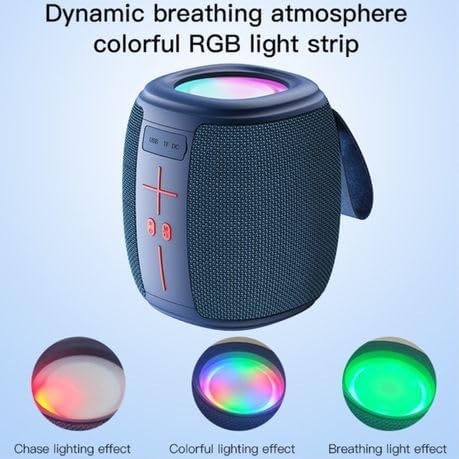
Imatge: The YESIDO YSW14 speaker showcasing different RGB lighting effects, including chase, colorful, and breathing light modes, illustrating its dynamic visual features.
- The RGB lights typically activate automatically when the speaker is powered on.
- To cycle through different lighting modes (e.g., chase, colorful, breathing) or to turn the lights off/on, locate the dedicated light control button (if available) or press and hold a specific button as indicated in the quick start guide (often the 'M' or Mode button, or a dedicated light icon).
4. Control de volum
- Augmenta el volum: Premeu el botó '+'.
- Disminueix el volum: Premeu el botó '-'.
- Note: Volume can also be controlled from your connected Bluetooth device.
Manteniment
- Mantingueu l'altaveu allunyat de l'aigua, la humitat i les temperatures extremes.
- Netegeu l'altaveu amb un drap suau i sec. No utilitzeu productes de neteja abrasius ni dissolvents.
- Eviteu deixar caure l'altaveu o sotmetre'l a impactes forts.
- If not used for an extended period, charge the speaker at least once every month to maintain battery health.
Resolució de problemes
| Problema | Possible solució |
|---|---|
| L'altaveu no s'encén. | Assegureu-vos que la bateria estigui carregada. Connecteu l'altaveu a una font d'alimentació i torneu-ho a provar. |
| No es pot emparellar per Bluetooth. |
|
| No hi ha so de la targeta TF/disc USB. |
|
| La qualitat del so és deficient o distorsionada. |
|
Especificacions
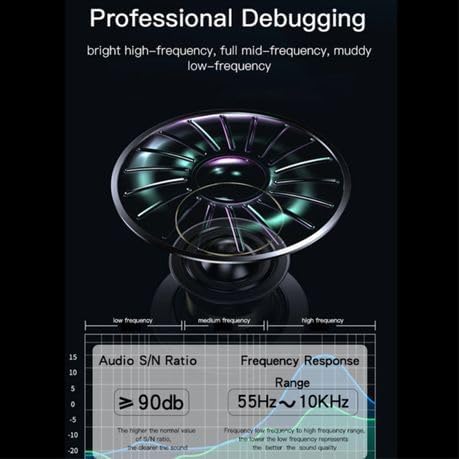
Imatge: Technical diagram illustrating the speaker's audio performance, including a Signal-to-Noise Ratio (S/N Ratio) of ≥90dB and a Frequency Response Range of 55Hz ~ 10KHz.
| Nom del model: | YESIDO YSW14 |
| Versió Bluetooth: | V5.0 (JL6965E chip) |
| Distància Bluetooth: | Fins a 10 metres |
| Sortida de l'altaveu: | 5W x 1 |
| Impedància: | 3Ω |
| Resposta de freqüència: | 55 Hz ~ 10 KHz |
| Relació senyal/soroll (S/N): | ≥90 dB |
| Capacitat de la bateria: | Bateria de liti de 1200 mAh |
| Entrada de càrrega: | DC5V |
| Temps de càrrega: | Aproximadament 4 hores |
| Temps de reproducció de música: | Approximately 2-5 hours (depending on usage) |
| Formats d'àudio compatibles: | MP3, WAV, WMA, FLAC, APE |
| Material: | ABS+PC+PU+Silicone |
| Dimensions del producte: | 10D x 9W x 8H centímetres |
| Característiques especials: | Bass Boost, RGB Light |
Garantia i Suport
The YESIDO YSW14 Portable Wireless Bluetooth Speaker comes with a Garantia del fabricant de 1 anys des de la data de compra. Aquesta garantia cobreix els defectes de fabricació i la mà d'obra en condicions d'ús normal.
For warranty claims or technical support, please contact your retailer or the YESIDO customer service department with your purchase receipt and product model number.
Please note that the warranty does not cover damage caused by misuse, accidents, unauthorized modifications, or normal wear and tear.


