1. Introducció
This manual provides detailed instructions for the assembly, installation, and maintenance of your Mars Gaming MCELITE High Performance Metal Micro-ATX PC Case. Please read this manual thoroughly before beginning installation to ensure proper setup and optimal performance of your system.

Imatge 1.1: Cara frontal view of the Mars Gaming MCELITE PC Case, showcasing its compact design and front panel connectivity.
2. Característiques del producte
- Aluminum Handles and Feet: The MCELITE PC case features sturdy polished aluminum handles and feet, providing both ergonomic grip for transport and enhanced stability.
- Mesh Technology and FDB Fans: Equipped with mesh panels on the side and top for optimized airflow and aesthetics. It includes 3 pre-installed FDB (Fluid Dynamic Bearing) fans for efficient and quiet cooling.
- Dual PSU Support: This compact mini-tower case supports both SFX and ATX power supplies, offering flexibility for various hardware configurations.
- Disseny compacte: Optimized structure for Micro-ATX and Mini-ITX motherboards, allowing seamless integration into smaller spaces while maintaining performance.
- Connectivitat avançada: The front panel includes one USB-C port, two USB 3.0 ports for high-speed data transfer, and one USB 2.0 port.

Image 2.1: Detail of the front panel, highlighting the USB ports and power button, along with the aluminum feet.

Imatge 2.2: View of the case demonstrating the side and top mesh design for improved ventilation.

Imatge 2.3: Interna view of the case, illustrating the placement of the three pre-installed FDB fans.
3. Especificacions
| Característica | Especificació |
|---|---|
| Marca | Mars Gaming |
| Model | MCELITE |
| Dimensions del producte | 34 x 21 x 41 cm |
| Pes | 3 kg |
| Color | Negre |
| Compatibilitat amb la placa base | Micro-ATX, Mini-ITX |
| Tipus de cas | Mini-tower |
| Material | Alumini |
| Muntatge de la font d'alimentació | SFX or ATX |
| Mètode de refrigeració | Aire |
| Ventiladors preinstal·lats | 3x FDB Fans |
| Ports d'E / S frontals | 1x USB-C, 2x USB 3.0, 1x USB 2.0 |
4. Contingut del paquet
Si us plau, verifiqueu que tots els elements siguin presents al paquet:
- Mars Gaming MCELITE PC Case
- 3x Pre-installed FDB Fans
- Caixa d'accessoris (que conté cargols, brides i altres peces petites)
- Manual d'instruccions (aquest document)
5. Guia d'instal·lació
Follow these steps for proper component installation. Refer to the clearance diagram for maximum component sizes.

Image 5.1: Component clearance diagram, detailing CPU cooler height, GPU length/width, and fan/radiator mounting points.
5.1. Preparació del cas
- Col·loqueu la caixa sobre una superfície plana i estable.
- Remove the side panels by unscrewing the thumb screws at the rear of the case and sliding the panels off.
5.2. Instal·lació de la placa base
- Instal·leu la protecció d'E/S (si no està preinstal·lada a la placa base) a l'obertura posterior de la carcassa.
- Alinea la placa base Micro-ATX o Mini-ITX amb els separadors de l'interior de la carcassa.
- Fixeu la placa base amb els cargols proporcionats. No els estrenyeu massa.
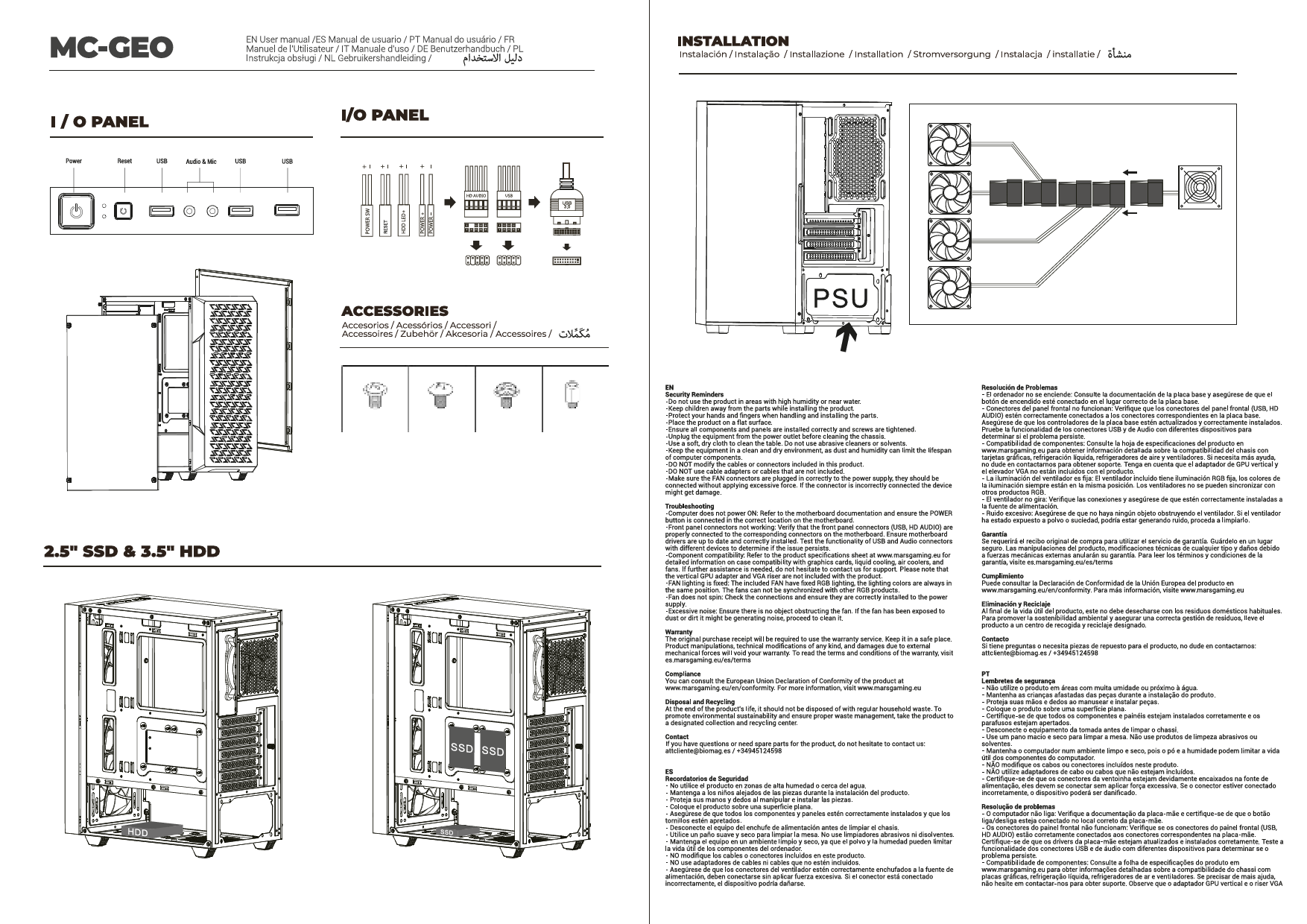
5.3. Instal·lació de la font d'alimentació (PSU)
The MCELITE supports both ATX and SFX power supplies.

Image 5.2: Illustrates the installation of both ATX and SFX power supplies, showing how they fit within the case structure.
- Determine the appropriate mounting bracket for your PSU type (ATX or SFX).
- Attach the PSU to the bracket, then slide the assembly into the designated PSU bay.
- Secure the PSU with the screws provided in the accessory box.
5.4. Instal·lació de la unitat d'emmagatzematge
Refer to your motherboard manual for specific drive mounting locations and methods. The case typically supports 2.5" SSDs and 3.5" HDDs in designated bays or mounting points.
- Locate the drive bays or mounting points within the case.
- Secure your SSDs or HDDs using the appropriate screws.
5.5. Instal·lació de la targeta gràfica (GPU)
- Traieu les cobertes de les ranures PCIe necessàries de la part posterior de la carcassa.
- Insert your graphics card into the primary PCIe slot on your motherboard until it clicks into place.
- Fixeu la targeta gràfica a la carcassa amb cargols.
5.6. Instal·lació del ventilador i del radiador
The case comes with 3 pre-installed FDB fans. Additional fans or radiators can be installed based on the clearance diagram (Image 5.1).
- Identify available mounting points for additional fans (e.g., side, top, rear).
- Mount fans or radiators using the appropriate screws. Ensure correct airflow direction.
5.7. Gestió de cables
Aprofita els retalls de cables i els punts d'amarratge que hi ha darrere de la safata de la placa base per gestionar els cables. Això millora la circulació del flux i l'estètica.
- Connecteu tots els cables d'alimentació necessaris de la font d'alimentació als vostres components (placa base, GPU, unitats).
- Connect front panel cables (USB, audio, power/reset switches) to the motherboard headers.
- Route cables neatly using cable ties to prevent obstruction of airflow.
6. Connectivitat
The front I/O panel provides convenient access to essential ports:
- Botó d'encesa: To power on/off your system.
- Port USB-C: For modern devices requiring USB-C connectivity.
- Ports USB 3.0 (x2): Per a la transferència de dades d'alta velocitat amb dispositius compatibles.
- Port USB 2.0 (x1): Per a dispositius USB estàndard.
- Preses d'àudio: Per a auriculars i micròfon.
7. Instruccions de funcionament
- Once all components are installed and cables are connected, replace the side panels.
- Connect your monitor, keyboard, mouse, and power cable to the rear of your PC.
- Press the power button on the front panel to start your system.
- The pre-installed FDB fans will operate automatically to maintain optimal cooling.
8. Manteniment
Un manteniment regular ajuda a garantir la longevitat i el rendiment dels components del teu PC.
- Neteja de pols: Periodically clean dust filters and internal components using compressed air. Ensure the system is powered off and unplugged before cleaning.
- Inspecció del ventilador: Reviseu els ventiladors per si hi ha acumulació de pols i assegureu-vos que girin lliurement.
- Gestió de cables: Re-evaluate cable routing if you notice any airflow issues or component overheating.
9. Solució De Problemes
Si teniu problemes durant o després del muntatge, tingueu en compte els passos habituals següents per resoldre problemes:
- Sense energia: Ensure the PSU is switched on, the power cable is securely connected, and all internal power cables (24-pin ATX, 8-pin CPU, GPU power) are properly seated.
- Sense pantalla: Verify that the monitor cable is connected to the graphics card (not the motherboard I/O, unless using integrated graphics) and that the graphics card is fully seated in its PCIe slot.
- Els ventiladors no giren: Check fan connections to the motherboard or fan controller. Ensure the PSU is providing power.
- Inestabilitat del sistema: Double-check all component installations, especially RAM and CPU. Ensure adequate cooling.
10. Garantia i Suport
For warranty information or technical support, please refer to the official Mars Gaming weblloc web o poseu-vos en contacte amb el vostre distribuïdor. Conserveu el comprovant de compra per a reclamacions de garantia.