1. Introducció
This manual provides essential information for the safe and effective operation of your ARCCAPTAIN iControl MIG145 Pro 145A Flux Core MIG Welder. Please read all instructions carefully before use to ensure proper setup, operation, and maintenance. This welder supports Flux Core MIG, MMA (Stick), and Lift TIG welding processes.

Image 1.1: The ARCCAPTAIN iControl MIG145 Pro Welder shown with included accessories such as the MIG torch, ground clamp, electrode holder, flux core wire, and contact tips.
2. Informació de seguretat
Prioritzeu sempre la seguretat quan feu servir equips de soldadura. Si no seguiu les pautes de seguretat, podeu patir lesions greus o la mort.
- Wear appropriate personal protective equipment (PPE), including a welding helmet with proper shade, welding gloves, protective clothing, and safety shoes.
- Assegureu-vos una ventilació adequada per evitar la inhalació de fums de soldadura.
- Mantenir un extintor a prop.
- No soldeu prop de materials inflamables.
- Assegureu-vos que la màquina de soldar estigui correctament connectada a terra.
- Desconnecteu l'alimentació abans de realitzar qualsevol manteniment o canviar accessoris.
3. Contingut del paquet
Verifiqueu que tots els elements siguin presents al paquet:
- 1 x ARCCAPTAIN MIG145 Pro Welder
- 1 x 6.5FT MIG Torch
- 1 x 10FT Ground Clamp
- 1 x 10FT Electrode Holder
- 1 x K.030-.035 Wire Feed Roller
- 1 x Boquilla
- 3 x Contact Tips
- 1 x .035"/2lbs Flux Core Wire
- 1 x Dust Cover for Welder
- 1 x corretja d'espatlla
- 1 raspall i martell

Image 3.1: All components included with the ARCCAPTAIN MIG145 Pro Welder, ready for setup.
4. Configuració
4.1 Connexió d'alimentació
The ARCCAPTAIN MIG145 Pro operates on a 120V AC power source. Ensure your power outlet can provide sufficient amperage (minimum 20A, 30A recommended for optimal performance) to prevent circuit overload.
4.2 Connexió d'accessoris de soldadura
- Terra Clamp: Connecteu la terra clamp cable to the appropriate terminal on the welder. Secure the clamp a la peça de treball o a la taula de soldadura, garantint un bon contacte elèctric.
- Torxa MIG: Connect the MIG torch to the designated MIG output terminal. Ensure it is securely fastened.
- Electrode Holder (for MMA/Stick welding): If performing MMA welding, connect the electrode holder cable to the positive (+) terminal.
- Lift TIG Torch (optional, not included): For Lift TIG welding, a separate Lift TIG torch is required. Connect it to the appropriate terminal as per the torch's instructions.
4.3 Wire Installation (Flux Core MIG)
- Open the wire feed compartment.
- Install the flux core wire spool onto the spindle, ensuring it rotates freely.
- Passeu el filferro a través del mecanisme d'alimentació de filferro i dins del revestiment de la torxa MIG.
- Adjust the wire tension to prevent slipping or crushing.
- Ensure the correct wire feed roller (.030-.035) is installed for the wire diameter being used.
4.4 Configuració de control d'aplicacions
The ARCCAPTAIN iControl MIG145 Pro features smartphone app control. Download the official ARCCAPTAIN app from your device's app store. Follow the in-app instructions to pair your welder via Bluetooth. This allows for remote adjustment of settings and saving preferred configurations.
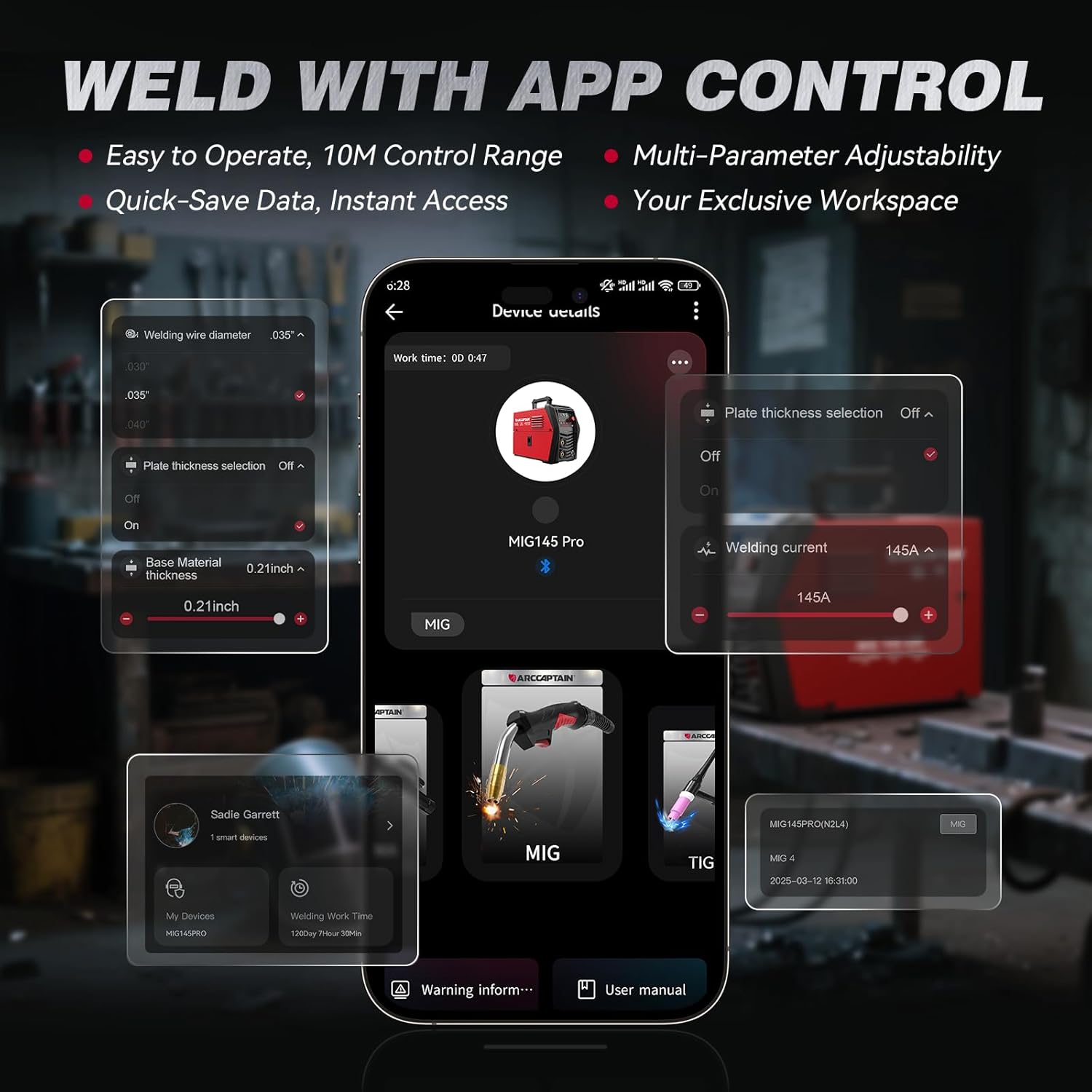
Image 4.1: The ARCCAPTAIN app interface, demonstrating remote control capabilities for welding parameters.
5. Instruccions de funcionament
5.1 Engegada i selecció de mode
Turn on the welder using the main power switch. The large LED display will illuminate, showing current settings. Use the mode button to select between Flux Core MIG, MMA (Stick), or Lift TIG welding processes.

Image 5.1: The large LED display provides clear, easy-to-read information for setting modes and adjusting parameters.
5.2 Synergic Control (Flux Core MIG)
For Flux Core MIG welding, the synergic control feature simplifies setup. Once you select the wire diameter and material thickness, the welder automatically adjusts the current and wire feed speed to recommended settings. This feature is beneficial for beginners.

Image 5.2: The synergic setting automatically matches wire feed speed and voltage, simplifying operation.
5.3 Manual Parameter Adjustment
For experienced users, parameters can be manually adjusted using the control knob and buttons on the welder's front panel or via the smartphone app. The large LED display provides real-time feedback on adjustments.
5.4 Welding Process Overview
The ARCCAPTAIN MIG145 Pro supports three welding processes:
- Flux Core MIG: Gasless welding suitable for outdoor use and various materials.
- MMA (Stick): Versatile for different rod types and conditions.
- Ascensor TIG: Provides precise welds, requires a separate TIG torch and shielding gas.

Image 5.3: Visual representation of the three welding processes supported by the machine: Flux Core, Stick, and Lift TIG.
5.5 Welding Parameter Guidelines
The following tables provide general guidelines for welding parameters. Actual settings may vary based on material, wire type, and specific application.
| Tipus de cable | Gas de protecció | Gruix del material | Corrent recomanada (A) |
|---|---|---|---|
| Flux E71T-GS | Sense Gas | 0.030" (0.8 mm) | 40-50 |
| Flux E71T-GS | Sense Gas | 0.040" (1.0 mm) | 45-55 |
| Flux E71T-GS | Sense Gas | 0.060" (1.5 mm) | 65-75 |
| Flux E71T-GS | Sense Gas | 0.079" (2.0 mm) | 90-100 |
| Flux E71T-GS | Sense Gas | 0.098" (2.5 mm) | 110-120 |
| Flux E71T-GS | Sense Gas | 0.118" (3.0 mm) | 130-145 |
| Elèctrode | Gruix del material | Corrent recomanada (A) |
|---|---|---|
| 2.5 mm (3/32") | 0.060" (1.5 mm) | 75 |
| 2.5 mm (3/32") | 0.078" (2.0 mm) | 105 |
| 2.5 mm (3/32") | 0.118" (3.0 mm) | 115 |
| 3.2 mm (1/8") | 0.078" (2.0 mm) | 105 |
| 3.2 mm (1/8") | 0.118" (3.0 mm) | 115 |
| 3.2 mm (1/8") | 0.157" (4.0 mm) | 145 |
| Gas de protecció | Tungstè | Gruix del material | Corrent recomanada (A) |
|---|---|---|---|
| 99.9% Ar | 1.6 mm (1/16") | 0.023" (0.6 mm) | 45 |
| 99.9% Ar | 1.6 mm (1/16") | 0.030" (0.8 mm) | 65 |
| 99.9% Ar | 1.6 mm (1/16") | 0.040" (1.0 mm) | 75 |
| 99.9% Ar | 2.4 mm (3/32") | 0.040" (1.0 mm) | 75 |
| 99.9% Ar | 2.4 mm (3/32") | 0.050" (1.25 mm) | 105 |
| 99.9% Ar | 2.4 mm (3/32") | 0.060" (1.5 mm) | 115 |
| 99.9% Ar | 2.4 mm (3/32") | 0.078" (2.0 mm) | 125 |
| 99.9% Ar | 2.4 mm (3/32") | 0.118" (3.0 mm) | 145 |
6. Manteniment
Un manteniment regular garanteix la longevitat i el rendiment òptim del vostre soldador.
- Neteja: Periodically clean the welder's exterior with a dry cloth. Use compressed air to clear dust from ventilation openings. The smart fan design helps reduce dust accumulation.
- Mecanisme d'alimentació de filferro: Inspeccioneu els rodets i el revestiment d'alimentació del filferro per detectar desgast o bloquejos. Netegeu-los o substituïu-los segons calgui per garantir una alimentació del filferro suau.
- Torxa i cables: Check all cables and the welding torch for damage. Replace any worn or damaged components immediately.
- Emmagatzematge: When not in use, store the welder in a clean, dry environment. Use the provided dust cover to protect it from dust and debris.
7. Solució De Problemes
If you encounter issues with your welder, consider the following common troubleshooting steps:
- Sense energia: Check the power cord connection, wall outlet, and circuit breaker. Ensure the welder's power switch is in the 'ON' position.
- Poor Arc Start/Stability: Verify proper grounding of the workpiece. Check for correct wire feed speed and voltage settings. Ensure contact tip and nozzle are clean and free from spatter. For MMA, check electrode condition.
- Problemes d'alimentació de cable: Inspect the wire spool for tangles. Check wire tension and ensure the correct wire feed roller is installed and clean.
- Sobreescalfament: The welder has a smart fan for cooling. If an overheat warning appears, allow the machine to cool down. Ensure ventilation openings are not blocked.
- Problemes de connectivitat de l'aplicació: Ensure Bluetooth is enabled on your smartphone and the welder. Restart both devices if connection fails.
For persistent issues, refer to the comprehensive troubleshooting section in the full product manual or contact ARCCAPTAIN customer support.
8. Especificacions
| Característica | Detall |
|---|---|
| Número de model | MIG145-PRO |
| Fabricant | ARCCAPTAIN |
| Entrada Voltage | 110 volts de corrent altern |
| Processos de soldadura | Flux Core MIG, MMA (Stick), Lift TIG |
| Corrent de sortida màx | 145A |
| Pes de l'article | 10 lliures |
| Dimensions del producte | 14.9 x 5.3 x 9.7 polzades |
| Material | ABS + metall |
| Característiques de control | Synergic Control, APP Control, Large LED Display |

Image 8.1: The compact size and light weight (9.5 lbs) of the ARCCAPTAIN MIG145 Pro, making it portable.
9. Garantia i Suport
For detailed warranty information, please refer to the official documentation included with your product or visit the ARCCAPTAIN official website. For technical support, service, or parts inquiries, please contact ARCCAPTAIN customer service through their official channels.


