Introducció
This manual provides detailed instructions for the safe and proper installation, operation, and maintenance of your BONTEC Single Monitor Desk Mount MDM001A. Please read this manual thoroughly before installation and retain it for future reference.
Informació important de seguretat
- Capacitat de pes: Do not exceed the maximum weight capacity of 22 lbs (10 kg). Overloading may result in property damage or personal injury.
- Mida de la pantalla: This mount is designed for monitors between 13 and 34 inches.
- Compatibilitat VESA: Ensure your monitor has VESA mounting patterns of 75x75mm or 100x100mm.
- Estabilitat de l'escriptori: Verify that your desk surface is stable and strong enough to support the combined weight of the mount and your monitor.
- Instal·lació: Follow all installation steps carefully. If you are unsure about any part of the installation, seek professional assistance.
- Parts mòbils: Be cautious when adjusting the mount to avoid pinching fingers or other body parts.
Contingut del paquet
Si us plau, verifiqueu que tots els components siguin presents i no estiguin danyats abans de continuar amb la instal·lació. Si hi ha alguna peça que falti o que estigui danyada, poseu-vos en contacte amb el servei d'atenció al client.
- Conjunt del braç del monitor
- Escriptori Clamp Component
- Component de la base del ojal
- Placa VESA
- Kit de ferramenta (cargols, volanderes, separadors)
- Tecles Allen
- Clips de gestió de cables

Imatge: Més deview of the BONTEC Single Monitor Desk Mount MDM001A, illustrating the main components and both desk clamp and grommet base installation options.
Configuració i instal·lació
The BONTEC Single Monitor Desk Mount offers two installation methods: Desk Clamp i base amb ullets. Trieu el mètode que millor s'adapti al vostre escriptori.
Comprovació de compatibilitat
- Mida del monitor: 13-34 polzades
- Pes del monitor: Fins a 22 lliures (10 kg)
- Patrons VESA: 75x75mm o 100x100mm
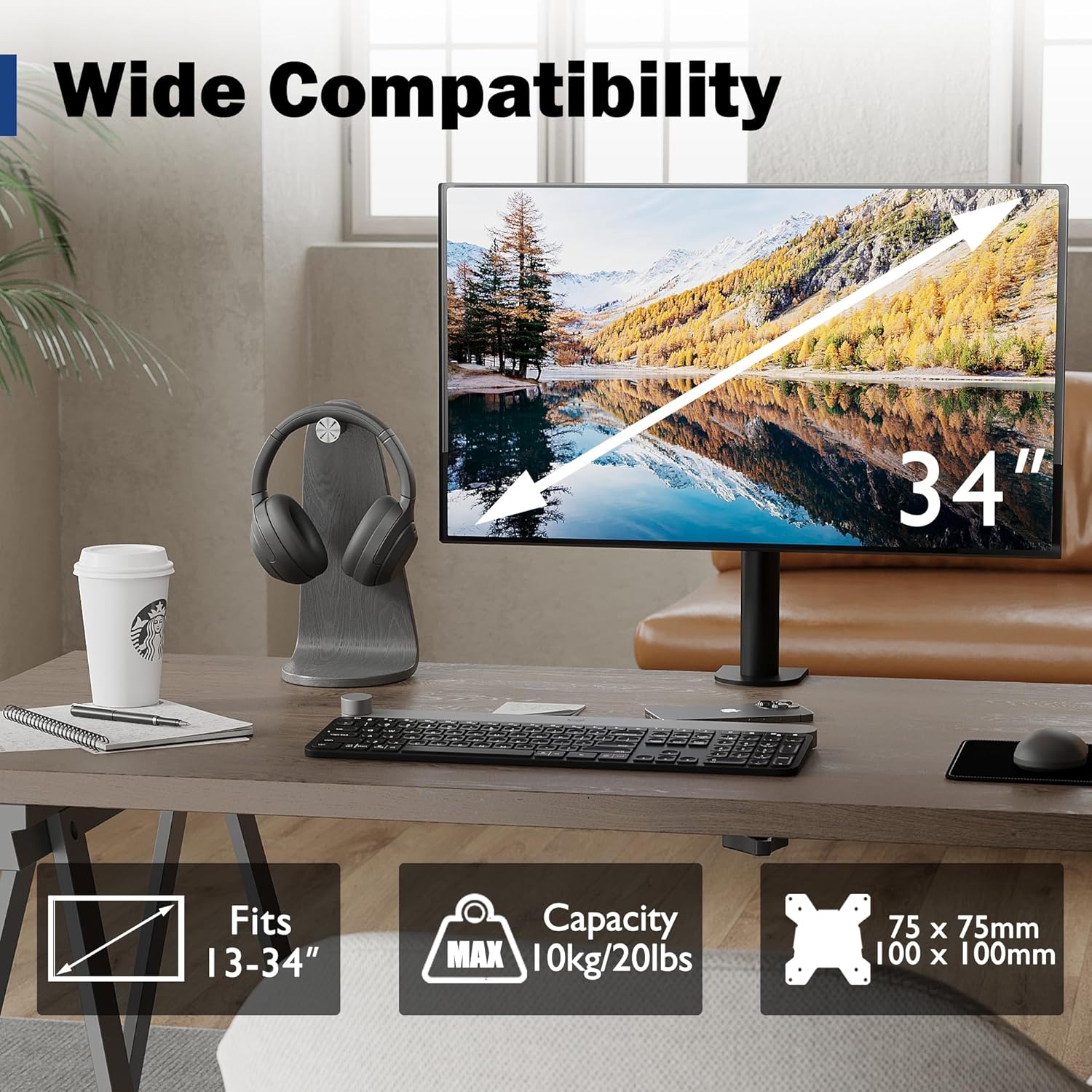
Image: Visual representation of monitor compatibility requirements, including screen size, weight, and VESA patterns.
Mètodes d'instal·lació
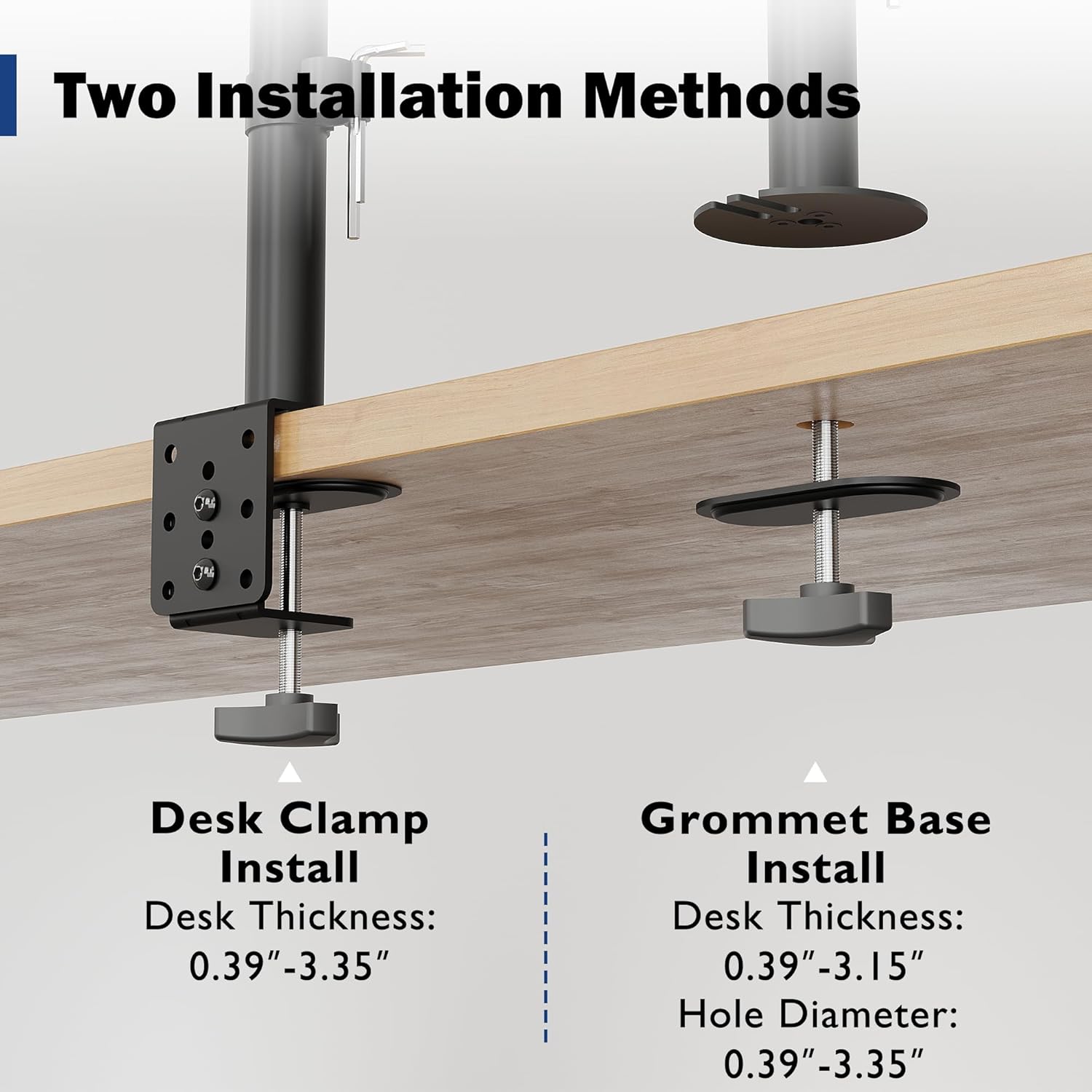
Image: Detailed illustration comparing the Desk Clamp and Grommet Base installation methods, including compatible desk thickness and hole diameter specifications.
Method 1: Desk Clamp Instal·lació
- Col·loca l'escriptori clamp component to the main pole.
- Col·loca el clamp a la vora de l'escriptori. Assegureu-vos que el gruix de l'escriptori estigui entre 0.39 i 3.35 cm.
- Apretar el clamp screw firmly until the mount is securely fixed to the desk.
Method 2: Grommet Base Installation
- If your desk has a bolt-through hole, ensure its diameter is between 0.39" and 3.35" and the desk thickness is between 0.39" and 3.15".
- Disassemble the desk clamp and use the grommet base plate and screw.
- Insert the grommet screw through the desk hole and secure it from underneath with the provided nut.
- Attach the main pole to the grommet base.
Col·locació del monitor
- Attach the VESA plate to the back of your monitor using the appropriate screws and spacers from the hardware kit. Ensure a secure fit.
- Carefully slide the monitor (with the attached VESA plate) onto the mounting head of the arm.
- Tighten any security screws on the mounting head to prevent accidental dislodging.
Funcionament i ajustos
The BONTEC monitor mount offers various adjustments to optimize your viewing experience and ergonomic posture.
Ajust d'alçada
The monitor can be raised or lowered along the 16.73-inch pole. Loosen the collar on the pole, adjust the monitor to the desired height, and then re-tighten the collar to secure its position.

Image: Illustration of the monitor mount's vertical height adjustment capability along the central pole.
Tilt, Swivel, and Rotation
The special swivel head design allows for flexible positioning:
- Inclinació: Adjust the screen vertically by ±15° to reduce glare and find the optimal viewangle de ing.
- Girar: Rotate the monitor horizontally up to 360° to share your screen or change viewdirecció.
- Rotació: Rotate the screen 360° from landscape to portrait mode for different tasks.
After adjusting the angle, use the back screw lock on the VESA plate to provide extra security and maintain the desired position.

Image: Visual guide to the tilt, swivel, and rotation adjustments available on the monitor mount.
Gestió de cables
Utilize the integrated cable management clips along the pole to route and organize your monitor cables. This helps maintain a tidy workspace and prevents cable clutter.
An integrated storage slot for Allen keys is also provided on the pole for convenient access to adjustment tools.

Imatge: Primer pla view of the cable management clips and the Allen key storage slot on the mount's pole.
Manteniment
- Neteja: Netegeu la muntura amb un drap suauamp drap. Eviteu productes de neteja abrasius o dissolvents que puguin danyar l'acabat.
- Comprovacions periòdiques: Reviseu periòdicament tots els cargols i connexions per assegurar-vos que estiguin ben ajustats i segurs. Torneu a apretar-los si cal.
- Lubricació: No lubrication is typically required for this product.
Resolució de problemes
| Problema | Causa possible | Solució |
|---|---|---|
| El monitor s'enfonsa o no manté la posició. | Mounting screws are loose; monitor weight exceeds capacity. | Ensure all screws, especially the back screw lock on the VESA plate, are tightened. Verify monitor weight is within 22 lbs (10 kg). |
| Mount is unstable on the desk. | Escriptori clamp/grommet base is not tightened sufficiently. | Torneu a apretar les pinces de l'escriptoriamp or grommet base screw. Ensure desk thickness is within specified limits. |
| Dificultat per ajustar l'alçada del monitor. | Height adjustment collar is too tight. | Loosen the height adjustment collar on the pole before attempting to adjust height. Re-tighten once desired height is achieved. |
| Els cables són desordenats. | No s'utilitza la gestió de cables. | Route cables through the integrated cable management clips on the pole. |
Especificacions
- Marca: BONTEC
- Model: MDM001A
- Compatibilitat de la mida de la pantalla: 13-34 polzades
- Capacitat de pes: 22 lliures (10 kg)
- Compatibilitat VESA: 75x75mm, 100x100mm
- Rang inclinat: ±15°
- Interval de rotació: 360°
- Rotació: 360°
- Ajust d'alçada: Up to 16.73 inches (along pole)
- Escriptori Clamp Gruix: 0.39" - 3.35"
- Grommet Base Desk Thickness: 0.39" - 3.15"
- Grommet Hole Diameter: 0.39" - 3.35"
- Material: Metall
- Color: Negre
Garantia i Suport
Specific warranty details are not provided within this manual. For warranty information, technical support, or to inquire about replacement parts, please visit the official BONTEC weblloc web o contacteu directament amb el seu servei d'atenció al client.
Weblloc: Botiga BONTEC a Amazon


