1. Introducció
The Vimtag 847-4 4MP CCTV Camera is a versatile security solution designed for both indoor and outdoor environments. It offers 2.5K resolution video, 360-degree coverage, and advanced features such as starlight night vision, two-way audio, and smart motion detection. This manual provides instructions for setting up, operating, maintaining, and troubleshooting your camera.
2. Què hi ha a la caixa
Desembaleu la caixa amb cura i assegureu-vos que hi hagi tots els elements:
- 1x Vimtag 847 Outdoor and Indoor CCTV Camera
- 1x adaptador
- 1x cable de càrrega
- 2x Auxiliary Positioning Stickers
- Cargols de muntatge
3. Producte acabatview
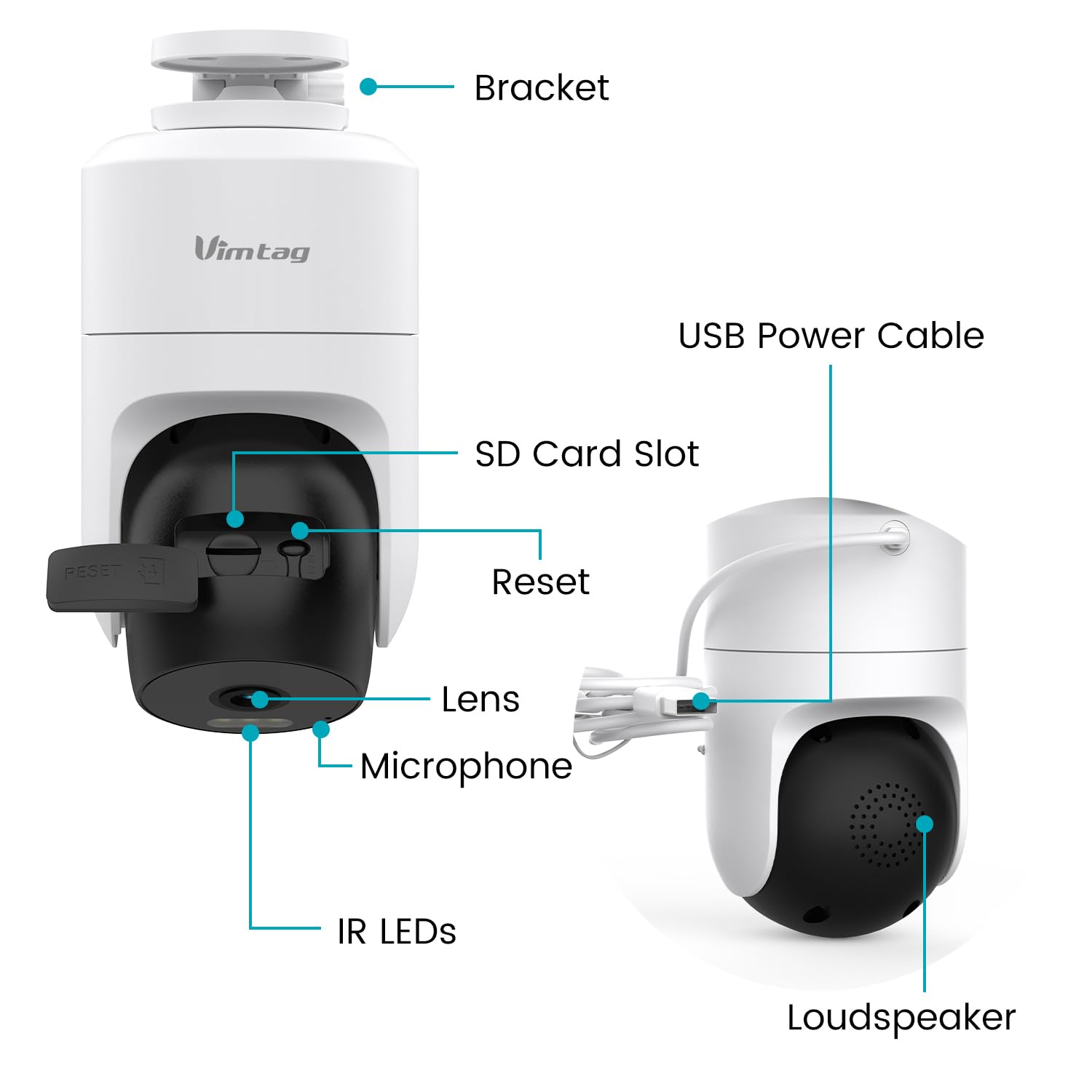
Familiaritzeu-vos amb els components de la càmera:

This image displays the various components of the Vimtag 847-4 camera, including the bracket, USB power cable, SD card slot, reset button, lens, microphone, IR LEDs, and loudspeaker.
- Parèntesis: For mounting the camera to a wall or ceiling.
- Cable d'alimentació USB: Connecta la càmera a l'adaptador de corrent.
- Ranura per a targeta SD: Insert a Micro SD card (up to 512GB) for local storage.
- Botó de restabliment: S'utilitza per restablir la càmera a la configuració de fàbrica.
- Lent: Captura vídeo footage.
- Micròfon: Per a entrada d'àudio i comunicació bidireccional.
- LED IR: Infrared lights for night vision.
- Altaveu: Per a sortida d'àudio i comunicació bidireccional.
4. Instruccions de configuració
Follow these steps to set up your Vimtag 847-4 camera:
- Enceneu la càmera:

Connect the charging cable to the camera and plug the adapter into a power outlet. The camera will power on and indicate readiness for setup.
- Descarrega el Vimtag Aplicació:

Cerca 'Vimtag' in your mobile device's app store (iOS or Android) and download the official application.
- Afegeix un dispositiu a l'aplicació:

Open the Vimtag app, create an account or log in, and tap the '+' icon to add a new device. Select the appropriate camera type (Dome Camera) and follow the on-screen instructions to connect the camera to your 2.4GHz Wi-Fi network.
- Verifica la connexió:

Once connected, you should see the live video feed from your camera in the app. This confirms successful setup.
- Muntatge de la càmera:
Use the included auxiliary positioning stickers and mounting screws to securely install the camera on a wall, ceiling, or other desired surface. Ensure the camera has a clear line of sight and is within Wi-Fi range.
5. Instruccions de funcionament
5.1 Viu View i la reproducció
Access the live video feed and review foo gravattage through the Vimtag app. The camera supports 24/7 recording to an inserted Micro SD card (up to 512GB) or optional cloud storage.

This image shows the live video feed from the camera displayed on a smartphone, allowing remote monitoring.
5.2 Àudio bidireccional
The camera features a built-in microphone and loudspeaker, enabling two-way communication. Use this feature to speak with individuals near the camera or deter intruders.

This image illustrates the two-way audio function, showing a user communicating with a delivery person via the camera and smartphone app.
5.3 Detecció de moviment i alertes
Configure motion and sound detection settings within the Vimtag app. The camera can detect human movement and sounds, sending instant alerts to your device.

This image shows an on-screen notification indicating a motion detection alert from the camera.

This image displays the motion detection settings interface within the Vimtag app, allowing users to customize sensitivity and detection types.
5.4 Visió nocturna
The camera provides clear visibility in low-light conditions through its starlight night vision, offering both full-color and infrared night vision options.

This image compares the visual output of full-color night vision and infrared night vision modes, demonstrating enhanced clarity in low light.
5.5 Multi-Terminal Viewing
Share camera access with family members or view footage on multiple devices, including iOS, Android, Mac, iPad, and Windows platforms.
This image illustrates the capability to view càmera footage across various devices and locations globally.
5.6 Control per veu amb Amazon Alexa
Integrate your Vimtag camera with Amazon Alexa for convenient voice control. You can request Alexa to display the camera feed on compatible smart displays.

This image shows a smart display showing the camera feed after a voice command to Alexa.
6. Manteniment
6.1 Neteja
Regularly clean the camera lens with a soft, dry cloth to ensure clear image quality. Avoid using harsh chemicals or abrasive materials that could damage the lens or casing.
6.2 actualitzacions de microprogramari
Periodically check the Vimtag app for available firmware updates. Keeping your camera's firmware up-to-date ensures optimal performance, security, and access to new features.
7. Solució De Problemes
- La càmera no es connecta a la Wi-Fi: Ensure your Wi-Fi network is 2.4GHz. Verify the Wi-Fi password is correct. Move the camera closer to the router. Reset the camera using the reset button and try the setup process again.
- Sense canal de vídeo: Check if the camera is powered on. Ensure a stable Wi-Fi connection. Restart the camera and the app.
- No s'han rebut alertes de moviment: Verify motion detection is enabled in the app settings. Check app notification permissions on your mobile device. Ensure the camera has a clear view de la zona que voleu controlar.
- L'àudio bidireccional no funciona: Check microphone and speaker permissions for the Vimtag app on your device. Ensure the camera's microphone and loudspeaker are not obstructed.
- La targeta SD no grava: Ensure the Micro SD card is inserted correctly and is not full. Format the SD card through the app if issues persist.
8. Especificacions
| Característica | Detall |
|---|---|
| Número de model | 847-4 |
| Resolució de captura de vídeo | 1440p (2.5K) |
| Tecnologia de comunicació sense fils | Wi-Fi (2.4 GHz) |
| Viewangle ing | 360 graus |
| Gamma de visió nocturna | 50 peus |
| Velocitat de fotogrames | 25 fotogrames per segon |
| Nivell de resistència a l'aigua | Impermeable (IP66) |
| Mida màxima admesa de la memòria flash | 512 GB (Micro SD) |
| Tipus d'alerta | Àudio i moviment |
| Mètode de control | Aplicació, Amazon Alexa |
| Font d'alimentació | Elèctric amb cable (5 volts DC) |
| Dimensions de l'article (L x A x A) | 10 x 10 x 10 centímetres |
| Pes de l'article | 277 g |
| Ús interior/exterior | Interior, Exterior |
9. Garantia i Suport
The Vimtag 847-4 CCTV Camera comes with a 2 any de garantia. For technical support, warranty claims, or further assistance, please contact Vimtag atenció al client a client@vimtag.com.


