Introducció
This manual provides detailed instructions for the setup, operation, and maintenance of your FUDONI GC888 Projector. Designed for a versatile viewing experience, this projector features native 1080P resolution with 4K support, electric focus, automatic keystone correction, and advanced connectivity options including WiFi 6 and Bluetooth 5.2. Please read this manual thoroughly to ensure optimal performance and longevity of your device.

Image: FUDONI GC888 Projector showcasing les seves característiques principals.
Què hi ha a la caixa
Verifiqueu que tots els elements que s'enumeren a continuació s'inclouen al vostre paquet:
- FUDONI GC888 Projector
- Control remot
- Cable HDMI
- Cable d'alimentació
- Cable AV
- Manual d'usuari
Video: Unboxing the FUDONI GC888 Projector and its included accessories.
Especificacions
| Característica | Detall |
|---|---|
| Marca | FUDONI |
| Número de model | GC888 |
| Resolució de visualització | 1920 x 1080 (1080P natiu, compatible amb 4K) |
| Tecnologia de connectivitat | Bluetooth 5.2, HDMI, TV Stick, USB, Wi-Fi 6 (5G+2.4G) |
| Característiques especials | Electric Focus, Auto Keystone, Built-In 5W Speaker |
| Mida de la pantalla de projecció | 30-300 polzades |
| Distància de projecció | 3.2-29.6 peus |
| Pes de l'article | 3.98 lliures |
| Dimensions del paquet | 13.39 x 8.74 x 5.04 polzades |
Configuració
1. Col·locació física
Place the projector on a stable, flat surface or mount it using a compatible tripod or ceiling mount. Ensure the lens is facing the projection surface (wall or screen) and there are no obstructions.

Image: Various projector placement options including desktop, ceiling, and tripod mounting.
2. Connexió d'alimentació
Connect the provided power cord to the projector's power input and then plug it into a standard electrical outlet.
3. Dispositius de connexió
The FUDONI GC888 Projector offers multiple ways to connect your devices:
- HDMI: Use the included HDMI cable to connect devices like TV sticks, laptops, gaming consoles (Xbox, PS5), or Blu-ray players.
- USB: Inseriu una unitat flash USB en un dels ports USB per reproduir contingut multimèdia files directament.
- DE: Use the included AV cable to connect older devices with AV output.
- Conector d'àudio de 3.5 mm: Connecteu altaveus o auriculars externs per obtenir un àudio millorat.

Imatge: Més deview of the projector's connectivity ports and compatible devices.
Connecting a TV Stick (e.g., Amazon Fire Stick)
- Plug the power cable into your TV stick.
- Plug the TV stick into the HDMI port on the projector.
- Plug the other end of the TV stick's power cable into a USB port on the projector or a power outlet.
- Select HDMI as the signal source on the projector.
Video: Step-by-step guide on how to connect a TV stick to the FUDONI GC888 Projector.
4. Wireless Connectivity (WiFi & Bluetooth)
The projector supports dual-band WiFi 6 (2.4G & 5G) for fast and stable screen mirroring, and Bluetooth 5.2 for audio connections.
- Connexió WiFi: Navigate to the WiFi settings on the projector's home screen to connect to your home network. This enables screen mirroring from iOS, Android, and Windows devices.
- Connexió Bluetooth: Access the Bluetooth settings to pair with external Bluetooth speakers or use the projector as a Bluetooth speaker for your phone/computer.

Image: Projector connected via WiFi 6, mirroring content from a laptop and smartphone.

Image: Projector using Bluetooth 5.2 for audio output to external speakers and input from a smartphone.
En funcionament
1. Encendre/apagar
Premeu el botó d'engegada del projector o del comandament a distància per encendre o apagar el dispositiu.
2. Electric Focus
Achieve a clear image instantly using the remote control. Press the "F+" button to sharpen the image or "F-" to soften it. This eliminates the need for manual lens rotation.

Image: Electric Focus feature, adjusting image clarity with the remote control.
3. Correcció automàtica de la distorsió trapezoidal
The projector is equipped with automatic keystone correction. When activated, the image will automatically adjust to a rectangular shape within 2 seconds, even if the projector is placed at an angle. Manual four-sided/cornerstone correction is also available via the remote control for fine-tuning.

Image: Automatic Keystone Correction ensuring a perfectly rectangular projection.
4. Adjusting Projection Size and Distance
The projector can display images from 30 to 300 inches, with optimal projection distances ranging from 3.2 to 29.6 feet. Adjust the distance between the projector and the screen to achieve your desired image size. Digital zoom is also available for further adjustments.
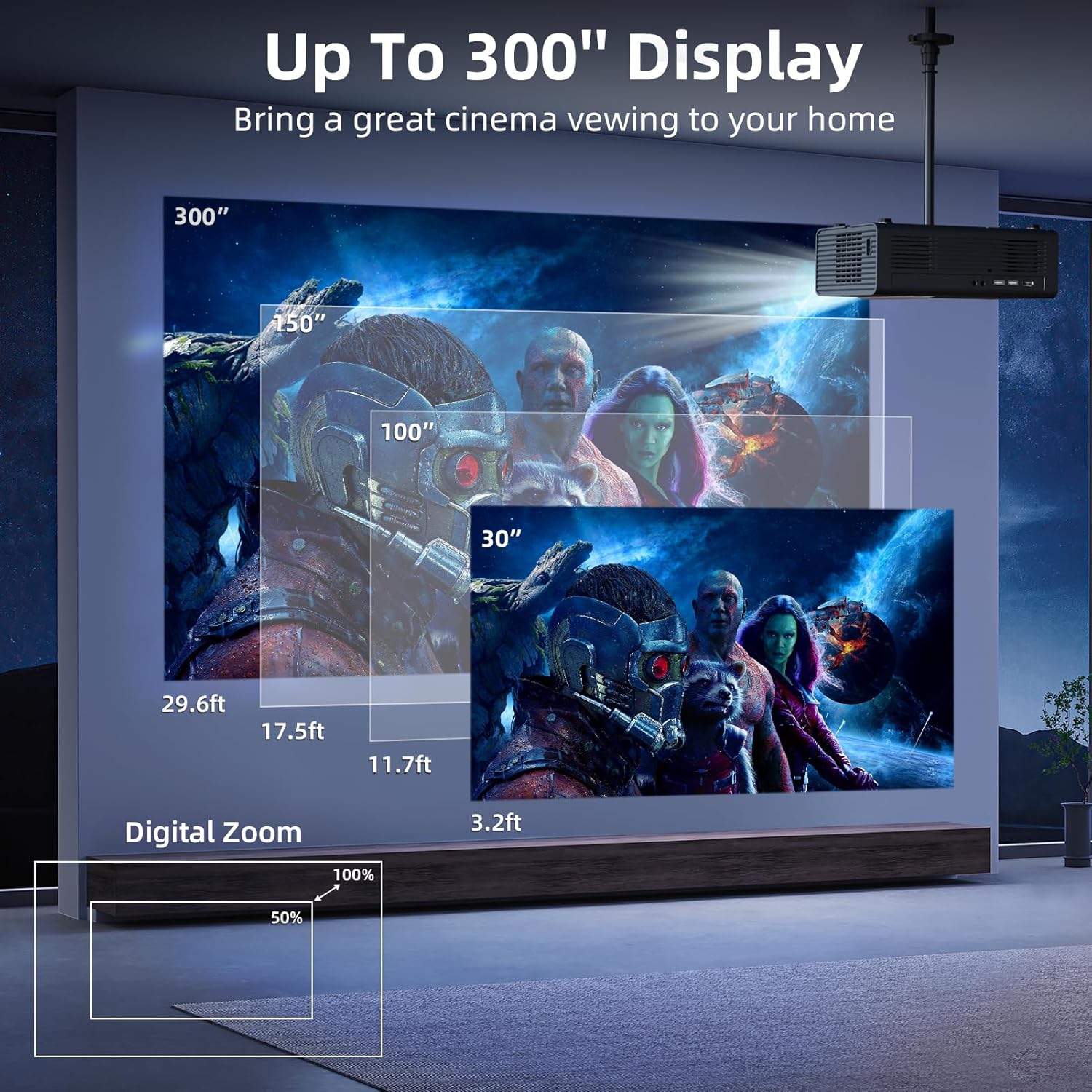
Image: Projection size and distance guide for the FUDONI GC888 Projector.
5. Navegació i configuració
Use the remote control or the buttons on top of the projector to navigate the user interface. The home screen provides quick access to signal sources, mirroring options, and various settings.
- Mode d'imatge: Adjust brightness, contrast, and color settings.
- Temperatura de color: Select between Cool, Standard, or Warm color profiles.
- Mode de so: Choose between Standard, Music, or Movie audio profiles.
- Temporitzador d'apagada: Estableix un temporitzador per a l'aturada automàtica.
Manteniment
Un manteniment regular garanteix la longevitat i el rendiment òptim del projector.
- Neteja de lents: Use the provided cleaning swabs or a soft, lint-free cloth to gently clean the projector lens. Avoid abrasive materials.
- Filtre de pols: The projector features a removable dust filter. It is recommended to clean the dust filter once a month to prevent dust accumulation inside the lens, which can affect image clarity.
- Ventilació: Ensure the projector's ventilation ports are clear and unobstructed to prevent overheating. The projector has a superior heat dissipation system designed for efficient cooling.

Image: Dustproof design of the projector, highlighting the importance of a clean lens.

Image: Superior Heat Dissipation System for efficient cooling and quiet operation.
Resolució de problemes
- Sense imatge/Imatge borrosa:
- Ensure the power cable is securely connected and the projector is powered on.
- Feu servir l'enfocament elèctric (botons F+/F- del comandament a distància) per ajustar la claredat de la imatge.
- Check the projection distance and adjust if necessary.
- Verifiqueu que s'ha seleccionat la font d'entrada correcta.
- Distorted Image (not rectangular):
- Ensure "Automatic Trapezoid" is enabled in the Projection settings.
- Use manual four-sided/cornerstone correction via the remote for fine adjustments.
- Sense so:
- Comproveu el nivell de volum tant del projector com del dispositiu connectat.
- If using external speakers, ensure they are properly connected via Bluetooth or the 3.5mm audio jack.
- Verify the sound mode settings.
- Problemes de rèplica de pantalla:
- Ensure both the projector and your device are connected to the same WiFi network (2.4G or 5G).
- Some streaming services (e.g., Netflix, Hulu, Disney+) may block screen mirroring due to copyright protection. In such cases, connect a TV stick or laptop via HDMI.
Garantia i Suport
For warranty information, technical support, or any inquiries, please refer to the contact details provided in your User Manual or visit the official FUDONI weblloc. Conserveu el rebut de compra per a reclamacions de garantia.


