Introducció
This manual provides essential information for the safe and efficient operation of your CLARION JM-KICK 6 Bluetooth Party Speaker. Please read these instructions thoroughly before using the product and retain this manual for future reference.
Contingut del paquet:
- 1pc Speaker Unit
- 2pc Wireless Microphones
- 1pc USB Charging Cable
- 1pc User Manual (this document)
- 1 targeta de garantia
Informació important de seguretat
Per garantir un funcionament segur i evitar danys, observeu les precaucions següents:
- No exposeu l'altaveu a l'aigua ni a una humitat excessiva.
- Do not place near heat sources or open flames.
- Utilitzeu només el cable de càrrega subministrat.
- No intenteu desmuntar ni reparar la unitat vosaltres mateixos. Poseu-vos en contacte amb personal de servei qualificat.
- Mantenir fora de l'abast dels nens.
- Assegureu-vos que hi hagi una ventilació adequada al voltant de l'altaveu durant l'ús.
Producte acabatview
The CLARION JM-KICK 6 is a portable 40W RMS Bluetooth party speaker featuring a 13.3 cm super woofer, karaoke functionality, and Bluetooth v5.0 connectivity. It includes two wireless microphones for an enhanced audio experience.
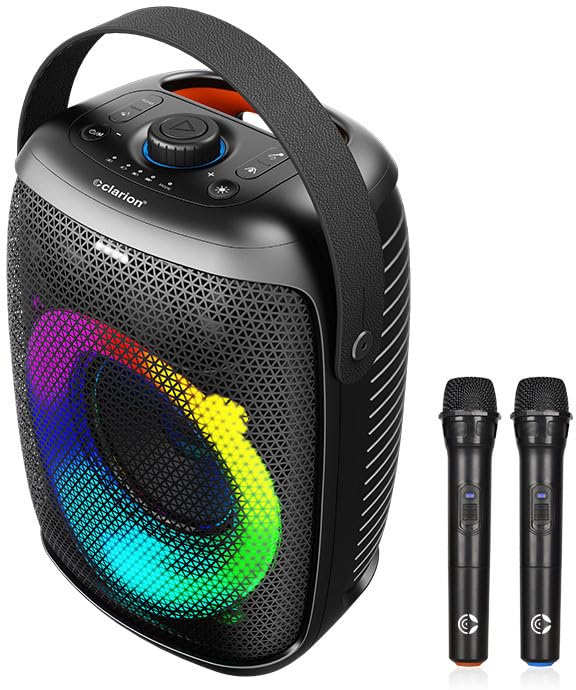
Figure 1: CLARION JM-KICK 6 Bluetooth Party Speaker and included wireless microphones.
This image displays the main speaker unit with its integrated handle and front grille, showcasing the multi-color LED lighting effect. Two wireless microphones are positioned to the right of the speaker.
Controls i Ports
Figure 2: Close-up of the top control panel.
The top panel features various buttons and a central rotary knob for controlling power, volume, playback, and lighting effects. The Clarion logo is visible below the controls.
Refer to the diagram above for the location of the following controls:
- Botó d'encesa: Encén/apaga l'altaveu.
- Pom de volum: Ajusta el volum mestre.
- Botó Reproduir/Pausa: Controla la reproducció de suports.
- Botó de mode: Canvia entre els modes d'entrada (Bluetooth, USB, AUX).
- Botó de llum: Toggles or changes LED light effects.
- Entrada de micròfon: For wired microphones (if applicable, though product comes with wireless).
- Port USB: For media playback from USB drives or charging.
- Port de càrrega: Per connectar el cable de càrrega USB.
Configuració
Carregant l'altaveu
- Connecteu el cable de càrrega USB proporcionat al port de càrrega de l'altaveu.
- Connect the other end of the USB cable to a compatible USB power adapter (not included) or a powered USB port.
- The charging indicator light will illuminate. The speaker is fully charged when the indicator light changes or turns off (refer to specific LED behavior in the product's quick start guide if available).
Encès/Apagat
- Per encendre: Press and hold the Power button until the speaker powers on.
- Per apagar: Premeu i manteniu premut el botó d'engegada fins que l'altaveu s'apagui.
Instruccions de funcionament
Connexió Bluetooth
- Assegureu-vos que l'altaveu estigui encès.
- The speaker will automatically enter Bluetooth pairing mode, indicated by a flashing LED light (refer to specific LED behavior).
- Al dispositiu mòbil (telèfon intel·ligent, tauleta, ordinador portàtil), activeu el Bluetooth i cerqueu els dispositius disponibles.
- Select "JM-KICK 6" from the list of devices.
- Un cop connectat, l'altaveu emetrà un so de confirmació i l'indicador LED deixarà de parpellejar.
- Ara pots reproduir àudio des del teu dispositiu a través de l'altaveu.
Using Wireless Microphones
Figure 3: Wireless microphones.
This image shows the two black wireless microphones, each with a power button and a Clarion logo at the base.
- Assegureu-vos que l'altaveu estigui encès.
- Insert batteries into the wireless microphones (if not pre-installed).
- Power on each microphone using its dedicated power button.
- The microphones should automatically connect to the speaker. If not, refer to the microphone's individual instructions for pairing.
- Adjust the microphone volume using the speaker's controls or dedicated microphone volume controls if available.
Reproducció USB
- Inseriu una unitat flash USB que contingui àudio MP3 files al port USB de l'altaveu.
- The speaker should automatically switch to USB mode and begin playing audio. If not, press the "Mode" button to select USB input.
- Use the Play/Pause and Volume controls on the speaker to manage playback.
Adjusting LED Lights
Press the "Light" button on the speaker's control panel to cycle through different LED lighting modes or to turn the lights off.
Manteniment
- Neteja: Feu servir un drap suau i sec per netejar l'exterior de l'altaveu. No utilitzeu netejadors líquids ni materials abrasius.
- Emmagatzematge: Quan no l'utilitzeu durant períodes prolongats, guardeu l'altaveu en un lloc fresc i sec, allunyat de la llum solar directa i de temperatures extremes.
- Cura de la bateria: For optimal battery life, fully charge the speaker before first use and recharge it regularly, even if not used frequently. Avoid completely draining the battery.
Resolució de problemes
| Problema | Causa possible | Solució |
|---|---|---|
| Sense poder | Battery drained; Power button not pressed | Charge the speaker; Press and hold the Power button |
| Sense so | Volum massa baix; Mode d'entrada incorrecte; Dispositiu no connectat | Increase volume; Press Mode button to select correct input; Re-pair Bluetooth device |
| Error de vinculació de Bluetooth | L'altaveu no està en mode d'emparellament; el dispositiu és massa lluny; l'interferència | Ensure speaker is in pairing mode; Move device closer; Turn off other Bluetooth devices |
| El micròfon no funciona | Microphone off; Batteries low/dead; Not paired | Turn on microphone; Replace batteries; Refer to microphone pairing instructions |
Especificacions
| Característica | Detall |
|---|---|
| Model | JM-KICK 6 |
| Sortida d'àudio | RMS de 40 Watts |
| Mida del woofer | 13.3 cm Super Woofer |
| Versió Bluetooth | v5.0 |
| Connectivitat | Bluetooth, USB, Microphone (wired/wireless) |
| Canals | 2 (estèreo) |
| Tipus d'altaveu | Actius |
| Dimensions | 38.3 x 29 x 23 cm (Dimensions del paquet) |
| Color | Negre |
Garantia i Suport
The CLARION JM-KICK 6 speaker comes with a 1 any de garantia des de la data de compra. Conserveu el rebut de compra i la targeta de garantia per a qualsevol reclamació de garantia.
For technical support, service, or warranty inquiries, please contact Clarion Computers Private Limited customer care:
- Atenció al client: 8100-028-028
- Fabricant: Clarion Computers Private Limited
Nota: La garantia no cobreix els danys causats per mal ús, accidents, modificacions no autoritzades o desgast normal.


