Introducció
Thank you for choosing the ZAQE A55 Digital Voice Recorder. This device is designed for high-quality audio recording with features such as voice activation, password protection, and a large 64GB internal memory. Please read this manual carefully to understand its functions and ensure optimal performance.

Image: The ZAQE A55 Digital Voice Recorder highlighting its key features: HD Recording, Voice Activated Recording, Password Lock, Music Playing, A-B Repeat, and Built-in Speaker.
Contingut del paquet
- 1x ZAQE A55 Voice Recorder
- 1 x auriculars
- 1x cable USB tipus C
- 1 x manual d'usuari

Imatge: Representació visual dels elements inclosos en el paquet del producte.
Producte acabatview
Familiarize yourself with the physical components of your ZAQE A55 recorder.

Imatge: Frontal view of the ZAQE A55 recorder, displaying the screen, REC, PLAY, STOP, and MENU buttons.

Davant View

lateral View (with clip)

Enrere View
The device features a clear display, dedicated recording and playback buttons, and side controls for volume and navigation. The built-in microphone is located at the top, and the USB-C port for charging and data transfer is typically at the bottom or side.
Configuració
1. Càrrega inicial
Before first use, fully charge the device. Connect the supplied USB Type-C cable to the recorder and a power source (e.g., computer USB port or USB wall adapter). The battery indicator on the screen will show charging status. A full charge takes approximately 3 hours.
2. Encendre/apagar
- Encès: Premeu i manteniu premut el botó d'engegada (normalment al lateral) durant uns segons fins que la pantalla s'il·lumini.
- Apagar: Premeu i manteniu premut el botó d'engegada fins que el dispositiu s'apagui.
3. Configuració de la data i l'hora
It is recommended to synchronize the recorder's time with your local time for accurate file vegades mésamps. This setting is usually found in the device's menu under 'System Settings' or 'Date/Time'. Refer to the on-screen prompts for navigation.
Instruccions de funcionament
1. Enregistrament bàsic
- Assegureu-vos que la gravadora estigui engegada.
- Premeu el botó REC button once to start recording. The screen will display recording status and time.
- Per aturar la gravació, premeu REC botó de nou. Premeu-lo una vegada més per reprendre.
- To stop and save the recording, press the STOP botó. El file es desarà automàticament.

Image: Illustrates the simple one-touch recording operation.
The recorder supports high-definition recording up to 3072kbps, with options for 512kbps and 1536kbps. These settings can typically be adjusted in the recording settings menu.

Image: The recorder's screen showing HD recording settings and a graphic representing sound waves for clear audio.
2. Enregistrament activat per veu (VAR)
The VAR function allows the recorder to start recording only when sound is detected, saving memory space and battery life by skipping silent periods.
- Navegueu fins al menú de configuració de gravació.
- Select 'Voice Activated Recording' or 'VOR' (Voice Operated Recording).
- Choose a sensitivity level (e.g., 1 to 5, where 5 is most sensitive).
- Start recording as usual. The device will now only record when sound is present.

Image: A visual explanation of Voice Activated Recording with adjustable sensitivity levels, showing the recorder in a professional environment.
3. Reproducció
- From the main menu, select 'Recordings' or 'Files'.
- Feu servir els botons de navegació per seleccionar l'àudio desitjat file.
- Premeu el botó JUGAR per iniciar la reproducció.
- Use the volume controls (usually side buttons) to adjust the playback volume.
Reproducció repetida AB
Aquesta funció permet repetir un segment específic d'un àudio file.
- During playback, press the 'MENU' button (or a dedicated A-B button if available) to mark point A.
- Press the same button again to mark point B. The section between A and B will loop.
- Press the button a third time to exit A-B repeat mode.
Reproducció de velocitat variable
Adjust the playback speed from -8x to +8x to listen to recordings faster or slower.
- During playback, access the playback options (often via the 'MENU' button).
- Select 'Playback Speed' and use navigation buttons to adjust.

Image: The recorder's screen showing A-B repeat markers and a slider for adjusting playback speed.
4. File Gestió i Transferència
The recorder has 64GB of built-in memory. To transfer files a un ordinador:
- Connect the recorder to your computer using the provided USB Type-C cable.
- La gravadora apareixerà com una unitat de disc extraïble a l'ordinador.
- Obriu la unitat per accedir a l'àudio gravat files (usually in a folder named 'RECORD' or similar).
- Copia i enganxa files to your computer as needed.

Image: The recorder connected to a laptop, illustrating the process of transferring recorded files.
5. Protecció amb contrasenya
Set a power-on password to protect your recordings and data.
- Go to 'System Settings' or 'Security' in the device menu.
- Select 'Set Password' or 'Password Protection'.
- Follow the on-screen instructions to create and confirm your password.
- Remember your password, as there may not be a recovery option.
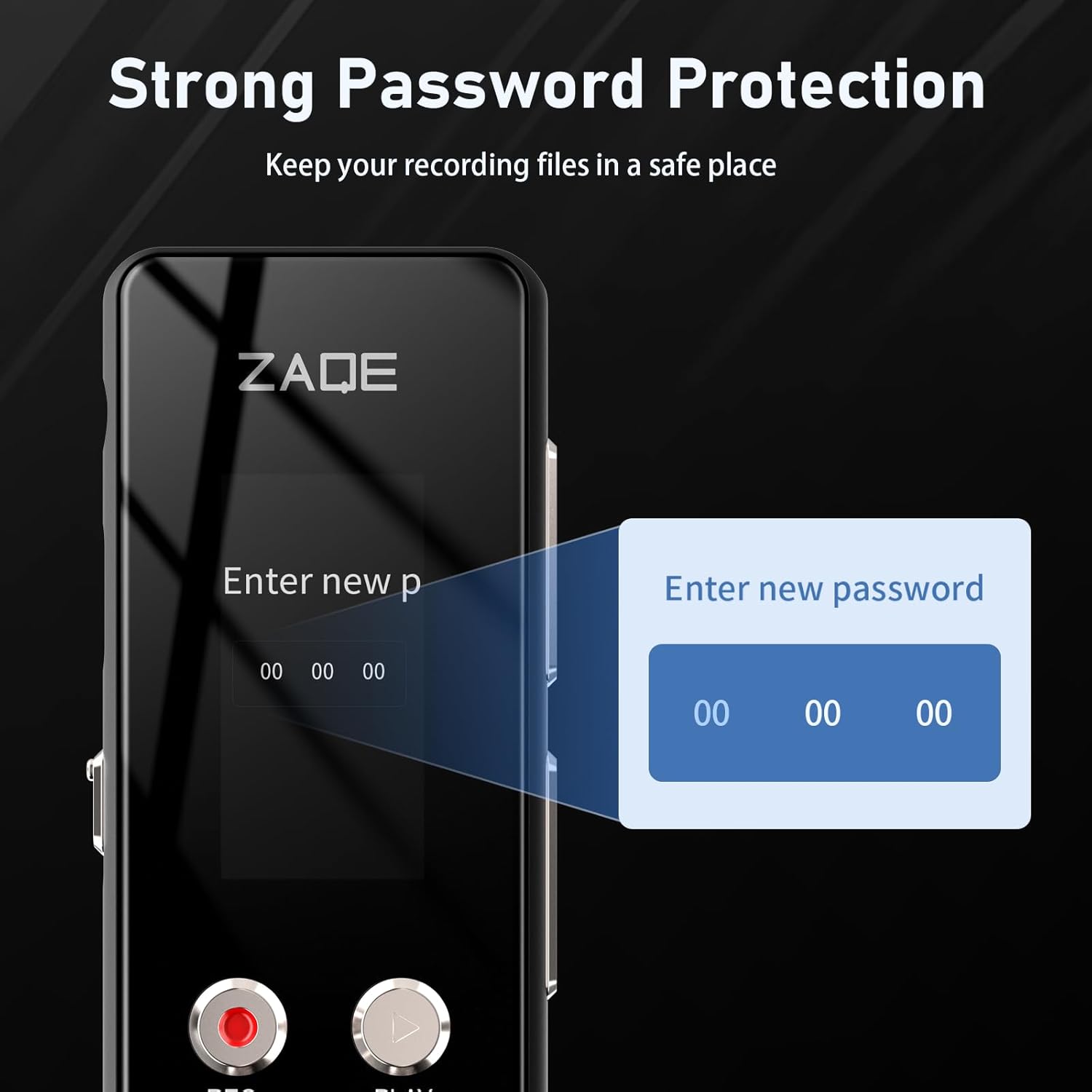
Image: The recorder's display showing the interface for setting a new password.
6. Timer Recording
Schedule the recorder to start and stop recording automatically at specific times.
- Access the 'Timer Recording' or 'Scheduled Recording' option in the menu.
- Set the desired start and end times for the recording session.
- Ensure the device has sufficient battery life for the scheduled recording.

Image: The recorder displaying options for setting start and finish times for automatic recording.
7. Altres funcions
- Reproductor mp3: The device can play MP3 and other audio files. Transfer music files to the recorder's memory and access them via the 'Music' or 'Player' menu.
- Altaveu integrat: Play back recordings directly through the integrated speaker.
- Ajust de volum: Use the dedicated volume buttons on the side of the device.
- Suport multi-idioma: Change the device's interface language through the 'System Settings' menu.
- Line-in Recording: Connect external audio sources via the 3.5mm audio input for direct recording.

Imatge: Una completa view of the recorder highlighting its various functionalities.
Especificacions
| Model | A55 |
| Capacitat de memòria | 64 GB (integrat) |
| Velocitat de bits de gravació | 512kbps / 1536kbps / 3072kbps |
| Format d'enregistrament | WAV |
| Compatibilitat amb formats musicals | MP3, WAV, APE, WMA, FLAC (16bit/48khz) |
| Tipus de bateria | Polímer de liti |
| Durada de la bateria (enregistrament) | Up to 134 hours (at 512Kbps) |
| Temps de càrrega | Aproximadament 3 hores |
| Interfície | USB tipus C, presa d'àudio de 3.5 mm |
| Pes de l'article | 1.88 unces (53.3 grams) |
| Dimensions | 5.28 x 5.24 x 0.83 polzades |
Resolució de problemes
- El dispositiu no s'encén: Ensure the battery is charged. Connect to a power source and try again. If unresponsive, perform a reset (refer to device-specific reset instructions if available, or hold power button for an extended period).
- Mala qualitat d'enregistrament:
- Check recording bit rate settings; higher bit rates (e.g., 1536kbps, 3072kbps) offer better quality.
- Assegureu-vos que el micròfon no estigui obstruït.
- Reduce background noise in the recording environment.
- Adjust VAR sensitivity if using voice activation.
- No es pot transferir files a l'ordinador:
- Ensure the USB Type-C cable is securely connected to both the recorder and the computer.
- Prova amb un port o cable USB diferent.
- Restart both the recorder and the computer.
- On some computers, you may need to select 'Mass Storage' or 'Connect to PC' option on the recorder's screen after connecting.
- Password forgotten: If you forget your password, contact customer support. There is typically no user-recoverable method to bypass a forgotten password for security reasons.
- Autonomia curta de la bateria:
- Assegureu-vos que el dispositiu estigui completament carregat abans d'utilitzar-lo.
- Redueix la brillantor de la pantalla.
- Use Voice Activated Recording (VAR) to avoid recording silence.
- Eviteu temperatures extremes.
Garantia i Suport
The ZAQE A55 Digital Voice Recorder comes with a 12 mesos de garantia from the date of purchase. This warranty covers manufacturing defects and ensures customer satisfaction.
If you encounter any issues or have questions regarding the use of your recorder, please contact ZAQE customer service. Refer to the contact information provided on the product packaging or the official ZAQE weblloc de suport.


