1. Introducció
The typecase Edge Keyboard Case is designed to enhance your iPad Pro 13-inch (M4) 2024 experience by transforming it into a versatile laptop-like device. It features a backlit wireless keyboard, a multi-touch trackpad, and a robust magnetic stand, offering comprehensive protection and improved productivity.
2. Compatibilitat
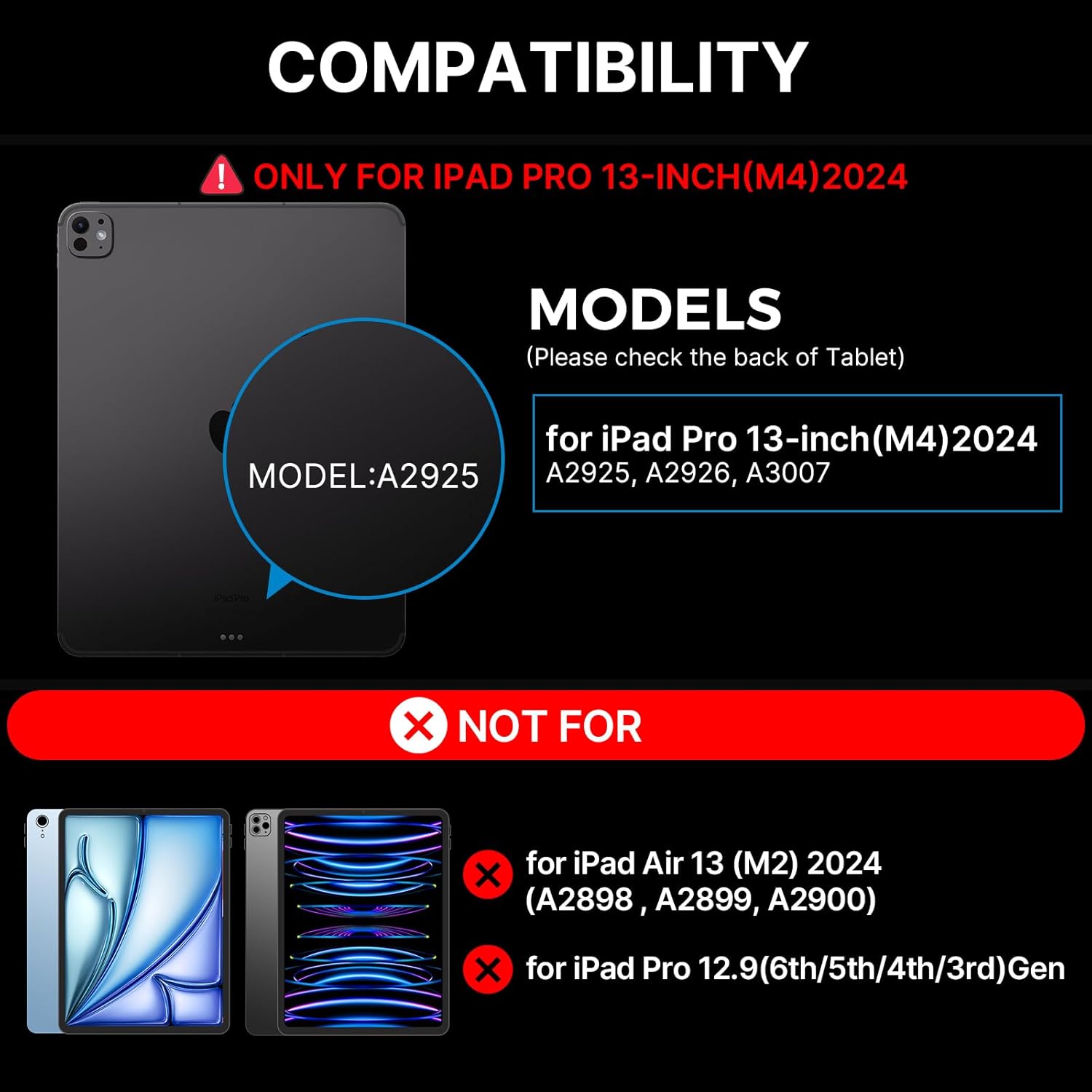
This keyboard case is specifically designed for the iPad Pro 13-inch (M4) 2024 models. Compatible iPad models include: A2925, A2926, A3007.
NOTE: This case is NOT compatible with iPad Air 13-inch (M2) 2024 (A2898, A2899, A2900) or iPad Pro 12.9-inch (6th/5th/4th/3rd Gen).
3. Què s'inclou
En obrir el paquet, assegureu-vos que hi hagi tots els elements següents:
- 1 x typecase Edge Magic Keyboard (Only for iPad Pro 13 inch 2024)
- 1 cable USB (per carregar)
- 1 x Manual d'usuari

4. Configuració
4.1 Instal·lació ràpida
- Place your iPad Pro 13-inch (M4) 2024 onto the magnetic surface of the keyboard case. Ensure proper alignment for a secure fit.
- Ajusteu el suport flotant en voladís al vostre gust viewing angle. The magnetic grip will hold the iPad firmly in place.
- The keyboard will automatically connect to your iPad via Bluetooth. If not, proceed to Bluetooth Pairing.
4.2 Vinculació Bluetooth
To pair your typecase Edge Keyboard Case with your iPad:
- Assegureu-vos que el teclat estigui carregat.
- Turn on the keyboard using the power switch (usually located on the side or back of the keyboard).
- Al teu iPad, vés a Configuració > Bluetooth.
- Look for "typecase Edge Keyboard" or a similar name in the list of available devices and tap to connect.
- Once connected, the keyboard is ready for use.
5. Instruccions de funcionament
Control de retroiluminació 5.1
The keyboard features 11 backlight colors and 3 levels of brightness. You can adjust these settings using the dedicated backlight key on the keyboard.
- Press the backlight brightness key (often depicted with a sun icon) to cycle through high, medium, low brightness, or turn the backlight off.
- Press the backlight mode key (often depicted with a color palette icon) to change between the 11 available backlight colors.
5.2 Multi-Touch Trackpad
The integrated multi-touch trackpad allows for precise navigation and gesture control, similar to a laptop. Common gestures include:
- Toc amb un sol dit: Click/Select
- Two Finger Pinch: Apropar/reduir
- Desplaçament amb dos dits: Scroll up/down or left/right
- Lliscament cap amunt amb tres dits: Obre el commutador d'aplicacions
- Lliscament cap avall amb tres dits: Torna a la pantalla d'inici
- Three Finger Swipe Left/Right: Canvia entre aplicacions obertes
5.3 Magnetic Stand and ViewAngles
The floating cantilever design allows for effortless adjustment of your iPad to various viewing angles, providing stability for typing, drawing, or media consumption. The strong magnetic clasp ensures your iPad is securely held and provides a dedicated spot for your Apple Pencil.

5.4 iPadOS Shortcuts
The keyboard includes handy iPadOS shortcuts for quick access to common functions, enhancing your productivity. Refer to the keyboard layout for specific shortcut keys.
5.5 Auto-Sleep/Wake Function
The typecase Edge Keyboard Case features an instant wake and sleep function. Your iPad's screen will automatically turn on when you open the case and turn off when you close it, conserving battery life.
6. Manteniment
To ensure the longevity and optimal performance of your typecase Edge Keyboard Case, follow these maintenance guidelines:
- Neteja: Use a soft, lint-free cloth to wipe down the keyboard and case. For stubborn spots, slightly dampRenta el drap amb aigua. Evita productes químics agressius o materials abrasius.
- Emmagatzematge: When not in use, keep the case closed to protect the keyboard and iPad screen. Store in a cool, dry place away from direct sunlight and extreme temperatures.
- Càrrega: Charge the keyboard using the provided USB-C cable. Avoid overcharging or using damaged cables.
- Manipulació: While the case offers robust protection, avoid dropping or subjecting it to excessive force.
7. Solució De Problemes
If you encounter issues with your typecase Edge Keyboard Case, refer to the following common solutions:
- Keyboard not responding/connecting:
- Assegureu-vos que el teclat estigui encès i completament carregat.
- Check your iPad's Bluetooth settings to confirm the keyboard is paired and connected. Try unpairing and re-pairing the device.
- Reinicieu tant l'iPad com el teclat.
- If the issue persists, a factory reset of the keyboard might be necessary (refer to specific instructions in the included user manual for your model).
- Backlight not staying on or not adjusting:
- Assegureu-vos que el teclat tingui prou bateria carregada.
- Press the backlight brightness key multiple times to cycle through all settings, including off, to ensure it's not just set to the lowest brightness.
- If the backlight functionality is inconsistent, try restarting the keyboard.
- iPad not securely attaching to the case:
- Ensure your iPad model is compatible with this specific case (iPad Pro 13-inch M4 2024).
- Verify that there are no obstructions (like debris or other accessories) between the iPad and the magnetic surface of the case.
For further assistance, please contact typecase customer support.
8. Especificacions
| Característica | Detall |
|---|---|
| Número de model | KB206130P |
| Dimensions del paquet | 12.36 x 11.57 x 1.46 polzades |
| Pes de l'article | 2 lliures |
| Fabricant | tipografia |
| Tecnologia de connectivitat | Sense fil |
| Descripció del teclat | Multi Funcional |
| Característiques especials | Portable, Lightweight, Backlit, Foldable, Trackpad |
| Color | Negre |
| Nombre de claus | 78 |
| Suport de color de retroil·luminació del teclat | RGB (11 colors) |
| Bateries | 1 bateria de polímer de liti (inclosa) |
9. Garantia i Suport
Your typecase Edge Keyboard Case comes with a Garantia del fabricant de 1 anysSi us plau, conserveu el comprovant de compra per a reclamacions de garantia.
For technical support, warranty inquiries, or any other questions, please contact typecase customer service through the vendor information provided at the point of purchase or visit the official typecase weblloc.


