1. Introducció
Gràcies per la compraasing the G-KENI Portable Multi-Band Radio Model 2400. This device is designed to provide versatile audio entertainment and information, featuring FM, AM, and Shortwave (SW1/SW2) radio reception, as well as multimedia playback from USB drives, SD cards, and TF cards. It offers flexible power options and a convenient headphone jack for private listening. Please read this manual thoroughly before use to ensure proper operation and to maximize your listening experience.
2. Informació de seguretat
- No exposeu la unitat a la pluja ni a la humitat per evitar incendis o descàrregues elèctriques.
- Avoid placing the unit in direct sunlight, near heat sources, or in environments with high humidity or dust.
- Use only the specified power sources (AC adapter or 4x AA batteries).
- No intenteu obrir ni reparar la unitat vosaltres mateixos. Encarregueu tot el manteniment a personal qualificat.
- Mantingueu les piles fora de l'abast dels nens. En cas d'ingestió, busqueu atenció mèdica immediatament.
- Eliminar les bateries usades d'acord amb la normativa local.
3. Contingut del paquet
- G-KENI Portable Multi-Band Radio Model 2400
- Adaptador de corrent alterna
- Manual d'instruccions
4. Producte acabatview
The image below illustrates the main components and controls of your G-KENI Portable Multi-Band Radio.

Figura 1: Frontal view of the G-KENI Portable Multi-Band Radio Model 2400, showing the speaker grille, tuning dial, band selector, and telescopic antenna.
Components clau:
- Antena telescòpica: For FM and Shortwave reception.
- Dial d'ajust: To select radio frequencies.
- Interruptor selector de banda: To switch between FM, AM, SW1, SW2, and media playback modes (USB/SD/TF).
- Control de volum: Ajusta el nivell de sortida d'àudio.
- Ponent: Sortida d'àudio integrada.
- Port USB: Per a la reproducció des d'una unitat flaix USB.
- Ranura per a targetes SD/TF: For SD or TF card playback.
- Presa d'auriculars (3.5 mm): Per a una escolta privada.
- Entrada d'alimentació de CA: Per connectar l'adaptador de CA.
- Compartiment de la bateria: For 4x AA batteries.
- Nansa de transport: Per a una fàcil portabilitat.
5. Configuració
5.1 Font d'alimentació
Your radio can be powered by two methods: AC power or dry cell batteries.
AC Power (Household Plug-in)
To use AC power, connect the included AC adapter to the AC power input port on the radio and then plug it into a standard wall outlet. This method is suitable for indoor use.

Figure 2: The radio connected to an AC power outlet using the provided adapter.
Battery Power (Outdoor Use)
For portable use, the radio requires 4x AA 1.5V dry cell batteries (not included). Open the battery compartment cover on the back of the unit and insert the batteries, ensuring correct polarity (+/-). Battery operation is ideal for outdoor activities or during power outages.
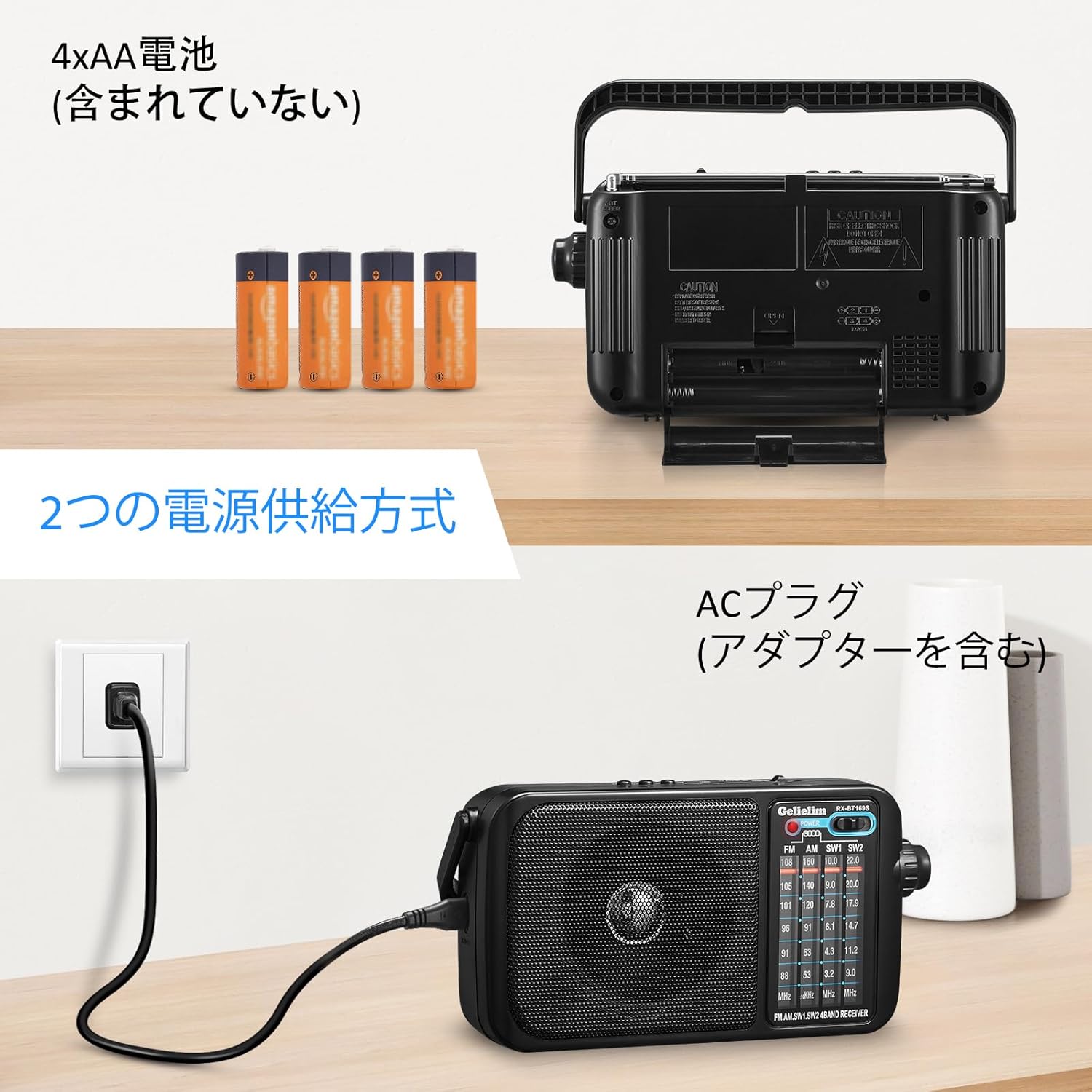
Figure 3: The battery compartment of the radio, showing the insertion of four AA batteries.
5.2 Antena
- FM/SO: Extend the telescopic antenna fully and adjust its angle for optimal reception.
- AM: The radio uses a built-in ferrite bar antenna for AM reception. Rotate the entire unit for the best signal.
- Terminal d'antena externa: For enhanced FM/Shortwave reception, an external antenna can be connected to the designated terminal.
6. Instruccions de funcionament
6.1 Radio Reception
- Gireu el Control de volum knob clockwise to power on the unit and set a low volume.
- Feu lliscar el Selector de banda to your desired band: FM, AM, SW1, or SW2.
- For FM/SW, extend and adjust the telescopic antenna. For AM, rotate the unit for best signal.
- Gira el Marcador de sintonització to scan for radio stations. The frequency scale will indicate the current tuning.
- Ajusteu el Control de volum to your preferred listening level.
6.2 Media Playback (USB/SD/TF Card)
- Insert a USB flash drive into the USB port or an SD/TF card into the corresponding slot. Ensure the card is inserted correctly.
- Feu lliscar el Selector de banda to the 'USB/SD/TF' position. The unit will automatically detect and begin playing audio files (e.g., MP3 format).
- Use the playback controls (if available, typically 'Next/Previous Track' buttons) to navigate through your audio files.
- Ajusteu el Control de volum to your preferred listening level.
6.3 Ús d'auriculars
To enjoy private listening, plug any standard 3.5mm stereo headphones into the headphone jack located on the side of the unit. The internal speaker will automatically mute when headphones are connected.

Figure 4: A user enjoying audio from the radio using headphones.
7. Manteniment
- Netegeu la unitat amb un drap suau i sec. No utilitzeu productes de neteja abrasius ni dissolvents.
- Si no heu d'utilitzar la unitat durant un període prolongat, traieu-ne les piles per evitar fuites.
- Keep the antenna clean and free from damage.
8. Solució De Problemes
| Problema | Causa possible | Solució |
|---|---|---|
| Sense poder | Les piles estan gastades o mal inserides; l'adaptador de CA no està connectat correctament. | Replace batteries, check polarity; ensure AC adapter is securely connected. |
| Mala recepció de ràdio | Antena no estesa/ajustada; zona de senyal feble; interferències. | Extend and adjust the telescopic antenna (FM/SW); rotate the unit (AM); try moving to a different location; connect an external antenna. |
| No hi ha so de l'altaveu | Volume too low; headphones connected; unit muted. | Increase volume; disconnect headphones; check if any mute function is active. |
| USB/SD/TF card not playing | Card/drive not inserted correctly; unsupported file format; corromput files. | Reinsert card/drive; ensure files are in a supported format (e.g., MP3); try a different card/drive. |
9. Especificacions

Figure 5: The radio displaying its approximate dimensions.
| Característica | Descripció |
|---|---|
| Número de model | 2400 |
| Tipus de sintonitzador | AM, FM, SW (Shortwave) |
| Interval de freqüència FM | 76 - 108 MHz |
| Rang de freqüències AM | 530 - 1600 kHz |
| SW1 Frequency Range | 3.2 - 10.0 MHz |
| SW2 Frequency Range | 9.0 - 22.0 MHz |
| Reproducció multimèdia | USB, SD Card, TF Card |
| Max Audio Output | 1.5W |
| Conector d'auriculars | Estèreo de 3.5 mm |
| Font d'alimentació | AC Power (DC 6V via adapter) / 4x AA 1.5V Dry Cell Batteries (not included) |
| Tipus de visualització | LED |
| Material | Acrilonitril butadiè estirè (ABS) |
| Dimensions (A x A x P) | Aprox. 21 cm x 6.5 cm x 12 cm |
| Pes | Aprox. 727 g (sense piles) |
| Components inclosos | Instruction Manual, AC Adapter |
10. Garantia i Suport
This G-KENI product comes with a 1 any de garantia de qualitat from the date of purchase. We provide reliable after-sales service and support. If you encounter any issues during use, please do not hesitate to contact us. Our customer support team will respond to your inquiries within 24 hours. In the event of a manufacturing defect within the warranty period, we will provide a free replacement unit.
For support, please refer to the contact information provided in your purchase documentation or on the official G-KENI weblloc.


