Introducció
Gràcies per la compraasing the kolegend 2.4GHz Transmitter for your RC Excavator. This manual provides essential information for the safe and efficient operation, setup, and maintenance of your new remote control. Please read this manual thoroughly before use and retain it for future reference.
Producte acabatview
Components inclosos
- 1 x 2.4GHz Remote Control Transmitter
- 2 x Gamepad (Note: This refers to the two joysticks integrated into the single remote control unit.)
Disseny del transmissor
Familiarize yourself with the various buttons and controls on your kolegend 2.4GHz Transmitter.
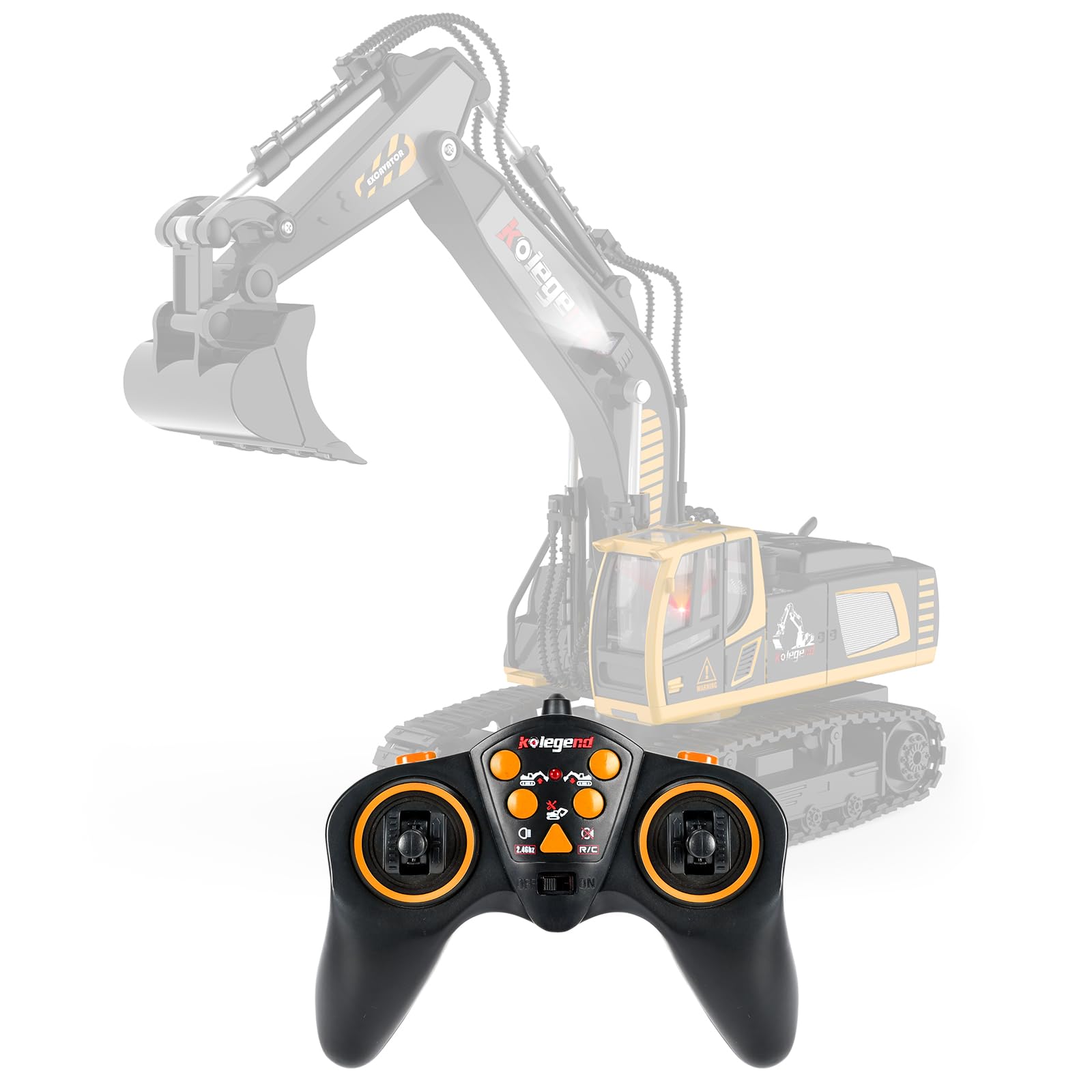
Imatge 1: kolegend 2.4GHz RC Excavator Transmitter with labeled buttons and functions. This image displays the front view of the black and orange remote control, highlighting the LED indicator, various control keys, and joysticks.
- Indicador LED: Mostra l'estat de l'alimentació i de la connexió.
- Dig Down Key: Controls the excavator's digging arm movement downwards.
- Tap Up Key: Controls the excavator's digging arm movement upwards.
- Left Rotation Key: Rotates the excavator's cabin to the left.
- Right Rotation Key: Rotates the excavator's cabin to the right.
- Botó de llum: Turns the excavator's lights ON.
- Light Off Key: Turns the excavator's lights OFF.
- Left Joystick (Go forward/backward of left tires): Controls the forward and backward movement of the left track.
- Right Joystick (Go forward/backward of right tires): Controls the forward and backward movement of the right track.
- Canvi: Power ON/OFF switch for the transmitter.
- Auto Demo Key: Activates an automatic demonstration sequence for the excavator.
Configuració
Instal·lació de la bateria
The transmitter requires batteries (not included). Ensure you use the correct type and polarity.
- Localitzeu el compartiment de la bateria a la part posterior del transmissor.
- Obriu la tapa del compartiment de la bateria.
- Introduïu les piles necessàries, assegurant-vos de la polaritat correcta (+/-).
- Tanqueu bé la tapa del compartiment de la bateria.
Pairing the Transmitter with the Excavator
The 2.4GHz transmitter automatically pairs with compatible kolegend RC excavators. Follow these steps:
- Ensure the excavator's power is OFF.
- Turn ON the transmitter using the "Switch" button. The LED indicator may flash.
- Turn ON the power switch on your kolegend RC Excavator.
- The transmitter and excavator should automatically pair. The LED indicator on the transmitter will become solid, indicating a successful connection.
- If pairing fails, turn both devices OFF, then repeat steps 1-4.
Instruccions de funcionament
Once the transmitter is paired with the excavator, you can control its movements and functions.
Excavator Movement
- Endavant/Enrere: Push both joysticks forward to move the excavator forward. Pull both joysticks backward to move it backward.
- Girar:
- To turn left: Push the right joystick forward and pull the left joystick backward, or push only the right joystick forward.
- To turn right: Push the left joystick forward and pull the right joystick backward, or push only the left joystick forward.
Excavator Rotation
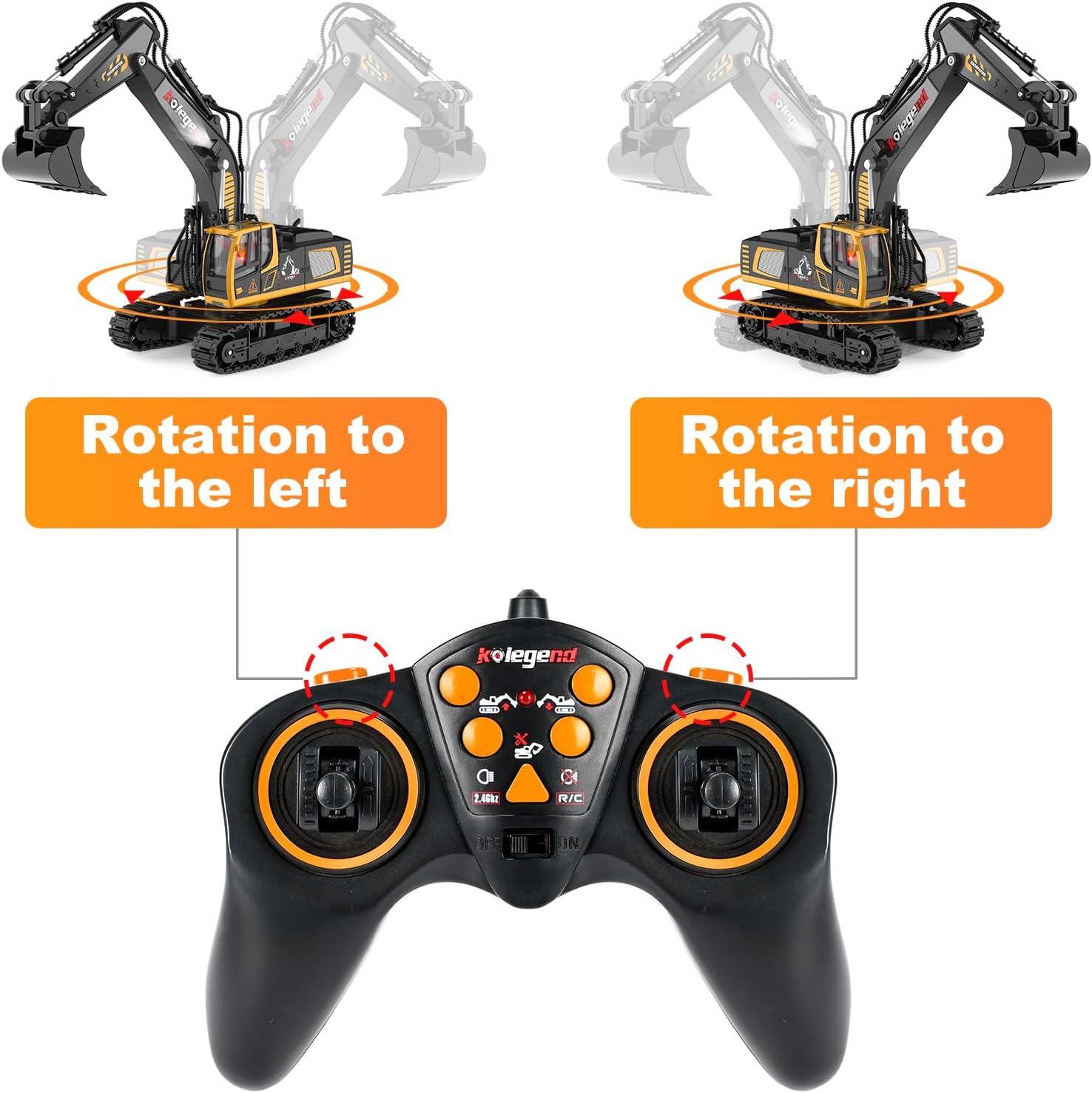
Imatge 2: Demonstration of excavator rotation using the kolegend 2.4GHz Transmitter. The image shows the excavator rotating left and right, corresponding to the use of the left and right rotation keys on the remote control.
- Girar a l'esquerra: Press the "Left Rotation Key" to rotate the excavator's cabin to the left.
- Gira a la dreta: Press the "Right Rotation Key" to rotate the excavator's cabin to the right.
Arm and Bucket Control
- Dig Down: Press the "Dig Down Key" to lower the excavator's digging arm and bucket.
- Tap Up: Press the "Tap Up Key" to raise the excavator's digging arm and bucket.
Lights and Auto Demo
- Lights ON: Press the "Light Button" to turn on the excavator's lights.
- Lights OFF: Press the "Light Off Key" to turn off the excavator's lights.
- Auto Demo: Press the "Auto Demo Key" to activate a pre-programmed demonstration sequence. Press it again to stop the demo.
Manteniment
- Neteja: Wipe the transmitter with a soft, dry cloth. Do not use harsh chemicals or abrasive cleaners.
- Emmagatzematge: When not in use for extended periods, remove the batteries from the transmitter to prevent leakage. Store the transmitter in a cool, dry place away from direct sunlight.
- Cura de la bateria: Replace batteries when the LED indicator shows low power or when control becomes erratic. Do not mix old and new batteries, or different types of batteries.
Resolució de problemes
| Problema | Causa possible | Solució |
|---|---|---|
| Transmitter does not power ON. | Les bateries estan esgotades o instal·lades incorrectament. | Comproveu la polaritat de la bateria i substituïu-la per piles noves. |
| Excavator does not respond to transmitter. | Not paired, out of range, or excavator power is OFF. | Ensure excavator is ON. Re-attempt pairing process. Move closer to the excavator. |
| Erratic control or short range. | Low transmitter batteries or interference. | Replace transmitter batteries. Avoid operating near other 2.4GHz devices. |
Especificacions

Imatge 3: Dimensions of the kolegend 2.4GHz RC Excavator Transmitter. The image shows the transmitter with a measurement indicating its width as 13cm / 5.12 inches.
- Model: 101-Control
- Marca: kolegend
- Freqüència: 2.4 GHz
- Font d'alimentació: Funciona amb piles (piles no incloses)
- Dimensions: Aproximadament 6 x 5 x 2 polzades (15.24 x 12.7 x 5.08 cm)
- Color: Black with orange accents
- Vehicle adequat: kolegend RC Excavator
- Edat mínima del fabricant: 36 mesos
- Manufacturer Maximum Age: 240 mesos
Garantia i Suport
For warranty information or technical support, please contact the manufacturer, kolegend, directly. Refer to the product packaging or the official kolegend weblloc per obtenir dades de contacte.
També podeu visitar el kolegend Store on Amazon per obtenir més informació sobre el producte i recursos d'assistència.


