Introducció
This manual provides essential instructions for setting up, operating, and maintaining your Microsoft Surface Pro 10. The Surface Pro 10 is a versatile 13-inch 2-in-1 tablet and laptop designed for peak performance and adaptability, featuring an Intel Core Ultra 7 processor, 32GB RAM, and a 1TB SSD. It integrates AI capabilities to enhance productivity and user experience.

Image: The Microsoft Surface Pro 10 displayed in tablet mode, supported by its integrated kickstand, showcasinel seu disseny elegant i la seva pantalla vibrant.
Configuració
1. Unboxing i Inspecció Inicial
Traieu amb cura tots els components de l'embalatge. Verifiqueu que hi hagi els elements següents:
- Microsoft Surface Pro 10 device
- Font d'alimentació
- Microsoft Surface Pro Keyboard (if bundled)
- Microsoft Surface Pro Slim Pen (if bundled)
- Guia d'inici ràpid
2. Càrrega del dispositiu
Connect the power supply to the Surface Connect port on your device and then to a power outlet. Allow the device to charge fully before first use for optimal battery calibration.
3. Engegada inicial i configuració de Windows
Press the power button located on the top edge of the device. Follow the on-screen instructions to complete the Windows 11 Pro setup, including language selection, network connection, and user account creation.
4. Attaching the Keyboard and Pen
Align the magnetic connector of the Microsoft Surface Pro Keyboard with the bottom edge of the Surface Pro 10 until it snaps into place. The Microsoft Surface Pro Slim Pen can be magnetically attached to the side of the device for storage and charging.
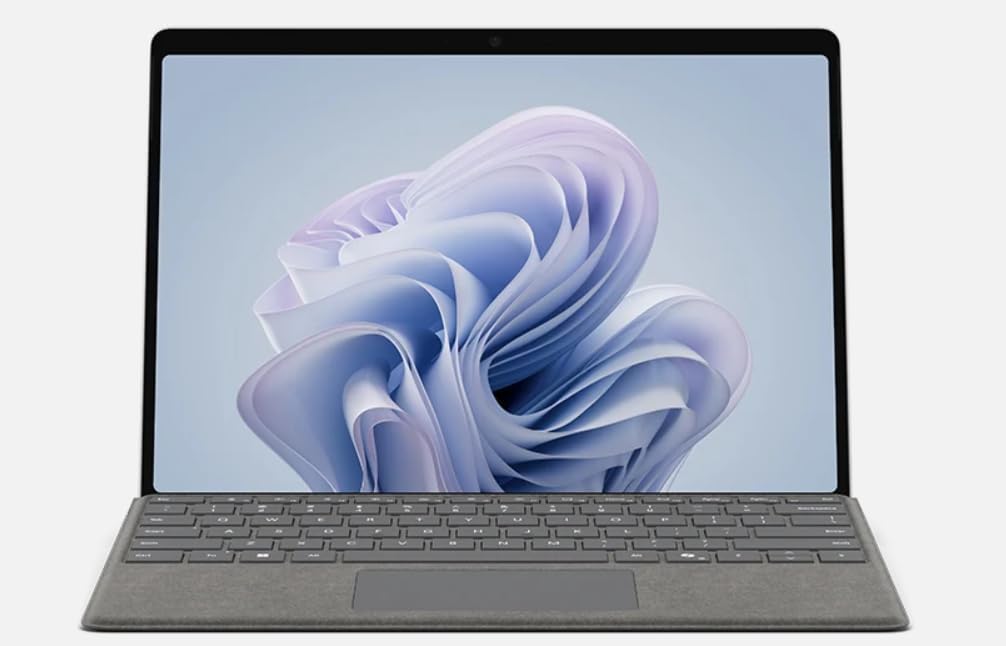
Image: The Microsoft Surface Pro 10 with its detachable keyboard attached, illustrating its laptop configuration.
Instruccions de funcionament
1. Navigating Windows 11 Pro
Utilize the 10-point multi-touch screen for intuitive gestures, the attached keyboard and touchpad for traditional input, or the Surface Slim Pen for precise writing and drawing. Windows 11 Pro offers a streamlined interface for productivity and creativity.
2. Canvi entre modes
The Surface Pro 10 seamlessly transitions between a tablet and a laptop. Simply attach or detach the keyboard to switch modes. The integrated kickstand allows for various viewing angles in both configurations, adapting to your work style.

Imatge: La part posterior view of the Microsoft Surface Pro 10, demonstrating its integrated kickstand extended for stable positioning.
3. Connecting to Networks and Peripherals
Connect to Wi-Fi networks via the Settings menu. The device features USB-C ports for connecting external displays, storage, and other peripherals. The Surface Connect port is primarily for power but can also support docking solutions.

Imatge: Un professional lateralfile of the Microsoft Surface Pro 10, highlighting its slim design and available ports for connectivity.
4. Ús de les funcions d'IA
The Intel Core Ultra 7 processor enables enhanced AI experiences, including accelerated Microsoft Copilot features. Access Copilot through the dedicated button on the taskbar or by voice command to assist with tasks, generate content, and streamline workflows.
Manteniment
1. Neteja del dispositiu
Utilitzeu un drap suau i sense pelusa dampened with water or an approved screen cleaner to gently wipe the screen and chassis. Avoid harsh chemicals or abrasive materials. Ensure the device is powered off and unplugged before cleaning.
2. Actualitzacions de programari
Regularly check for and install Windows updates to ensure optimal performance, security, and access to the latest features. Navigate to Configuració > Actualització de Windows per gestionar les actualitzacions.
3. Cura de la bateria
To prolong battery life, avoid extreme temperatures and allow the battery to discharge partially before recharging. For long-term storage, charge the device to approximately 50% and store it in a cool, dry place.
4. Gestió de l'emmagatzematge
Periòdicament review and manage your 1TB SSD storage. Delete unnecessary files, uninstall unused applications, and consider cloud storage solutions to free up local space and maintain performance.
Resolució de problemes
Problemes comuns i solucions
- El dispositiu no s'encén: Ensure the device is charged. Press and hold the power button for 10-15 seconds to perform a force restart.
- Problemes de connectivitat Wi-Fi: Check if Wi-Fi is enabled in Settings. Restart your router and the Surface Pro 10. Forget and reconnect to the network.
- Rendiment lent: Close unnecessary applications. Check for and install Windows updates. Run a disk cleanup.
- Pantalla tàctil que no respon: Restart the device. Ensure the screen is clean and free of debris.
- Accessory Not Detected: Ensure the accessory (keyboard, pen) is properly attached or paired. Check battery levels for wireless accessories.
For more detailed troubleshooting or persistent issues, refer to the official Microsoft Surface support weblloc.
Especificacions
| Nom del model | ZEA-00001 |
| Mida de la pantalla | 13 polzades |
| Resolució de pantalla | 2880 x 1920 píxels (267 ppp) |
| Freqüència d'actualització | 120 Hz (60 Hz Default) |
| Processador | 1.4 GHz Intel Core Ultra 7 165U (16-Core) |
| RAM | 32 GB de RAM DDR5 |
| Emmagatzematge | SSD de 1 TB |
| Sistema operatiu | Windows 11 Pro |
| Targeta gràfica | Gràfics Intel integrats |
| Tipus sense fil | 802.11ac |
| posterior WebResolució de la càmera | 13 MP |
| Dimensions del producte | 11.3 x 8.2 x 0.4 polzades |
| Color | Platí |
| Bateries | 1 bateria de ions de liti (inclosa) |
Garantia i Suport
Garantia del fabricant
Your Microsoft Surface Pro 10 is covered by a limited manufacturer's warranty. Details regarding the warranty period and coverage can be found on the official Microsoft Surface support website or within the warranty documentation included with your device.
Atenció al client
For technical assistance, warranty claims, or additional support, please visit the official Microsoft Surface support weblloc:
Please have your device's serial number ready when contacting support.


