Introducció
This manual provides detailed instructions for the setup, operation, maintenance, and troubleshooting of your DeLUX Wireless Ergonomic Keyboard (GM901D) and Vertical Mouse (M618GDB) Combo. Please read this manual thoroughly before using the product to ensure proper functionality and to maximize your ergonomic benefits.

Image: The DeLUX Wireless Ergonomic Keyboard and Vertical Mouse Combo.
Contingut del paquet
- DeLUX GM901D Wireless Ergonomic Keyboard
- DeLUX M618GDB Wireless Vertical Mouse
- USB Receiver (stored in the mouse or keyboard battery compartment)
- Cable de càrrega USB-C
- Manual d'usuari (aquest document)
Instruccions de configuració
1. Keyboard Setup (GM901D)
The keyboard supports both 2.4G wireless (via USB receiver) and Bluetooth 5.0 connections (BT1, BT2).
- Connexió sense fil 2.4G:
- Locate the USB receiver. It may be stored in the mouse or keyboard.
- Connecteu el receptor USB a un port USB disponible de l'ordinador.
- Engegueu el teclat. El teclat s'hauria de connectar automàticament.
- Connexió Bluetooth (BT1 / BT2):
- Assegureu-vos que el Bluetooth de l'ordinador estigui activat.
- On the keyboard, press the Bluetooth button (usually labeled BT1 or BT2) to select a channel. The indicator light will flash.
- On your computer, go to Bluetooth settings and search for new devices. Select "DeLUX Keyboard" or similar from the list.
- Seguiu les indicacions de la pantalla per completar l'aparellament.

Image: The keyboard demonstrating multi-device connectivity with 2.4G, BT1, and BT2 channels.
2. Mouse Setup (M618GDB)
The mouse supports both 2.4G wireless (via USB receiver) and Bluetooth 4.0 connections.
- Connexió sense fil 2.4G:
- If not already, plug the USB receiver into an available USB port on your computer.
- Turn on the mouse using the switch on its underside. The mouse should automatically connect.
- Connexió Bluetooth:
- Assegureu-vos que el Bluetooth de l'ordinador estigui activat.
- Turn on the mouse. On the underside, switch the mode to Bluetooth.
- On your computer, go to Bluetooth settings and search for new devices. Select "DeLUX Mouse" or similar from the list.
- Seguiu les indicacions de la pantalla per completar l'aparellament.

Image: The underside of the DeLUX vertical mouse showing the dual mode connection switch for 2.4G and Bluetooth.
Instruccions de funcionament
Keyboard Features (GM901D)
- Disseny ergonòmic: The keyboard features a curved and split structure designed to promote a natural arm and wrist posture, reducing strain during typing. The built-in pillowed wrist rest provides support for your palms.
- Commutació multidispositiu: Easily switch between up to three connected devices (one 2.4G, two Bluetooth) by pressing the corresponding connection buttons (2.4G, BT1, BT2) located on the keyboard.
- FN-Lock Function: The keyboard includes a dedicated FN-Lock key, allowing you to toggle between standard function keys (F1-F12) and multimedia/shortcut functions without holding down the 'Fn' key.
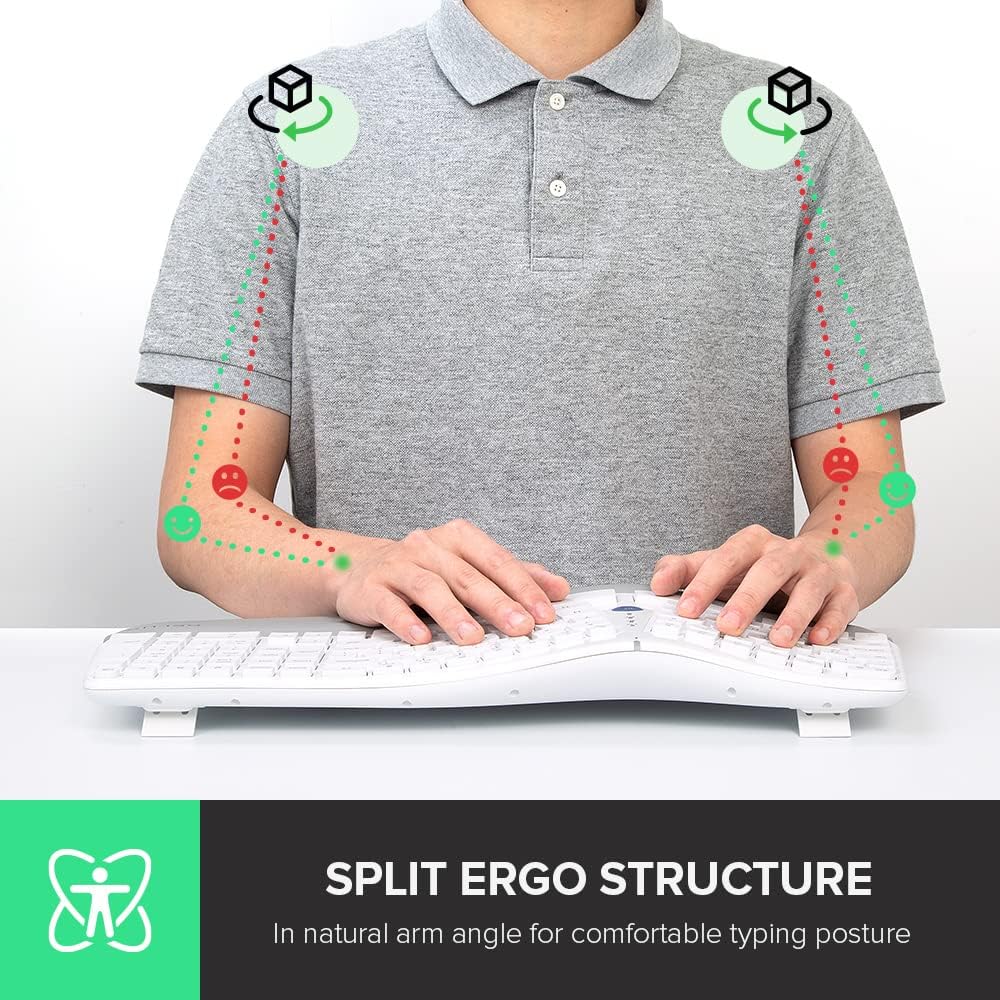
Image: A user demonstrating the natural arm angle achieved with the split ergonomic keyboard structure.

Image: Close-up of the keyboard's built-in pillowed wrist rest, designed for skin-friendly comfort.

Image: Detail of the keyboard highlighting the 'FN-Lock' key for easy access controls.
Mouse Features (M618GDB)
- Vertical Ergonomic Design: The mouse features a unique 'snail bionic' vertical design with a curved backside and thumb groove, promoting a natural handshake posture to reduce wrist and arm fatigue.
- Configuració de DPI ajustable: Cycle through 3 DPI settings (800/1200/1600) using the dedicated DPI button to adjust tracking precision to your preference. The mouse features a 4000DPI tracking engine for enhanced accuracy.
- Bateria recarregable incorporada: The mouse is equipped with a built-in rechargeable battery. Connect the included USB-C cable to charge. A full charge can last approximately one week with 8 hours of daily use.
- Removable Palm Rest: The mouse includes a removable palm rest that provides additional support and helps relieve pressure on your wrist.

Image: The DeLUX vertical mouse illustrating its 'snail bionic' design and how it reduces wrist fatigue compared to a traditional mouse.

Image: The DeLUX vertical mouse connected via USB-C cable, indicating its built-in rechargeable battery feature.

Image: The DeLUX vertical mouse with its removable palm rest detached, showing how it protects the wrist and relieves pressure.
Manteniment
- Neteja: Feu servir un drap suau i sec per netejar les superfícies del teclat i el ratolí. Per a la brutícia persistent, netegeu lleugerament.amp Es pot utilitzar un drap amb sabó suau, assegurant-se que no entri líquid als dispositius.
- Càrrega de la bateria: Recharge the mouse when the battery indicator light signals low power. Use the provided USB-C cable and connect to a standard USB power source.
- Emmagatzematge: When not in use for extended periods, turn off both devices to conserve battery life. Store in a cool, dry place.
Resolució de problemes
- El dispositiu no es connecta:
- Ensure the devices are turned on and fully charged.
- For 2.4G connection, ensure the USB receiver is securely plugged in. Try a different USB port.
- For Bluetooth connection, ensure Bluetooth is enabled on your computer and the device is in pairing mode. Remove previous pairings and try pairing again.
- Proveu de reiniciar l'ordinador.
- Connexió endarrerida o intermitent:
- Move the devices closer to the USB receiver or your computer.
- Eviteu utilitzar els dispositius a prop de fonts d'interferència fortes (per exemple, encaminadors Wi-Fi o altres dispositius sense fil).
- Assegureu-vos que les piles no estiguin baixes.
- El cursor del ratolí salta o és inexacte:
- Clean the mouse sensor with a soft cloth.
- Feu servir el ratolí sobre una superfície neta i no reflectant o sobre una alfombrilla de ratolí.
- Ajusteu la configuració de DPI a un valor més baix si el cursor és massa sensible.
Especificacions
| Característica | Descripció |
|---|---|
| Marca | DeLUX |
| Model de teclat | GM901D |
| Model de ratolí | M618GDB |
| Tecnologia de connectivitat | 2.4G Wireless (USB Receiver), Bluetooth 5.0 (Keyboard), Bluetooth 4.0 (Mouse) |
| Característiques especials | Ergonomic Design (Split Keyboard, Vertical Mouse), Multi-Device Connection, FN-Lock, Adjustable DPI, Rechargeable Battery, Removable Palm Rest |
| Dispositius compatibles | Gaming Console, Laptop (and other devices supporting USB/Bluetooth input) |
| Configuració de DPI del ratolí | 800/1200/1600 (3 gears) |
Garantia i Suport
DeLUX products are designed for reliability and performance. For warranty information, technical support, or service inquiries, please refer to the warranty card included with your product or visit the official DeLUX weblloc web. Conserveu el rebut de compra com a comprovant de compra.


