1. Introducció
Thank you for choosing the truefree O2 Open Ear Headphones. This manual provides detailed instructions for setting up, operating, and maintaining your new wireless earbuds. Please read this guide thoroughly to ensure optimal performance and a satisfying user experience.
2. Contingut del paquet
Verifiqueu que tots els elements que s'enumeren a continuació siguin presents al vostre paquet:
- truefree O2 Open Ear Earbuds (x2)
- Estoig de càrrega
- Cable de càrrega USB-C
- Manual d'usuari
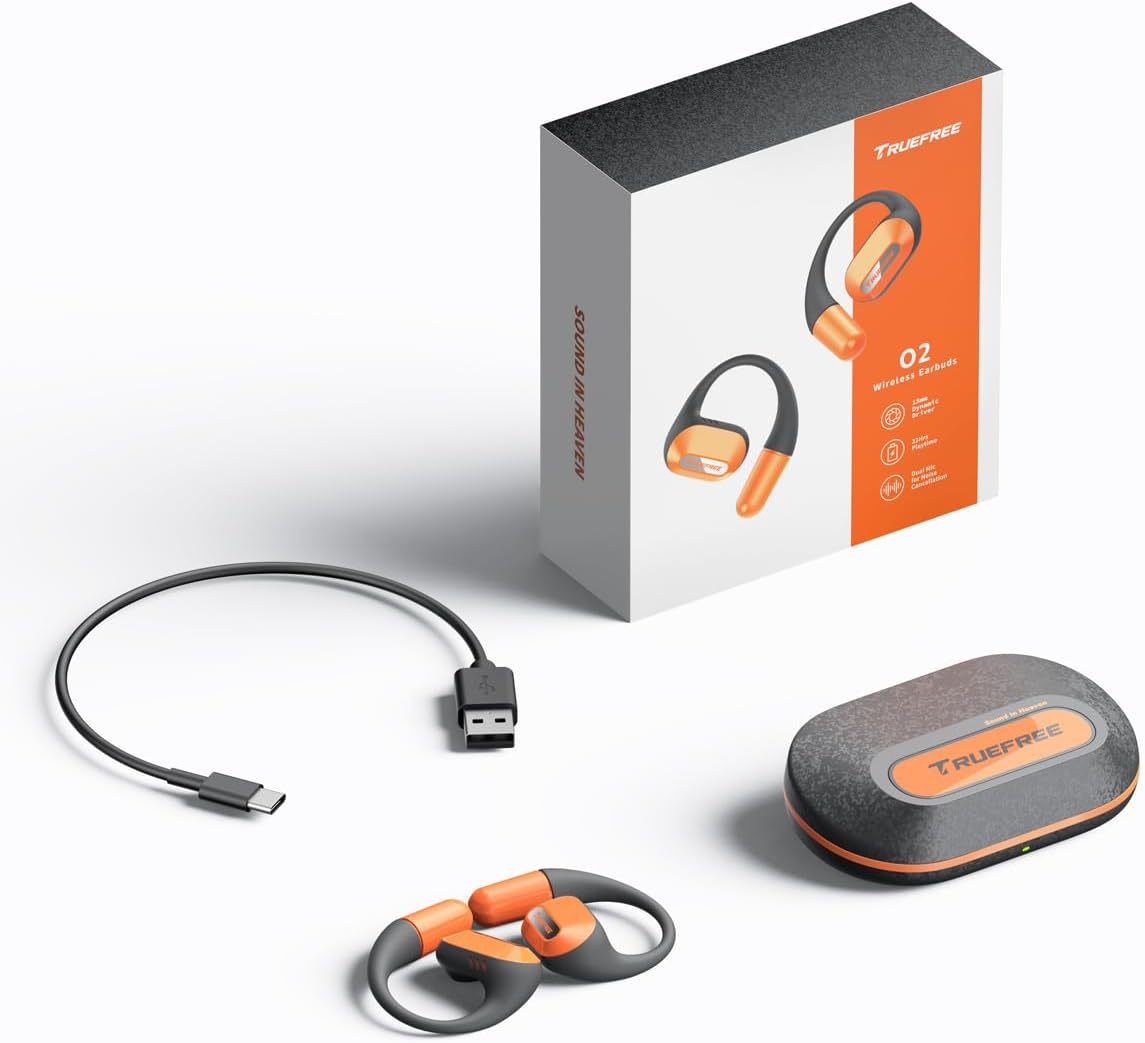
The complete package contents: two truefree O2 open ear earbuds, the charging case, a USB-C charging cable, and the user manual.
3. Producte acabatview
The truefree O2 headphones feature an open-ear design for comfort and situational awareness, equipped with 15mm dynamic drivers and directional acoustics. The earbuds are ultra-lightweight (8g each) and designed with soft silicone ear hooks for a secure fit during various activities.

The truefree O2 open ear headphones and their compact charging case.
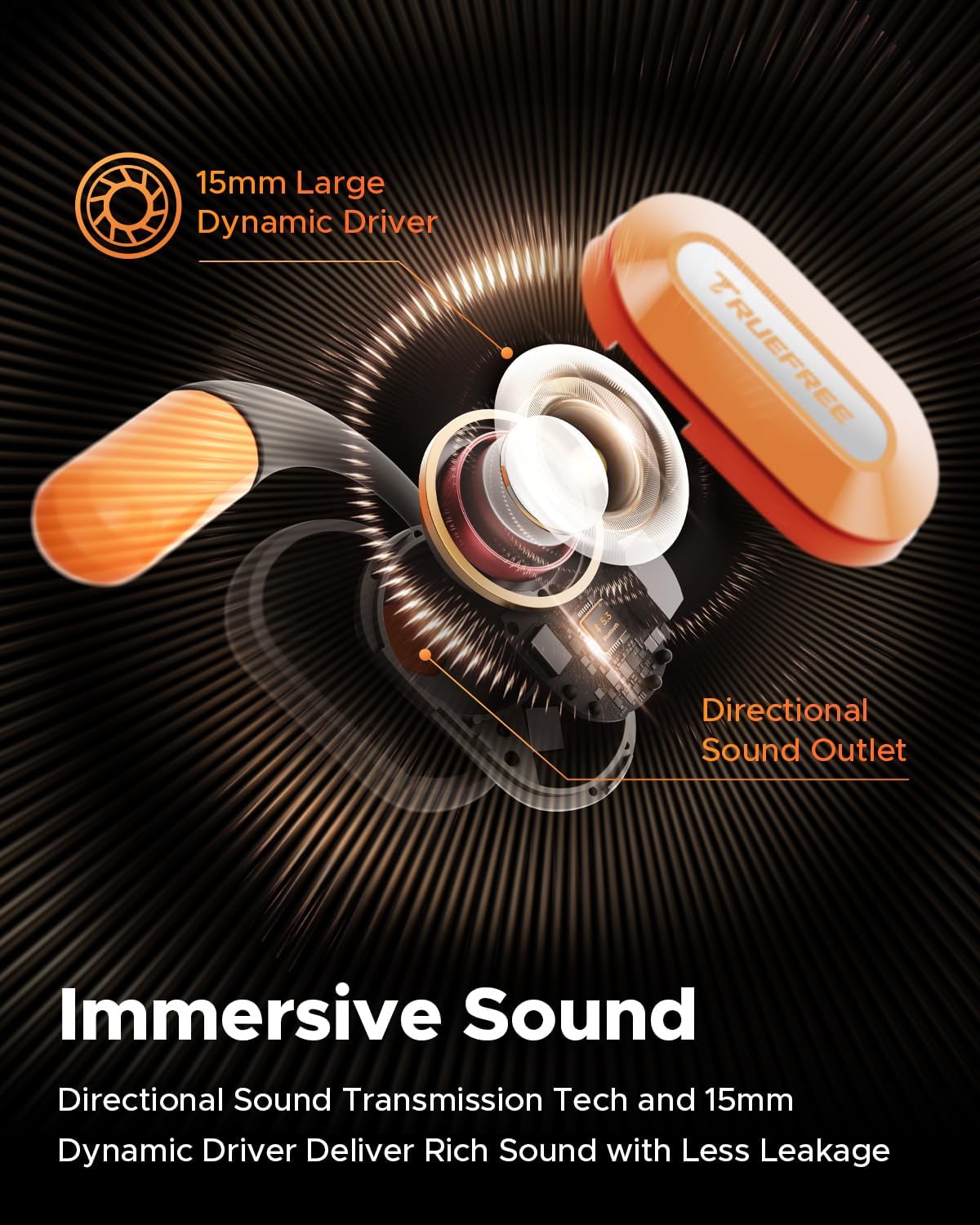
Un va explotar view diagram of the truefree O2 earbud, highlighting its 15mm large dynamic driver and directional sound outlet for immersive audio with minimal leakage.
4. Posar-se els auriculars
Per a una qualitat de so i una comoditat òptimes, assegureu-vos que els auriculars es portin correctament.
- Identifiqueu els auriculars esquerre (L) i dret (R).
- Gently hook the earbud over your ear, positioning the speaker part towards your ear canal.
- Adjust the ear hook to fit snugly and securely around your ear. The flexible NiTi alloy memory steel wire ensures a stable fit for various ear shapes.
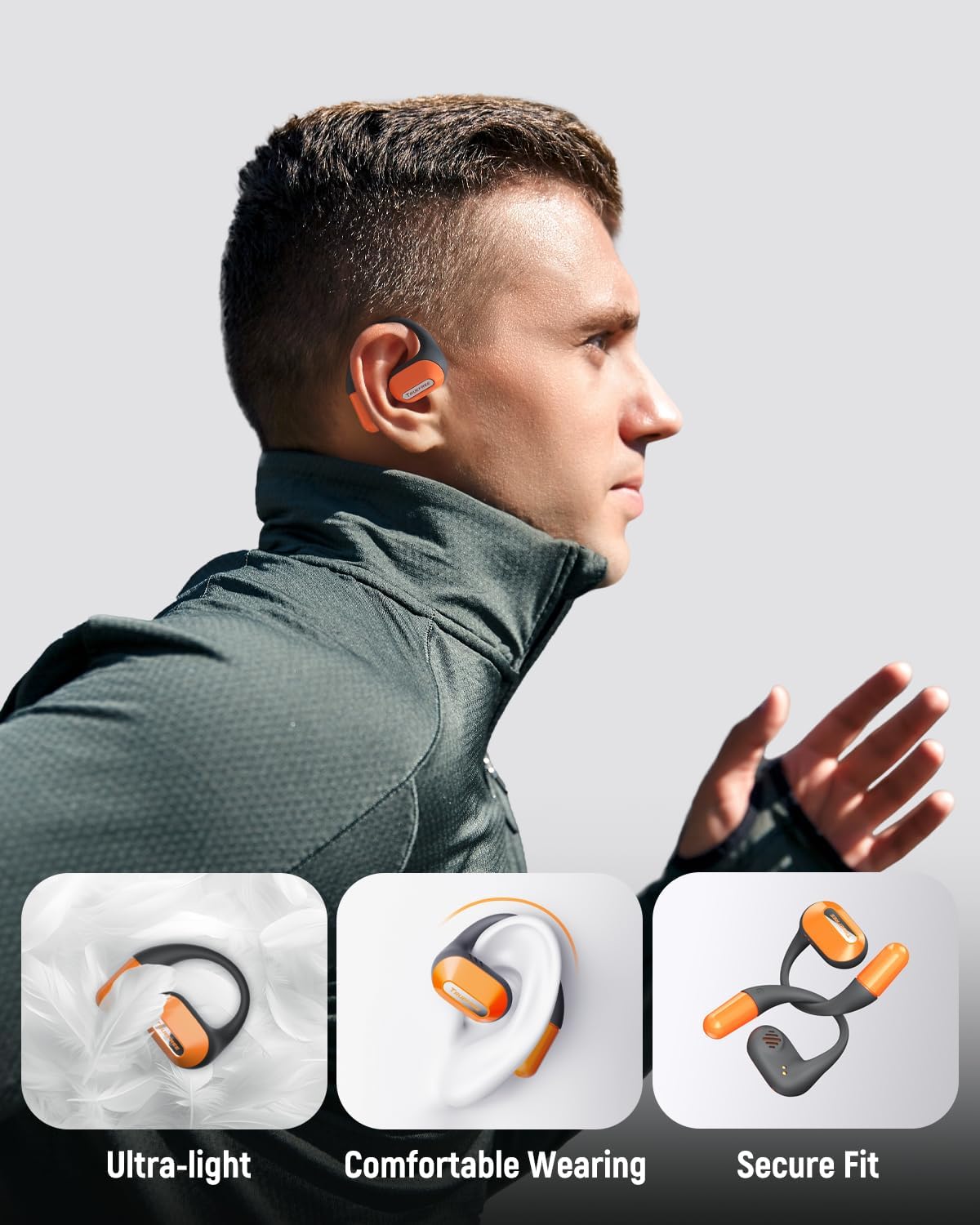
A user wearing the truefree O2 headphones, demonstrating their ultra-light design, comfortable fit, and secure ear hooks suitable for active use.
5. Càrrega
The truefree O2 headphones and charging case are designed for efficient power management.
5.1 Càrrega dels auriculars
- Col·loca els auriculars a l'estoig de càrrega. Assegura't que els contactes de càrrega estiguin alineats.
- The indicator lights on the earbuds will show their charging status.
- Una càrrega completa proporciona aproximadament 6.5 hores de reproducció.
5.2 Càrrega de la funda
- Connecteu el cable de càrrega USB-C al port de càrrega de la funda i a una font d'alimentació.
- The charging case can be fully charged in approximately 1 hour and 15 minutes.
- A fully charged case provides up to 22 hours of total playtime for the earbuds.

An illustration detailing the IPX5 waterproof rating, 6.5 hours of playtime on a single charge, 22 hours total with the charging case, and 1 hour 15 minutes fast charging via USB-C.
6. Configuració
6.1 Emparellament inicial de Bluetooth
- Obre l'estoig de càrrega. Els auriculars entraran automàticament en mode d'emparellament.
- Activa el Bluetooth al teu dispositiu (telèfon intel·ligent, tauleta, ordinador portàtil).
- Cerca "truefree O2" in the list of available Bluetooth devices.
- Select "truefree O2" to connect. A voice prompt will confirm successful pairing.
6.2 Control d'aplicacions
Enhance your experience by downloading the "Truefree" application from your device's app store.
- Personalització: Adjust EQ settings, including 9 personalized presets and a customizable option.
- Actualitzacions de firmware: Mantingueu els vostres auriculars actualitzats amb les darreres funcions i millores.
- Funcions especials: Control features like game mode and other settings directly from the app.
- Connexió de dispositiu dual: Enable multipoint connection for seamless switching between two devices.
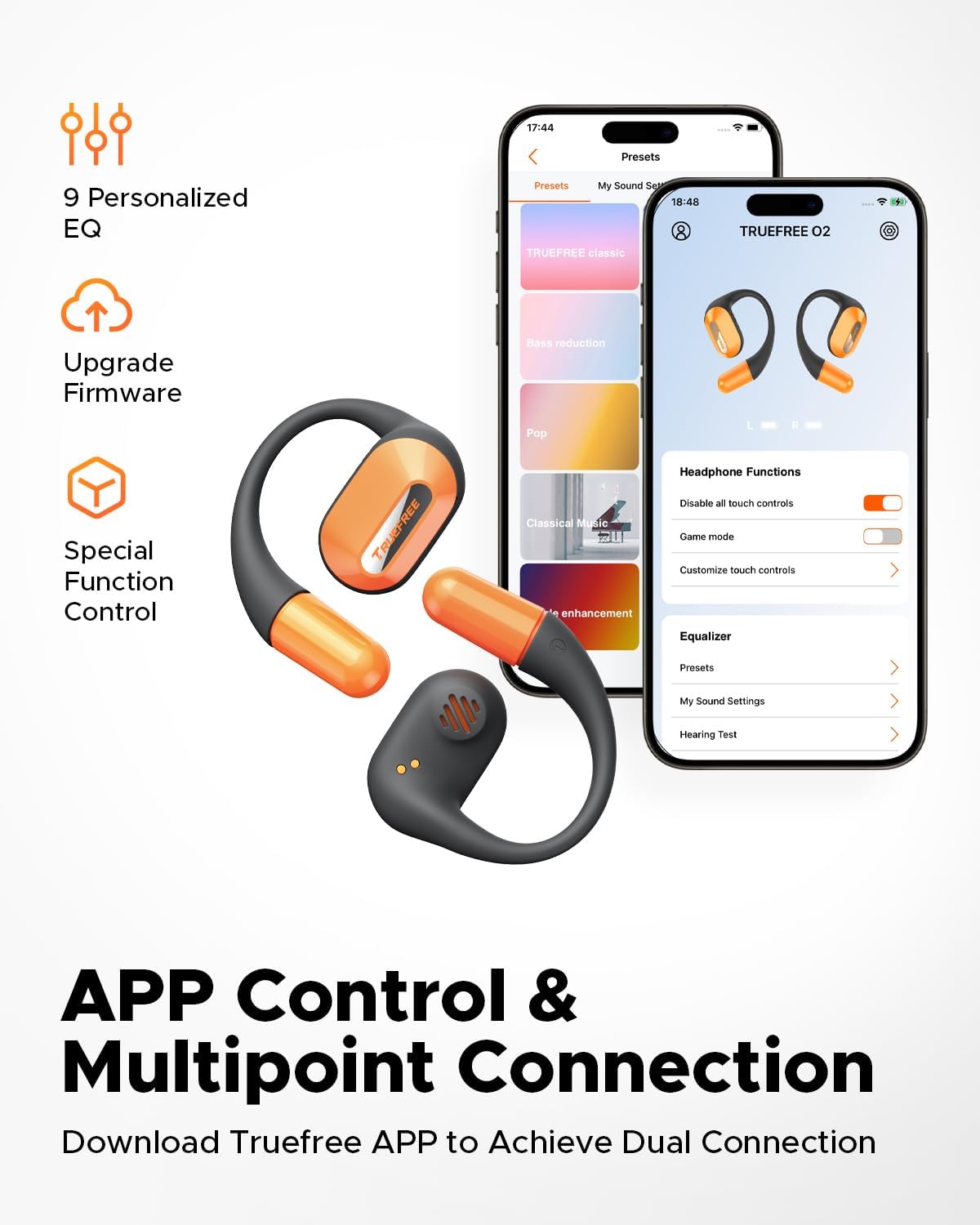
Screenshots of the Truefree mobile application, illustrating options for customizing EQ settings, game mode, and other control functions for the O2 headphones.
7. Funcionament
7.1 Controls tàctils
The truefree O2 earbuds feature intuitive touch controls on both the left (L) and right (R) earbuds.
| Acció | Funció |
|---|---|
| L & R Double tap | Reproduir/Pausa, Respondre/Finalitzar trucada |
| L & R Long press for 1.5s | Previous Track (L), Next Track (R), Power On/Off (when not in case) |
| L Single tap | Baixa el volum |
| R Single tap | Puja el volum |
| L Long press for 3s | Activa el mode de joc |
| R Long press for 3s | Activa l'Assistent de veu |

A visual guide to the touch control functions on the truefree O2 earbuds.
7.2 Connexió multipunt
The truefree O2 supports connecting to two devices simultaneously, allowing for seamless switching between audio sources.
- Ensure the earbuds are connected to your first device.
- Put the earbuds back into the charging case, then take them out again to re-enter pairing mode.
- Connect the earbuds to your second device via Bluetooth.
- Once both devices are paired, the earbuds will intelligently switch audio based on activity (e.g., taking a call on your phone while listening to music on your laptop).

An image showing the truefree O2 headphones connected to both a laptop and a smartphone, illustrating the multipoint connection feature for seamless device switching.
7.3 Mode de joc
Activate Game Mode for reduced audio latency, providing a more synchronized audio-visual experience during gaming.
- To activate: Long press the left earbud for 3 seconds.
- To deactivate: Repeat the action.
- Game Mode can also be toggled via the Truefree app.
8. Manteniment
Classificació d'impermeabilitat IPX5 8.1
The truefree O2 earbuds are IPX5 waterproof, meaning they are resistant to sweat and light splashes of water. This makes them suitable for workouts and outdoor activities.
- No submergiu els auriculars a l'aigua.
- Assegureu-vos que els auriculars estiguin secs abans de tornar-los a col·locar a l'estoig de càrrega per evitar que es facin malbé.

The truefree O2 earbud with water droplets, illustrating its IPX5 waterproof rating.
8.2 Neteja
- Netegeu els auriculars i l'estoig de càrrega amb un drap suau, sec i sense borrissol.
- Eviteu utilitzar materials abrasius o productes químics durs.
- Netegeu regularment els contactes de càrrega tant dels auriculars com de la funda per garantir una càrrega correcta.
9. Solució De Problemes
If you encounter issues with your truefree O2 headphones, refer to the following common solutions:
| Problema | Solució |
|---|---|
| Els auriculars no s'aparellen | Ensure earbuds are charged. Turn off and on Bluetooth on your device. Forget "truefree O2" from your device's Bluetooth list and re-pair. |
| No hi ha so d'un auricular | Torna a posar els dos auriculars a la funda, tanca-la i torna-la a obrir. Comprova la configuració del balanç d'àudio del dispositiu. |
| Problema de càrrega | Clean charging contacts on earbuds and case. Try a different USB-C cable and power adapter. Ensure earbuds are correctly seated in the case. |
| Volum baix | Adjust volume on both the earbuds and your connected device. Check EQ settings in the Truefree app. |
| La connexió cau amb freqüència | Ensure no obstructions between earbuds and device. Reduce distance between earbuds and device. Avoid strong electromagnetic interference. |
If the issue persists, please contact truefree customer support for further assistance.
10. Especificacions
| Característica | Detall |
|---|---|
| Nom del model | truefree O2 |
| Connectivitat | Bluetooth 5.3 |
| Col·locació de l'orella | Orella oberta |
| Forma de l'auricular | Ganxo |
| Resistència a l'aigua | IPX5 |
| Durada de la bateria dels auriculars | Fins a 6.5 hores |
| Temps de reproducció total (amb estoig) | Fins a 22 hores |
| Temps de càrrega de la caixa | Approx. 1 hour 15 minutes (USB-C) |
| Mida del controlador d'àudio | 15 mm |
| Pes de l'auricular | 8 grams (cada una) |
| Tipus de control | Control tàctil, Control d'aplicacions |
| Característiques especials | Multipoint Pairing, Game Mode, Dual-mic Noise Cancelling |
11. Garantia i Suport
truefree is committed to providing excellent customer experience. If you have any problems or suggestions regarding your truefree O2 Open Ear Headphones, please do not hesitate to contact our customer support team. We are ready to offer you a satisfactory solution.
For support, please refer to the contact information provided on the truefree official weblloc web o la vostra plataforma de compra.


