1. Producte acabatview
The ThinkRider X2 Smart Bike Trainer is a direct drive indoor cycling trainer designed to provide a realistic and immersive training experience. It features smart resistance, accurate power measurement, and broad compatibility with popular cycling software.
Les característiques clau inclouen:
- Compatibilitat forta: Supports BLE and ANT+ dual mode protocols, compatible with mainstream cycling software such as ZWIFT.
- Powerful and Accurate Power Output: Utilizes DEPT dynamic electromagnetic torque power meter, with power up to 2000W and a power meter error of ±2%.
- Intelligent Variable Resistance: Simulates a tilt resistance of 18%. Automatically matches tilt resistance to actual map tilt when connected to riding software, enhancing realism.
- Funcionament silenciós: The X2 smart trainer operates quietly, with noise levels around 58dB at a running speed of 30km/h.
- I-beam Structure: Designed with an I-beam triangular structure for enhanced balance and stability during use.

Figura 1.1: Frontal view of the ThinkRider X2 Smart Bike Trainer, showcasing el seu disseny compacte i estable.
2. Muntatge i muntatge
2.1. Desembalatge i components
Carefully unpack all components from the box. Verify that all included items are present:
- ThinkRider X2 Smart Bicycle Trainer unit
- Manual d'instruccions
- Power adapter and power plug
- Quick Release 12x142/12x148 Standard Thru Axle adapter
- Mounting hardware for feet (typically 4 screws)
2.2. Assembling the Trainer
- Enganxeu els peus: Securely attach the two base feet to the main trainer unit using the provided screws. Ensure they are tightened firmly to provide maximum stability.
- Install Cassette (Not Included): The ThinkRider X2 is a direct drive trainer and requires a bicycle cassette (not included) to be installed. Ensure you have a cassette that matches your bicycle's derailleur (e.g., Shimano 10-speed). You will need specific tools for cassette installation, such as a cassette lockring tool and a chain whip. Refer to bicycle maintenance guides or professional assistance if unsure.
- Position the Trainer: Place the trainer on a flat, stable surface. The I-beam triangular structure is designed for inherent stability, but proper placement is crucial.
- Connectar l'alimentació: Plug the power adapter into the trainer and then into a suitable power outlet.

Figure 2.1: The stable I-beam (pyramid) structure of the ThinkRider X2, ensuring balance during intense training sessions.
3. Instruccions de funcionament
3.1. Connecting Your Bicycle
Once the cassette is installed, carefully mount your bicycle onto the trainer, ensuring the rear wheel is removed and the bicycle's chain is properly seated on the trainer's cassette.
3.2. Connectivity and Software
The ThinkRider X2 supports both Bluetooth Low Energy (BLE) and ANT+ dual mode protocols, allowing seamless connection to various devices and cycling applications.
- BLE Connection: Enable Bluetooth on your smartphone, tablet, or computer. Open your preferred cycling application (e.g., Zwift, TrainerRoad, Rouvy) and search for available devices. Select "ThinkRider X2" to connect.
- ANT+ Connection: If using an ANT+ compatible device (e.g., Garmin Edge, Wahoo ELEMNT, or a computer with an ANT+ dongle), ensure ANT+ is enabled. Your device should automatically detect the trainer.

Figure 3.1: The ThinkRider X2 offers strong compatibility with BLE and ANT+ protocols, supporting popular cycling software.
3.3. Smart Resistance and Power Measurement
The X2 trainer features intelligent variable resistance and built-in power and cadence sensors for accurate real-time data.
- Automatic Slope Simulation: When connected to compatible riding software, the trainer automatically adjusts resistance to simulate inclines and declines on virtual routes, providing a realistic riding experience.
- Power and Cadence Data: The integrated DEPT dynamic electromagnetic torque power meter provides power readings up to 2000W with an accuracy of ±2%. Cadence data is also transmitted.
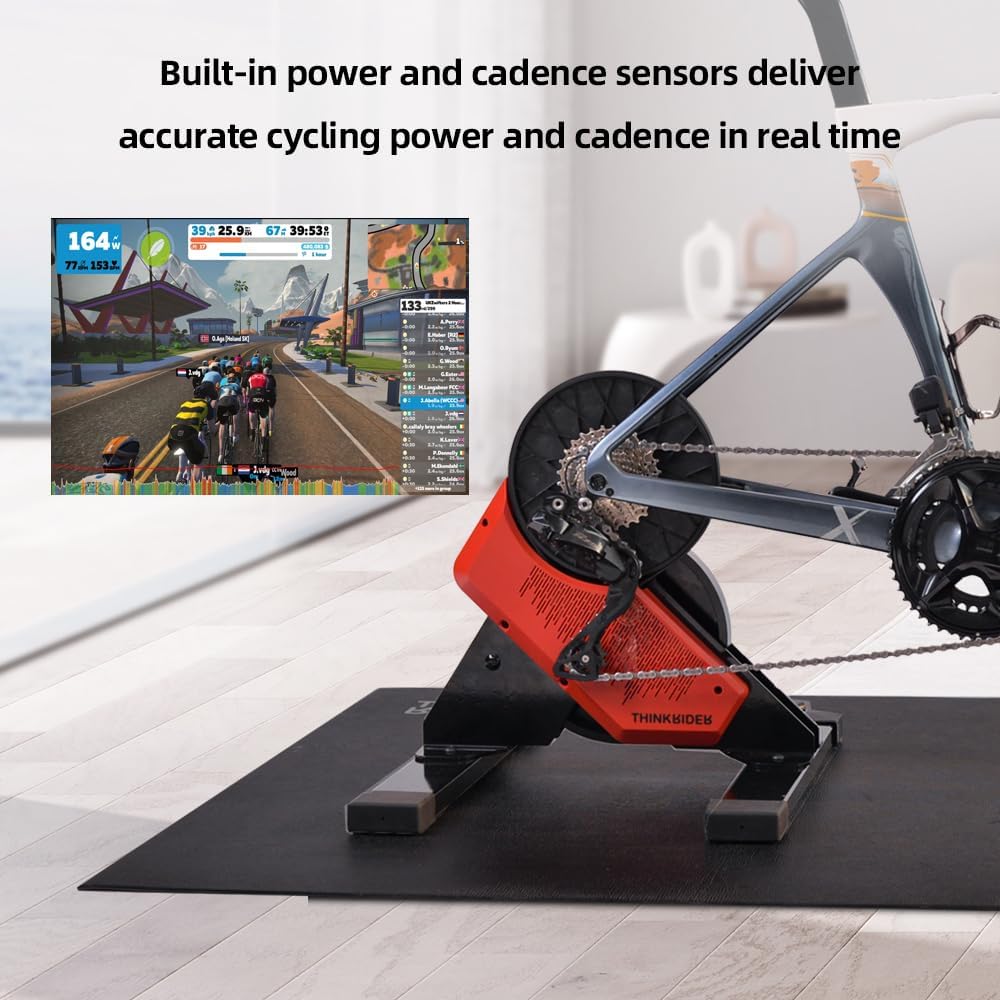
Figure 3.2: The X2 trainer with built-in power and cadence sensors, delivering accurate real-time cycling data, as seen on a virtual training platform.

Figure 3.3: Smart resistance adjusts for uphill (higher resistance) and downhill (lower resistance) scenarios, enhancing training realism.
3.4. Funcionament silenciós
The X2 is designed for quiet operation, making it suitable for home use without disturbing others. At 30km/h, the noise level is approximately 58dB.

Figure 3.4: Noise level comparison, showing the X2 trainer's quiet operation compared to common sounds.
4. Manteniment
Regular maintenance ensures the longevity and optimal performance of your ThinkRider X2 Smart Bike Trainer.
- Neteja: Wipe down the trainer regularly with a soft, damp cloth to remove sweat and dust. Avoid using abrasive cleaners or solvents.
- Emmagatzematge: When not in use, store the trainer in a dry, cool place away from direct sunlight and extreme temperatures.
- Cassette and Drivetrain: Keep your bicycle's cassette and chain clean and lubricated as per standard bicycle maintenance practices. This will reduce wear on both your bike and the trainer.
- Inspeccions: Reviseu periòdicament tots els cargols i connexions per assegurar-vos que estiguin ben ajustats i segurs.
5. Solució De Problemes
If you encounter issues with your ThinkRider X2 Smart Bike Trainer, refer to the following common troubleshooting steps:
- No Power/Trainer Not Turning On:
- Ensure the power adapter is securely connected to both the trainer and a working electrical outlet.
- Comproveu si la presa de corrent funciona connectant-hi un altre dispositiu.
- Connectivity Issues (BLE/ANT+):
- Ensure Bluetooth or ANT+ is enabled on your device (smartphone, tablet, computer, bike computer).
- Make sure the trainer is powered on and within range of your device.
- Close and reopen the cycling application.
- Try restarting your device and the trainer.
- Ensure no other devices are actively connected to the trainer via BLE, as it typically supports only one BLE connection at a time.
- Lectures de potència inexactes:
- Perform a spindown calibration within your cycling application if available. This helps the trainer accurately measure power.
- Ensure the trainer is on a level surface.
- Verify that your bicycle's drivetrain (chain, cassette) is clean and well-maintained.
- Soroll inusual durant el funcionament:
- Check that the trainer is placed on a stable, level surface.
- Ensure your bicycle is securely mounted and the cassette is properly installed and tightened.
- Inspect the trainer for any loose components or foreign objects.
- Noise from the bicycle's drivetrain (chain, derailleur) is normal; ensure your bike is well-lubricated.
6. Especificacions
| Característica | Especificació |
|---|---|
| Nom del model | X2 |
| Dimensions del producte | 45L x 43W x 48H Centimetres (approx. 45 x 43 x 48 cm) |
| Pes de l'article | 16.6 kg (approx. 16.58 kg) |
| Material | Acer d'aliatge |
| Color | Negre vermellós |
| Mecanisme de resistència | Electromagnètic |
| Potència màxima de sortida | 2000W |
| Precisió de potència | ±2% |
| Max Simulated Slope | 18% |
| Nivell de soroll | Approx. 58dB at 30km/h |
| Connectivitat | ANT+, BLE (Bluetooth de baixa energia) |
| Tipus de bicicletes compatibles | Mountain Bike, Road Bike |
| Mida de roda compatible | 26 Inches (and likely others, but 26 is specified) |
| Capacitat de càrrega màxima | 100 quilograms |
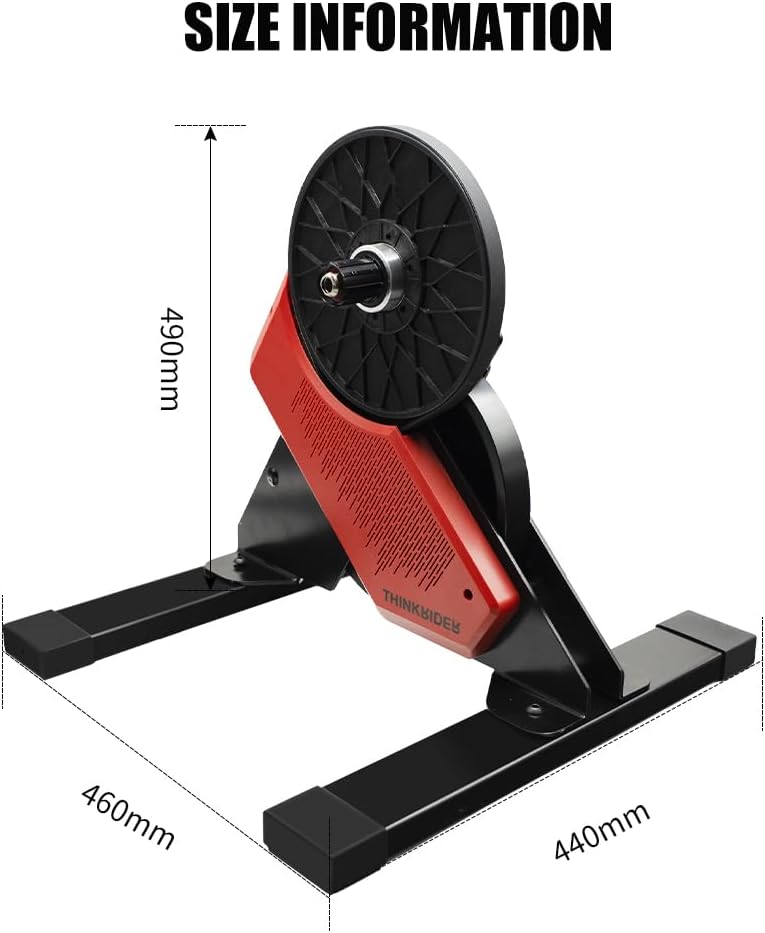
Figure 6.1: Dimensional information for the ThinkRider X2 Smart Bike Trainer.
7. Garantia i Suport
For warranty information, technical support, or any inquiries regarding your ThinkRider X2 Smart Bike Trainer, please contact the manufacturer directly.
Fabricant: THINKRIDER
Lloc de treball: Wuxi ThinkRider Techonology Co.,Ltd. Add: CN-8F, Building 8, 67 Zhujiang Road, Xinwu District, Wuxi, Jiangsu, China
Telèfon: +86-17312769872
Si us plau, conserveu el comprovant de compra per a qualsevol reclamació de garantia.


