Introducció
This manual provides detailed instructions for the installation, operation, maintenance, and troubleshooting of your Xiaomi Smart Doorbell 3S. Please read this manual thoroughly before using the product to ensure proper function and safety. The Xiaomi Smart Doorbell 3S features ultra-clear 2K resolution, AI human recognition, a 5200mAh battery, an electronic chime, and two-way audio communication.

Image: The Xiaomi Smart Doorbell 3S and its accompanying indoor chime unit.
Què hi ha a la caixa
Verifiqueu que tots els components siguin presents a l'embalatge:
- Timbre intel·ligent Xiaomi 3S (unitat principal)
- Unitat de timbre interior
- Suport de muntatge
- Cargols de muntatge i tacs de paret
- Cable de càrrega (tipus C)
- Manual d'usuari
Configuració
1. Instal·lació física
- Trieu una ubicació: Select a suitable location near your door, ensuring a clear view i bon senyal Wi-Fi.
- Muntar el suport: Use the provided screws and wall plugs to securely attach the mounting bracket to the wall.
- Connexió d'alimentació:
- Potència de la bateria: Ensure the doorbell's internal 5200mAh battery is charged.
- Hardwired Power: If using hardwired power, connect the doorbell to your existing doorbell wiring according to local electrical codes.
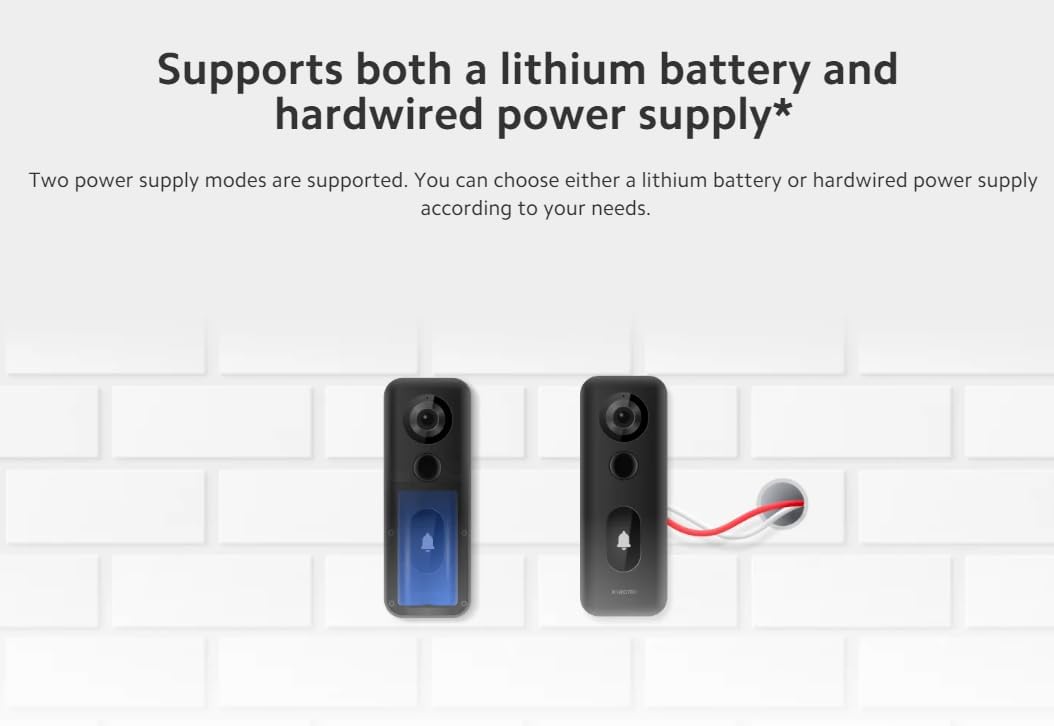
Image: Illustration showing the two power supply options for the doorbell: internal battery or hardwired connection.
- Connecteu el timbre de la porta: Slide the Xiaomi Smart Doorbell 3S onto the mounted bracket until it clicks into place.
2. Emparellament d'aplicacions
- Descarrega l'aplicació: Baixeu l'aplicació Xiaomi Home des de la botiga d'aplicacions del vostre dispositiu.
- Crea/Iniciar sessió: Obre l'aplicació i crea un compte nou o inicia la sessió en un d'existent.
- Afegeix un dispositiu: Follow the in-app instructions to add the Xiaomi Smart Doorbell 3S. This typically involves scanning a QR code on the device or selecting it from a list of nearby devices.
- Connecta't a Wi-Fi: Connect the doorbell to your home Wi-Fi network (supports Wi-Fi 6).
- Pair Chime: Follow the app's instructions to pair the indoor chime unit with the doorbell.
Instruccions de funcionament
1. En directe View i àudio bidireccional
Access the Xiaomi Home app to view a live feed from your doorbell. Use the two-way audio feature to communicate with visitors at your door.
2. Detecció de moviment i notificacions
The doorbell features 24-hour smart motion detection with AI human recognition. When motion is detected, especially human presence, the doorbell will automatically record video and send notifications to your smartphone.

Image: A smartphone displaying a notification indicating motion detection by the Smart Doorbell 3S, showing a delivery person at the door.
3. Resolució de vídeo
The doorbell records in ultra-clear 2K resolution, providing clearer and more detailed images compared to 1080p, allowing for better identification of visitors.

Image: A visual comparison demonstrating the superior clarity and detail of 2K resolution over 1080p in a doorbell camera feed.
4. Emmagatzematge al núvol
The device includes free, rolling 72-hour cloud storage for recorded events.
Manteniment
1. Càrrega de la bateria
The built-in 5200mAh lithium battery offers extended usage. When the battery level is low, charge the doorbell using the provided Type-C charging cable. The charging port is typically located on the back or bottom of the doorbell unit. Frequent charging is minimized due to the large battery capacity.

Image: An illustration showing the internal 5200mAh battery of the doorbell and its Type-C charging port.
2. Neteja
To maintain optimal performance, periodically clean the doorbell's camera lens and body with a soft, dry cloth. Avoid using harsh chemicals or abrasive materials that could damage the device. The doorbell has an IP65 waterproof rating, providing protection against dust and water splashes.
Resolució de problemes
- Sense energia: Ensure the battery is charged or the hardwired connection is secure and providing power.
- Sense connexió Wi-Fi: Check your router and ensure the doorbell is within range. Re-pair the device through the Xiaomi Home app if necessary.
- Poca qualitat de vídeo: Ensure the camera lens is clean and free from obstructions. Check your Wi-Fi signal strength.
- Problemes de detecció de moviment: Adjust the motion detection sensitivity and customizable monitoring area settings within the Xiaomi Home app.
- El timbre no sona: Verify the indoor chime is powered and properly paired with the doorbell via the app.
Especificacions

Image: A comparison table highlighting the specifications and features of the Xiaomi Smart Doorbell 3S against the previous Xiaomi Smart Doorbell 3.
| Característica | Especificació |
|---|---|
| Marca | XIAOMI |
| Número de model | 46068 |
| Dimensions del producte | 19.99 x 19.99 x 14 cm |
| Pes de l'article | 312 g |
| Resolució | 2K |
| Camp de View (FoV) | Diagonal 180 ° |
| Tipus de bateria | Ió de liti |
| Capacitat de la bateria | 5200 mAh |
| Tipus d'alimentació | Lithium battery + Hardwired |
| Resistència a la pols i l'aigua | IP65 * |
| Connectivitat sense fil | Wi-Fi 6 |
| Emmagatzematge al núvol | Free, rolling 72-hour |

Image: Icons representing key features: 180° field of view, IP65 waterproof, two power supply modes, Xiaomi security chip, 2K resolution, 5200mAh battery, 72h cloud storage, and dedicated indoor chime.
Garantia i Suport
Per obtenir informació sobre la garantia i assistència tècnica, consulteu la pàgina oficial de Xiaomi. website or contact Xiaomi customer service. Keep your purchase receipt as proof of purchase for warranty claims. You can also visit the Botiga XIAOMI a Amazon per obtenir informació addicional sobre el producte i recursos d'assistència.


