Introducció
The ZGRMBO Digital Pool Thermometer provides an accurate and convenient way to monitor water temperature in various environments, along with indoor temperature and time display. Its wireless design allows for remote monitoring, making it ideal for pools, bathtubs, fish tanks, and more.
This manual provides detailed instructions for setting up, operating, and maintaining your ZGRMBO Digital Pool Thermometer to ensure optimal performance and longevity.

Image: The ZGRMBO Digital Pool Thermometer floating unit and its indoor display receiver.
Components del producte
The ZGRMBO Digital Pool Thermometer package includes the following items:
- 1 x Floating Pool Thermometer Sensor Unit
- 1 x Indoor Display Receiver Unit
- 1 x cordó
- Manual d'usuari (aquest document)
Note: AAA batteries (2 for sensor, 2 for receiver) are not included and must be purchased separately.
Instruccions de configuració
Follow these steps to set up your ZGRMBO Digital Pool Thermometer:
1. Instal·lació de la bateria
Proper battery installation is crucial for the device's functionality and waterproofing.
- For the Indoor Display Receiver:
Locate the battery compartment on the back of the indoor display unit. Open the cover and insert 2 x AAA batteries, ensuring correct polarity (+/-). Close the battery cover securely.
- For the Floating Pool Thermometer Sensor Unit:
Carefully unscrew the top cover of the floating sensor unit. Locate the battery box inside. Insert 2 x AAA batteries, observing correct polarity. Crucially, ensure the rubber sealing ring is properly seated and then tighten the cover firmly to prevent water seepage.
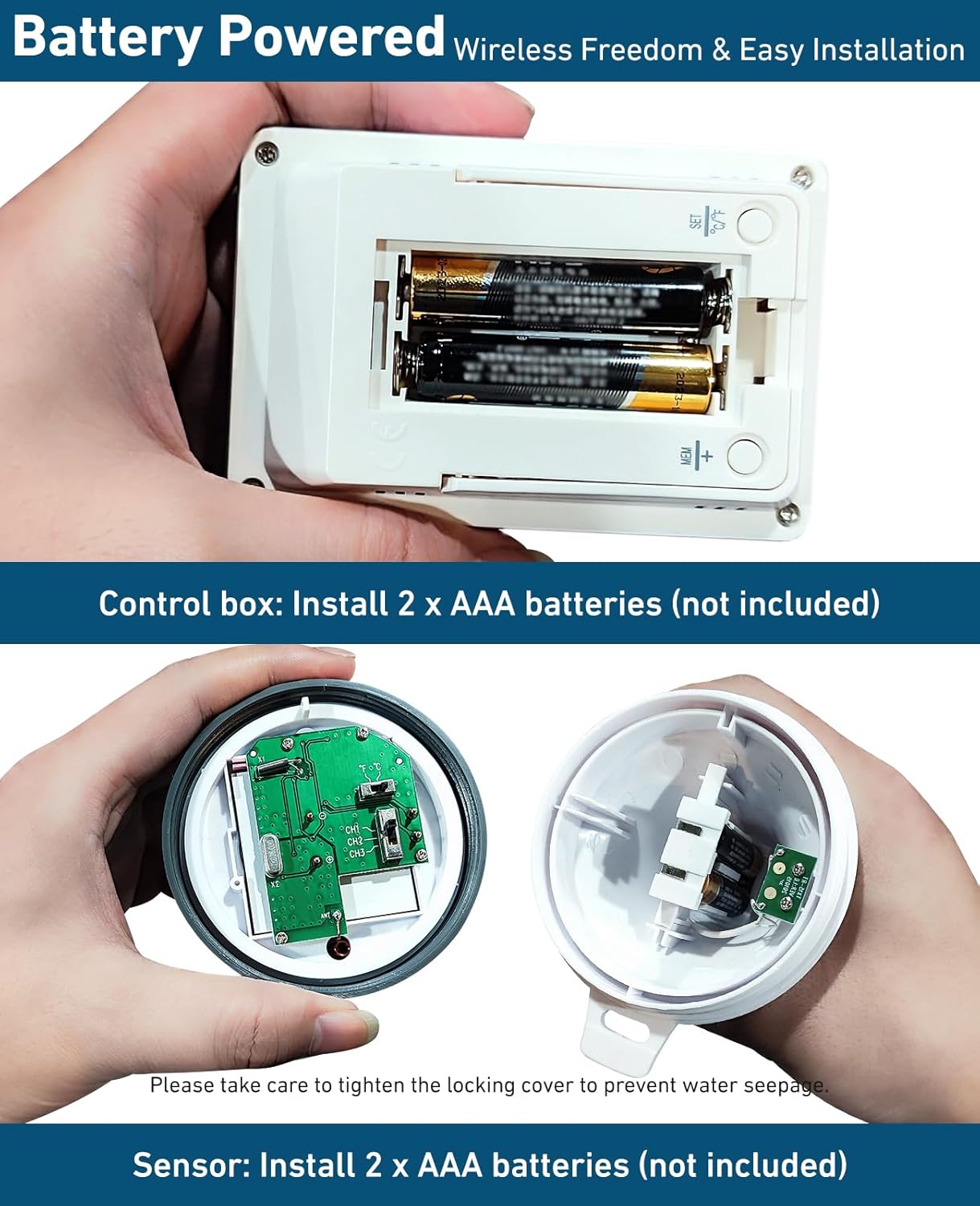
Imatge: Detallada view of battery compartments for both the indoor display unit and the floating sensor unit.

Image: Visual guide for the 3-step wireless connection: install batteries in control, install batteries in sensor, wait 3 minutes for data reception.
2. Connexió inicial
After installing batteries in both units, place the floating sensor unit in the water (pool, bathtub, etc.). The indoor display receiver will automatically attempt to connect with the sensor. Allow approximately 3 minutes for the units to establish a connection and begin displaying temperature data.
If the temperature information is not received after 3 minutes, press and hold the "Search Button" on the indoor display unit for 2 seconds to manually initiate transmission. The signal icon on the LCD display will flash during this process.
Instruccions de funcionament
The ZGRMBO Digital Pool Thermometer offers several display modes and functions:
Modes de visualització

Image: The indoor display unit showing water temperature, indoor temperature, and current time.
- Temperatura de l'aigua: Displays the temperature measured by the floating sensor unit.
- Temperatura interior: Displays the ambient temperature at the location of the indoor display receiver.
- Visualització de l'hora: Shows the current time (12/24-hour format).
Funcions del botó

Image: Close-up of the indoor display unit, highlighting the Search, MEM/+, and SET/℃/℉ buttons, and the battery box location.
- Botó de cerca: Press and hold for 2 seconds to manually search for the sensor signal.
- MEM/+ Button:
- Premeu una vegada per view the maximum temperature recorded for the day.
- Premeu de nou per view the minimum temperature recorded for the day.
- In setting mode, use to increase values.
- SET/℃/℉ Button:
- Press once to switch between Celsius (℃) and Fahrenheit (℉) temperature units.
- Manteniu premut per entrar al mode de configuració de l'hora.
Configuració de l'hora
- Press and hold the "SET/℃/℉" button until the hour digits begin to flash.
- Use the "MEM/+" button to adjust the hour.
- Press the "SET/℃/℉" button again to move to the minute digits.
- Use the "MEM/+" button to adjust the minutes.
- Press the "SET/℃/℉" button one more time to confirm and exit time setting mode.
Manteniment
To ensure the longevity and accuracy of your ZGRMBO Digital Pool Thermometer, follow these maintenance guidelines:
- Neteja: Wipe both the sensor unit and the display receiver with a soft, damp tela. No utilitzeu netejadors abrasius ni dissolvents.
- Substitució de la bateria: Replace batteries in both units when the low battery indicator appears on the display. Always ensure the sensor unit's cover is tightened securely after battery replacement to maintain its IPX8 waterproof rating.
- Water Seepage Prevention: Before placing the digital pool thermometer in the water, always ensure the thermometer cover is tightened completely. This is critical to prevent water from entering the unit.
- Addressing Water Mist: If you observe water mist on the screen of the wireless pool thermometer lid, immediately unscrew the lid. Allow the interior to dry completely before re-sealing and using the device again. This indicates a potential breach in the seal that needs to be addressed.
- Emmagatzematge: Quan no les utilitzeu durant períodes prolongats, traieu les piles de les dues unitats i guardeu-les en un lloc fresc i sec.
Resolució de problemes
If you encounter issues with your ZGRMBO Digital Pool Thermometer, refer to the following common problems and solutions:
| Problema | Causa possible | Solució |
|---|---|---|
| No display on receiver unit. | Piles gastades o instal·lades incorrectament. | Comproveu la polaritat de les piles i substituïu-les per piles AAA noves. |
| No temperature reading from sensor. | Sensor batteries dead, sensor not paired, or out of range. |
|
| Lectures de temperatura inexactes. | Sensor unit not fully submerged or exposed to direct sunlight. | Ensure the sensor is properly floating and submerged. Avoid placing the sensor in direct, intense sunlight for prolonged periods if possible. |
| Water mist inside sensor display. | Lid not tightened sufficiently or seal compromised. | Immediately unscrew the lid, dry the interior thoroughly, and then re-tighten the lid very firmly, ensuring the rubber seal is correctly seated. |
| Display shows incorrect time. | Time not set or reset after battery change. | Refer to the "Setting Time" section in Operating Instructions to adjust the time. |
Especificacions
| Característica | Detall |
|---|---|
| Número de model | FJ3351A |
| Marca | Zgrmbo |
| Classificació impermeable | IPX8 (Floating Sensor Unit) |
| Interval de transmissió sense fil | Fins a 60 metres (196 peus) a l'aire lliure |
| Precisió de la temperatura | ± 1 ℃ |
| Unitats de temperatura | Celsius (℃) / Fahrenheit (℉) |
| Font d'alimentació (sensor) | 2 piles AAA (no incloses) |
| Font d'alimentació (receptor) | 2 piles AAA (no incloses) |
| Tipus de visualització | LCD digital |
| Material | Plàstic |
| Components inclosos | Corda |
Escenaris d'aplicació
The ZGRMBO Digital Pool Thermometer is versatile and suitable for a wide range of applications:
- Piscines
- Bathtubs and Children's Bathing
- Fish Tanks and Aquariums
- Saunas and Hot Springs
- Aquaculture Ponds

Imatge: Examples of where the ZGRMBO thermometer can be used, such as swimming pools, aquariums, and hot springs.
Atenció al client
For any usage problems, questions, or concerns not covered in this manual, please feel free to contact ZGRMBO customer service. We are committed to providing assistance and ensuring your satisfaction with our product.
Please refer to the product packaging or the retailer's weblloc web per obtenir informació de contacte específica.


