1. Introducció
This manual provides essential information for setting up, operating, maintaining, and troubleshooting your HP Pro Mini 400 G9 MFF Mini PC. Please read this manual thoroughly before using your device to ensure proper functionality and longevity.
2. Què hi ha a la caixa
Verifiqueu que tots els elements estiguin presents a l'embalatge:
- HP Pro Mini 400 G9 MFF Mini PC
- Adaptador de corrent (90 W)
- Teclat d'escriptori amb cable HP 320K
- Ratolí amb cable HP 125
- Vertical Stand (optional, may vary by region)
- Documentació (Guia d'inici ràpid, Informació de garantia)
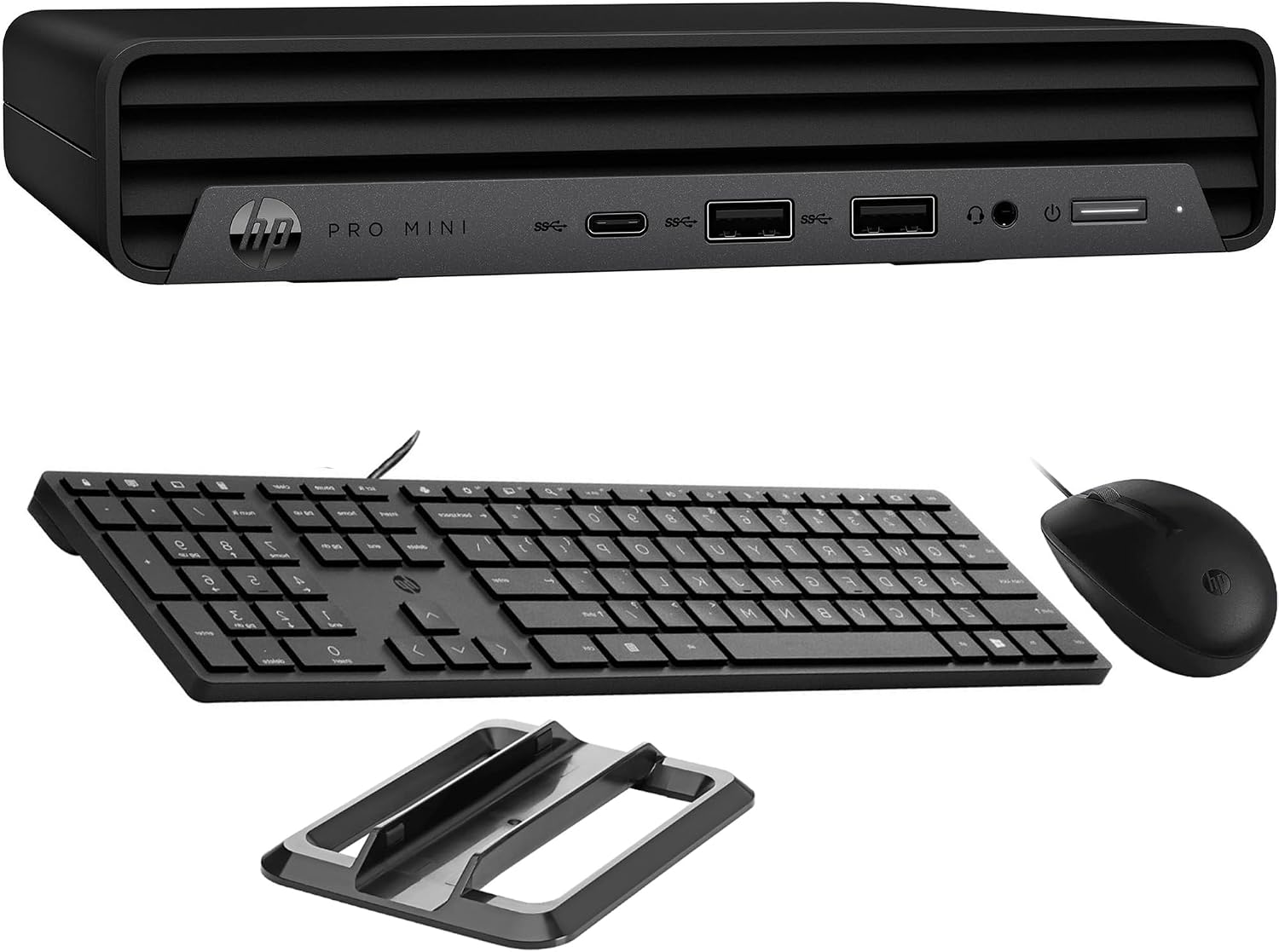
Image: HP Pro Mini 400 G9 Mini PC shown with its wired keyboard, wired mouse, and a vertical stand.
3. Sobrecàrrega físicaview
3.1 Tauler frontal
The front panel provides easily accessible ports for common peripherals and power control.
- Botó d'encesa: Per encendre o apagar l'ordinador.
- Presa combinada per a auriculars/micròfon: Per a l'entrada i sortida d'àudio.
- SuperSpeed USB Type-A 10Gbps (Charging): For high-speed data transfer and charging devices.
- SuperSpeed USB Type-A 10Gbps: Per a la transferència de dades d'alta velocitat.
- SuperSpeed USB Type-C 20Gbps: For ultra-high-speed data transfer and display output.

Imatge: Frontal view of the HP Pro Mini 400 G9, highlighting the power button, USB Type-A ports, USB Type-C port, and headphone/microphone combo jack.
3.2 Panell posterior
The rear panel contains ports for display, network, and additional USB devices.
- Connector d'alimentació: Connects to the external power adapter.
- Port RJ-45 (Ethernet): Per a la connexió de xarxa amb cable.
- SuperSpeed USB Type-A 10Gbps: Per a la transferència de dades d'alta velocitat.
- SuperSpeed USB Type-A 5Gbps (x2): For standard data transfer.
- DisplayPort 1.4 (x2): Per connectar pantalles externes.
- HDMI 2.1: Per connectar pantalles externes.

Imatge: Part posterior view of the HP Pro Mini 400 G9, detailing the power connector, RJ-45 Ethernet port, various USB Type-A ports, two DisplayPort 1.4 ports, and one HDMI 2.1 port.
3.3 Diagrama de ports
A comprehensive diagram illustrating all available ports on the HP Pro Mini 400 G9.
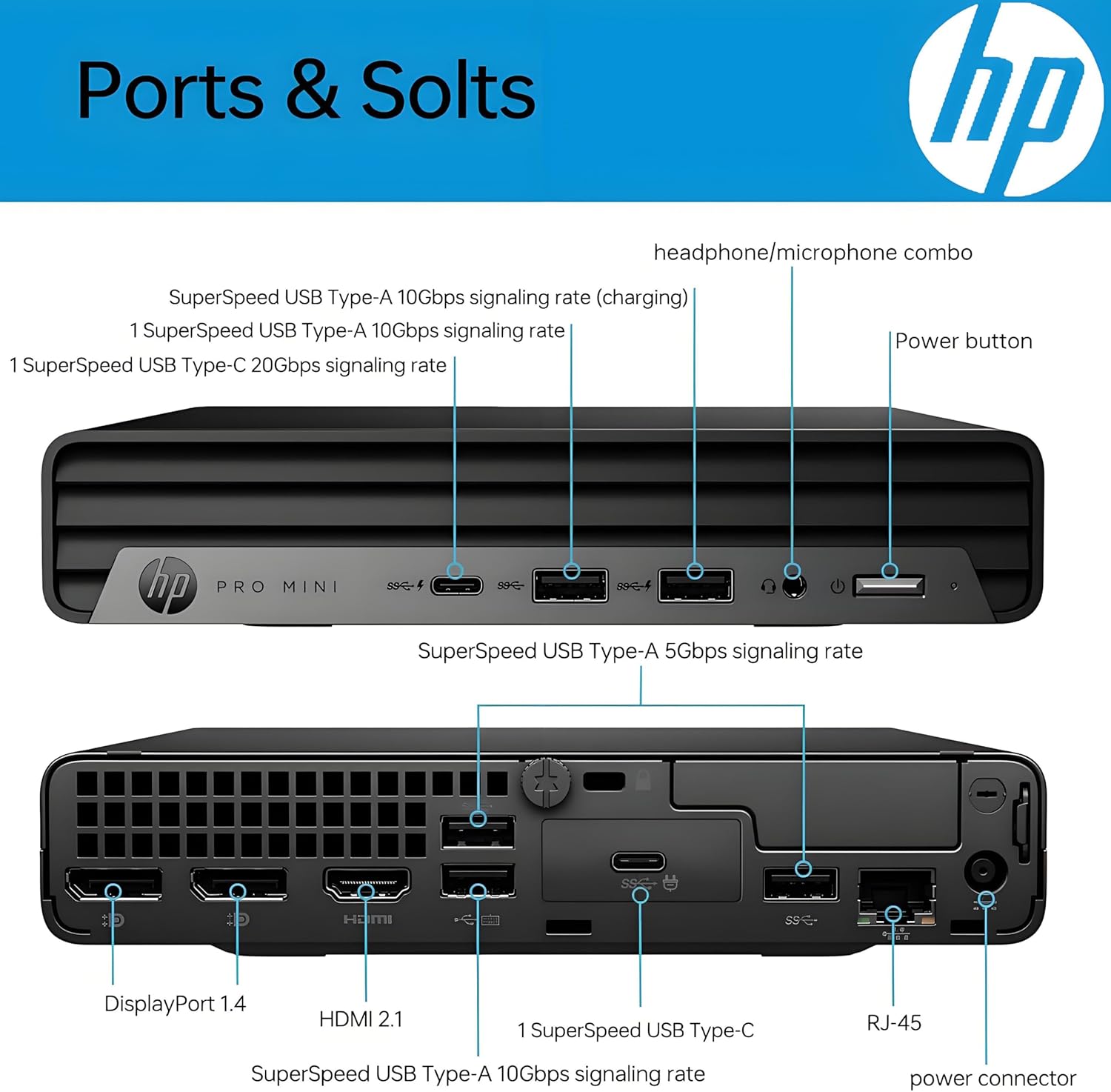
Image: Detailed diagram labeling each port on both the front and rear panels of the HP Pro Mini 400 G9 for easy identification.
3.4 Dimensions i pes
The HP Pro Mini 400 G9 is designed for a compact footprint.
- Dimensions (L x P x A): 6.97 x 6.89 x 1.34 polzades (17.7 x 17.5 x 3.4 cm)
- Pes: Aproximadament 3.13 lliures (1.42 kg)

Image: The HP Pro Mini 400 G9 with its physical dimensions (width, depth, height) and weight clearly indicated.
4. Configuració inicial
Follow these steps to set up your HP Pro Mini 400 G9:
- Desempaquetar l'ordinador: Carefully remove the Mini PC and all accessories from the packaging.
- Connecteu els perifèrics:
- Connect the wired keyboard and mouse to any available USB Type-A ports on the front or rear panel.
- Connect your monitor(s) to the DisplayPort or HDMI ports on the rear panel.
- Connectar-se a la xarxa (opcional):
- For a wired connection, connect an Ethernet cable from your router/modem to the RJ-45 port on the rear panel.
- For wireless (Wi-Fi), the PC will prompt you to connect during Windows setup.
- Connectar l'alimentació: Connect the power adapter cable to the power connector on the rear panel of the PC, then plug the power adapter into a wall outlet.
- Primer arrencada: Press the power button on the front panel. The PC will start, and you will be guided through the Windows 11 Pro initial setup process.
5. Instruccions de funcionament
5.1 Encès/Apagat
- Per encendre: Premeu el botó d'engegada del panell frontal.
- Per apagar: Feu clic al botó Inici del Windows i, a continuació, seleccioneu Energia > Apagar.
- Per reiniciar: Feu clic al botó Inici del Windows i, a continuació, seleccioneu Energia > Reiniciar.
- Per dormir: Feu clic al botó Inici del Windows i, a continuació, seleccioneu Energia > Suspensió.
5.2 Connexió a una xarxa sense fil (Wi-Fi)
- Feu clic a la icona Wi-Fi a la safata del sistema (a la cantonada inferior dreta de la pantalla).
- Seleccioneu la xarxa Wi-Fi que vulgueu de la llista.
- Feu clic a "Connecta" i introduïu la clau de seguretat de xarxa (contrasenya) si se us demana.
5.3 Ús d'USB i Display Ports
- Ports USB: Connect USB devices such as external hard drives, flash drives, printers, or other peripherals. The USB Type-C port supports data transfer and can also be used for display output with an appropriate adapter (sold separately).
- Display Ports (HDMI, DisplayPort): Connect up to three external monitors simultaneously for extended desktop or mirrored display configurations.
6. Manteniment
Regular maintenance helps ensure optimal performance and extends the life of your Mini PC.
- Neteja: Use a soft, dry cloth to clean the exterior of the PC. For dust accumulation in vents, use compressed air. Ensure the PC is powered off and unplugged before cleaning.
- Actualitzacions de programari: Regularly check for and install Windows updates and HP driver updates to maintain system security and performance.
- Còpia de seguretat de dades: Feu còpies de seguretat periòdiques de les dades importants en un disc dur extern o en un emmagatzematge al núvol per evitar la pèrdua de dades.
- Ventilació: Ensure the PC's vents are not obstructed to allow for proper airflow and prevent overheating.
7. Solució De Problemes
Aquesta secció tracta problemes comuns que podeu trobar.
| Problema | Possible solució |
|---|---|
| L'ordinador no s'encén | Ensure the power adapter is securely connected to both the PC and a working power outlet. Test the outlet with another device. |
| No es mostra al monitor | Check that the monitor is powered on and the video cable (HDMI/DisplayPort) is securely connected to both the PC and the monitor. Try a different video port or cable if available. |
| Sense connexió a Internet | For wired connection, check the Ethernet cable and router/modem status. For Wi-Fi, ensure Wi-Fi is enabled and you are connected to the correct network with the correct password. Restart your router/modem. |
| El teclat o el ratolí no responen | Ensure the USB cables for the keyboard and mouse are securely plugged into the PC. Try different USB ports. |
| El sistema és lent o no respon | Close unnecessary applications. Check Task Manager for high resource usage. Ensure Windows and drivers are up to date. Restart the PC. |
8. Especificacions tècniques
Key technical specifications for the HP Pro Mini 400 G9 MFF Mini PC (configuration may vary).
| Característica | Especificació |
|---|---|
| Sistema operatiu | Windows 11 Pro |
| Processador | Intel 6-Core i5-12500T (up to 4.20 GHz) |
| Gràfics | Intel UHD Graphics 770 integrat |
| RAM | 8 GB de RAM DDR4 (ampliable) |
| Emmagatzematge | 256GB PCIe NVMe TLC SSD (M.2) |
| Connectivitat sense fil | Intel AX201 Wi-Fi 6 (2x2) and Bluetooth 5.2 combo |
| Ports davanters | 1x Headphone/Microphone combo, 1x SuperSpeed USB Type-A 10Gbps (charging), 1x SuperSpeed USB Type-A 10Gbps, 1x SuperSpeed USB Type-C 20Gbps |
| Ports posteriors | 1x Power connector, 1x RJ-45, 1x SuperSpeed USB Type-A 10Gbps, 2x SuperSpeed USB Type-A 5Gbps, 2x DisplayPort 1.4, 1x HDMI 2.1 |
| Font d'alimentació | 90 W external power adapter |
| Dimensions (L x P x A) | 6.97 x 6.89 x 1.34 polzades (17.7 x 17.5 x 3.4 cm) |
| Pes | Aprox. 3.13 kg (1.42 lliures) |
9. Garantia i Suport
Your HP Pro Mini 400 G9 MFF Mini PC comes with a standard limited warranty. Please refer to the warranty documentation included in your product packaging for specific terms and conditions.
Per obtenir assistència tècnica, descàrregues de controladors i informació addicional sobre el producte, visiteu el lloc web oficial d'assistència d'HP. weblloc:
You may also find helpful resources and community forums on the HP weblloc.