Introducció
Gràcies per la compraasing the VGN V98Pro V2 Gaming Keyboard. This manual provides detailed instructions for setting up, operating, and maintaining your new keyboard. Please read this manual thoroughly before use to ensure optimal performance and longevity of your device.
Contingut del paquet
- VGN V98Pro V2 Gaming Keyboard
- Cable USB-C a USB-A
- Extractor de tecles
- Manual d'usuari
Producte acabatview
The VGN V98Pro V2 is a high-performance gaming keyboard designed for durability and responsiveness. It features a compact layout with a dedicated number pad, customizable keycaps, and a robust build quality.
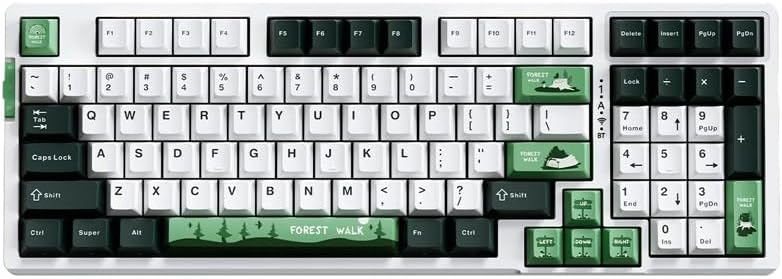
Figura 1: De dalt a baix view of the VGN V98Pro V2 Gaming Keyboard. This image displays the full keyboard layout, including the main alphanumeric keys, function row, navigation cluster, and numeric keypad. The keycaps feature a white, dark green, and light green color scheme, with specific keys like 'Forest Walk' and 'Forest' having unique designs.
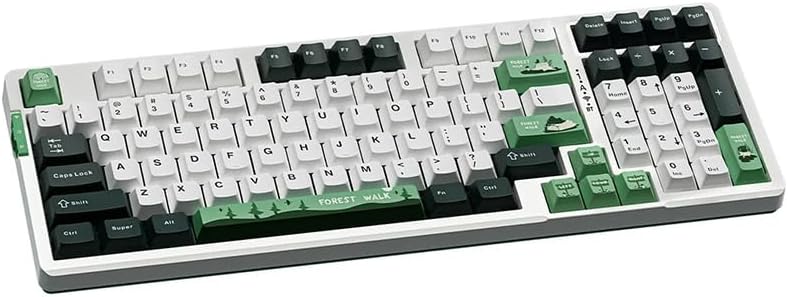
Figura 2: En angle view of the VGN V98Pro V2 Gaming Keyboard. This perspective highlights the profile of the keycaps and the overall ergonomic design of the keyboard. The side view shows the slight incline of the keyboard base and the texture of the keycaps.
Configuració
- Descomprimir el teclat: Traieu amb cura el teclat i tots els accessoris de l'embalatge.
- Connecteu el cable USB:
- Insert the USB-C end of the provided cable into the port on the back or side of the VGN V98Pro V2 keyboard.
- Insert the USB-A end of the cable into an available USB port on your computer or laptop.
- Reconeixement del sistema: Your operating system should automatically detect and install the necessary drivers for the keyboard. This process may take a few moments. No additional software installation is typically required for basic functionality.
- Funcionalitat de prova: Open a text editor or browser and type to ensure all keys are functioning correctly.
Instruccions de funcionament
Ús bàsic
The VGN V98Pro V2 functions as a standard QWERTY keyboard. Simply connect it to your computer, and it will be ready for use. The numeric keypad provides convenient data entry.
Function Key Combinations (Fn Key)
The keyboard features an Fn (Function) key, typically located near the left Ctrl or Alt key. This key, when pressed in combination with other keys, activates secondary functions. Common Fn key combinations include:
- Fn + F1-F12: Multimedia controls (e.g., volume up/down, play/pause, stop, next/previous track). Specific functions may vary.
- Fn + tecla Windows: Locks/unlocks the Windows key to prevent accidental presses during gaming.
- Fn + Tecles de fletxa: May control backlight brightness or effects (if applicable).
- Fn + PrtSc/ScrLk/Pause: May offer additional system functions.
Refer to the keycap legends for specific Fn key functions on your V98Pro V2 keyboard.
Manteniment i cura
- Neteja:
- Desconnecteu el teclat de l'ordinador abans de netejar-lo.
- Utilitzeu un drap suau i sense pelusa lleugerament dampRenteu-les amb aigua o una solució netejadora suau per netejar les tecles i el xassís.
- Per a la pols i les restes entre les tecles, feu servir aire comprimit.
- Eviteu l'ús de productes químics agressius, abrasius o dissolvents.
- Eliminació de la tapa de les tecles: Use the provided keycap puller to carefully remove keycaps for deeper cleaning or replacement. Gently pull straight up to avoid damaging the switch.
- Emmagatzematge: Store the keyboard in a clean, dry environment away from extreme temperatures and direct sunlight.
- Exposició líquida: Avoid spilling liquids on the keyboard. If a spill occurs, immediately disconnect it, turn it upside down to drain, and allow it to dry completely before reconnecting.
Resolució de problemes
- El teclat no respon:
- Assegureu-vos que el cable USB estigui connectat correctament tant al teclat com a l'ordinador.
- Prova de connectar el teclat a un port USB diferent de l'ordinador.
- Prova el teclat en un altre ordinador per descartar un problema específic del sistema.
- Reinicieu l'ordinador.
- Tecles específiques que no funcionen:
- Remove the keycap using the keycap puller and check for any debris obstructing the switch. Clean if necessary.
- Si el problema persisteix, pot indicar un error de maquinari.
- Input Lag or Delays:
- Assegureu-vos que els controladors USB de l'ordinador estiguin actualitzats.
- Avoid connecting the keyboard through unpowered USB hubs. Connect directly to the computer.
Especificacions
| Marca | VGN |
| Número de model | V98PROV2BBICF |
| Tipus de teclat | Teclat per a jocs |
| Dispositius compatibles | Portàtil, PC |
| Connectivitat | Cablejat (USB-C) |
| Pes de l'article | 1 kg |
| Esquema de colors | Blueberry Ice Cream - Forest (White, Dark Green, Light Green) |
Garantia i Suport
The VGN V98Pro V2 Gaming Keyboard comes with a standard manufacturer's warranty. Please refer to the warranty card included in your package for specific terms and conditions. For technical support, troubleshooting assistance, or warranty claims, please contact VGN customer service through their official weblloc web o el distribuïdor on vau comprar el producte.


