1. Introducció
This manual provides detailed instructions for the setup, operation, and maintenance of your SABLUTE Wireless Keyboard and Mouse Combo, model KC213D. Please read this manual thoroughly before use to ensure optimal performance and longevity of your device.

Image 1.1: SABLUTE Wireless Keyboard and Mouse Combo (Champagne Pink) with USB receiver and batteries.
2. Contingut del paquet
Verifiqueu que tots els elements siguin presents al vostre paquet:
- 1 x SABLUTE Wireless Keyboard (KC213D)
- 1 x SABLUTE Wireless Mouse
- 1 x USB 2.4G Receiver (stored in the mouse battery compartment)
- 2 x AAA Batteries (for keyboard)
- 1 x AA Battery (for mouse)

Image 2.1: Illustration of the keyboard, mouse, USB receiver, and batteries included in the package.
3. Instruccions de configuració
3.1 Instal·lació de la bateria
Per al teclat:
- Localitzeu el compartiment de la bateria a la part inferior del teclat.
- Obriu la tapa del compartiment de la bateria.
- Introduïu dues (2) piles AAA, assegurant-vos de la polaritat correcta (+/-).
- Tanqueu la tapa del compartiment de la bateria.
Per al ratolí:
- Locate the battery compartment on the underside of the mouse. The USB receiver is typically stored here.
- Obriu la tapa del compartiment de la bateria.
- Inseriu una (1) pila AA, assegurant-vos de la polaritat correcta (+/-).
- Tanqueu la tapa del compartiment de la bateria.

Image 3.1: Keyboard battery compartment with AAA batteries and USB receiver.

Image 3.2: Mouse battery compartment with AA battery.
3.2 Connexió del receptor USB
- Remove the USB 2.4G receiver from the mouse battery compartment.
- Connecteu el receptor USB a un port USB-A disponible del vostre ordinador o portàtil.
- El teclat i el ratolí s'haurien de connectar automàticament en pocs segons. Normalment no calen controladors addicionals.
The wireless connection operates on a 2.4G frequency, providing a reliable range of up to 33 feet (10 meters).

Image 3.3: The USB 2.4G receiver and its effective wireless range.
3.3 Compatibilitat
This keyboard and mouse combo is compatible with a variety of operating systems and devices:
- Sistemes operatius Windows
- macOS
- Chrome OS
- Ordinadors d'escriptori
- Portàtils
- Chromebooks
- Dell Inspiron, HP ENVY, HUAWEI MateBook, Macbook Air, iMac, Personal Computer, Television (with USB-A port)
Nota: A USB-C dongle is not included. This combo cannot connect directly to tablets or phones without an appropriate adapter.

Image 3.4: Visual representation of compatible operating systems and device types.
4. Instruccions de funcionament
4.1 Ergonomic Design Features
The keyboard is designed for comfort during extended use:
- Integrated Wrist Rest: Features a 2.8-inch wide wrist rest to provide support and reduce strain.
- 10° Tilt Angle: The keyboard is designed with a 10-degree tilt for a more natural typing posture.

Image 4.1: The ergonomic wrist rest and 10-degree tilt angle of the keyboard.
4.2 Integrated Phone and Tablet Holder
The keyboard includes a built-in holder for mobile devices:
- The holder accommodates phones and tablets up to 11.9 inches in width.
- Dimensions of the holder: 8.87 inches (length) x 0.59 inches (width).

Image 4.2: A tablet positioned in the keyboard's integrated holder.
4.3 Multimedia and Shortcut Keys
The keyboard features 6 multimedia hotkeys for quick access to common functions:
- Pàgina anterior: Navigates to the previous page in a browser or document.
- Pàgina següent: Navigates to the next page in a browser or document.
- Refresh/Search: Refreshes the current page or activates search function.
- Cerca: Opens the search utility.
- Stop Loading: Halts the loading of a web pàgina.
- Calculadora: Opens the system calculator.

Imatge 4.3: Detallada view of the dedicated multimedia and shortcut keys.
4.4 Silent Typing and Clicking
- The keyboard utilizes soft membrane keys designed to reduce typing noise by up to 95%.
- The wireless mouse features Silent Micro Motion technology, resulting in nearly silent clicks.

Image 4.4: Comparison of noise levels, highlighting the 95% noise reduction of the combo.
4.5 Funcionament del ratolí
The wireless mouse is equipped with 6 buttons and adjustable tracking speed:
- Disseny de 6 botons: Includes standard left/right click, scroll wheel, DPI adjustment, and forward/backward buttons.
- 3 Levels of Tracking Speed (DPI): Adjust the mouse sensitivity to your preference. Press the DPI button (usually located below the scroll wheel) to cycle through the settings.
- Botons Endavant/Enrere: Located on the side of the mouse for convenient navigation in web navegadors o file exploradors.
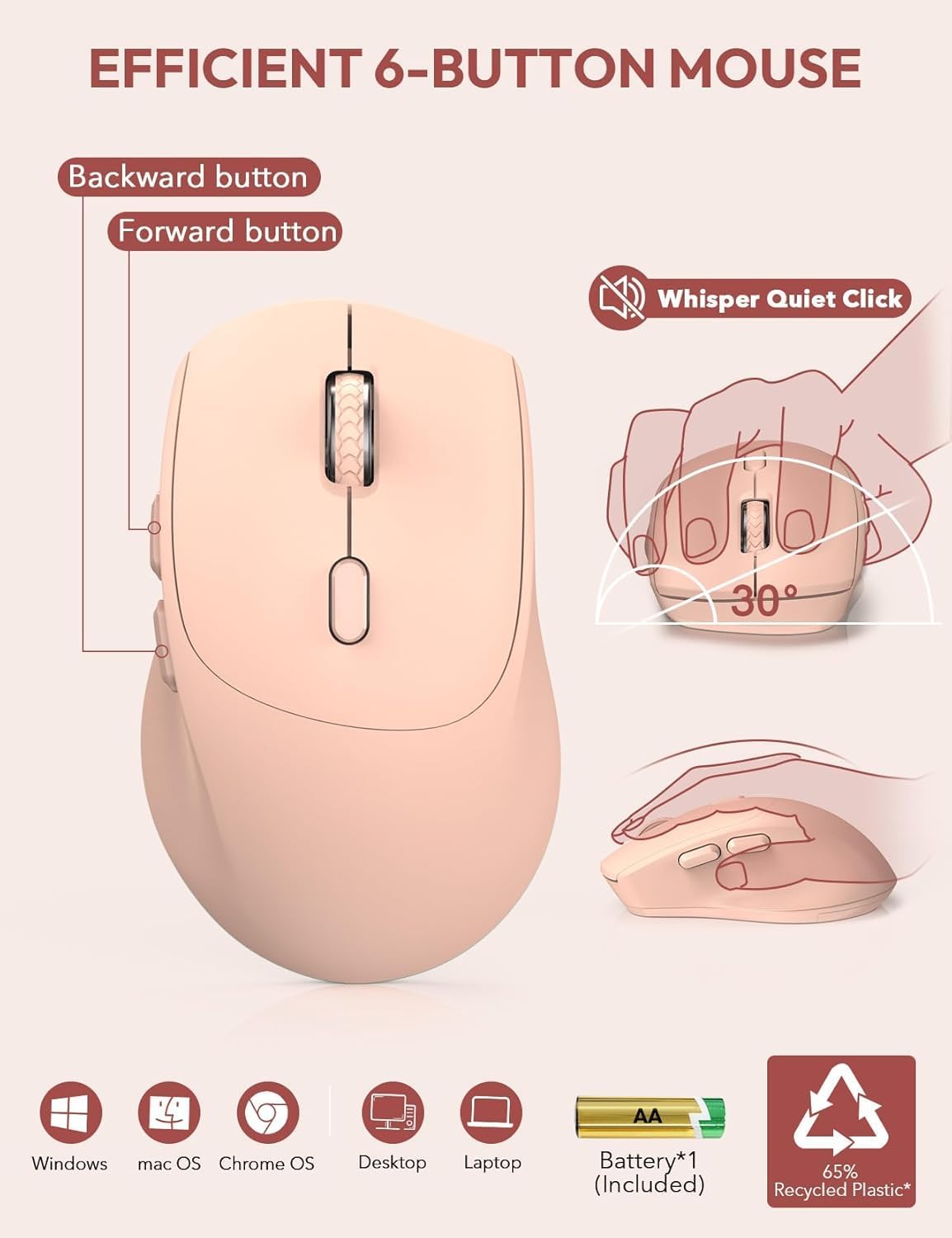
Image 4.5: Features of the 6-button mouse, including silent click and ergonomic design.
4.6 Power Saving Function
To conserve battery life, the keyboard and mouse feature an automatic sleep mode:
- Mode de repòs automàtic: Both devices will enter sleep mode after 10 minutes of inactivity.
- Quick Wake-up: To wake the keyboard, press any key. To wake the mouse, click any button. The devices will become active within 1 second.
- Espera ampliada: Provides up to 365 days of standby time for the keyboard and up to 400 hours of working time for the mouse on a single set of batteries.

Image 4.6: Details on the power-saving functions and battery life.
5. Manteniment
Proper maintenance ensures the longevity and performance of your SABLUTE Wireless Keyboard and Mouse Combo:
- Neteja: Feu servir un drap suau i sec per netejar les superfícies del teclat i el ratolí. Per a la brutícia persistent, netegeu lleugerament.amp Es pot fer servir un drap amb sabó suau, assegurant-se que no entri líquid al dispositiu.
- Substitució de la bateria: Replace batteries when performance degrades or the low battery indicator (if present) illuminates. Always use new batteries of the specified type (AAA for keyboard, AA for mouse).
- Emmagatzematge: Guardeu els dispositius en un lloc fresc i sec, allunyat de la llum solar directa i de temperatures extremes.
- Receptor USB: When not in use, the USB receiver can be stored in the mouse's battery compartment to prevent loss.
6. Solució De Problemes
If you encounter issues with your SABLUTE Wireless Keyboard and Mouse Combo, refer to the following common solutions:
- El dispositiu no respon:
- Ensure the USB receiver is securely plugged into a functional USB-A port on your computer.
- Check if the batteries in both the keyboard and mouse are correctly installed and have sufficient charge. Replace if necessary.
- Acosteu el teclat i el ratolí al receptor USB per descartar problemes d'abast.
- Try plugging the USB receiver into a different USB-A port, preferably directly on your computer rather than a USB hub, as some hubs may cause connectivity issues.
- Missing USB Dongle:
- The USB receiver is typically stored in a sealed bag within the product packaging or inside the mouse's battery compartment. Please check all packaging materials and the mouse compartment carefully.
- If still missing, contact customer support for assistance.
- Connexió endarrerida o intermitent:
- Ensure there are no large metallic objects or other wireless devices (like Wi-Fi routers, cordless phones) operating too close to the receiver, which could cause interference.
- As noted in reviews, connecting the USB receiver directly to a computer's USB-A port, rather than a USB-A hub, can resolve lag issues.
- Keys Wearing Off:
- Keycap legends may show wear over time with heavy use. Gentle typing and regular cleaning can help preserve them.
- If excessive wear occurs prematurely, contact customer support.
- Problemes generals:
- For any other issues not covered here, refer to the support section or contact SABLUTE customer service.
7. Especificacions
| Característica | Detall |
|---|---|
| Número de model | KC213D |
| Dimensions del producte (teclat) | 16.54 x 8.27 x 1.38 polzades |
| Pes de l'article | 2.2 lliures |
| Tecnologia de connectivitat | 2.4G USB sense fil |
| Bateries del teclat | 2 piles AAA (incloses) |
| Bateries de ratolí | 1 x bateria AA (inclosa) |
| Característiques especials | Ergonomic Wrist Rest, Phone Holder, Full Size, Shortcut Keys, Low-profile keycap, Water Repellent |
| Dispositius compatibles | Chromebook, Dell Inspiron, HP ENVY, HUAWEI MateBook, Laptop, Notebook, Macbook Air, iMac, Personal Computer, Television |
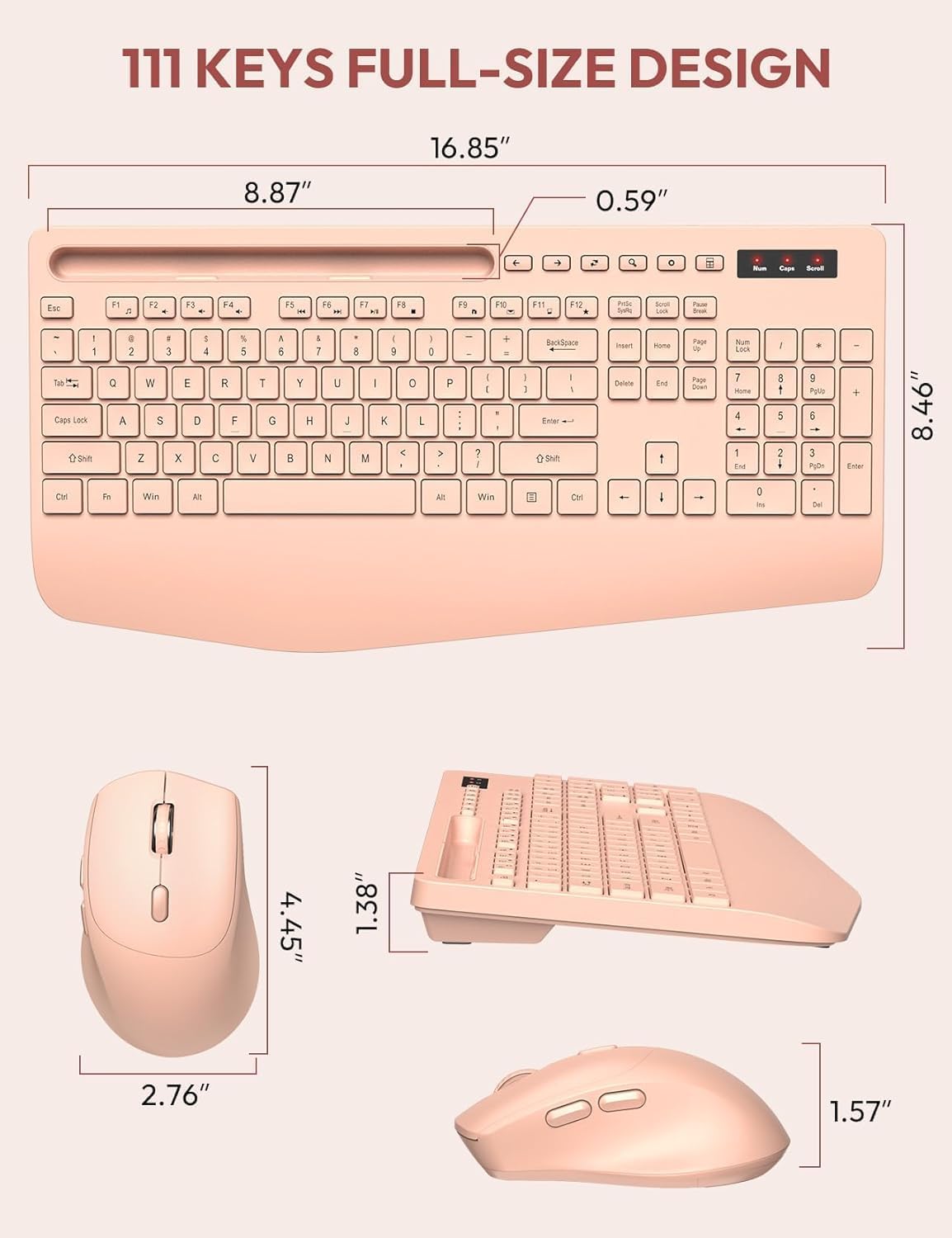
Image 7.1: Detailed dimensions of the keyboard and mouse.
8. Garantia i Suport
SABLUTE is committed to providing quality products and customer satisfaction.
- Substitució de 90 dies: We offer a 90-day replacement policy for product defects.
- 360-Day Manufacturer Warranty: Your product is covered by a 360-day manufacturer warranty from the date of purchase.
- Atenció al client: For any inquiries, troubleshooting assistance, or warranty claims, please contact our support team.
Correu electrònic de contacte: sabluteservices@outlook.com

Image 8.1: SABLUTE customer support details.


