1. Introducció
Thank you for choosing the Rampage KB-RX63 ATOM Mini Gaming Keyboard. This compact mechanical keyboard is designed for gaming enthusiasts and users seeking a minimalist yet powerful input device. Featuring a 63-key layout, RGB backlight, and durable Brown mechanical switches, it offers a responsive and customizable typing experience. This manual provides essential information for setting up, operating, maintaining, and troubleshooting your new keyboard.
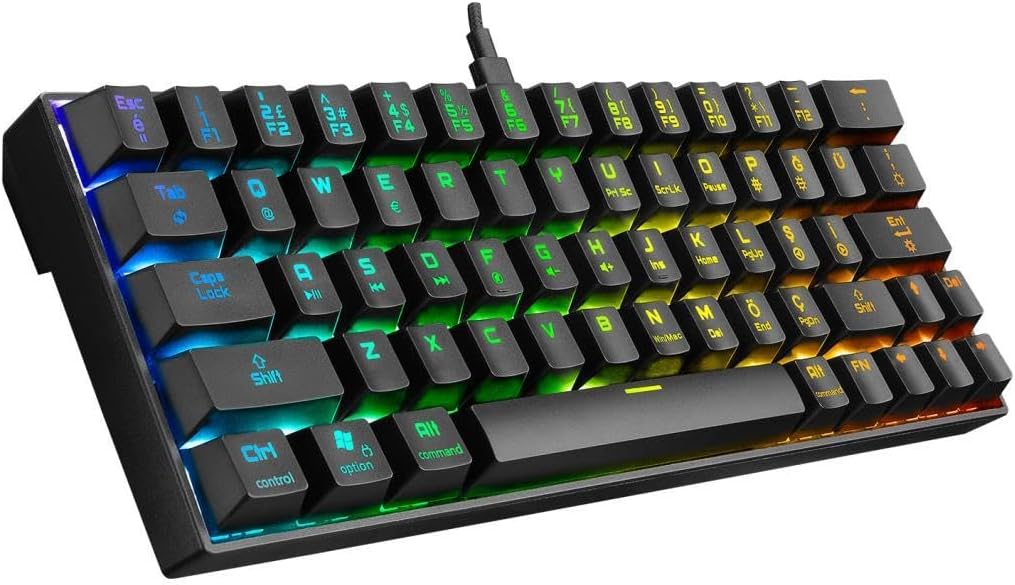
Figura 1.1: Mésview of the Rampage KB-RX63 ATOM Mini Gaming Keyboard with RGB lighting.
2. Informació de seguretat
Please read the following safety precautions carefully before using your keyboard to ensure safe operation and prevent damage.
- Do not expose the keyboard to liquids, humidity, or extreme temperatures.
- Eviteu deixar caure el teclat ni sotmetre'l a impactes forts.
- No intenteu desmuntar ni modificar el teclat. Això anul·larà la garantia.
- Mantingueu el teclat allunyat de camps magnètics forts.
- Feu servir només el cable tipus C proporcionat per a la connexió.
3. Contingut del paquet
Verifiqueu que tots els elements siguin presents al paquet:
- Rampage KB-RX63 ATOM Mini Gaming Keyboard
- Cable USB tipus C a USB A
- Manual d'usuari (aquest document)
4. Configuració
Follow these steps to set up your Rampage KB-RX63 ATOM keyboard:
- Connecteu el cable: Insert the USB Type-C end of the provided cable into the Type-C port on the keyboard.
- Connexió a l'ordinador: Connecteu l'extrem USB-A del cable a un port USB disponible de l'ordinador.
- Instal·lació del controlador: The keyboard is plug-and-play and does not require specific driver installation for basic functionality. Your operating system will automatically detect and install the necessary drivers.
- A punt per al seu ús: Once detected, the keyboard's RGB lighting will illuminate, indicating it is ready for use.

Figura 4.1: Pro lateralfile of the keyboard, highlighting the Type-C connection port.
5. Instruccions de funcionament
El Rampage KB-RX63 ATOM features a compact 63-key layout. Many functions are accessed via the Fn (Function) key combined with other keys.
5.1. Funcions bàsiques de les tecles
All standard alphanumeric and symbol keys function as labeled. Due to the compact layout, some keys have secondary functions.
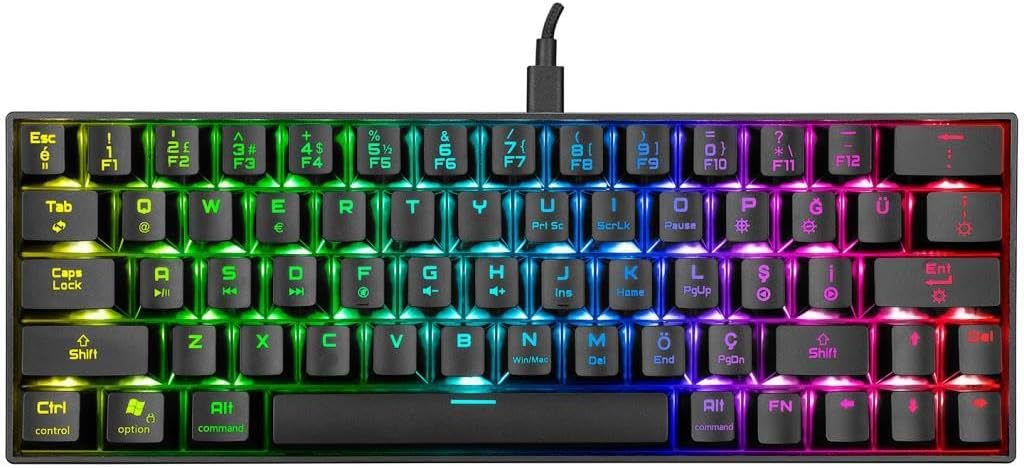
Figura 5.1: De dalt a baix view of the keyboard layout, showing primary and secondary key legends.
5.2. Control de retroiluminació RGB
The keyboard features dynamic RGB backlighting. Use the following Fn key combinations to control the lighting effects:
- Fn + \ |: Cycle through different RGB lighting modes.
- Fn + [ {: Redueix la brillantor de la retroiluminació.
- Fn + ] }: Augmenta la brillantor de la retroiluminació.
- Fn + ; :: Redueix la velocitat de l'efecte d'il·luminació.
- Fn + ' ": Augmenta la velocitat de l'efecte d'il·luminació.
- Fn + . >: Canvia el color de la retroiluminació (per a modes estàtics).

Figure 5.2: The keyboard displaying its customizable RGB backlight effects.
5.3. Tecles multimèdia i de funció
Access multimedia and system functions by pressing Fn in combination with the corresponding keys:
| Combinació de tecles | Funció |
|---|---|
| Fn + Q | Switch to Mac OS layout (if applicable) |
| Fn + W | Switch to Windows OS layout (if applicable) |
| Fn+A | Pista anterior |
| Fn + S | Reproduir/Pausa |
| Fn + D | Pista següent |
| Fn + F | Baixa el volum |
| Fn + G | Puja el volum |
| Fn + H | Silenciar |
| Fn + J | Obre El meu ordinador |
| Fn + K | Obriu la calculadora |
| Fn + L | Obriu el navegador |
| Fn + P | Imprimir pantalla |
| Fn + ; : | Casa |
| Fn + ' " | Final |
| Fn + , | Amunt pàgina |
| Fn + . > | Pàgina avall |
| Fn + / ? | Insereix |
| Fn + Maj dreta | Suprimeix |
| Fn + Ctrl dreta | Arrow Keys (Up, Down, Left, Right) |
6. Manteniment
Un manteniment adequat garanteix la longevitat i el rendiment òptim del teclat.
- Neteja:
- Desconnecteu el teclat de l'ordinador abans de netejar-lo.
- Utilitzeu un drap suau i sense pelusa lleugerament dampEsbandiu amb aigua o una solució netejadora suau per netejar les tecles i la superfície.
- Do not spray cleaners directly onto the keyboard.
- Feu servir aire comprimit per eliminar la pols i les restes que hi ha entre les tecles.
- Emmagatzematge: Guardeu el teclat en un lloc fresc i sec, allunyat de la llum solar directa i de temperatures extremes quan no l'utilitzeu durant períodes prolongats.
7. Solució De Problemes
If you encounter issues with your Rampage KB-RX63 ATOM keyboard, refer to the following common problems and solutions:
| Problema | Possible solució |
|---|---|
| Keyboard not responding / Not detected by computer. |
|
| La il·luminació RGB no funciona o està enganxada. |
|
| Algunes tecles no responen. |
|
8. Especificacions
| Característica | Detall |
|---|---|
| Model | Rampage KB-RX63 ATOM |
| Recompte de claus | 63 claus |
| Tipus de canvi | Interruptors mecànics marrons |
| Llum de fons | Retroil·luminació RGB |
| Connectivitat | Wired, USB Type-C |
| Disseny | Q (Turkish QWERTY, based on product title) |
| Color | Negre |
| Compatibilitat | Windows, macOS (via Fn key functions) |
9. Garantia i Suport
Rampage products are designed for durability and performance. This product comes with a standard manufacturer's warranty against defects in materials and workmanship. Please refer to your purchase receipt or the official Rampedat website for specific warranty terms and conditions applicable in your region.
For technical support, warranty claims, or further assistance, please contact Rampage customer service through their official weblloc web o el distribuïdor on vau comprar el producte.
Oficial Weblloc: www.rampage.com.tr (Si us plau, tingueu en compte: URL és un example and may vary)


