Introducció
Thank you for choosing the WORKPRO 3.6V Electric Cordless Screwdriver. This manual provides essential information for the safe and efficient operation, maintenance, and care of your new tool. Please read this manual thoroughly before use and retain it for future reference.
Informació de seguretat
Sempre observeu les precaucions de seguretat bàsiques quan utilitzeu eines elèctriques per reduir el risc d'incendi, descàrrega elèctrica i lesions personals.
- Mantenir la zona de treball neta i ben il·luminada. Les zones desordenades o fosques conviden a accidents.
- No feu servir eines elèctriques en atmosferes explosives, com ara en presència de líquids, gasos o pols inflamables. Les eines elèctriques generen espurnes que poden encendre la pols o els fums.
- Mantingueu els nens i els espectadors allunyats mentre feu servir una eina elèctrica. Les distraccions poden fer que perdis el control.
- Eviteu l'arrencada accidental. Assegureu-vos que l'interruptor estigui en la posició d'apagada abans de connectar la bateria, agafar o transportar l'eina.
- No sobrepasseu. Mantingueu els peus i l'equilibri adequats en tot moment. Això permet un millor control de l'eina elèctrica en situacions inesperades.
- Vesteix-te correctament. No porteu roba solta ni joies. Mantingueu els cabells i la roba allunyats de les parts mòbils. La roba solta, les joies o els cabells llargs poden quedar atrapats a les parts mòbils.
- Utilitzar equips de seguretat. Utilitzeu sempre protecció ocular. S'han d'utilitzar màscara antipols, sabates de seguretat antilliscants, casc o protecció auditiva per a les condicions adequades.
Contingut del paquet
Verifiqueu que tots els elements que s'enumeren a continuació s'inclouen al vostre paquet:
- 1 PC Electric Cordless Screwdriver
- 1 PC USB Cable (Type-A to Type-C)
- 1 PC Carrying Case
- 1 PC 50mm Extension Rod
- 2 PCS 50mm Bits (PH2/PZ2)
- 19 PCS 25mm Bits (PH0/1/2/3, PZ1/2/3, H1/8, 5/32, 3/16, 1/4, T10/15/20/25, SL1/8, 5/32, 3/16, 1/4)
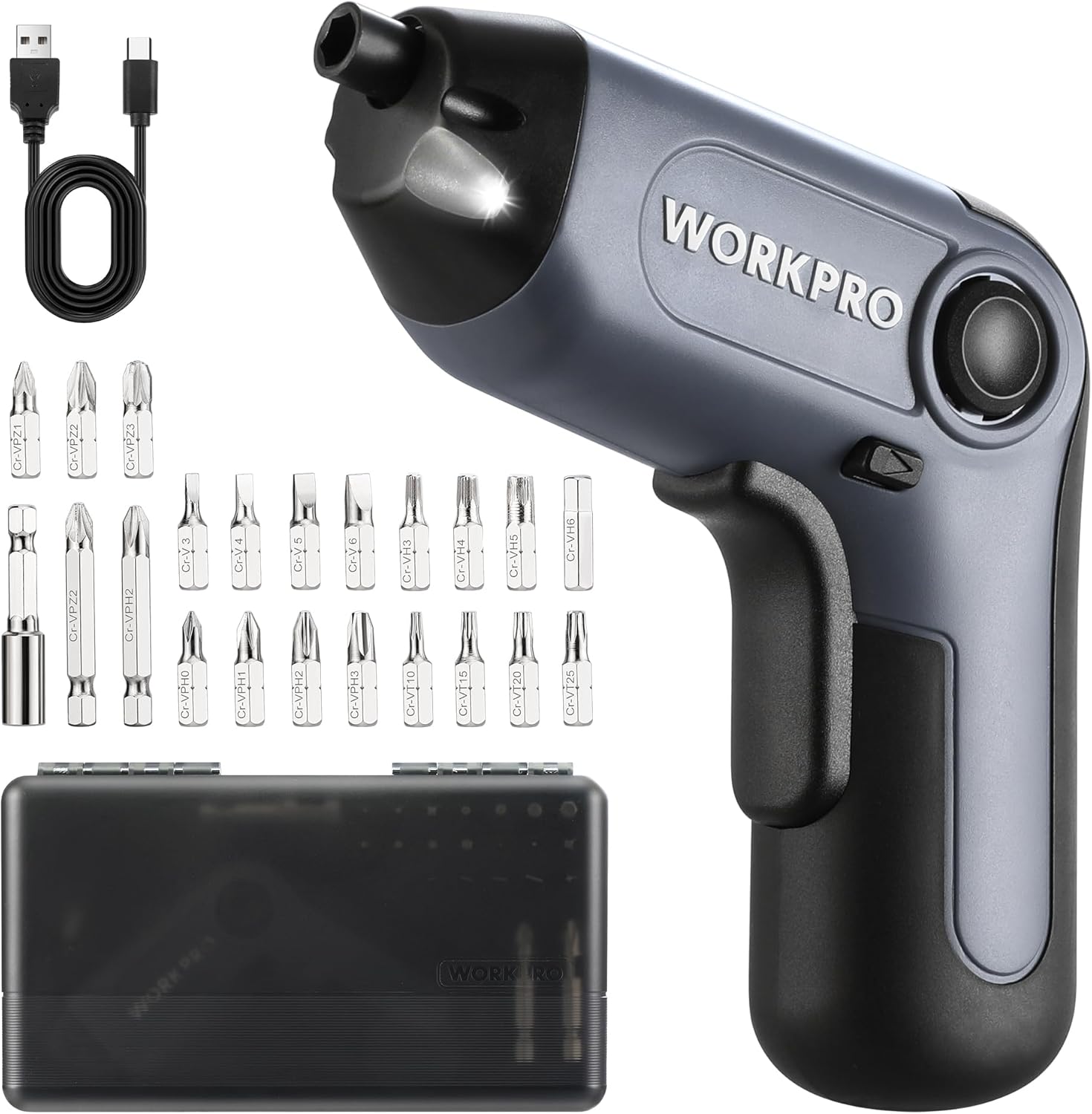
Image: The WORKPRO Electric Cordless Screwdriver, USB cable, carrying case, extension rod, and various screwdriver bits.
Producte acabatview
Familiarize yourself with the components and features of your WORKPRO Electric Cordless Screwdriver.

Image: A diagram highlighting key parts of the screwdriver, including the 1/4" Collet Sleeve, LED Light, ON/OFF Switch, USB-C Cable port, Forward/Reverse/Lock Control, and Charge Port & Charge Indicator.
- Offset Driving Shaft: Designed for improved access in tight spaces and corners, offering greater flexibility compared to traditional center-driving tools.
- Llum LED: An integrated front LED light automatically illuminates the work area, enhancing visibility in dimly lit environments.
- Magnetic Chuck: The 1/4" magnetic chuck securely holds screwdriver bits in place during operation.
- Forward/Reverse/Lock Control: A convenient switch allows for easy selection of driving direction or locking the tool for manual use.
Configuració
Carregant la bateria
The screwdriver is equipped with a built-in rechargeable battery. Before first use, or when the battery is low, charge the tool using the provided USB cable.
- Connect the USB cable (Type-A to Type-C) to the charging port on the screwdriver.
- Connect the other end of the USB cable to a power source such as a power bank, USB charger (5V), car charger, or laptop/PC.
- The charge indicator light will show vermell mentre es carrega.
- Once fully charged, the indicator light will turn verdUna càrrega completa sol trigar entre 1.5 i 2 hores.

Image: The screwdriver being charged via USB-C, illustrating the built-in 2000mAh battery and compatible charging methods.
Installing/Changing Bits
The screwdriver features a 1/4" magnetic chuck for quick and secure bit changes.
- Ensure the screwdriver is in the 'Lock' position (center position of the Forward/Reverse switch) to prevent accidental activation.
- Insert the desired 1/4" hex bit directly into the magnetic chuck until it is firmly seated.
- To remove a bit, simply pull it straight out from the chuck.
- For extended reach, insert the 50mm extension rod into the chuck first, then insert the desired bit into the extension rod.
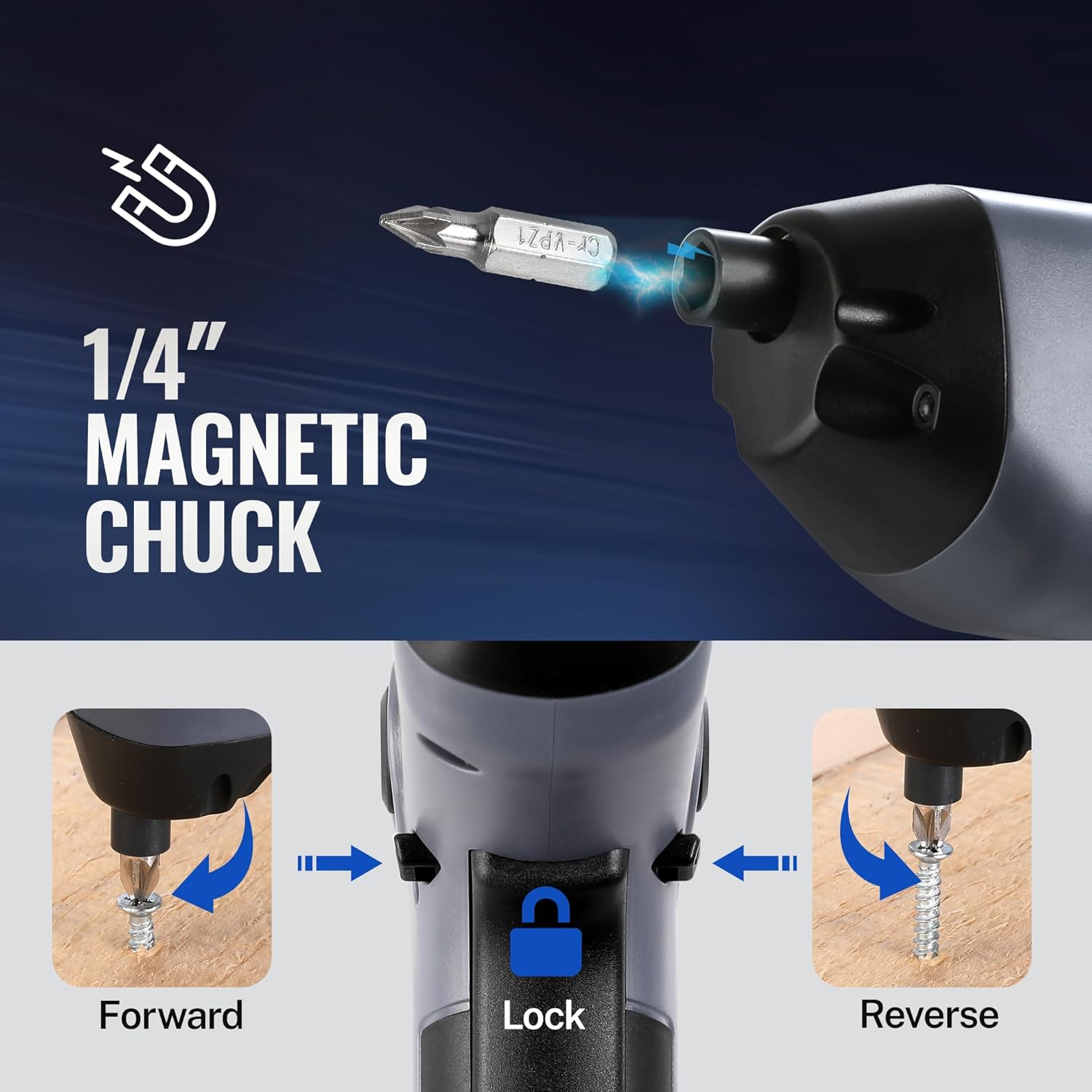
Image: A visual representation of inserting a bit into the magnetic chuck and the Forward, Lock, and Reverse positions of the control switch.
Instruccions de funcionament
Encès/Apagat
To operate the screwdriver, press the ON/OFF switch (trigger) located on the handle. Release the switch to stop the tool.
Forward/Reverse Operation
The Forward/Reverse/Lock control switch is located near the top of the handle.
- Push the switch forward (towards the bit) for endavant rotation (to drive screws).
- Push the switch backward (towards the base) for revés rotation (to remove screws).
- Posa l'interruptor a centre position to lock the tool, preventing accidental activation and allowing for manual tightening/loosening if needed.
Ús de la llum LED
The integrated LED light automatically activates when the ON/OFF switch is pressed, illuminating your work area. It will turn off automatically when the switch is released.

Image: The screwdriver in use, demonstrating how the LED light illuminates the screw and surrounding area for better visibility.
Utilizing the Offset Driving Shaft
The offset design of this screwdriver allows it to reach screws in confined spaces and close to edges where traditional screwdrivers or drills might not fit.
- When working in corners or near obstacles, position the offset shaft to align the bit with the screw head.
- This design provides increased flexibility for precise work in challenging areas.

Image: A comparison showing a standard drill with a center driving shaft unable to reach a screw in a corner, contrasted with the WORKPRO screwdriver's offset driving shaft successfully accessing the screw in a narrow space.
Manteniment
Proper maintenance ensures the longevity and optimal performance of your screwdriver.
- Neteja: Netegeu l'eina regularment amb un drap suau iamp drap. No utilitzeu productes químics agressius ni netejadors abrasius. Mantingueu les obertures de ventilació netes de pols i deixalles.
- Emmagatzematge: Store the screwdriver and its accessories in the provided carrying case in a dry, cool place, away from direct sunlight and moisture.
- Cura de la bateria: Per a l'emmagatzematge a llarg termini, carregueu la bateria aproximadament al 50% cada 3-6 mesos per mantenir-la en bon estat.
- Inspecció de bits: Periodically inspect screwdriver bits for wear or damage. Replace worn bits to ensure effective screw driving and prevent damage to screw heads.
Resolució de problemes
If you encounter issues with your WORKPRO Electric Cordless Screwdriver, refer to the following common problems and solutions:
- Screwdriver does not turn on:
- Ensure the battery is charged. Connect the tool to a power source and check the charging indicator.
- Verify the Forward/Reverse/Lock switch is not in the 'Lock' (center) position.
- Screwdriver lacks power/torque:
- The battery may be low. Recharge the tool.
- Ensure the correct bit size is used for the screw to prevent stripping and maximize torque transfer.
- Bit falls out of chuck:
- Ensure the bit is fully inserted into the magnetic chuck.
- Check if the bit is a standard 1/4" hex shank.
- Charging indicator light does not turn green:
- Ensure the USB cable is securely connected to both the screwdriver and the power source.
- Try a different USB cable or power adapter to rule out a faulty accessory.
Especificacions
| Característica | Especificació |
|---|---|
| Marca | WORKPRO |
| Model | 3.6V Electric Cordless Screwdriver |
| Tipus de bateria | Ió de liti (inclòs) |
| Torque | Fins a 5 Nm |
| Velocitat sense càrrega | 210 RPM |
| Temps de càrrega | 1.5-2 hores |
| Port de càrrega | USB-C |
| Estil del cap | Phillips, Pozidriv, Torx, Hex, Slotted |
| Mida del bit | 1/4" Hex Shank (25mm and 50mm bits included) |
| Pes de l'article | 1.96 lliures |
| Dimensions del paquet | 9.96 x 5.71 x 2.64 polzades |
Garantia i Suport
WORKPRO products are manufactured to high-quality standards. For warranty information, technical support, or service inquiries, please refer to the contact information provided with your purchase documentation or visit the official WORKPRO weblloc web. Si us plau, conserveu el comprovant de compra per a reclamacions de garantia.


