1. Producte acabatview
The INNOVV N1 is a portable 5.5-inch smart screen designed for motorcycles, integrating Apple CarPlay, Android Auto, GPS navigation, and a dual dash cam system. It features front and rear 1080P@30FPS recording, 5.8G Wi-Fi connectivity, IP67 waterproofing, a full-screen touch interface, and parking monitoring. This manual provides comprehensive instructions for its setup, operation, and maintenance.

Image 1.1: The INNOVV N1 smart screen display unit and two compact dash cameras.
2. Contingut del paquet
Verifiqueu que tots els elements que s'enumeren a continuació s'inclouen al vostre paquet. Si falta algun element o hi ha algun malmès, poseu-vos en contacte amb l'atenció al client.
- DVR and Display Unit (1 pc)
- 0.6 Meter Extended Cable (2 pcs)
- 2.5 Meter Extended Cable (1 pc)
- Power Supply Cable (1 pc)
- Accessory Kit (3 pcs)
- Manual d'usuari (1 pc)
- GPS Module (1 pc)
- Front Camera (1 pc)
- Rear Camera (1 pc)
- TPMS Sensors (2 pcs, if included in your model)
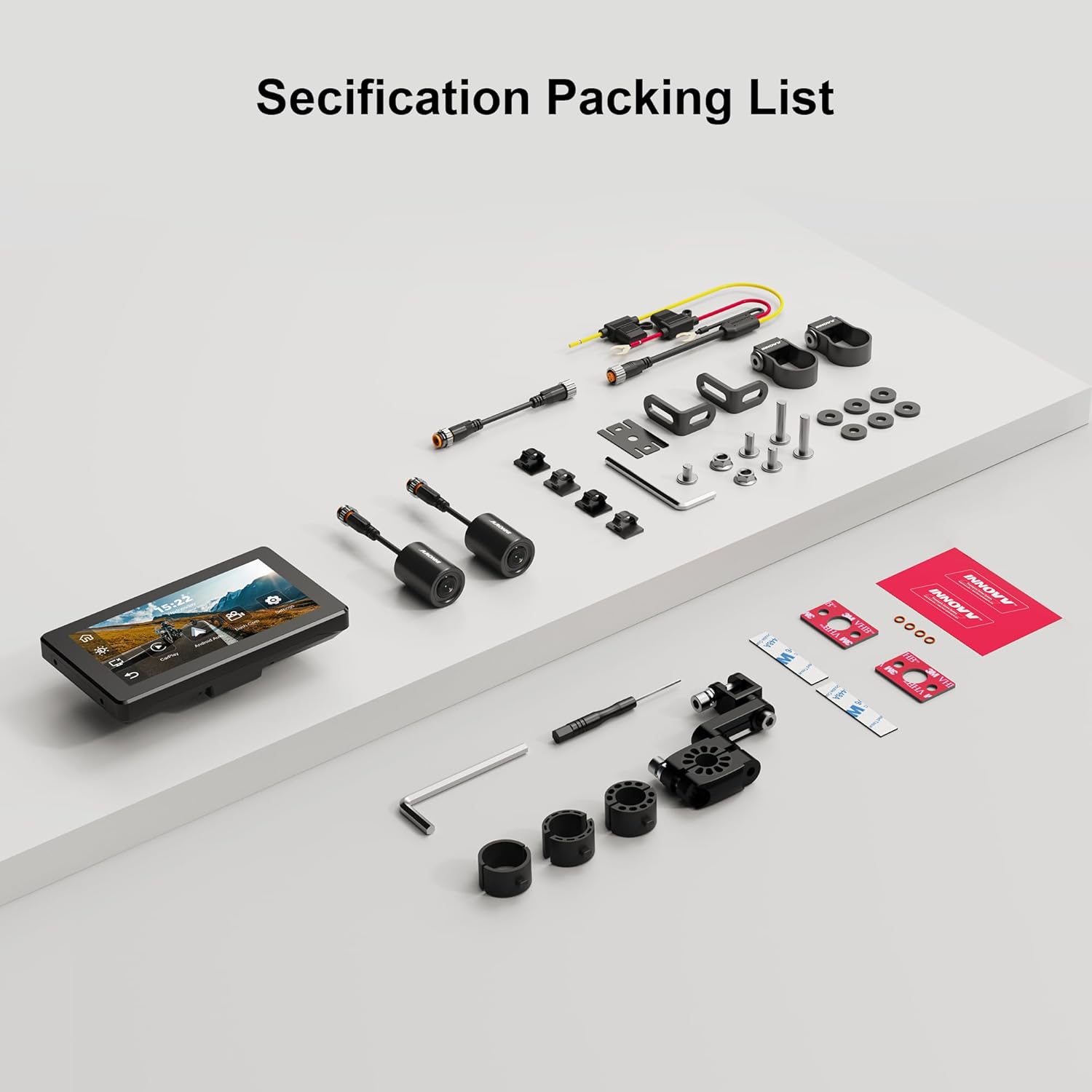
Image 2.1: A visual representation of the INNOVV N1 system components and accessories included in the package.
3. Guia d'instal·lació
Proper installation ensures optimal performance and safety. It is recommended to have this device installed by a qualified professional if you are unsure about any steps.
3.1 Muntatge de la unitat de visualització
- Select a suitable location on your motorcycle's handlebar that does not obstruct your view or control of the vehicle.
- Use the provided handlebar mount from the accessory kit to securely attach the display unit. Ensure it is firmly installed without shaking.
- Ajusteu el viewangle d'inclinació per a una visibilitat òptima.

Image 3.1: The 5.5-inch display unit securely mounted on a motorcycle handlebar, showing its compact dimensions (150mm x 84.5mm).
3.2 Connexió de les càmeres
- Identify the front and rear cameras. The cameras are designed for 1080P recording with a 125-degree wide-angle lens.
- Munteu la càmera frontal en una posició que proporcioni una visió clara i sense obstacles view del camí per davant.
- Munta la càmera posterior per capturar la view darrere de la teva motocicleta.
- Connect the camera cables to the corresponding ports on the main DVR unit. Use the extended cables as needed.

Imatge 3.2: Primer pla view of the dual 1080P cameras with 125-degree wide-angle lenses, designed for comprehensive coverage.
3.3 Connexió d'alimentació
- Connect the power supply cable to the main DVR unit.
- Route the power cable safely to your motorcycle's power source, ensuring it does not interfere with moving parts or get pinched.
3.4 Instal·lació del mòdul GPS
- Connect the GPS module to the designated port on the main unit.
- Munteu el mòdul GPS en un lloc amb llum clara view del cel per a una recepció òptima del senyal.
3.5 TPMS Sensor Installation (If Applicable)
- If your package includes TPMS sensors, install them on your motorcycle's tire valves according to the instructions provided with the sensors.
- Ensure the sensors are securely fastened to prevent air leakage.
3.6 Finalització de la instal·lacióview Vídeo
For a visual guide on the installation and features of the INNOVV N1, please refer to the video below:
Video 3.1: This video demonstrates the physical components, connections, and initial setup of the INNOVV N1 system, including the dash cameras, GPS module, and tire pressure sensors, along with a brief overview of its functions like CarPlay and Android Auto.
4. Instruccions de funcionament
Familiarize yourself with the device's functions to enhance your riding experience.
4.1 Encès/Apagat
- Encès: The device will automatically power on when your motorcycle's ignition is turned on.
- Apagar: The device will automatically power off when your motorcycle's ignition is turned off.
4.2 Interfície de pantalla tàctil
The 5.5-inch full-screen touch display allows for intuitive navigation. Tap icons to access different functions such as CarPlay, Android Auto, Dash Cam, and Settings.
4.3 Apple CarPlay i Android Auto
Connect your smartphone wirelessly via Bluetooth 4.2 and 5.8G Wi-Fi to access CarPlay or Android Auto features directly on the N1 display.
- Assegureu-vos que el Bluetooth i la Wi-Fi estiguin activats al vostre telèfon intel·ligent.
- On the N1 display, select the CarPlay or Android Auto icon.
- Follow the on-screen prompts to pair your device. For CarPlay, your iPhone must be iOS 13 or above. For Android Auto, your Android phone must be Android 11 or above and support 5G Wi-Fi.
- Once connected, you can use navigation apps, make calls, send messages, and play music through the N1 display.

Image 4.1: The INNOVV N1 display showing the Apple CarPlay and Android Auto interfaces, demonstrating seamless smartphone integration.
4.4 Funcionalitat de la càmera del salpicader
The integrated dual dash cam records continuously in 1080P@30FPS from both front and rear cameras.
- Gravació: Recording starts automatically when the device powers on.
- Enregistrament en bucle: The system supports loop recording, overwriting the oldest footage quan la targeta d'emmagatzematge està plena.
- Enregistrament d'esdeveniments: In case of sudden impact or vibration, the G-sensor will trigger event recording, locking the footage per evitar la sobreescritura.
- Reproducció: Access recorded videos through the Dash Cam menu on the display.
4.5 Navegació GPS
Utilize the GPS module for accurate location tracking and navigation through connected CarPlay or Android Auto applications.
- Assegureu-vos que el mòdul GPS estigui connectat correctament i que tingui una vista clara view del cel.
- Open your preferred navigation app (e.g., Google Maps, Apple Maps) via CarPlay or Android Auto.
4.6 Parking Monitoring Mode
The N1 automatically monitors your motorcycle's status when parked. If vibrations are detected, it will record videos from the front and rear cameras, providing 24-hour parking surveillance.

Image 4.2: The INNOVV N1's parking monitoring feature, which activates 24-hour surveillance upon detecting vibrations while parked.
4.7 Sistema de control de la pressió dels pneumàtics (TPMS)
If equipped, the TPMS sensors provide real-time tire pressure and temperature readings directly on the N1 display, enhancing safety.
- The display will show current tire pressure and temperature for both front and rear tires.
- Set high and low pressure alarms in the settings to receive alerts for abnormal tire conditions.
5. Manteniment
Regular maintenance ensures the longevity and optimal performance of your INNOVV N1 system.
- Neteja: Utilitzeu un suau, damp cloth to clean the display and camera lenses. Avoid abrasive cleaners or solvents.
- Actualitzacions de firmware: Periodically check the INNOVV website for firmware updates to ensure your device has the latest features and bug fixes. Follow the provided instructions carefully for any updates.
- Emmagatzematge: Quan no l'utilitzeu durant períodes prolongats, guardeu el dispositiu en un lloc fresc i sec, allunyat de la llum solar directa.
- Targeta SD: Format the microSD card regularly (e.g., once a month) to maintain optimal recording performance and prevent data corruption.
6. Solució De Problemes
If you encounter issues with your INNOVV N1, refer to the table below for common problems and solutions.
| Problema | Causa possible | Solució |
|---|---|---|
| El dispositiu no s'encén. | Sense font d'alimentació; connexió fluixa. | Check power cable connection to the motorcycle and the device. Ensure ignition is on. |
| Cameras not recording or showing video. | Loose camera connection; faulty SD card; camera malfunction. | Check camera cable connections. Ensure SD card is inserted correctly and formatted. Try a different SD card. |
| El CarPlay/Android Auto no es connecta. | Bluetooth/Wi-Fi off on phone; incorrect pairing; phone OS not supported. | Ensure phone's Bluetooth and Wi-Fi are on. Re-pair the device. Check phone OS version compatibility. |
| Senyal GPS feble o no disponible. | GPS module obstructed; faulty module. | Ensure GPS module has a clear view of the sky. Check connection. |
| TPMS not displaying readings. | Sensors not paired; low sensor battery; incorrect installation. | Ensure sensors are correctly installed and paired. Check sensor battery status. |
7. Especificacions del producte
| Característica | Especificació |
|---|---|
| Mida de la pantalla | 5.5 polzades |
| Resolució | 1080p (Video Recording) |
| Sistema operatiu | Android (for internal system, supports CarPlay/Android Auto) |
| Entrada de la interfície humana | Pantalla tàctil |
| Tipus de visualització | LCD |
| Tipus de pantalla tàctil | Capacitiva |
| Tipus de muntatge | Muntatge de manillar |
| Tipus de mapa | Street (via connected smartphone apps) |
| Tipus de servei del vehicle | Motocicleta |
| Classificació impermeable | IP67 |
| Freqüència Wi-Fi | 5.8G |
8. Garantia i Suport
The INNOVV N1 comes with a 12 mesos de garantia des de la data de compra, que cobreix els defectes de fabricació. Conserveu el comprovant de compra per a reclamacions de garantia.
For technical support, troubleshooting assistance, or warranty inquiries, please contact INNOVV customer service through their official weblloc web o el venedor on vau comprar el producte.
Recursos en línia: Visit the official INNOVV website for FAQs, updated manuals, and firmware downloads.