1. Introducció
This manual provides detailed instructions for the setup, operation, and maintenance of your JBL PartyBox Ultimate portable speaker. Please read this manual thoroughly before using the product to ensure proper function and to maximize your listening experience. The JBL PartyBox Ultimate delivers powerful sound, dynamic light shows, and versatile connectivity options for any event.
2. Què hi ha a la caixa
Verifiqueu que hi hagi tots els elements en desembalar-los:
- JBL PartyBox Ultimate 1100W Portable Speaker
- Sistema de dos micròfons sense fil JBL amb receptor de dos canals
- Ring-Angle Power Cord (6.6')
- MicroFiber Cleaning Cloth
- Cable USBC
- Cable AUX
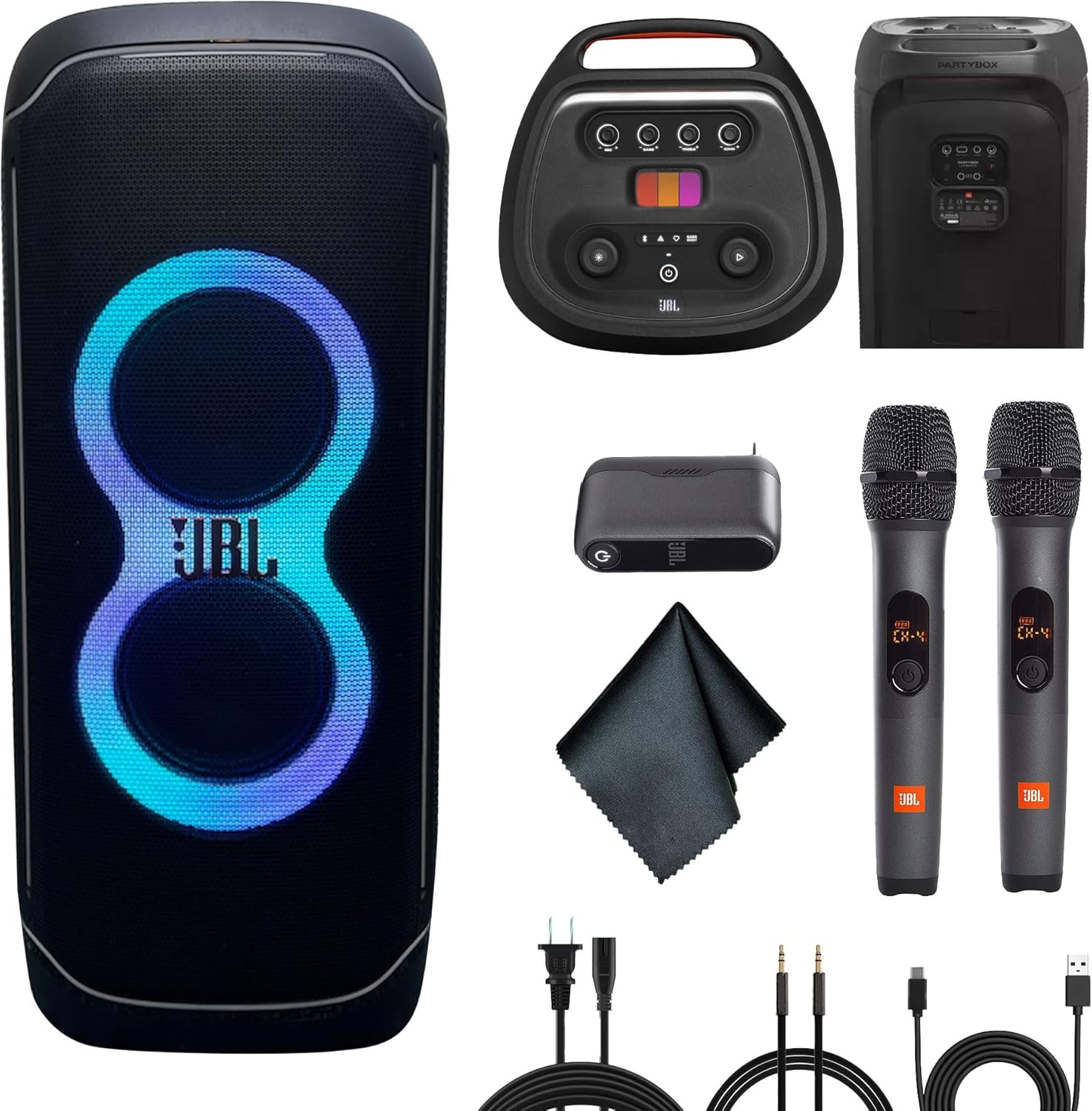
Image: The JBL PartyBox Ultimate speaker shown with all bundled accessories, including the wireless microphones, cables, and cleaning cloth.
3. Producte acabatview
3.1 Característiques dels altaveus
The JBL PartyBox Ultimate is designed for powerful audio and dynamic visual experiences. Key features include:
- 1100W JBL Signature Sound: High-fidelity audio with deep bass, clear mids, and crisp highs.
- Suport per a Dolby Atmos: Immersive 3D audio experience via Wi-Fi streaming.
- Espectacle de llum dinàmica: Multi-colored lights, starry LEDs, and strobe effects that sync with the music.
- Dual-band Wi-Fi & Bluetooth Connectivity: Seamless streaming from various devices and services.
- Dual Microphone Inputs & Guitar Jack: For live performances and karaoke.
- IPX4 Splashproof Rating: Protection against splashing water.
- Built-in Self-Tuning: Optimizes audio performance for any environment.
- Mobilitat: Nansa i rodes integrades per facilitar el transport.
- JBL One App Control: Full control over speaker functions and customization.
3.2 Tauler de control

Image: The top control panel of the JBL PartyBox Ultimate, showing various buttons and the PartyPad interface.
The top panel provides access to essential controls:
- Botó d'encesa: Activa o desactiva l'altaveu.
- Botó Bluetooth: Inicia el mode d'emparellament Bluetooth.
- Botó d'espectacle de llums: Cycles through light show modes or turns them off.
- Botó de reforç dels baixos: Enhances bass levels.
- Botó Reproduir/Pausa: Controla la reproducció d'àudio.
- Microphone Volume/Bass/Treble/Echo Knobs: Adjusts microphone audio settings.
- PartyPad: Interactive pads for sound effects.
3.3 Connexions del panell posterior

Image: The rear panel of the JBL PartyBox Ultimate, displaying various input and output ports, including power input.
El panell posterior inclou:
- Entrada d'alimentació de CA: Per connectar el cable d'alimentació.
- Port USB: For charging devices or playing audio from USB drives.
- Entrada AUX: Per connectar fonts d'àudio externes mitjançant un cable de 3.5 mm.
- Microphone Inputs (x2): For wired microphones or the wireless microphone receiver.
- Entrada de guitarra: For connecting a guitar.
4. Configuració
4.1 Connexió d'alimentació
- Connect the provided power cord to the AC Power Input on the rear of the speaker.
- Connecteu l'altre extrem del cable d'alimentació a una presa de corrent adequada.
- The speaker will begin charging automatically if the battery is not full.
4.2 Encès inicial
Premeu el botó Botó d'engegada on the top control panel to turn on the speaker. The light show will activate, and the speaker will be ready for use.
4.3 Col·locació dels altaveus
For optimal sound performance, place the speaker on a stable, flat surface. The integrated wheels and handle allow for easy repositioning. Ensure adequate space around the speaker for sound dispersion and light show visibility.
5. Instruccions de funcionament
5.1 Connectivitat Bluetooth
- Turn on the JBL PartyBox Ultimate.
- Premeu el botó Botó Bluetooth al panell superior. L'indicador Bluetooth parpellejarà, indicant el mode d'emparellament.
- On your mobile device, enable Bluetooth and select "JBL PartyBox Ultimate" from the list of available devices.
- Once connected, the Bluetooth indicator will glow solid, and you can begin streaming audio.
5.2 Wi-Fi Connectivity (Dolby Atmos, AirPlay, Google Home, Alexa)
- Baixeu i instal·leu el Aplicació JBL One al teu telèfon intel·ligent o tauleta.
- Open the app and follow the on-screen instructions to connect your PartyBox Ultimate to your Wi-Fi network.
- Once connected to Wi-Fi, you can stream high-resolution audio, including content with Dolby Atmos support, and integrate with services like Apple AirPlay, Google Home, and Alexa.
5.3 Ajust de so
- Utilitza el Pom de volum on the top panel to adjust the overall speaker volume.
- Premeu el botó Botó de reforç dels baixos to cycle through different bass enhancement levels.
- For microphone inputs, use the dedicated Baix i Aguts botons per ajustar el so amb precisió.
5.4 Control de l'espectacle de llums

Imatge: Frontal view of the JBL PartyBox Ultimate speaker with its vibrant light show active.

Imatge: Lateral view of the JBL PartyBox Ultimate speaker showcasing its integrated light effects.
Premeu el botó Botó d'espectacle de llums on the top panel to cycle through various light patterns and colors. The lights will synchronize with the beat of the music. Further customization is available through the JBL One App.
5.5 Sistema de micròfon sense fil
Image: The JBL Wireless Two Microphone System, including two microphones and a dual-channel receiver.
- Connect the dual-channel receiver of the wireless microphone system to one of the microphone inputs on the rear panel of the PartyBox Ultimate.
- Turn on the wireless microphones. They should automatically pair with the receiver.
- Utilitza el Volum del micròfon, Baix, Aguts, i Ressò knobs on the top panel to adjust the microphone audio to your preference.
5.6 PartyPad
The PartyPad on the top control panel allows you to trigger various sound effects and loops to enhance your party atmosphere. Tap the different colored pads to activate effects.
5.7 Pairing Multiple PartyBox Ultimate Speakers
For an even larger sound experience, you can wirelessly pair multiple PartyBox Ultimate speakers. Refer to the JBL One App for instructions on how to set up a multi-speaker system.
6. Manteniment
6.1 Neteja
- Always disconnect the speaker from the power source before cleaning.
- Use the provided microfiber cleaning cloth to gently wipe down the speaker's exterior.
- Per a la brutícia tossuda, utilitzeu una mica damp cloth. Avoid using harsh chemicals, abrasive cleaners, or solvents.
- Ensure all ports are dry before reconnecting power or other devices.
6.2 Resistència a l'aigua
The JBL PartyBox Ultimate has an IPX4 splashproof rating, meaning it is resistant to splashing water from any direction. It is not designed to be submerged in water. Do not expose the speaker to heavy rain or immerse it in liquids.
6.3 Emmagatzematge
When not in use, store the speaker in a cool, dry place away from direct sunlight and extreme temperatures. If storing for an extended period, ensure the battery is partially charged (around 50%) to prolong its lifespan.
7. Solució De Problemes
If you encounter issues with your JBL PartyBox Ultimate, refer to the following common solutions:
- Sense energia: Ensure the power cord is securely connected to both the speaker and a working power outlet. Check if the power outlet is functional.
- Sense so: Verify the volume is turned up on both the speaker and your connected device. Check that the correct input source is selected (Bluetooth, Wi-Fi, AUX).
- Problemes de vinculació de Bluetooth: Ensure the speaker is in pairing mode (flashing Bluetooth indicator). Turn off and on Bluetooth on your device, then try pairing again. Move closer to the speaker.
- Problemes de connexió Wi-Fi: Check your Wi-Fi router and internet connection. Ensure the speaker is within range of your Wi-Fi network. Use the JBL One App to reconfigure the Wi-Fi connection.
- El micròfon no funciona: Ensure the wireless microphone receiver is properly connected to a microphone input. Check that the microphones are powered on and paired with the receiver. Adjust microphone volume knobs.
- Light Show Not Working: Press the Light Show button to ensure it's enabled. Check settings in the JBL One App.
For more detailed troubleshooting or persistent issues, please contact JBL customer support or visit the official JBL weblloc.
8. Especificacions
| Característica | Especificació |
|---|---|
| Nom del model | JBLPARTYBOXULTAM |
| Tipus d'altaveu | 3D, Woofer |
| Potència de sortida màxima dels altaveus | 1100 watts |
| Tecnologia de connectivitat | Auxiliary, Bluetooth, Wi-Fi |
| Tecnologia de comunicació sense fils | Bluetooth, WiFi |
| Mode de sortida d'àudio | 3D Spatial Audio (Dolby Atmos) |
| Diàmetre del woofer | 9 polzades |
| Diàmetre del Tweeter | 2.75 polzades |
| Nivell de resistència a l'aigua | IPX4 a prova d'esquitxades |
| Mètode de control | App |
| Font d'alimentació | Elèctric amb cable |
| Dimensions del producte | 17.3 x 17.9 x 41.3 polzades |
| Pes de l'article | 87.1 lliures |
9. Garantia i Suport
9.1 Informació de la garantia
The JBL PartyBox Ultimate comes with an Garantia ampliadaConsulteu la targeta de garantia inclosa amb el producte o visiteu el lloc web oficial de JBL. website for specific terms and conditions regarding your warranty coverage.
9.2 Atenció al client
For technical assistance, product registration, or further inquiries, please visit the official JBL support weblloc web o poseu-vos en contacte amb el seu departament d'atenció al client. Normalment, podeu trobar la informació de contacte al lloc web de JBL weblloc web o a l'embalatge del producte.


