1. Introducció
The StarTech.com 16-Port Industrial USB 5Gbps Hub is designed for robust performance in demanding environments. It features 16 USB-A ports with 5Gbps shared bandwidth, a 2-port host switch, and comprehensive ESD protection. This hub offers versatile mounting options and supports USB Battery Charging Specification 1.2 for efficient device charging.
2. Contingut del paquet
- 1x 16-Port Industrial USB 5Gbps Hub
- 1 adaptador de corrent de 160 W
- 1x USB-A to USB-B Host Cable (10ft/3m)
- 2x Rackmount Brackets
- 2x DIN-Rail Mounting Clips
- Cargols de muntatge
- Connector del bloc de terminals

3. Configuració
3.1 Connexió d'alimentació
- Connect the included 160W power adapter to the hub's DC input port.
- Alternatively, for industrial power sources, connect a 12-24V DC power supply to the 2-wire terminal block.
- For optional redundant power, connect a separate 12-24V DC power source to the barrel power input.
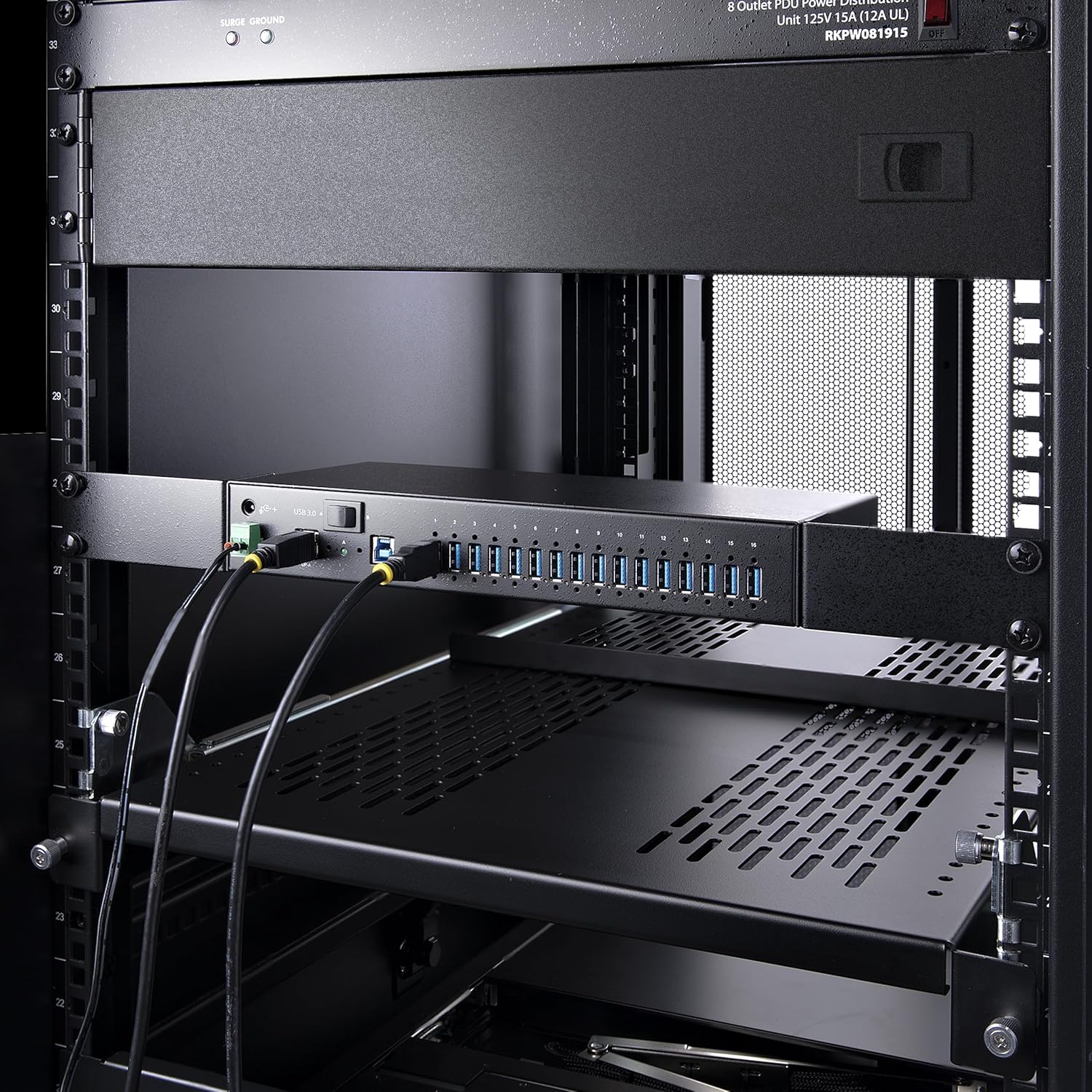
3.2 Host Connection
- Connect the included 10ft USB-A to USB-B host cable from the hub's USB 3.0 A or B port to an available USB-A port on your host computer.
- The hub is OS independent and does not require additional drivers.
3.3 Connexió del dispositiu
Connect your USB devices to any of the 16 available USB-A ports on the hub. Ensure screw-lock enabled connectors are used for reliable connections where applicable.
3.4 Opcions de muntatge
The hub offers three primary mounting options:
- 19" Rackmount: Use the EIA-310 compliant rackmount brackets to install the hub into 1U of rack space.
- Muntatge en superfície: Utilize the built-in mounting ears for installation on workstations, desks, or walls.
- DIN-Rail Mount: Attach the standard DIN-rail (Top-Hat/TH) mounting hardware for installation in industrial equipment.

4. Instruccions de funcionament
4.1 Dual-Host Switch
The hub features a 2-port host switch (labeled A and B) allowing connection to two separate host computers. Use the manual rocker switch to seamlessly switch between the primary host devices.
4.2 USB Charging (BC 1.2)
When connected to the power adapter, the hub supports USB Battery Charging Specification 1.2 (BC 1.2). This enables each port to provide up to 1.5A (7.5W) for simultaneous charging across all 16 ports, or up to 2.0A (10W) when charging up to 8 ports.
4.3 Indicadors LED
Each USB port on the hub has an LED status indicator light. These lights illuminate green when a device is successfully connected to the port.
4.4 Screw-Lock Connectors
All ports feature screw-lock connectors to prevent accidental cable disconnections, ensuring stable and reliable connections in dynamic environments.
5. Manteniment
- Mantingueu el centre net i lliure de pols. Feu servir un drap suau i sec per netejar-lo.
- Assegureu-vos una ventilació adequada al voltant de la unitat per evitar el sobreescalfament.
- Regularly check all cable connections for security.
6. Solució De Problemes
6.1 Dispositiu no reconegut
- Ensure the hub is properly powered and connected to the host computer.
- Verify the device is securely connected to a USB port on the hub.
- Check the LED indicator for the connected port; if it's not green, try another port or device.
- Restart the host computer.
6.2 Slow Data Transfer Speeds
- Ensure both the host computer's USB port and the connected device support USB 3.0 (5Gbps) speeds.
- Avoid connecting multiple high-bandwidth devices simultaneously if experiencing performance issues.
6.3 Problemes de càrrega
- Confirm the hub is connected to the 160W power adapter.
- Ensure the device supports BC 1.2 charging.
- Note that total shared charging power is 120W across all ports.
7. Especificacions
| Característica | Detall |
|---|---|
| Marca | StarTech |
| Número de model | S5G16AINDS-USB-A-HUB |
| Sistema operatiu | SO independent |
| Pes de l'article | 2.42 lliures |
| Dimensions del producte | 0.5 x 1.2 x 0.2 polzades |
| Color | Negre |
| Interfície del maquinari | USB 3.0 |
| Característica especial | Fast Charging, Powered |
| Dispositius compatibles | Desktops, Laptops |
8. Garantia i Suport
This StarTech.com product is backed by a 2-year warranty and free lifetime technical support. For assistance, please visit the StarTech.com store on Amazon o el seu oficial weblloc.
9. Vídeos de productes
StarTech.com 16-Port Industrial USB 5Gbps Hub Overview
Aquest vídeo ofereix una visió detalladaview of the StarTech.com 16-Port Industrial USB 5Gbps Hub, highlighting its features, robust design, and various mounting and power options. It demonstrates the hub's functionality in industrial and commercial settings.
Tikol-trade 16 Ports Powered USB 3 Hub - Desktop Expander Hub
This video from Tikol-trade showcases a 16-port powered USB 3 hub, demonstrating its use as a desktop expander for multiple devices. It highlights features like fast charging and compatibility.
USBGear USB Mountable Charging & SuperSpeed Data Hubs
This USBGear video illustrates the features of their USB mountable charging and SuperSpeed data hubs, including their rugged design and various mounting options, which are relevant to industrial USB hubs.


