Producte acabatview
The Thomson RC112A Android TV Remote Control is designed to provide seamless control over your Thomson Android TV. This official replacement remote offers a blend of sophisticated design and practical functionality, ensuring a comfortable and intuitive user experience. It features an ergonomic design, backlit buttons for low-light conditions, integrated voice control via Google Assistant, and a customizable favorite apps button.

Imatge: Frontal view of the Thomson Android TV Remote Control, showcasinel seu elegant disseny negre i la disposició dels botons.
Configuració i ús inicial
1. Instal·lació de la bateria
El comandament a distància necessita dues (2) piles AAA per funcionar. Assegureu-vos de la polaritat correcta en inserir les piles.
- Localitzeu la tapa del compartiment de la bateria a la part posterior del comandament a distància.
- Feu lliscar la tapa cap avall o en la direcció indicada per una fletxa per obrir-la.
- Insert two AAA batteries, matching the positive (+) and negative (-) terminals as indicated inside the compartment.
- Torneu a col·locar la tapa del compartiment de la bateria, assegurant-vos que encaixi correctament al seu lloc amb un clic.
2. Pairing with your Android TV
This remote control connects to your Thomson Android TV via Bluetooth. The pairing process may vary slightly depending on your TV model. Generally, follow these steps:
- Ensure your Thomson Android TV is powered on.
- On your TV, navigate to Configuració > Comandaments a distància i accessoris or Configuració de Bluetooth.
- Seleccioneu Afegeix un accessori or Vincula un dispositiu nou.
- On the Thomson remote control, press and hold the Casa botó i el Enrere button simultaneously for a few seconds until the LED indicator on the remote starts blinking, indicating it's in pairing mode.
- On your TV screen, select "Thomson RC112A" or a similar name from the list of available devices.
- Confirm the pairing on your TV if prompted. The LED on the remote will stop blinking and remain solid for a moment, indicating successful pairing.
If pairing fails, ensure the remote is close to the TV and repeat the steps. Refer to your TV's user manual for specific pairing instructions if needed.
Funcionament del comandament a distància
The Thomson RC112A remote control features a comprehensive set of buttons for navigating your Android TV. Below are the primary functions:
- Botó d'encendre (●): Encén o apaga el televisor.
- Teclat numèric (0-9): Direct channel selection or input.
- Teclat de navegació (amunt, avall, esquerra, dreta, OK): Per a la navegació i selecció de menús.
- Botó enrere (←): Torna a la pantalla o menú anterior.
- Botó d'inici (⌂): Accedeix a la pantalla d'inici d'Android TV.
- Pujar/baixar volum (V+/V-): Ajusta el volum del televisor.
- Canal amunt/avall (P+/P-): Canvia els canals de televisió.
- Botó Silenciar (🔇): Silencia o activa l'àudio del televisor.
- Google Assistant Button (🎤): Activa el control per veu. Mantén premut per dir ordres.
- Favorite Apps Button (⭐): Customizable button to quickly launch your preferred application. Refer to your TV's settings to assign an app to this button.
- Dedicated App Buttons (e.g., YouTube, Netflix, Prime Video, Disney+, Google Play): Accés directe a aquests serveis de streaming.
Característiques especials
Disseny ergonòmic
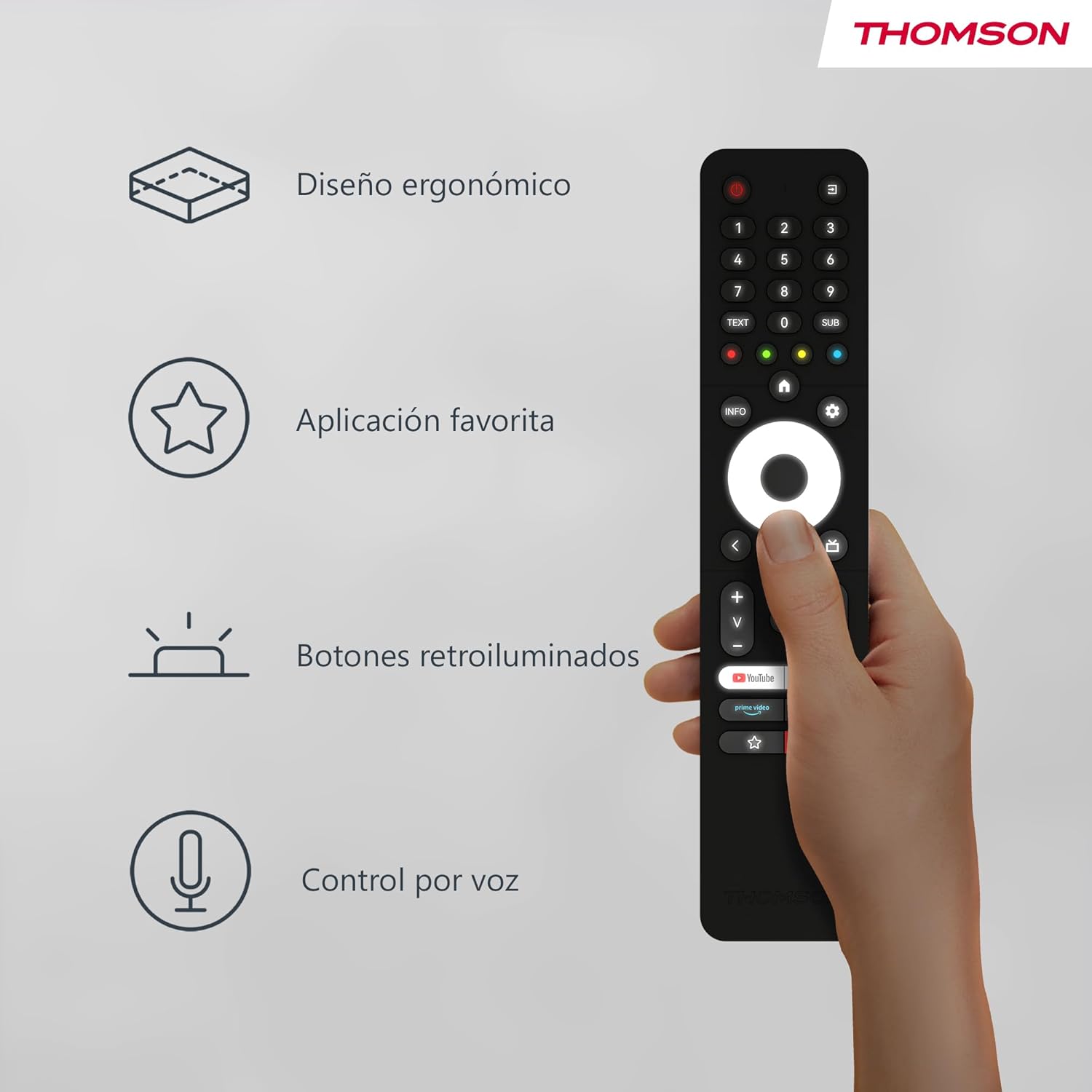
The remote control is designed to fit comfortably in your hand, making prolonged use easy and reducing fatigue. Its sleek profile and balanced weight contribute to a pleasant user experience.
Image: A hand holding the Thomson remote control, illustrating its comfortable ergonomic design and highlighting key features like voice control and favorite apps.
Botons retroil·luminats

The buttons on the remote control illuminate, making it easy to locate and press the correct buttons in dimly lit environments. This feature prevents accidental key presses and enhances usability during night-time viewing.
Imatge: Dos views of the Thomson remote control side-by-side, one showing the buttons unlit and the other showing them illuminated, demonstrating the backlit feature for low-light use.
Voice Control (Google Assistant)
With the integrated Google Assistant, you can control your TV using voice commands. Press and hold the Google Assistant button, then speak clearly into the remote. You can:
- Adjust volume (e.g., "Volume up", "Set volume to 20").
- Cerca content (e.g., "Find action movies", "Play [Movie Title]").
- Open applications (e.g., "Open Netflix", "Launch YouTube").
- Ask questions (e.g., "What's the weather like?").
- Controla els dispositius domèstics intel·ligents compatibles.
Manteniment
Canvi de bateria
Replace batteries when the remote's performance degrades or if the LED indicator does not light up during use. Always replace both batteries simultaneously with new AAA alkaline batteries.
Neteja
Per netejar el comandament a distància, utilitzeu un drap suau i sec. Per a la brutícia resistent, netegeu lleugerament.ampen the cloth with water or a mild, non-abrasive cleaner. Do not use harsh chemicals or abrasive materials, as they may damage the remote's surface or internal components. Avoid getting moisture into the battery compartment or button crevices.
Emmagatzematge
Store the remote control in a cool, dry place away from direct sunlight, extreme temperatures, and high humidity. If the remote will not be used for an extended period, it is recommended to remove the batteries to prevent leakage and potential damage.
Resolució de problemes
| Problema | Causa possible | Solució |
|---|---|---|
| El comandament a distància no respon. | Piles baixes o gastades; comandament a distància no emparellat; obstrucció entre el comandament a distància i el televisor. | Replace batteries; Re-pair the remote with the TV (see "Pairing" section); Ensure no objects are blocking the signal (though Bluetooth is less sensitive to this, direct line of sight can sometimes help with initial pairing). |
| El control per veu no funciona. | Microphone blocked; Remote not properly paired for voice; Internet connection issue on TV. | Ensure nothing is covering the microphone hole; Re-pair the remote; Check TV's internet connection. |
| Backlight not illuminating. | Batteries are low; Feature is disabled (if applicable, though usually automatic). | Replace batteries. The backlight feature is typically automatic and activates when the remote is moved or a button is pressed. |
| Favorite app button not launching desired app. | App not assigned or incorrectly assigned. | Go to your TV's settings and re-assign the desired application to the favorite app button. |
Especificacions
- Marca: Thomson
- Número de model: RC112A
- Color: Negre
- Característiques especials: Ergonomic, Backlit, Voice Search (Google Assistant)
- Dispositius compatibles: Thomson Android TVs
- Tipus de bateria: 2 piles AAA (no incloses)
- Interval màxim: 10 metres
- Connectivitat: Bluetooth
Garantia i Suport
Warranty information for your Thomson RC112A remote control is typically provided with your purchase documentation or can be found on the official Thomson weblloc web. Si us plau, conserveu el comprovant de compra per a reclamacions de garantia.
For technical support, troubleshooting assistance beyond this manual, or to inquire about replacement parts, please visit the official Thomson support website or contact their customer service. Contact details are usually available on the manufacturer's official weblloc web o a l'embalatge del producte.
Nota: La informació sobre la disponibilitat de peces de recanvi no es proporciona als detalls del producte.


