1. Introducció
Thank you for choosing the Ebitcam 3MP Smart Outdoor WiFi Camera. This device is designed to provide reliable outdoor surveillance with advanced features such as 3MP resolution, IP66 waterproofing, motion and sound detection, two-way audio, and color night vision. This manual will guide you through the installation, operation, and maintenance of your new camera to ensure optimal performance and security for your home or property.
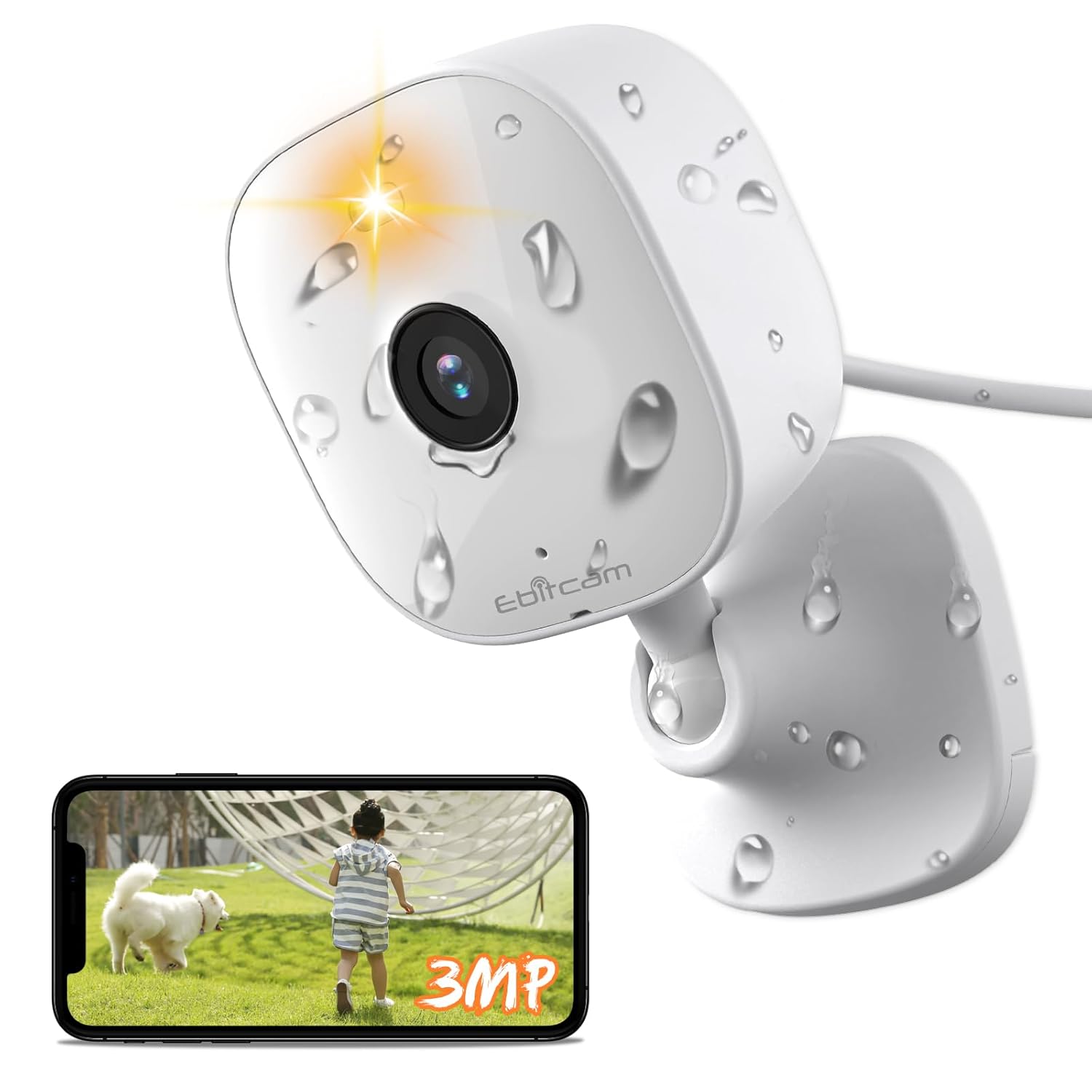
Image: The Ebitcam 3MP Smart Outdoor WiFi Camera, showcasing its compact design and waterproof capabilities, alongside a smartphone displaying its live monitoring feature.
2. Característiques del producte
- 3MP High-Resolution Video: Captura imatges clares i detalladestage with 2K (2560*1440 OHD) resolution.
- Classificació impermeable IP66: Designed for outdoor use, resistant to dust and powerful water jets.
- Detecció de moviment i so: Advanced AI human detection and sound detection for accurate alerts.
- Smart Spotlight & Color Night Vision: Provides illumination and full-color video even in low-light conditions up to 10 meters.
- Àudio bidireccional: Comuniqueu-vos amb els visitants o dissuadeu els intrusos mitjançant el micròfon i l'altaveu integrats.
- Alexa habilitat: Seamless integration with Amazon Alexa for voice control and live view on compatible devices.
- Opcions d'emmagatzematge flexibles: Supports cloud storage and local storage via TF card (up to 512GB).
- 360-Grau Viewangle: Offers comprehensive coverage of your surveillance area.
- Zoom digital 8x: Zoom in on details for closer inspection.

Image: The Ebitcam camera demonstrating its IP66 waterproof capability, suitable for various weather conditions.

Image: A visual comparison highlighting the superior clarity and detail of 2K resolution (2560*1440 OHD) captured by the Ebitcam camera compared to 1080P.
3. Què hi ha a la caixa
Upon unboxing your Ebitcam Smart Outdoor WiFi Camera, please verify that all the following components are included:
- 1 x Ebitcam 3MP Smart Outdoor WiFi Camera
- 1 x adaptador de corrent
- 1 x cable d'alimentació
- 1 x placa de muntatge
- 1 x Quick Service Guide
- 3 sets of Screw Package (for mounting)
4. Guia de configuració
4.1. Instal·lació i muntatge
The Ebitcam camera offers versatile mounting options to suit your needs:
- Muntatge a la paret: Secure the mounting plate to a suitable outdoor wall using the provided screws. Attach the camera to the plate.
- Col·locació de la taula: The camera can be placed on any flat surface, such as a table or shelf, for indoor or covered outdoor use.
- Muntatge al sostre: Similar to wall mounting, the camera can be inverted and attached to a ceiling for overhead surveillance.
Assegureu-vos que la ubicació escollida ofereixi una visibilitat clara view of the area you wish to monitor and is within range of your Wi-Fi network and a power outlet.
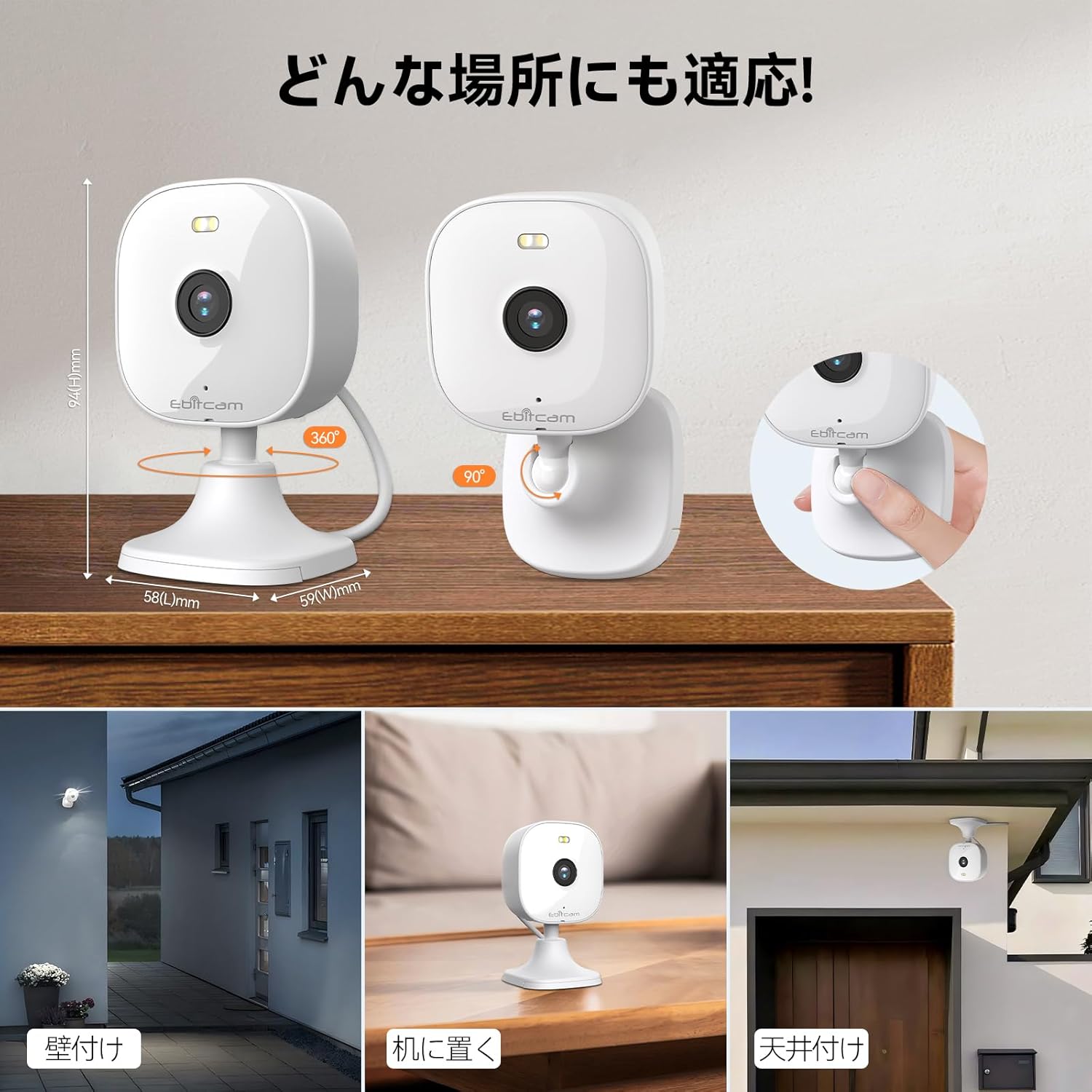
Image: Illustrations of the Ebitcam camera's flexible installation methods, including wall, tabletop, and ceiling mounting, demonstrating its adaptability to various environments.
4.2. Instal·lació de l'aplicació i creació de compte
- Download the Ebitcam app from your smartphone's app store (available for Android and iOS).
- Obriu l'aplicació i seguiu les instruccions a la pantalla per crear un compte nou.
- Inicia la sessió al teu compte recentment creat.
4.3. Connexió a la xarxa
- Power on the Ebitcam camera using the provided power adapter and cable.
- In the Ebitcam app, tap the '+' icon to add a new device.
- Select your camera model and follow the in-app prompts to connect the camera to your 2.4G Wi-Fi network (IEEE802.11b/g/n).
- Ensure your Wi-Fi signal is strong at the camera's installation location for stable connectivity.
5. Instruccions de funcionament
5.1. En directe View
Once connected, you can access the live video feed from your camera anytime, anywhere via the Ebitcam app. The app provides clear and smooth video browsing, intelligently adapting to network conditions.
5.2. Àudio bidireccional
The camera supports two-way voice intercom. To use this feature:
- Obre el directe view in the Ebitcam app.
- Tap the microphone icon to speak through the camera's speaker.
- Tap the speaker icon to hear audio from the camera's microphone.

Image: A visual representation of the Ebitcam camera's real-time two-way audio feature, allowing communication with individuals at your doorstep.
5.3. Detecció de moviment i alertes
The camera features intelligent motion detection and optional AI human detection and sound detection. When motion or sound is detected, the camera can:
- Trigger a smart alarm (sound and light).
- Send real-time notifications to your smartphone.
- Record video clips or capture photos.
You can customize alert sensitivity and notification methods within the app.

Image: The Ebitcam camera's advanced AI human detection feature, accurately identifying human figures while minimizing false alarms from other movements like pets or swaying plants.
5.4. Modes de visió nocturna
The camera offers 24-hour monitoring with advanced night vision capabilities:
- Visió nocturna intel·ligent: Automatically switches between infrared and color night vision based on ambient light.
- Visió nocturna en color: Utilizes the smart spotlight to provide full-color video in low-light conditions.
- Visió nocturna per infrarojos: Provides clear black-and-white video using infrared lamps (up to 10 meters).
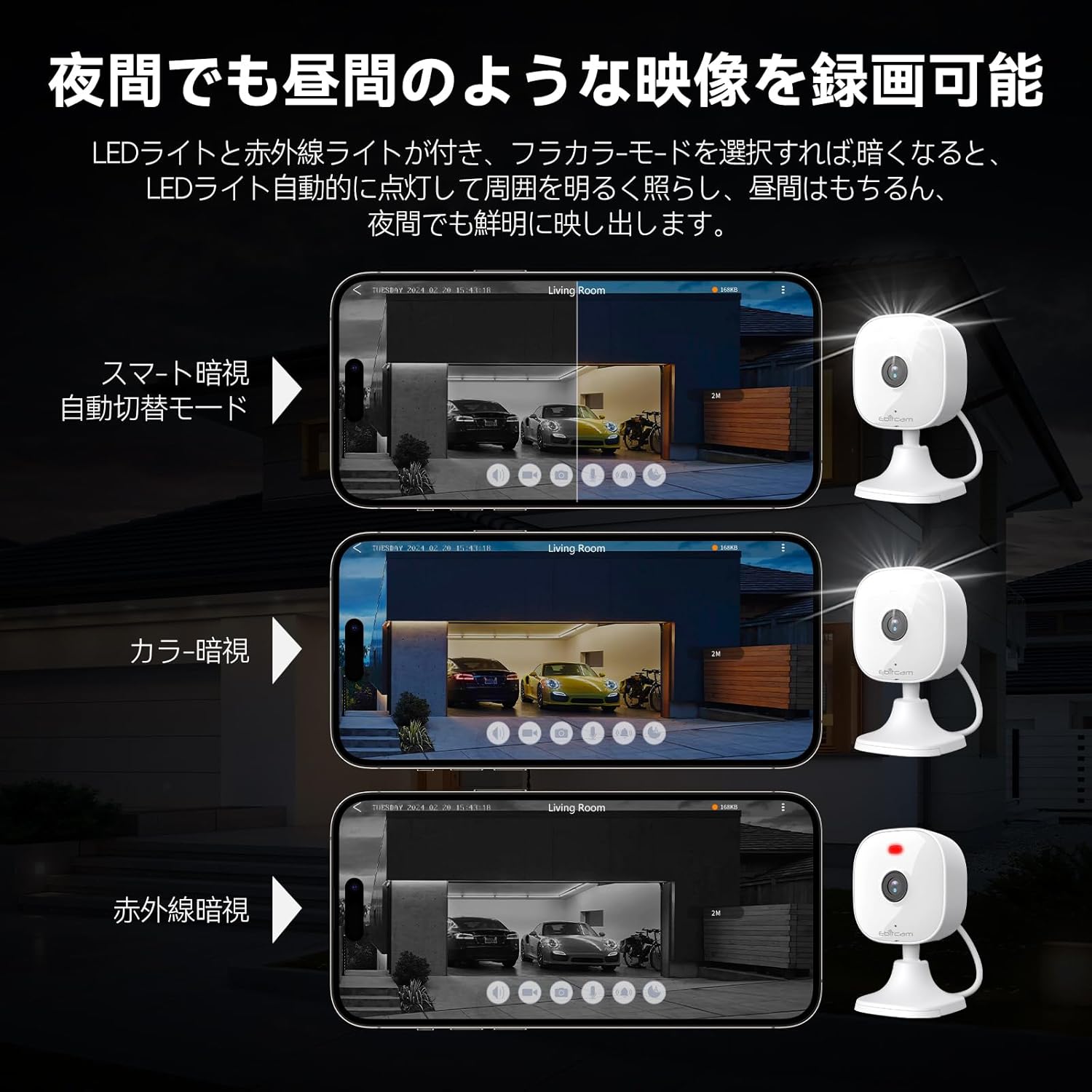
Image: A demonstration of the Ebitcam camera's versatile night vision modes, including smart automatic switching, full-color night vision, and traditional infrared night vision, ensuring clear visibility in various lighting conditions.
5.5. Enregistrament i emmagatzematge
The camera supports multiple recording and storage options:
- Emmagatzematge de targetes TF: Insert a TF card (maximum 512GB, not included) into the camera's slot for local video storage.
- Emmagatzematge al núvol: Subscribe to Ebitcam's cloud storage service for secure, off-site video backup.
The camera uses H.264 and H.265 video compression algorithms for efficient storage and smooth playback.
5.6. Zoom digital
Utilize the 8x digital zoom function within the app to magnify specific areas of the live or recorded video for more detailed viewing.
5.7. Integració d'Alexa
The Ebitcam camera is compatible with Amazon Alexa. You can use voice commands to view the camera feed on compatible Alexa-enabled devices (e.g., Echo Show).

Image: A user demonstrating the seamless integration of the Ebitcam camera with Amazon Alexa, allowing for convenient voice-controlled viewing of the camera feed on a smart display.
6. Manteniment
- Neteja: Netegeu regularment la lent i el cos de la càmera amb un drap suau i sec.amp drap per eliminar la pols i la brutícia. No utilitzeu productes químics agressius ni netejadors abrasius.
- Actualitzacions de firmware: Keep your camera's firmware updated through the Ebitcam app. Online firmware upgrades ensure you have the latest features and security enhancements.
- Estabilitat de la xarxa: Ensure your Wi-Fi network is stable and strong to maintain consistent camera performance.
- Gestió d'emmagatzematge: Periòdicament review el teu foo gravattage and manage your storage (TF card or cloud) to prevent it from filling up.
7. Solució De Problemes
| Problema | Causa possible | Solució |
|---|---|---|
| Càmera fora de línia/No es pot connectar a la Wi-Fi | Weak Wi-Fi signal, incorrect Wi-Fi password, camera too far from router. | Move camera closer to router, ensure correct Wi-Fi password, restart camera and router. |
| Poca qualitat de vídeo | Insufficient bandwidth, dirty lens, low light conditions. | Check internet speed, clean lens, ensure adequate lighting or use night vision modes. |
| La detecció de moviment no funciona | Detection sensitivity too low, detection area not set correctly, firmware outdated. | Adjust sensitivity in app, redefine detection zones, update firmware. |
| Problemes d'àudio bidireccional | Microphone/speaker blocked, network latency. | Ensure clear path for audio, check network connection. |
| No es reconeix la targeta SD | SD card not inserted correctly, incompatible card, card corrupted. | Reinsert SD card, try a different compatible card, format card in app if possible. |
8. Especificacions
| Característica | Detall |
|---|---|
| Número de model | 8311 |
| Resolució de captura de vídeo | 3MP (2K) |
| Resolució de fixes efectius | 3 MP |
| Velocitat de fotogrames | 25 fps |
| Compressió de vídeo | H.264, H.265 |
| Tecnologia de connectivitat | Wi-Fi (2.4G, IEEE802.11b/g/n) |
| Classificació de protecció internacional | IP66 (impermeable) |
| Viewangle ing | 360 graus |
| Gamma de visió nocturna | 10 metres |
| Tecnologia de poca llum | Color nocturn |
| Zoom òptic | 8x (zoom digital) |
| Suport d'emmagatzematge | TF Card (Max 512GB), Cloud Storage |
| Àudio | 2-Way Audio (Built-in Mic & Speaker) |
| Tipus d'alerta | Motion Only (with AI human/sound detection options) |
| Mètode de control | Voice (Alexa), App (Smartphone) |
| Font d'alimentació | Power Adapter (No Batteries Required) |
| Dimensions del producte | 10 x 5 x 5 cm |
| Pes de l'article | 190 g |
| Ús interior/exterior | A l'aire lliure |
9. Garantia i Suport
For warranty information and technical support, please contact Ebitcam directly. You can reach the Ebitcam Service team at: client@ebitcam.com.
Si us plau, conserveu el rebut de compra com a comprovant de compra per a reclamacions de garantia.


