Introducció
The ATN BlazeSeeker-210 Thermal Imaging Monocular is a compact and powerful device designed for enhanced visibility in various conditions. Featuring a 256x192 thermal sensor with 12 micron pixel size and a <35 NETD rating, it provides clear thermal imagery up to 460 meters. This monocular offers multiple color palettes, video recording, photo capture, and Wi-Fi connectivity for seamless integration with smart devices. Its low power consumption ensures up to 9 hours of continuous operation, making it ideal for extended use.
Què hi ha a la caixa
- CABLE USB-C
- SOFT CARRYING CASE
- ATN BlazeSeeker-210 Thermal Imaging Monocular
Característiques clau
- Quality Thermal Sensor: 256x192 (25 HZ) 12 µm (microns) pixel size and a 7 mm and 10mm lens for detection range up to 460m.
- NETD Rating <35mK: Low NETD rating for good sensitivity to temperature variations, creating an overall better image.
- Múltiples ViewModes de funcionament: Five color palettes to choose from: White Hot, Black Hot, Iron Red, Alarm, Sepia, and Green Hot for a custom viewexperiència.
- Video Record and Photo: Built-in still image and video recording capabilities. Videos and pictures can be stored on a MicroSD card with a capacity of up to 256GB.
- Built-in Wi-Fi and App Connectivity: Wireless connect to smartphone and App to adjust the monocular, take photos, or record thermal video directly from the smartphone.
Configuració
- Desembalatge: Carefully remove the ATN BlazeSeeker-210 monocular and all accessories from the packaging. Inspect for any damage.
- Càrrega de la bateria: The monocular includes a built-in Lithium Ion battery. Connect the provided USB-C cable to the monocular's charging port and to a compatible USB power source (e.g., wall adapter, computer USB port). The charging indicator will show the charging status. Ensure the device is fully charged before first use for optimal battery life.
- Inserting MicroSD Card (Optional): For video recording and photo storage, insert a MicroSD card (up to 256GB, not included) into the designated slot. Ensure the card is inserted correctly according to the diagram near the slot.
- Encès/apagat: Premeu i manteniu premut el botó d'engegada (normalment marcat amb un símbol d'engegada) per encendre o apagar el dispositiu.
Instruccions de funcionament
Funcionament bàsic
- Viewing: Hold the monocular to your eye and adjust the diopter (if available) for a clear view de la pantalla.
- Ajust del focus: Rotate the focus ring on the objective lens to achieve a sharp image of your target.
- Zoom: Use the designated zoom buttons (often marked with '+' and '-' or up/down arrows) to adjust the magnification.
Viewmodes
The BlazeSeeker-210 offers multiple color palettes to optimize viewing for different environments and preferences. Cycle through these modes using the dedicated mode button (refer to your device's button layout for exact location).
- Blanc calent: Hot objects appear white, colder objects appear black.
- Negre calent: Hot objects appear black, colder objects appear white.
- Ferro vermell: Displays a spectrum of colors from black to red to yellow, indicating temperature differences.
- Alarma: Highlights the hottest areas in a distinct color.
- Sèpia: Provides a warm, brown-toned image.
- Verd calent: Displays a green-toned image, often preferred for reduced eye strain during prolonged use.
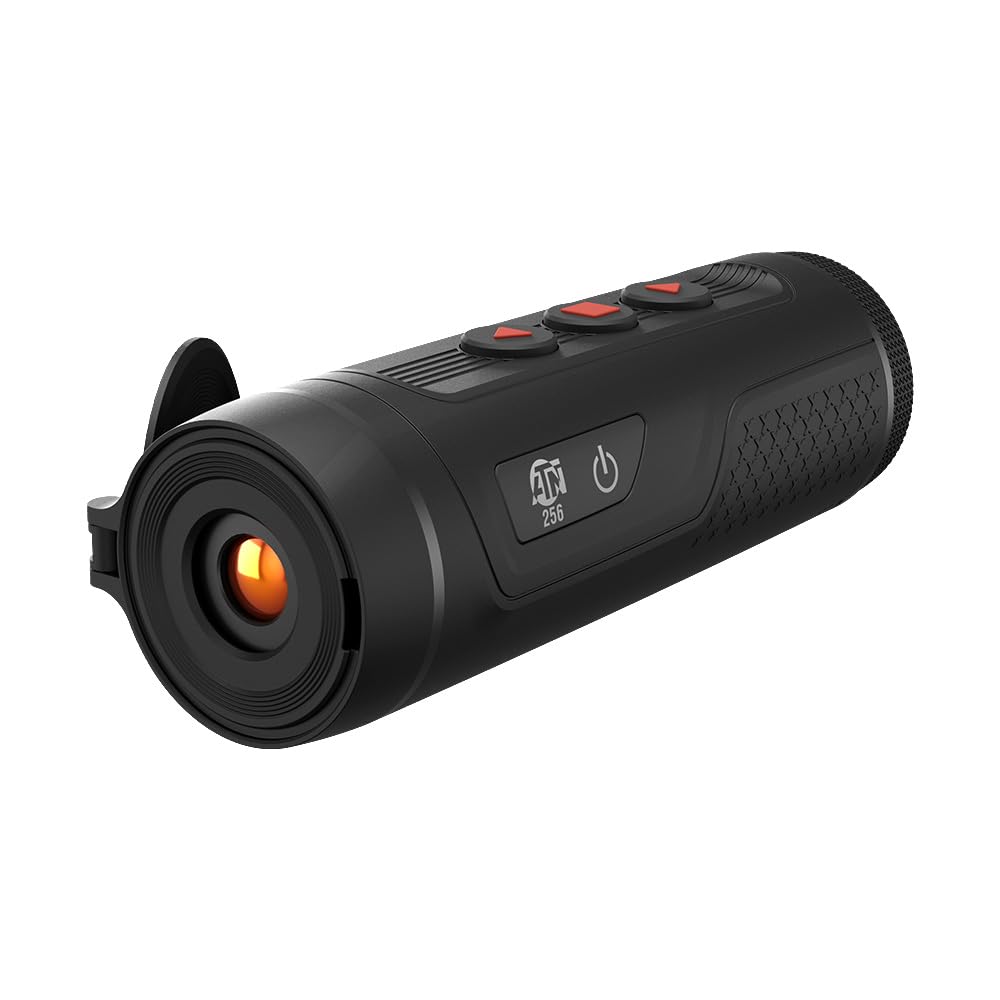
Image: The ATN BlazeSeeker-210 Thermal Monocular in use, demonstrating various thermal viewing modes like green hot, black hot, and a thermal sensor overlay.
Vídeo: Un funcionari ha acabatview of the ATN BlazeSeeker Thermal Hunting Monocular, showcasing its features and thermal imaging capabilities in various modes.
Video Recording and Photo Capture
The monocular allows you to capture still images and record videos directly to an inserted MicroSD card.
- Fer una foto: Briefly press the photo capture button (usually a dedicated button or a short press of a multi-function button). The screen may briefly flash or display an icon to confirm capture.
- Gravació de vídeo: Press the video record button (often a dedicated button or a long press of a multi-function button) to start recording. Press it again to stop recording. A recording indicator (e.g., a red dot or timer) will typically appear on the display during recording.
- Accés als mitjans: Captured photos and videos can be reviewed on the device or by connecting the monocular to a computer via USB-C, or by removing the MicroSD card and inserting it into a card reader.

Image: The ATN BlazeSeeker-210 Thermal Monocular demonstrating its video record and photo capabilities, with a smartphone showing captured thermal footage.
Wi-Fi i connectivitat d'aplicacions
The ATN BlazeSeeker-210 can connect wirelessly to your smartphone via Wi-Fi, allowing you to control the monocular, view viu footage, and manage media through a dedicated mobile application.
- Descarrega l'aplicació: Download the official ATN app from your smartphone's app store (iOS or Android).
- Enable Wi-Fi on Monocular: Turn on the Wi-Fi feature on your BlazeSeeker-210 (refer to the device's menu for the Wi-Fi setting).
- Connecta't a Wi-Fi: On your smartphone, go to Wi-Fi settings and connect to the network broadcast by your monocular (e.g., "ATN_BlazeSeeker_XXXX"). The default password is often "12345678" or found in the device's menu.
- Inicia l'aplicació: Open the ATN app. It should automatically detect and connect to your monocular, providing access to live view, settings, and media management.

Image: The ATN BlazeSeeker-210 Thermal Monocular highlighting its built-in Wi-Fi and app connectivity features.
Manteniment
- Neteja: Use a soft, lint-free cloth to clean the exterior of the monocular. For the lens, use a specialized lens cleaning cloth and solution. Avoid abrasive materials.
- Emmagatzematge: Store the monocular in its soft carrying case in a cool, dry place when not in use. Avoid extreme temperatures and humidity.
- Cura de la bateria: For long-term storage, ensure the battery is charged to approximately 50%. Recharge periodically if stored for extended periods to prevent deep discharge.
- Actualitzacions de firmware: Periodically check the ATN website for firmware updates. Follow the instructions provided by ATN for safe and proper firmware installation.
Resolució de problemes
| Problema | Causa possible | Solució |
|---|---|---|
| El dispositiu no s'encén. | Bateria baixa o esgotada. | Carregueu la bateria amb el cable USB-C proporcionat. |
| La imatge està borrosa o desenfocada. | Ajust incorrecte de l'enfocament. | Adjust the objective lens focus ring and diopter for your vision. |
| No es pot connectar a la Wi-Fi/aplicació. | Wi-Fi not enabled on monocular; incorrect password; app not updated. | Ensure Wi-Fi is enabled on the device. Verify Wi-Fi password. Update the ATN app to the latest version. |
| No es pot gravar vídeo ni fer fotos. | No hi ha cap targeta MicroSD inserida o la targeta està plena/corrompuda. | Insert a compatible MicroSD card. Check card capacity and format if necessary. |
| Durada de la bateria curta. | Frequent use of power-intensive features (Wi-Fi, recording); battery degradation. | Reduce use of Wi-Fi and continuous recording. Ensure full charge before use. If battery life significantly degrades, contact support. |
Especificacions
| Característica | Detall |
|---|---|
| Sensor tèrmic | 256x192 (25 Hz) |
| Mida de píxels | 12 µm |
| NETD Rating | <35 mK |
| Interval de detecció | Fins a 460 metres |
| Ampliació | 1.5-12x |
| Paletes de colors | White Hot, Black Hot, Iron Red, Alarm, Sepia, Green Hot |
| Gravació de vídeo | Sí |
| Captura de fotografies | Sí |
| Emmagatzematge | Targeta MicroSD de fins a 256 GB |
| Wi-Fi | Yes (App Connectivity) |
| Durada de la bateria | Fins a 9 hores |
| Dimensions del producte | 5.9 x 2 x 2.2 polzades |
| Pes de l'article | 9.6 unces |
| Número de model de l'article | TIMNBLS210 |
| Tipus de bateria | 1 ió de liti (inclòs) |

Image: The compact and lightweight design of the ATN BlazeSeeker-210 Thermal Monocular, illustrating its dimensions and portability.

Image: The ATN BlazeSeeker-210 Thermal Monocular highlighting its low power consumption, providing over 9 hours of operation.
Garantia i Suport
For warranty information, please refer to the documentation included with your product or visit the official ATN website. For technical support, product inquiries, or service, please contact ATN customer support directly. Contact details can typically be found on the manufacturer's weblloc o a l'embalatge del producte.
Advertència de la proposta 65: Aquest producte pot contenir substàncies químiques que l'estat de Califòrnia sap que causen càncer i defectes congènits o altres danys reproductius. Per a més informació, visiteu www.P65Warnings.ca.gov.


