Introducció
Welcome to the user manual for your new boAt Stone 352 Pro Bluetooth Speaker. This guide provides detailed instructions on how to set up, operate, and maintain your speaker, ensuring you get the best audio experience. Please read this manual thoroughly before using the product.
Què hi ha a la caixa
Upon unboxing your boAt Stone 352 Pro, you should find the following items:
- 1 x boAt Stone 352 Pro Bluetooth Speaker
- 1 x Cable de càrrega (Tipus C)
- 1 x Manual d'usuari (aquest document)
- 1 x Targeta de garantia
- 1 x Catàleg

Image: The boAt Stone 352 Pro speaker, a USB Type-C charging cable, and the warranty card/user manual are shown, representing the contents of the product box.
Video: An unboxing demonstration of the boAt Stone 352 Pro Bluetooth Speaker, showing the speaker, charging cable, and documentation included in the package.
Producte acabatview
The boAt Stone 352 Pro is a portable Bluetooth speaker designed to deliver powerful audio with enhanced features. Key highlights include:
- So característic de 14 W: Experience clear and powerful audio output.
- Dynamic RGB LEDs: Enhance your listening experience with vibrant lighting effects.
- Fins a 12 hores de reproducció: Gaudeix de reproducció de música prolongada amb una sola càrrega.
- Característica TWS: Connect two Stone 352 Pro speakers for a stereo sound experience.
- Micròfon integrat: Facilitates hands-free calling.
- Bluetooth v5.3: Garanteix una connectivitat sense fil estable i eficient.
- Resistència a l'aigua IPX5: Proporciona protecció contra esquitxades i suor.
- Multiple Connectivity Modes: Supports Bluetooth, AUX, and TF Card playback.
- Càrrega tipus C: Interfície de càrrega moderna i convenient.

Image: A black boAt Stone 352 Pro speaker, showcasing its cylindrical design and the illuminated RGB LED strip on the front.
Controls i indicadors
Familiarize yourself with the speaker's controls and indicators for optimal use.

Image: The side panel of the boAt Stone 352 Pro speaker, highlighting the power button, volume up/down buttons, and mode selection button.
- Botó d'encesa: Premeu i manteniu premut per encendre/apagar. Premeu curtament per reproduir/pausar la música.
- Puja el volum (+): Premeu curt per augmentar el volum. Premeu llargament per passar a la següent pista.
- Baixar el volum (-): Premeu curt per baixar el volum. Premeu llargament per anar a la pista anterior.
- Botó Mode (M): Premeu breument per canviar entre els modes Bluetooth, AUX i targeta TF.
- RGB LED Strip: Indicates power status, charging, and provides dynamic lighting effects.
Primers passos
Carregant l'altaveu
Before first use, fully charge your speaker. The boAt Stone 352 Pro features a Type-C charging port.
- Connect the Type-C end of the charging cable to the speaker's charging port.
- Connect the USB-A end of the cable to a compatible USB power adapter (5V/1A recommended).
- The RGB LED strip will indicate charging status. It typically takes approximately 2 hours for a full charge.
- Un cop estigui completament carregat, desconnecteu el cable de càrrega.

Imatge: Una imatge detallada view of the boAt Stone 352 Pro's side panel, illustrating the Type-C charging interface and the various connectivity ports (Bluetooth, AUX, TF Card).
Encès/Apagat
- To power on, press and hold the Power button until you hear an audible prompt and the RGB LEDs illuminate.
- To power off, press and hold the Power button again until you hear an audible prompt and the RGB LEDs turn off.
Instruccions de funcionament
Connectivitat Bluetooth
- Ensure the speaker is powered on and in Bluetooth mode (indicated by a specific LED pattern or audible prompt).
- Al telèfon intel·ligent o dispositiu d'àudio, activeu el Bluetooth i cerqueu els dispositius disponibles.
- Select "boAt Stone 352 Pro" from the list of devices.
- Once paired, you will hear a confirmation tone, and the speaker's LED will indicate a successful connection.
- L'altaveu es tornarà a connectar automàticament a l'últim dispositiu emparellat quan s'engegui, si el dispositiu està dins del seu abast.
Mode AUX
For wired connections, use the AUX port.
- Connect one end of a 3.5mm AUX cable (not included) to the speaker's AUX port.
- Connect the other end to your audio device's 3.5mm audio output.
- Press the 'M' (Mode) button on the speaker to switch to AUX mode.
- Ara l'àudio es reproduirà a través de l'altaveu des del dispositiu connectat.
Reproducció de targetes TF
Play music directly from a TF (microSD) card.
- Inseriu una targeta TF amb àudio MP3 files into the speaker's TF card slot.
- Press the 'M' (Mode) button to switch to TF Card mode.
- The speaker will automatically begin playing music from the card.
Funció TWS (True Wireless Stereo)
Connect two boAt Stone 352 Pro speakers wirelessly for a true stereo sound experience.
- Assegureu-vos que tots dos altaveus estiguin encesos i no connectats a cap altre dispositiu Bluetooth.
- On one speaker (this will be the primary speaker), long press the 'M' (Mode) button until you hear a TWS pairing prompt.
- The two speakers will automatically search and pair with each other. A confirmation tone will indicate successful TWS pairing.
- Now, connect your audio device to the primary speaker via Bluetooth as described above.
- Both speakers will play audio in stereo.

Image: Two boAt Stone 352 Pro speakers, one black and one blue, operating in TWS mode, demonstrating synchronized audio playback from a connected smartphone.
Trucades mans lliures
The built-in microphone allows for convenient hands-free calls when connected via Bluetooth.
- When an incoming call is received, press the Power button once to answer.
- To end a call, press the Power button once again.
- To reject an incoming call, long press the Power button.
RGB LED Functionality
The boAt Stone 352 Pro features dynamic RGB LEDs that add a visual element to your audio experience.

Imatge: Un primer pla view of the boAt Stone 352 Pro's RGB LED strip, displaying a gradient of colors from blue to green to orange, highlighting its dynamic lighting feature.
- The RGB LEDs automatically cycle through various colors, synchronizing with the music or providing ambient lighting.
- Specific button presses may allow for changing LED modes or turning them off (refer to product-specific quick start guide for advanced controls if available).
Manteniment i cura
- Neteja: Feu servir un drap suau i sec per netejar l'altaveu. No utilitzeu productes de neteja abrasius ni dissolvents.
- Resistència a l'aigua (IPX5): The speaker is IPX5 rated, meaning it is protected against low-pressure water jets from any direction. It is not designed for submersion in water. Ensure the charging port cover is securely closed to maintain water resistance.
- Emmagatzematge: Guardeu l'altaveu en un lloc fresc i sec, allunyat de la llum solar directa i de temperatures extremes.
- Cura de la bateria: Per allargar la durada de la bateria, eviteu descarregar completament l'altaveu amb freqüència. Carregueu-lo regularment, fins i tot si no l'utilitzeu durant períodes prolongats.

Image: The boAt Stone 352 Pro speaker with water droplets on its surface, emphasizing its IPX5 splash and sweat resistance feature.
Resolució de problemes
| Problema | Possible solució |
|---|---|
| L'altaveu no s'encén. | Assegureu-vos que l'altaveu estigui carregat. Connecteu-lo a una font d'alimentació i torneu-ho a provar. |
| No es pot emparellar per Bluetooth. |
|
| Sense so o amb un volum baix. |
|
| L'emparellament TWS ha fallat. |
|
| La qualitat de la trucada és deficient. |
|
Especificacions
| Característica | Detall |
|---|---|
| Nom del model | Stone 352 Pro |
| Tipus d'altaveu | Altaveu portàtil |
| Potència de sortida dels altaveus | 14 watts |
| Versió Bluetooth | v5.3 |
| Interval Bluetooth | 10 metres |
| Durada mitjana de la bateria | 12 hores |
| Temps de càrrega | 2 hores |
| Capacitat de la bateria | 3600 milionsamp Hores |
| Resistència a l'aigua | IPX5 |
| Tecnologia de connectivitat | Bluetooth, USB, Wi-Fi (Note: While Wi-Fi is listed, primary connectivity is Bluetooth, AUX, and TF Card as per product features.) |
| Mètode de control | Pulsador |
| Dimensions del producte | 15.8P x 9.4A x 9.4H centímetres |
| Pes de l'article | 20 grams |
| Components inclosos | Speaker, Cable, User Manual, Warranty Card, Catalogue |
Garantia i Suport
Your boAt Stone 352 Pro Bluetooth Speaker comes with a standard brand warranty. Please refer to the included Warranty Card for specific terms and conditions.
- Període de garantia: Typically 1 year from the date of purchase.
- Procés de reclamació: For warranty claims or technical support, please contact boAt customer service or visit their official website. Keep your purchase receipt and warranty card handy.
- Garantia ampliada: An optional 1 Year Extended Warranty by OneAssist is available for purchase.
Per a més ajuda, també podeu consultar la boAt Hearables App for additional user help guides and support resources.
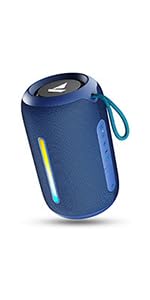
Image: A QR code for the boAt Hearables App, which provides additional support and features for the speaker.


