1. Introducció
This manual provides comprehensive instructions for the installation, operation, and maintenance of your XTRONS QLA42A6L 14.9-inch Car Tablet GPS. This advanced system is designed to enhance your driving experience with modern connectivity and entertainment features, while seamlessly integrating with your vehicle's existing systems.
Please read this manual thoroughly before installation and use to ensure proper functionality and to avoid any damage to the unit or your vehicle.
2. Producte acabatview i Característiques
The XTRONS QLA42A6L is a high-performance car tablet featuring a 14.9-inch display, powered by Android 13. It offers a range of functionalities including GPS navigation, multimedia playback, and smartphone integration.
Característiques principals:
- Sistema operatiu: Android 13
- Processador: Octa-Core (2 x Cortex-A75, 6 x Cortex-A55)
- Memòria: 4GB LPDDR4 RAM, 64GB EMMC 5.1 ROM (expandable via USB)
- Visualització: 14.9-inch Fully-laminated 2K IPS Touch Screen
- Connectivitat: Global 4G LTE (SIM card slot included, data only), Dual-band WiFi (5GHz/2.4GHz), Bluetooth
- Integració del telèfon intel·ligent: Wireless Apple CarPlay, Wireless & Cable Android Auto, Wireless Screen Mirroring
- Àudio: DSP Equalizer support
- Vídeo: 2K Video Playback support
- Entrades: 2 x USB inputs, External Microphone input (microphone not included)
- Integració de vehicles: CANBUS (retains original car information and steering wheel controls), maintains original radio and CD player functionality
- Optional Support: DAB+ (box not included), OBD2 (module not included), DVR (camera not included), TPMS (kit not included)

This image highlights the core specifications of the XTRONS QLA42A6L, including its powerful Octa-core processor, 4GB LPDDR4 RAM, 64GB EMMC 5.1 ROM, and 4G LTE connectivity. It also showcases the 14.9-inch fully-laminated 2K IPS screen and support for Wireless CarPlay and Android Auto.
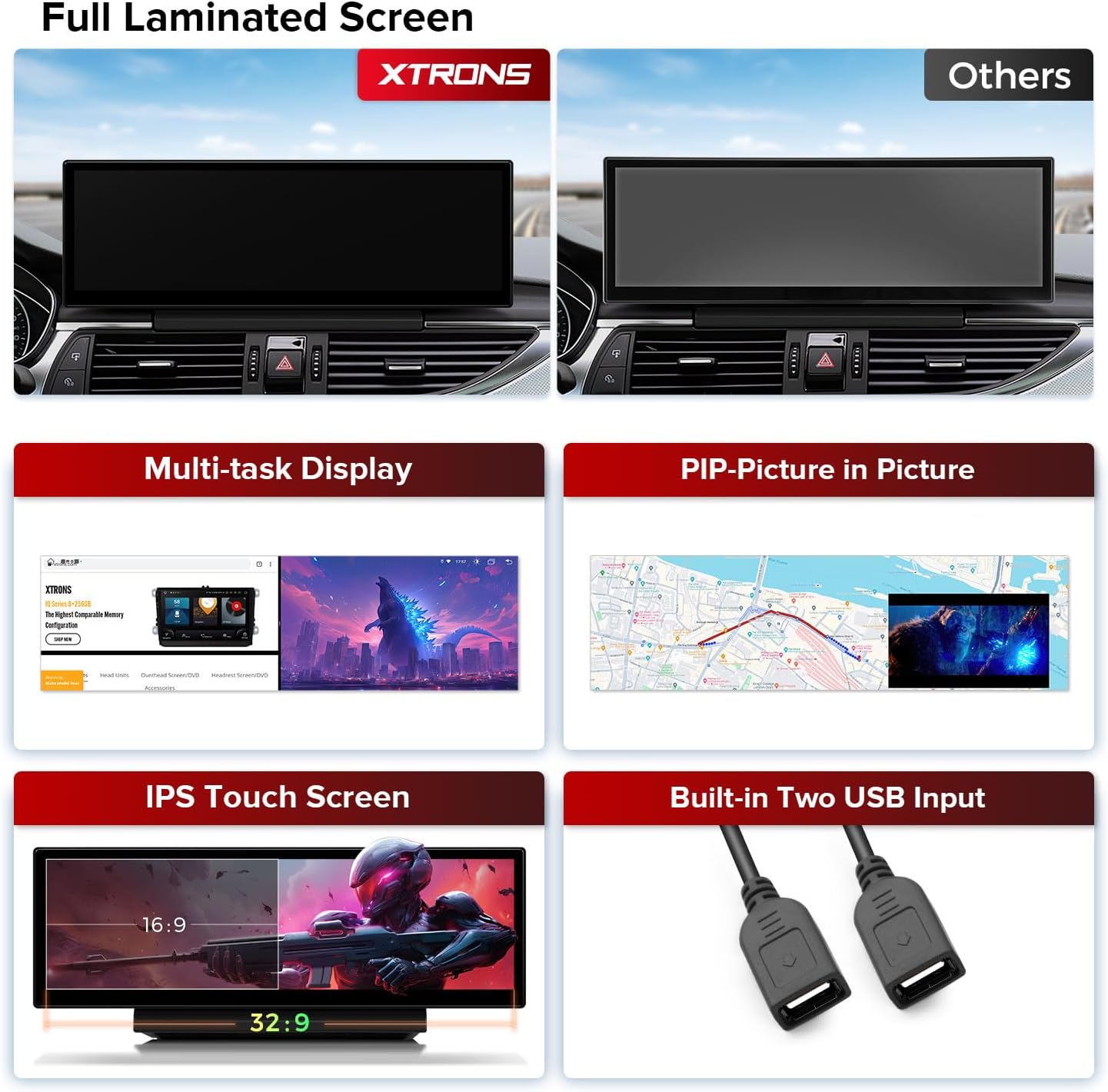
This image illustrates the advanced display capabilities of the unit, featuring a full laminated screen for improved clarity, multi-task display, and Picture-in-Picture (PIP) functionality. It also shows the IPS touch screen and the two integrated USB inputs for expanded connectivity.
3. Compatibilitat
This unit is specifically designed for the following Audi models:
- Audi A6, S6, RS6 (2012-2015)
- Audi A7, S7, RS7 (2012-2015)
Important: This unit is compatible només with vehicles equipped with the MMI 3G/3G+ system. Please verify your vehicle's MMI software version before installation.

This image details the vehicle compatibility for the XTRONS QLA42A6L, specifically for Audi A6, S6, RS6, A7, S7, RS7 models from 2012-2015 equipped with the MMI 3G/3G+ system. It provides visual guidance on how to check your car's MMI software version (HN+R, MHI2, RMC) for proper installation and cable requirements.
4. What's in the Box (Accessories)
Si us plau, comproveu el contingut del vostre paquet amb la llista següent:
- 1 x monitor
- 1 x Arnès de cablejat ISO
- 1 ranura per a targeta SIM 4G
- 1 x Mini micròfon
- 1 minialtaveu
- 1 x antena 4G
- 1 x cable d'àudio
- 1 cable AMI
- 1 x Antena GPS
- 1 x Tira de guarnició
- 1 x Manual d'usuari (aquest document)
- 1 x Instrucció d'instal·lació
- 2 x cargols

This image provides the physical dimensions of the XTRONS QLA42A6L unit (372mm x 122mm) and lists all included accessories. These accessories are essential for installation and include various cables, antennas, a microphone, a speaker, and both a user manual and installation instructions.
5. Configuració i instal·lació
Installation of the XTRONS QLA42A6L requires technical knowledge and familiarity with car audio systems. It is highly recommended to have the unit installed by a qualified professional to prevent damage to the product or your vehicle.
Passos generals d'instal·lació:
- Preparació: Assegureu-vos que el contacte del vehicle estigui apagat i que la bateria estigui desconnectada.
- Treure els components originals: Carefully remove the existing car stereo or display unit and trim panels as per your vehicle's service manual.
- Connecteu l'arnès de cablejat: Connect the provided ISO wiring harness to the vehicle's wiring and the XTRONS unit. Ensure all connections are secure.
- Connecteu les antenes: Connect the GPS antenna and 4G antenna (if using) to their respective ports on the unit. Position antennas in locations with clear signal reception.
- Unitat d'instal·lació: Mount the XTRONS QLA42A6L into the dashboard opening. Secure it using the provided screws and trim strip.
- Torneu a connectar la bateria: Torneu a connectar la bateria del vehicle i proveu el funcionament de la unitat.
- Assemblea final: Torneu a instal·lar els panells de guarnició que hàgiu tret.
Refer to the dedicated "Installation Instruction" document included in your package for detailed, step-by-step guidance specific to your vehicle model and MMI system.
6. Instruccions de funcionament
Your XTRONS QLA42A6L operates on an Android 13 system, providing a familiar interface similar to a smartphone or tablet.
Funcionament bàsic:
- Encès/apagat: The unit typically powers on with the vehicle's ignition. A long press on the power button (if available) may manually turn it off or on.
- Pantalla tàctil: Navegueu per la interfície tocant, lliscant i pinçant a la pantalla tàctil IPS de 14.9 polzades.
- Pantalla d'inici: Access various applications and widgets from the customizable home screen.
- Control de volum: Adjust volume using the vehicle's steering wheel controls or on-screen controls.
Integració del telèfon intel·ligent:

This image demonstrates how the unit integrates with smartphones, offering Wireless Apple CarPlay, Wireless and Cable Android Auto, and Wireless Screen Mirroring. It also shows the voice control feature, allowing hands-free operation for navigation and media playback.
- Apple CarPlay (sense fil): Connecta el teu iPhone sense fil per accedir a la navegació, la música, els missatges i molt més directament a la pantalla de la unitat.
- Android Auto (Wireless & Cable): Connect your Android phone wirelessly or via USB to use Google Maps, play music, and send messages.
- Screen Mirroring (Wireless): Project your smartphone's screen onto the car tablet for viewing contingut.
- Control de veu: Utilize voice commands (e.g., "Hey Siri" or "OK Google") for hands-free control of navigation, music, and calls.
Multi-tasking and Display:
- Pantalla dividida: Run two applications simultaneously side-by-side on the large display.
- Imatge en imatge (PIP): View a video or navigation in a small overlay window while using another application.
Funcions originals conservades:

This image illustrates the unit's ability to retain and display original vehicle information, including speed, engine RPM, fuel level, engine temperature, parking brake status, and seat belt reminders, ensuring essential car data remains accessible.

This image confirms that the XTRONS QLA42A6L seamlessly integrates with and retains key original car functions, such as the amplifier system, factory radio, CD player, Bluetooth connectivity, backup camera display, and steering wheel controls.
- Original Car Information: The unit displays essential vehicle data such as speed, engine speed, fuel level, temperature, parking brake status, and seat belt reminders.
- Controls del volant: Continue to use your vehicle's steering wheel buttons for audio control and other functions.
- Original Radio & CD Player: The factory radio and CD player functionalities are retained and accessible.
- AmpSistema més viu: The unit integrates with your car's original ampsistema de filtració.
- Pantalla de la càmera de marxa enrere: If your vehicle has an original backup camera, its display will be integrated.
7. Connectivitat
The XTRONS QLA42A6L offers multiple ways to stay connected:
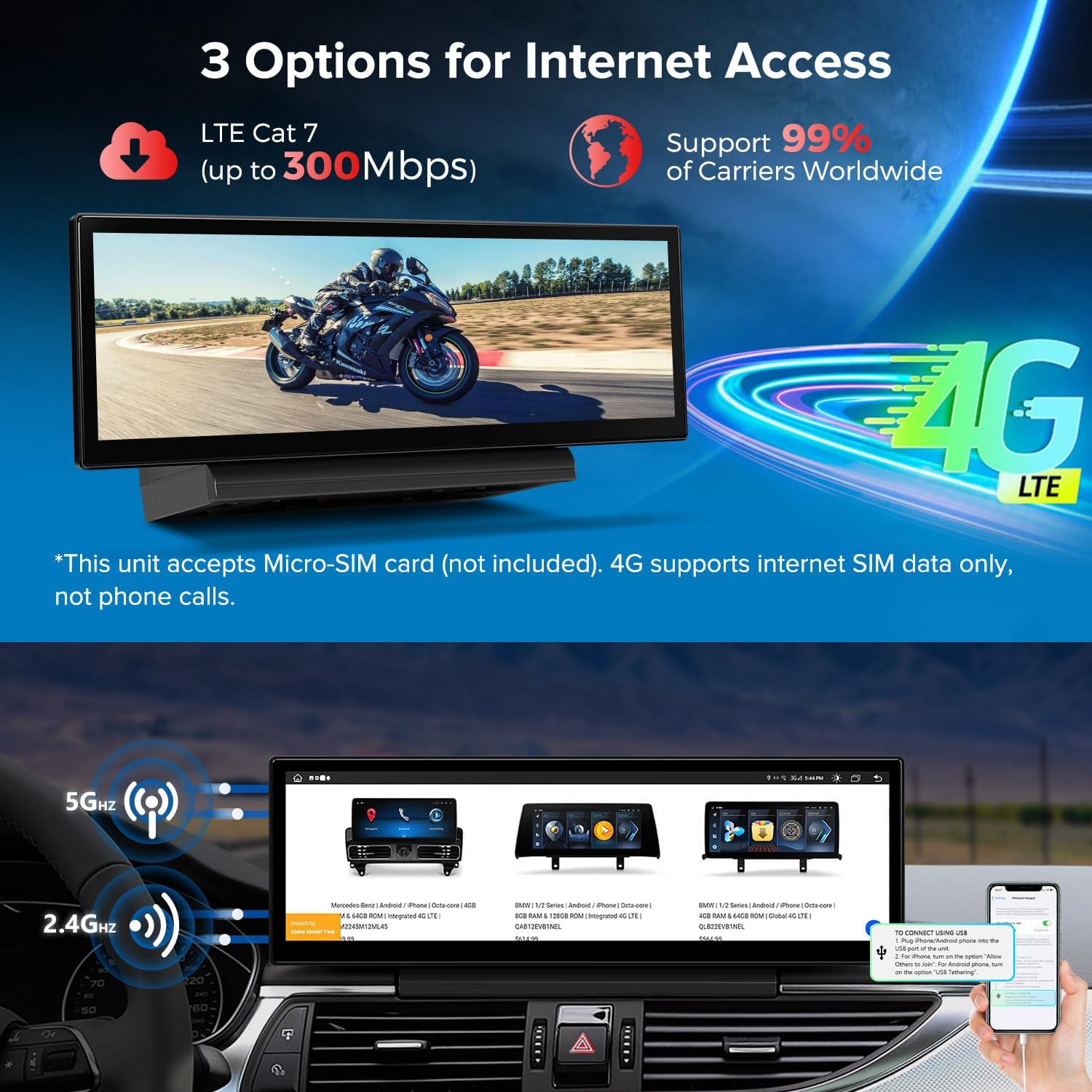
This image highlights the versatile internet connectivity options, including high-speed 4G LTE (Cat 7 up to 300Mbps) and dual-band Wi-Fi (5GHz and 2.4GHz). Note that the 4G function supports internet data only, not phone calls, and requires a Micro-SIM card (not included).
- 4G LTE: Insert a Micro-SIM card (not included) into the provided slot for mobile data connectivity. This supports internet access for navigation, streaming, and app downloads. Note: This function is for internet data only and does not support phone calls.
- Wi-Fi: Connect to available Wi-Fi networks (2.4GHz and 5GHz) for internet access.
- Bluetooth: Emparella el teu telèfon intel·ligent per a trucades amb mans lliures, sincronització de contactes i reproducció d'àudio en temps real.
- USB: Use the two built-in USB ports to connect external storage devices (up to 64GB each) for media playback or to connect compatible accessories.
8. Manteniment
Proper maintenance ensures the longevity and optimal performance of your XTRONS QLA42A6L.
- Neteja de la pantalla: Feu servir un drap suau i sense borrissol, lleugerament humitampened with water or a screen cleaner, to gently wipe the display. Avoid harsh chemicals or abrasive materials.
- Actualitzacions de programari: Periodically check for software updates from the manufacturer. Updates can improve performance, add features, and fix bugs. Follow the manufacturer's instructions for updating the system.
- Condicions ambientals: Eviteu exposar la unitat a temperatures extremes, a la llum solar directa durant períodes prolongats o a una humitat excessiva.
- Connexions de cable: Assegureu-vos que tots els cables estiguin connectats correctament i que no estiguin pinçats ni danyats.
9. Solució De Problemes
If you encounter issues with your XTRONS QLA42A6L, refer to the following common troubleshooting steps:
| Problema | Causa possible | Solució |
|---|---|---|
| La unitat no s'encén | Connexió d'alimentació fluixa, fusible cremat, problema amb la bateria del vehicle | Check wiring harness connections. Inspect vehicle fuses. Ensure car battery is charged. |
| Sense so | Volume too low, incorrect audio source, loose speaker connections | Increase volume. Select correct audio source. Check speaker wiring. |
| Senyal GPS perdut o inexacte | GPS antenna obstruction, loose connection, poor satellite coverage | Assegureu-vos que l'antena GPS tingui una visió clara view of the sky. Check antenna connection. Move to an open area. |
| Problemes de connectivitat Bluetooth | Device not paired, Bluetooth off, interference | Assegureu-vos que el Bluetooth estigui activat en tots dos dispositius. Torneu a emparellar el dispositiu. Acosteu-vos a la unitat. |
| Microphone feedback/poor quality | Microphone placement, external microphone not connected (if applicable) | Adjust microphone position to reduce echo. Ensure external microphone is securely connected if used. |
| La pantalla no respon o està bloquejada | Software glitch, temporary system error | Perform a soft reset (refer to the installation manual for specific instructions). If issue persists, disconnect and reconnect vehicle battery. |
| 4G/WiFi not connecting | Incorrect SIM card, no data plan, weak signal, incorrect WiFi password | Ensure SIM card is correctly inserted and has an active data plan. Check WiFi password. Move to an area with better signal. |
If these steps do not resolve the issue, please contact XTRONS customer support.
10. Especificacions
| Característica | Especificació |
|---|---|
| Marca | XTRONS |
| Número de model | QLA42A6L |
| Sistema operatiu | Android 13 |
| Mida de la pantalla | 14.9 polzades |
| Capacitat de memòria | 64 GB |
| Tecnologia de connectivitat | Wi-Fi, 4G, Bluetooth, USB |
| Característiques especials | Wireless, Voice Control |
| Tipus de servei del vehicle | Automòbil |
| Tipus de muntatge | On panel |
| Tipus de mapa | Carrers |
11. Garantia i Suport
XTRONS products are designed for reliability and performance. For warranty information, please refer to the documentation included with your purchase or visit the official XTRONS weblloc.
If you require technical assistance, have questions about installation, or need support for any issues not covered in this manual, please contact XTRONS customer support. Provide your product model number (QLA42A6L) and a detailed description of your issue for efficient service.