Introducció
This manual provides comprehensive instructions for the 8Bitdo Ultimate 2C Wired Controller. Designed for Windows PC and Android, this controller features a 1000Hz polling rate, Hall Effect joysticks and triggers, and remappable L4/R4 bumpers for an enhanced gaming experience. Please read this manual thoroughly before use to ensure proper operation and longevity of your device.
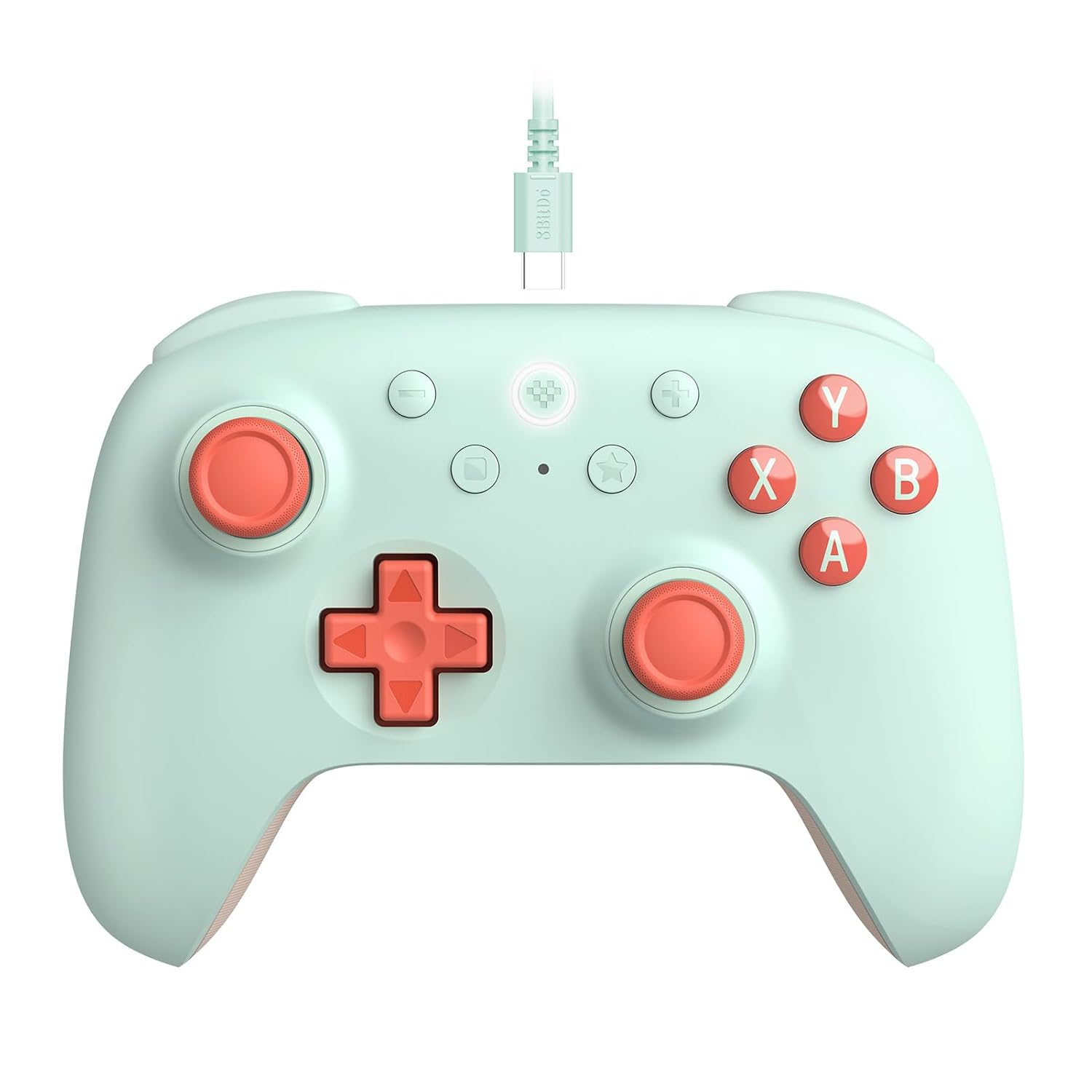
Figura 1: Frontal view of the 8Bitdo Ultimate 2C Wired Controller in mint color, showcasinel seu disseny ergonòmic i la disposició dels botons.
Característiques clau
- Connexió per cable: Detachable USB-C cable for reliable, low-latency connection.
- Compatibilitat: Fully compatible with Windows PC and Android devices.
- Alta taxa de votació: Features a 1000Hz polling rate for ultra-responsive input.
- Joysticks i disparadors d'efecte Hall: Equipped with wear-resistant metal joystick rings for enhanced durability and precision, preventing stick drift.
- Remappable L4/R4 Bumpers: Extra bumpers for personalized configuration without the need for software.
- Funció turbo: Allows for rapid-fire input on selected buttons.
- Disseny refinat: Light yet tactile, with refined bumpers and D-pad for comfortable use.
- Vibració de rumble: Proporciona una resposta hàptica immersiva durant el joc.

Figure 2: Detail of the Hall Effect joystick, highlighting its textured cap and smooth movement for precise control.

Figura 3: View of the L4 and R4 remappable bumpers, positioned for easy access and quick customization.
Guia de configuració
Connecting to Windows PC or Android
- Locate the USB-C port on the top edge of your 8Bitdo Ultimate 2C controller.
- Insert the smaller end of the provided USB-C cable into the controller's port.
- Insert the standard USB-A end of the cable into an available USB port on your Windows PC or Android device.
- The controller is plug-and-play; your system should automatically detect and configure the device. No additional drivers are typically required.
- Verify connection: Once connected, the controller's indicator light will illuminate, confirming a successful connection.

Figure 4: Illustrates the process of connecting the detachable USB-C cable to the controller's port.

Figure 5: The controller connected and in use with a laptop, demonstrating its compatibility with PC gaming setups.

Figure 6: The controller connected and in use with an Android tablet, highlighting its versatility across different platforms.
Instruccions de funcionament
Controls bàsics
The 8Bitdo Ultimate 2C controller features standard gamepad controls including two analog joysticks, a D-pad, A/B/X/Y face buttons, L1/R1 bumpers, and L2/R2 triggers. Additionally, it includes dedicated L4/R4 remappable buttons and a Turbo function button.

Figure 7: Comprehensive front view of the controller, detailing the placement of all primary control inputs.
Custom Button Mapping (L4/R4)
The L4 and R4 buttons can be mapped to duplicate the function of other buttons directly on the controller, without requiring any software. This allows for quick in-game adjustments to suit your playstyle.
- To Map L4/R4: Press and hold the square button (mapping button) + either L4 or R4. While holding these, press the button you wish to map (e.g., A, B, X, Y, L1, R1, L2, R2, L3, R3, or D-pad direction). The L4/R4 button will now perform the function of the mapped button.
- Comentaris: An LED light between the square and star buttons will flash when an L4/R4 button is programmed, providing visual confirmation.
Funció Turbo
The Turbo function allows a button to register multiple presses rapidly when held down, useful for certain game mechanics.
- Per activar el Turbo: Press and hold the star button (Turbo button) + the button you wish to apply Turbo to.
- Per desactivar el Turbo: Repeat the same combination (hold star button + the Turbo-enabled button).
- Comentaris: The LED light between the square and star buttons will flash rapidly when a Turbo-enabled button is pressed, indicating the function is active.
Manteniment
Proper care and maintenance will extend the lifespan of your 8Bitdo Ultimate 2C controller.
- Neteja: Feu servir un drap suau i sec per netejar el controlador regularment. Per a la brutícia persistent, netegeu lleugerament.ampNetegeu el drap amb aigua o un netejador suau i no abrasiu. Eviteu la humitat excessiva.
- Emmagatzematge: Store the controller in a cool, dry place away from direct sunlight and extreme temperatures. When not in use, coil the USB-C cable neatly to prevent tangling and damage.
- Manipulació: Avoid dropping the controller or subjecting it to strong impacts. Do not attempt to disassemble the controller, as this will void the warranty.

Figura 8: posterior view of the controller, highlighting the textured grips designed to prevent slipping during intense gaming sessions.
Resolució de problemes
- Controlador no reconegut pel PC/Android:
- Ensure the USB-C cable is securely connected to both the controller and your device.
- Prova de connectar-te a un port USB diferent del teu PC o dispositiu Android.
- Reinicieu el vostre PC o dispositiu Android.
- Verify your operating system is Windows 10 or above, or Android 9.0 or above.
- Buttons or joysticks are unresponsive/behaving erratically:
- Comproveu si hi ha obstruccions físiques o residus al voltant dels botons o els joysticks.
- Ensure the controller's firmware is up to date. Visit the official 8Bitdo support weblloc web per obtenir el firmware i les instruccions d'actualització més recents.
- Test the controller on another compatible device to determine if the issue is with the controller or the original device.
- Turbo function or L4/R4 mapping not working:
- Ensure you are following the correct button combination for mapping or activating Turbo as described in the "Operating Instructions" section.
- Observe the LED indicator between the square and star buttons for feedback on successful programming.
Especificacions
| Número de model | 6922621506027 |
| Connectivitat | USB-C amb cable |
| Compatibilitat | Windows 10 and above, Android 9.0 and above |
| Taxa de votació | 1000 Hz |
| Joysticks/Triggers | Efecte Hall |
| Botons addicionals | Para-xocs L4/R4 remapables |
| Pes | 12.7 unces (aproximadament 360 grams) |
| Dimensions | 6.06 x 5.2 x 2.83 polzades |
| Fabricant | 8BitDo |
| País d'origen | Xina |
Informació de la garantia
The 8Bitdo Ultimate 2C Wired Controller comes with a manufacturer's warranty. Please refer to the official 8Bitdo website or your purchase documentation for specific warranty terms and conditions, including duration and coverage details. Typically, 8Bitdo controllers include a one-year manufacturer's warranty against defects in materials and workmanship.
Suport
For further assistance, firmware updates, or frequently asked questions, please visit the official 8Bitdo support weblloc:
You can also contact 8Bitdo customer service directly through their website for personalized support.