Introducció
Thank you for choosing the THOMSON Multimedia Tower with CD Player. This device is designed to provide versatile audio playback options, including Bluetooth connectivity, CD playback, USB and SD card support for MP3 files, FM radio, and an AUX input. This manual will guide you through the setup, operation, and maintenance of your new audio system to ensure optimal performance and longevity.
Informació de seguretat
- Llegiu atentament totes les instruccions abans d'utilitzar el producte.
- Conserveu aquest manual com a referència futura.
- No exposeu la unitat a la pluja, la humitat o les temperatures extremes.
- Assegureu-vos que hi hagi una ventilació adequada al voltant de la unitat. No bloquegeu cap obertura de ventilació.
- Use only the power supply specified for this device (230V AC).
- No obriu la c.asing. Demaneu totes les tasques de manteniment a personal qualificat.
- Eviteu col·locar la unitat a prop de fonts de calor o sota la llum solar directa.
- Clean the unit only with a dry, soft cloth.
Contingut del paquet
Verifiqueu que tots els elements siguin presents al paquet:
- THOMSON Multimedia Tower
- Cable d'entrada auxiliar de 3.5 mm
- Control remot
- 230V AC Power Supply Cable
- Manual d'instruccions
Producte acabatview
Familiarize yourself with the various parts and controls of your multimedia tower.
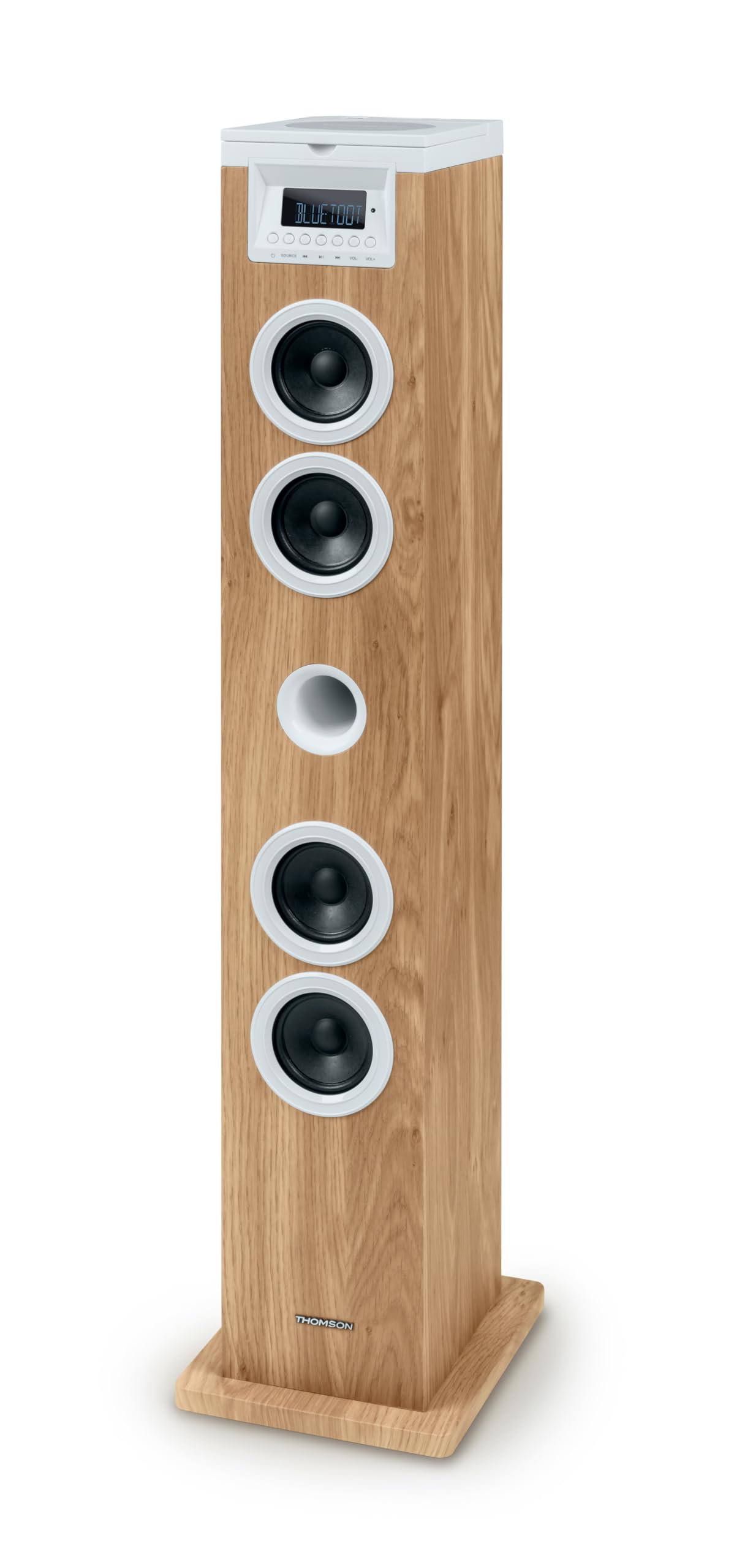
Figura 1: Top Panel with USB and SD Card Slots. This image displays the top surface of the multimedia tower, highlighting the USB port with a flash drive inserted and the adjacent SD card slot for media playback.
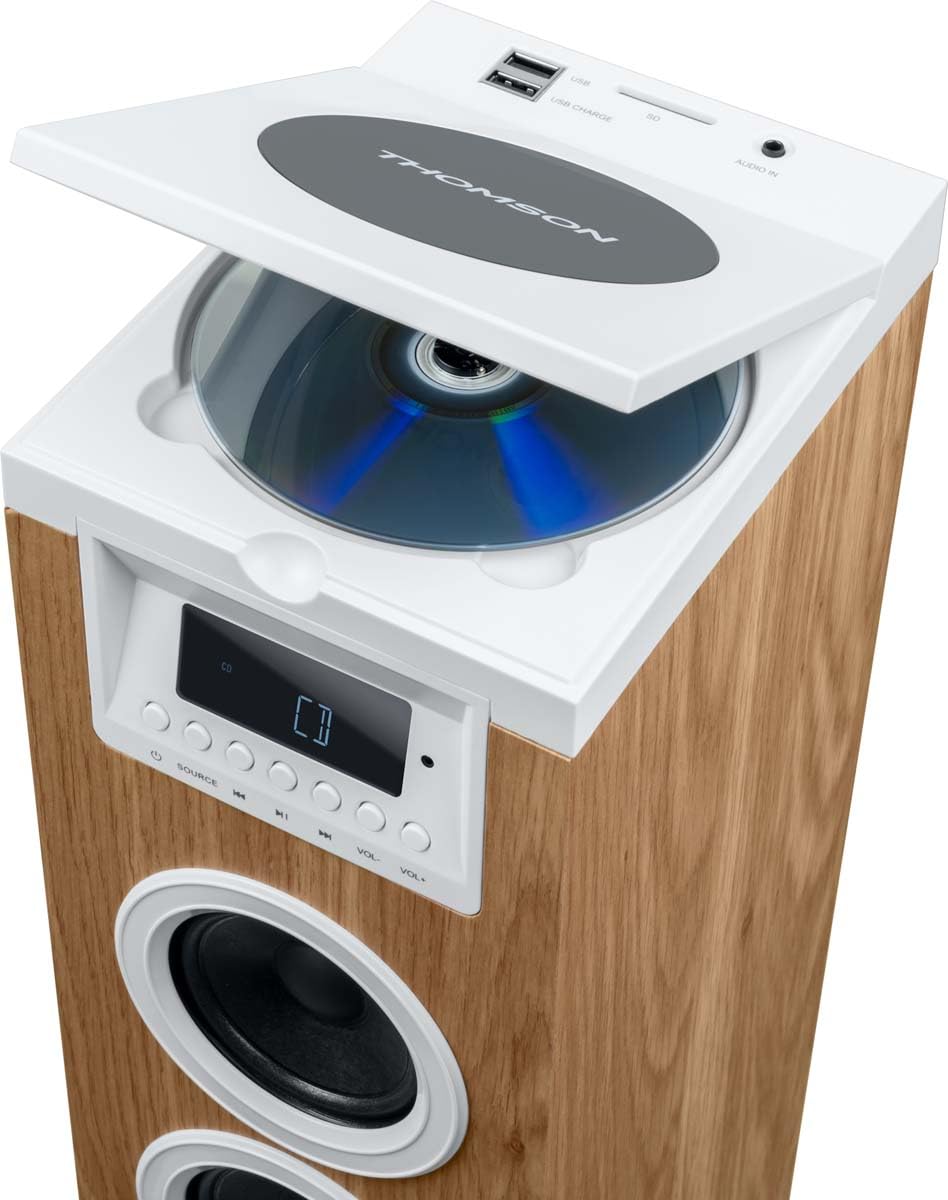
Figura 2: Top Panel with CD Player Open. This image shows the top panel of the tower with the CD compartment lid lifted, revealing a compact disc placed inside the player.

Figura 3: Included Remote Control and AUX Cable. This image features the white remote control unit and the 3.5mm AUX IN cable, both essential accessories for operating the multimedia tower.
Controls del panell frontal
- Pantalla LED: Shows current mode, track information, and radio frequency.
- Botó SOURCE: Switches between input modes (Bluetooth, CD, USB, SD, FM, AUX).
- Botó Reproduir/Pausa: Controls playback for CD, USB, and SD modes.
- Botons de pista anterior/següent: Navega per pistes o emissores de ràdio.
- Botons de pujar / baixar de volum: Ajusta el nivell de sortida d'àudio.
Connexions del panell superior
- Reproductor de CD: Top-loading CD compartment.
- USB Port (Playback/Charging): Per reproduir MP3 files from USB drives and charging compatible devices.
- Ranura per a targeta SD: Per reproduir MP3 files de targetes SD.
- AUDIO IN (3.5mm AUX): Connecteu dispositius d'àudio externs.
Configuració
- Desembalatge: Carefully remove the multimedia tower and all accessories from the packaging. Retain the packaging for future transport or storage.
- Col·locació: Place the tower on a stable, flat surface. Ensure there is adequate space around the unit for ventilation. Avoid placing it near direct heat sources or in areas with high humidity.
- Connexió d'alimentació: Connect the 230V AC power supply cable to the power input on the back of the tower, then plug it into a standard wall outlet.
- Antenna (FM Radio): Extend the FM antenna for better radio reception.
Instruccions de funcionament
Encès/Apagat
To turn the unit on or off, use the ON/OFF switch located on the back of the tower or press the Power button on the remote control.
Selecció de la font
Premeu el botó FONT button on the front panel or remote control repeatedly to cycle through the available input modes: Bluetooth, CD, USB, SD, FM Radio, and AUX IN.
Funcionament Bluetooth
- Switch the tower to Bluetooth mode using the FONT button. The LED display will show 'BT' or a similar indicator.
- Al dispositiu mòbil (telèfon intel·ligent, tauleta), activeu el Bluetooth i cerqueu els dispositius disponibles.
- Select 'THOMSON Tower' (or similar name) from the list of devices.
- Once paired, you can play audio from your device through the tower.
Reproducció de CD
- Switch the tower to CD mode using the FONT botó.
- Open the CD compartment lid on the top panel.
- Col·loca un CD amb l'etiqueta cap amunt.
- Close the CD compartment lid. The unit will begin reading the CD automatically.
- Use the Play/Pause, Previous/Next Track buttons on the front panel or remote control to manage playback.
Reproducció USB/SD
- Inseriu una unitat flaix USB al port USB o una targeta SD a la ranura per a targetes SD del panell superior.
- Switch the tower to USB or SD mode using the FONT button. The unit will automatically detect and begin playing compatible MP3 files.
- Use the Play/Pause, Previous/Next Track buttons on the front panel or remote control to manage playback.
Ràdio FM
- Switch the tower to FM Radio mode using the FONT botó.
- Escaneig automàtic: Premeu i manteniu premut el botó Reproduir/Pausa per escanejar i desar automàticament les emissores de FM disponibles.
- Sintonització manual: Use the Previous/Next Track buttons to manually tune to desired frequencies.
- Estacions preseleccionades: Use the MEM- / MEM+ buttons on the remote control to navigate through saved stations.
Entrada AUX
- Connect an external audio device (e.g., smartphone, MP3 player) to the 3.5mm AUDIO IN port on the top panel using the provided AUX cable.
- Switch the tower to AUX IN mode using the FONT botó.
- Play audio from your connected device. The volume can be controlled via the tower or the external device.
Funcions de control remot
The remote control provides convenient access to all functions. Refer to Figure 3 for a visual guide to the remote control buttons.
- Potència (⑂): Encén o apaga la unitat.
- DORMIR: Sets a sleep timer.
- MUT: Silencia o activa l'àudio.
- HORA: Displays or sets the time.
- ALARMA: Sets an alarm.
- FONT: Selects input mode.
- MEM-, MEM+: Navigates saved radio stations or folders.
- Repeat (↺): Repeteix la pista actual o totes les pistes.
- Atura (■): Atura la reproducció.
- Shuffle (⇄): Reprodueix pistes en ordre aleatori.
- VOL+, VOL-: Ajusta el volum amunt o avall.
- Previous (◀◀), Play/Pause (▶‖), Next (▶▶): Controls de reproducció estàndard.
Manteniment
- Neteja: Desconnecteu l'alimentació abans de netejar-la. Feu servir un drap suau i sec per netejar l'exterior de la unitat. No utilitzeu netejadors líquids ni materials abrasius.
- Cura del reproductor de CD: Handle CDs by their edges to avoid fingerprints and scratches. If the CD lens needs cleaning, use a specialized CD lens cleaner disc.
- Emmagatzematge: If storing the unit for an extended period, unplug it from the power outlet and store it in a cool, dry place, preferably in its original packaging.
Resolució de problemes
| Problema | Causa possible | Solució |
|---|---|---|
| Sense poder | Cable d'alimentació no connectat; interruptor apagat | Ensure power cable is securely plugged in; Turn the ON/OFF switch to ON. |
| Sense so | Volume too low; Mute function active; Incorrect source selected | Increase volume; Press MUTE on remote; Select correct source (CD, BT, USB, SD, FM, AUX). |
| Bluetooth no connectat | Device not in pairing mode; Tower not in Bluetooth mode; Device too far | Ensure tower is in BT mode; Enable Bluetooth on your device and search; Move device closer to the tower. |
| El CD no es reprodueix | CD inserted incorrectly; CD scratched/dirty; Incorrect source selected | Insert CD with label side up; Clean or replace CD; Select CD source. |
| Mala recepció FM | Antena no estesa; Senyal feble | Fully extend the FM antenna; Reposition the tower for better signal. |
Especificacions
| Característica | Especificació |
|---|---|
| Marca | Thomson |
| Número de model | 9eb81657-1d7e-4ab8-8f71-2c93aa6b3ea7 |
| Dispositius compatibles | Telèfon intel·ligent, tauleta, ordinador portàtil |
| Configuració del canal de so envoltant | 2.0 |
| Color | White, Wood |
| Pes de l'article | 4.28 quilos |
| Tipus de garantia | Limitat |
| Mètode de control | Remot |
| Tecnologia de comunicació sense fils | Bluetooth |
| Mida de l'altaveu | 1 polzades |
| Font d'alimentació | Elèctric amb cable |
| Potència de sortida màxima dels altaveus | 60 watts |
| Tecnologia de connectivitat | AUX, USB |
| Mode de sortida d'àudio | estèreo |
| Entrada Voltage | 230 Volts |
| Tipus de muntatge | Terra de peu |
| Tipus d'altaveu | estèreo |
| Característica especial | Bluetooth |
| Usos recomanats per al producte | Per a telèfons intel·ligents o tauletes |
Garantia i Suport
This product comes with a limited warranty. For detailed warranty information, please refer to the warranty card included in your package or contact Thomson customer support. For technical assistance or service inquiries, please visit the official Thomson weblloc o poseu-vos en contacte amb el seu departament d'atenció al client.


